
For IT and security teams
A small IT team cannot patch everything and cannot watch everything. ScanTitan scans the public side of your estate, meaning public IPs, servers and websites. It ranks CVE findings with CVSS, CISA KEV and EPSS so the team fixes what is most likely to cause harm first, and it reports what could not be checked instead of calling it clean.
Business costs $155 per asset place per year, billed annually, and covers websites, public IP or server assets and Web APIs. You can buy 1 to 10 places.
Choose BusinessSee how it worksAn external scan sees your estate the way an attacker on the internet does: which services answer on a public address, which versions they report and which known vulnerabilities match those versions. It is the fastest way to find what is exposed, because only public assets need an answer first.
Scanners need a known list of targets. ScanTitan adds a discovery review for observed public subdomains and IPs on Business and Consultant: you review, dismiss or add each one. New observations are not approved or scanned automatically, and a discovery result is not proof of ownership.
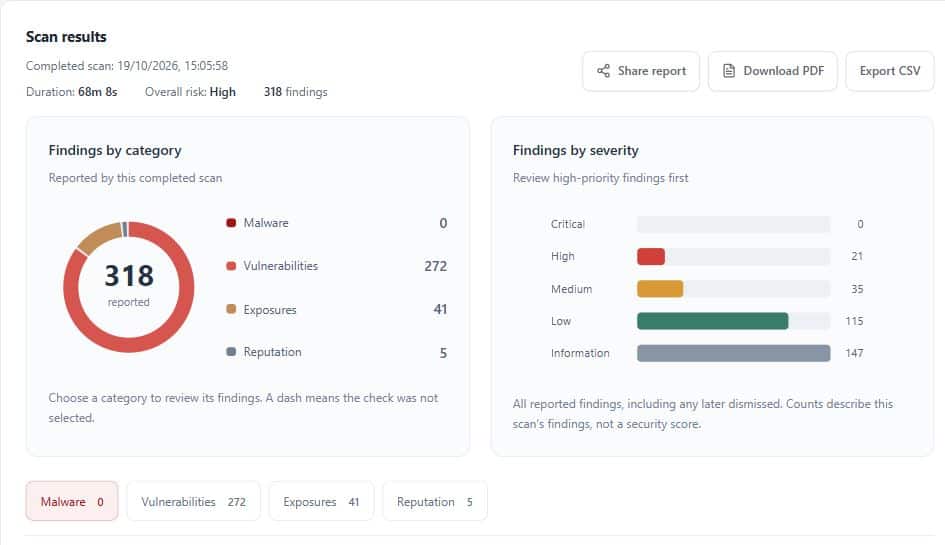
A scan can return more findings than a small team can fix. ScanTitan shows CVSS severity next to CISA KEV, which records known exploitation, and FIRST EPSS, which estimates exploitation probability, for eligible CVE findings when the intelligence is available. Start with KEV-listed items, then high EPSS, then severity and exposure. A high score does not prove your asset is exploited, and a missing signal is not a safety guarantee. Read more on vulnerability prioritization.
Read more on the network vulnerability scanner and the IP vulnerability scanner.
Business at $155 per asset place per year includes public server and IP assessment, authenticated Linux checks, API assets, customer API access and the discovery review. IT service providers who assess client assets can look at Consultant. Free covers one website only. See pricing.
It checks public-facing assets, such as IPs, servers and websites, from the outside to find exposed services and known vulnerabilities.
No. ScanTitan covers public assets only. Private networks, CIDR ranges and private connectors are not part of the released scope.
By CVSS together with CISA KEV and FIRST EPSS for eligible CVE findings when the intelligence is available.
It reports observed public subdomains and IPs for review on Business and Consultant. You approve each one, and nothing is scanned automatically.
Yes, on Business and Consultant, through an authorized read-only SSH account. Linux servers only.
Yes. Reports can be exported as CSV and PDF.
Business for public servers, APIs and the discovery review. Free covers one website only.
Choose Business with the IP / server asset type and run your first assessment.
Choose BusinessCompare plans