
Website scanning feature
Many single page applications show their pages and make their requests only after JavaScript runs. ScanTitan can explore a JavaScript website with an isolated browser, so dynamic navigation and requests are discovered instead of missed, and each scan reports what was covered and what was not.
Start with a free account. Free includes one website and one included website security scan. Registering does not activate paid features.
Create free accountSee how exploration worksA traditional website sends a separate HTML page for every URL, so a crawler can follow links and find them. A single page application sends a small HTML shell and builds the views, routes and API calls in the browser with JavaScript. A scanner that only reads HTML sees very little of that.
For the owner of a JavaScript website this matters in three ways:
ScanTitan does not certify specific frameworks or versions. It works with what the browser renders and requests on your site. For dependency and library findings, see the JavaScript vulnerability scanner, which is a different check from browser exploration.
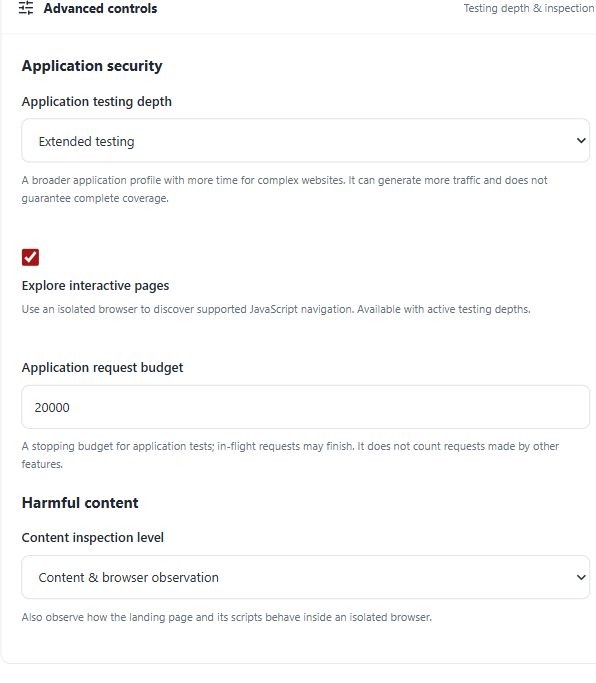
Create a free account to run the included website security scan. Whether browser exploration runs depends on the scan profile you select, and the pricing page lists what each plan includes. Business adds extended controls and server and API assets, and Consultant adds client organization and branded reports.
See pricing for the annual price per asset place, or the Consultant plan if you assess websites for clients. The main website vulnerability scanner page covers the wider web assessment.
It is a website scanner that runs your JavaScript application in a browser, so pages and requests that only appear after scripts run can be discovered and assessed. ScanTitan does this with an isolated browser when Explore interactive pages is enabled for a supported profile.
No. Exploration is bounded by scope, page, request and time budgets, and it does not exercise every route, authenticated workflow or business transaction. The coverage report shows what was covered and what was skipped.
ScanTitan does not certify specific frameworks or versions. It assesses what the browser renders and requests, whichever framework builds the site.
Availability depends on the scan profile. The pricing page lists the plans and what each includes. Registering does not activate paid features.
The JavaScript scanner reports dependency and library observations. Browser exploration discovers dynamic pages and requests at runtime. They answer different questions.
Imported API scans use a different workflow and do not use browser exploration. See the API vulnerability scanner for the supported formats and limits.
Extended testing can generate more traffic. Use the request budget, and only scan websites you own or are authorized to test.
Create a free account to run the included website security scan and read the coverage report for your single page application.
Create free accountCompare plans