config.php.bak, database.sql, site-backup.zip, or index.php~ can reveal source code, credentials, private data, and internal application details.The impact depends on what the backup contains. An obsolete static page may have little security value, while a database dump or configuration backup containing valid credentials can create a serious data or account-compromise risk.
The backup filename identifies the exposure, but the contents determine most of the risk.Removing the public file stops future direct access, but exposed passwords, API keys, tokens, certificates, or other reusable secrets may still need to be rotated.
What Is an Exposed Backup Files Vulnerability?
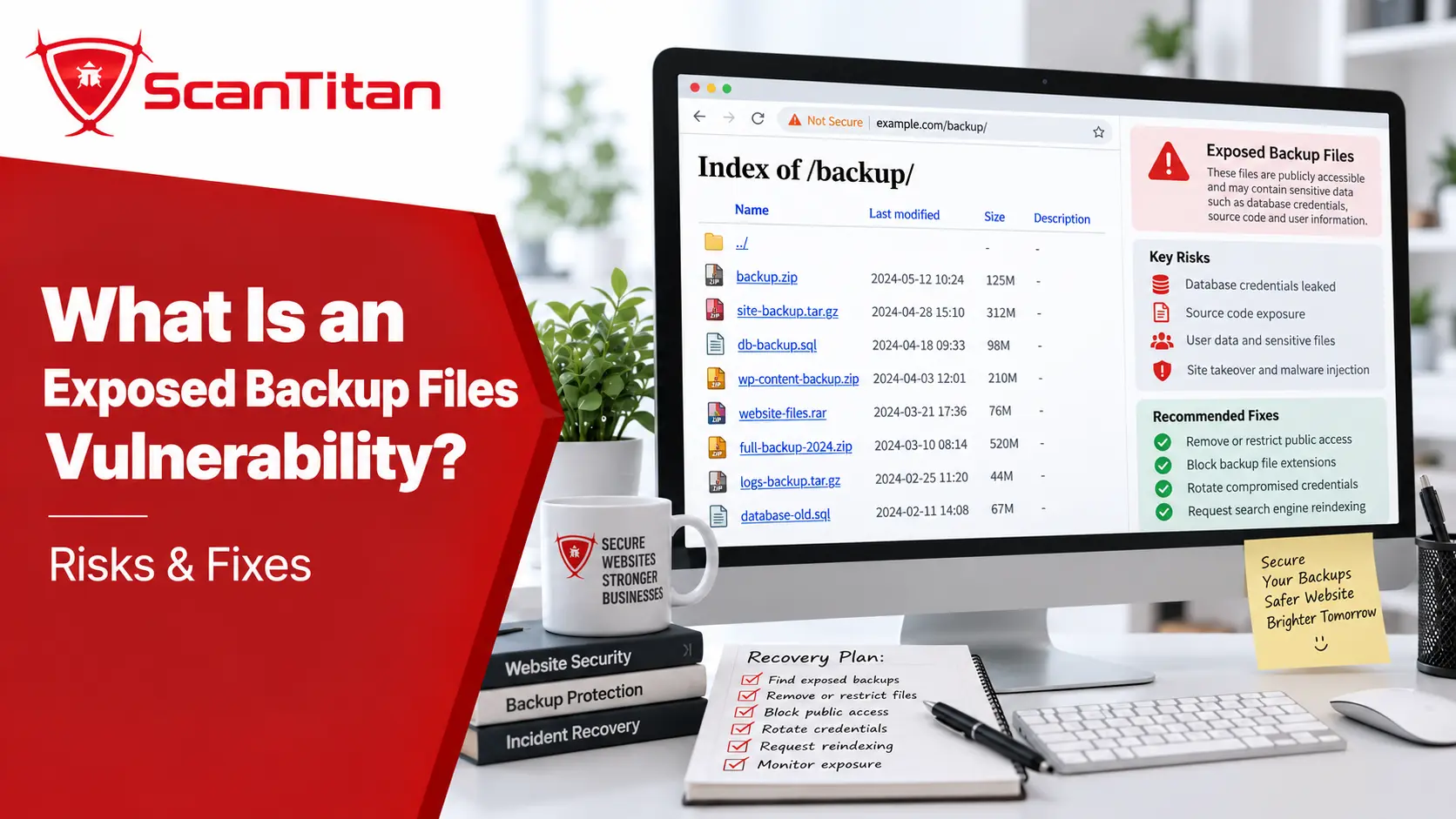
An exposed backup files vulnerability is an information-disclosure weakness where a backup or obsolete copy of a file is accessible to unauthorized users. The file may have been created legitimately during development, editing, migration, troubleshooting, deployment, or disaster recovery, but it becomes a security problem when the web server can deliver it publicly.
Common examples include config.php.bak, settings.old, database.sql, db.sql.gz, site-backup.zip, release.tar.gz, editor backup files ending in ~, and swap or recovery files.
This weakness is specifically represented by CWE-530: Exposure of Backup File to an Unauthorized Control Sphere. The problem is not that backups exist; backups are necessary for recovery. The problem is storing them somewhere unauthorized users can retrieve them.
Why Do Backup Files Become Public?
Backup files usually become public because development or maintenance processes leave copies inside a web-accessible directory. The most common causes are:
- Manual copies: an administrator creates
config.php.bakbefore editing the live file and leaves the copy in the document root. - Editor artifacts: text editors create files such as
.swp,.orig, orfilename~beside the original source file. - Database exports: a
.sqlor.sql.gzfile is uploaded during migration or troubleshooting and never removed. - Deployment archives: a
.zip,.tar.gz, or.tgzpackage is left behind after deployment or rollback. - Backup tools: a CMS, hosting panel, or automated job writes backups beneath a directory served by the public website.
The best prevention is therefore operational: production deployment and backup processes should prevent these files from entering the public document root in the first place.
Which Backup Files Are Most Dangerous?
The most dangerous exposed backups are files that contain credentials, private records, source code, configuration, or reusable secrets. The extension alone does not determine severity.
| Backup Type | Example | What It May Expose |
|---|---|---|
| Source-code copy | config.php.bak, index.php.old |
Source code, credentials, hidden routes, internal logic |
| Database dump | database.sql, db.sql.gz |
User records, password hashes, tokens, business data |
| Site archive | backup.zip, site.tar.gz |
Source code, configuration, dependencies, embedded secrets |
| Configuration backup | settings.php.bak, config.old |
Database passwords, API keys, internal hosts, connection strings |
| Editor artifact | .swp, filename~, .orig |
Previous source or configuration contents |
| Deployment archive | release-old.zip |
Historical code, outdated dependencies, old secrets |
An old backup is not automatically harmless. Credentials may still work, old source code can reveal architecture that remains in production, and historical database dumps may still contain sensitive customer or account data.
Why Can a Backup File Reveal Source Code?
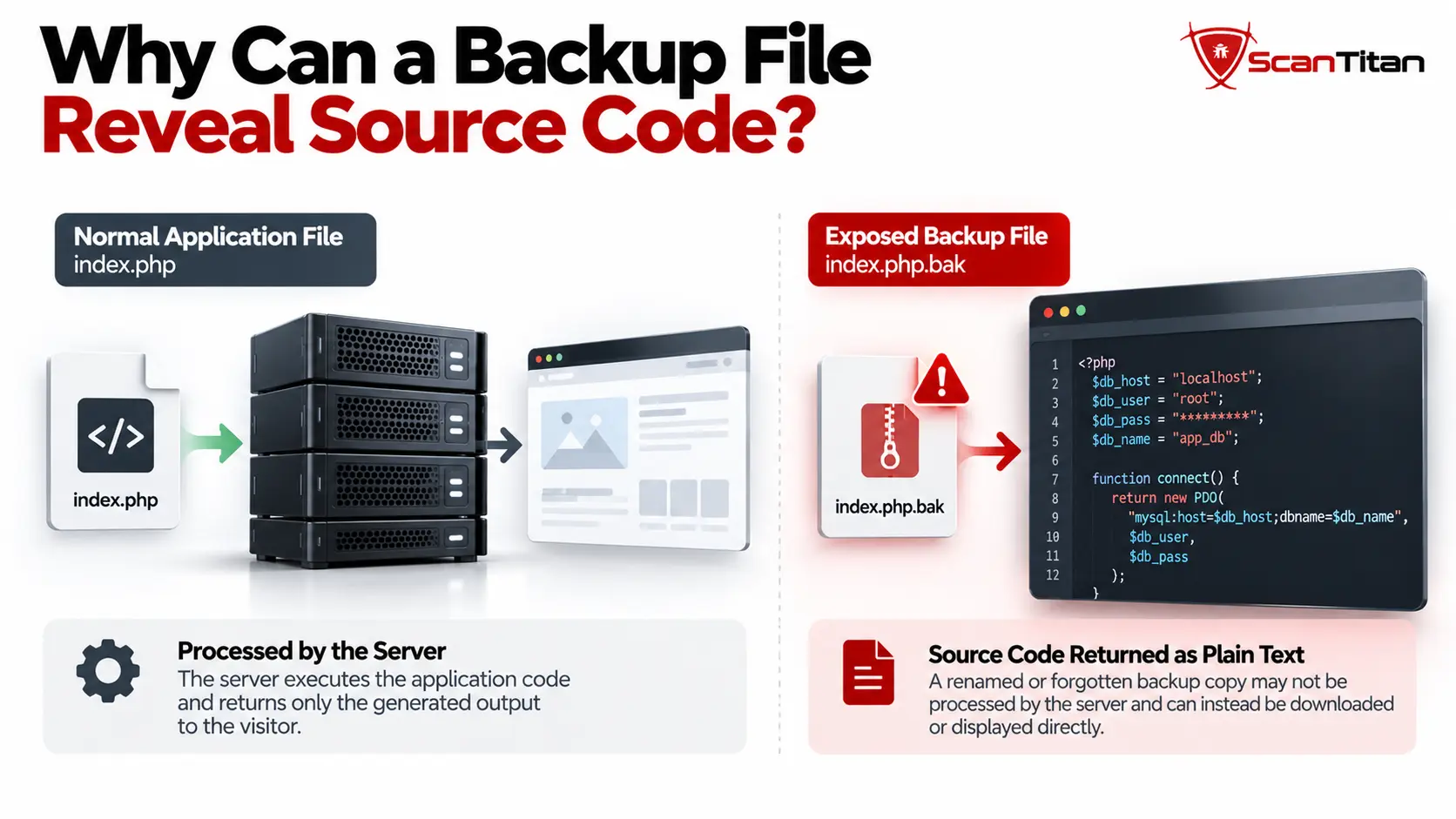
A renamed backup may no longer match the server’s normal application handler, so the server can return its contents instead of executing the original code.
For example:
https://example.com/config.phpmay be processed by PHP and return only the generated application response.
But a backup such as:
https://example.com/config.php.bakmay not match the same PHP-processing rule. Depending on the server configuration, it can be treated as a normal file and returned directly to the browser.
This behavior is configuration-dependent.Do not assume every .php.bak file will automatically be served as plaintext. The result depends on the web server, runtime mappings, filename handling, and access controls.
Exposed Backup Files Vulnerability Example
A typical exposed backup files vulnerability occurs when migration or deployment files remain reachable after production work is complete.
https://example.com/config.php.bak
https://example.com/database.sql.gz
https://example.com/site-backup.zip| Exposed Backup | Possible Impact |
|---|---|
config.php.bak |
May reveal database credentials, API keys, or application secrets |
database.sql.gz |
May expose account records, password hashes, tokens, or private business data |
site-backup.zip |
May expose the application source tree, configuration, dependencies, and historical files |
The exposed backup is the vulnerability. What an attacker can do afterward depends on what the file contains and whether the exposed data is still usable.
How Dangerous Is an Exposed Backup File?
An exposed backup file does not have one universal severity. Risk depends on the contents of the file, whether exposed secrets remain valid, and whether the information enables further access.
| Exposed File | Typical Security Implication |
|---|---|
| Old public or static content | Low information value |
| Source-code backup | Source-code disclosure and reconnaissance |
| Configuration backup | Internal configuration exposure |
| Configuration with valid credentials | Credential compromise risk |
| Production database dump | Potential major confidentiality exposure |
| Archive containing keys or tokens | Potential wider system compromise if the credentials remain valid |
PortSwigger lists the generic backup-file finding with a typical severity of Information, but confirmed sensitive contents can justify a much higher practical risk. Severity should therefore be based on the exposed data rather than the filename alone.
How Do You Detect Exposed Backup Files?
Detect exposed backup files by reviewing public deployment locations and testing whether known or likely backup resources are reachable without authorization.
Manual Backup File Checks
For a broader authorized testing workflow, see how to check vulnerability of a website manually. OWASP also covers this issue in WSTG-CONF-04: Review Old Backup and Unreferenced Files for Sensitive Information.
- Review production directories:Look for database dumps, compressed archives, renamed source files, editor artifacts, and rollback packages.
- Review deployment history:Check migration files, previous releases, troubleshooting copies, and temporary backups created during maintenance.
- Request identified backup URLs:On a system you are authorized to test, verify whether known backup files can be retrieved without authentication.
- Inspect the response:Confirm that the response is an actual backup or source file rather than a custom error page.
Automated Vulnerability Scanning
A scanner detects exposed backup files by deriving likely backup names from discovered resources, requesting those URLs, and analyzing the responses.
- Discover application resources:Crawl the authorized site and record reachable files and directories.
- Generate backup candidates:Check relevant backup, database-dump, archive, and editor-generated naming variants associated with discovered resources.
- Request candidate URLs:Record HTTP status, headers, response size, content type, and body characteristics.
- Compare normal error behavior:Distinguish genuine files from soft-404 pages and custom error responses.
- Validate the content:Determine whether the response resembles source code, configuration, an archive, or database-export data.
A 200 OK response does not prove backup exposure.Some websites return custom error pages with HTTP 200. Reliable detection should confirm that the response actually contains a backup or other unintended resource.
How Is Backup File Exposure Classified?
Backup file exposure maps directly to CWE-530: Exposure of Backup File to an Unauthorized Control Sphere.
MITRE describes this weakness as storing a backup somewhere that unauthorized actors can access it. The main security consequence is loss of confidentiality because backups can reveal source code, database information, application architecture, configuration, or other sensitive contents.
MITRE also recommends preventing web application source backups from being stored inside the web root. That is the strongest control because it removes the file from the public delivery path instead of relying only on filename filtering.
How to Fix an Exposed Backup Files Vulnerability
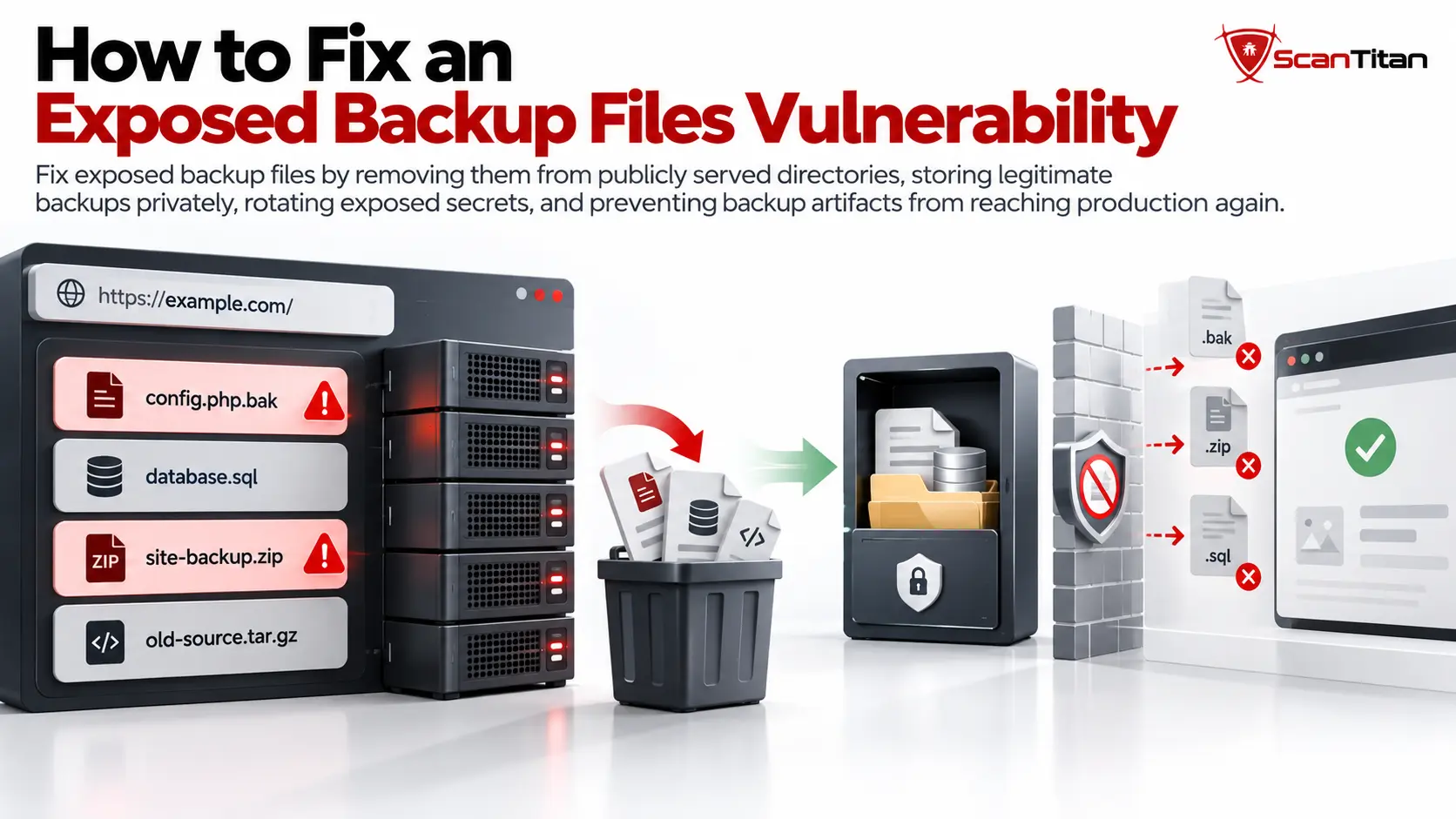
Fix exposed backup files by removing them from publicly served directories, storing legitimate backups privately, rotating exposed secrets, and preventing backup artifacts from reaching production again.
1. Remove Backups From the Web Root
Delete unintended backups from public directories: A database export, old source copy, or site archive that users do not need should not exist beneath the public document root.
Renaming database.sql to database-old.sql does not fix the vulnerability if the new URL remains public.
2. Store Backups in Private Storage
Move legitimate backups outside the public website: Use private object storage, restricted filesystem locations, or dedicated backup infrastructure with appropriate access controls.
3. Rotate Secrets Exposed in Backups
Replace reusable credentials: If a backup contained database passwords, API keys, tokens, signing secrets, SSH keys, or certificates, rotate or revoke them where appropriate.
4. Block Backup Extensions as Defense in Depth
Use web-server rules as a secondary control: Extension restrictions can help if a backup is accidentally deployed, but they should not replace removing the file.
For Apache <FilesMatch>:
<FilesMatch "\.(bak|old|orig|save|sql)$">
    Require all denied
</FilesMatch>
For the Nginx location directive:
location ~* \.(bak|old|orig|save|sql)$ {
    return 404;
}
Extension blocking is not the primary fix.Backups can use ordinary archive extensions or unpredictable names. Preventing them from entering the public web root is more reliable.
5. Fix the Deployment Process
Prevent recurrence during deployment: Exclude database dumps, editor artifacts, backup copies, release archives, and temporary rollback files from production artifacts.
- exclude backup and editor-generated files from build packages;
- keep database exports outside the publish directory;
- remove temporary rollback archives after deployment;
- review CMS and hosting backup destinations;
- use continuous vulnerability scanning after deployment to catch unintended backup exposure.
What Should You Do If a Backup File Was Already Exposed?
If a backup was already public, remove access immediately and investigate whether any exposed information must be revoked or rotated.
- Remove public access:Delete or restrict the backup so additional downloads cannot occur.
- Identify what was exposed:Determine whether the file contained private data, passwords, keys, tokens, certificates, or source code.
- Review available logs:Look for previous requests to the backup URL and related paths.
- Rotate reusable secrets:Change or revoke credentials, tokens, private keys, certificates, and other sensitive values where necessary.
- Check connected systems and rescan:Determine whether exposed credentials could access databases, cloud platforms, APIs, repositories, or infrastructure, then verify that no equivalent backup files remain public.
Deleting the backup does not revoke information that may already have been copied.If the file contained reusable secrets, remediation is not complete until those secrets are rotated or invalidated.
Check for Exposed Backup Files With ScanTitan
Exposed backups can reveal source code, credentials, database records, or application configuration. External scanning can help identify backup files and other publicly reachable security weaknesses before they remain unnoticed in production.
Scan your public attack surfaceUse the ScanTitan Website Vulnerability Scanner to check for web vulnerabilities, security misconfigurations, and other externally reachable risks.
Exposed Backup Files Vulnerability FAQ
What is an exposed backup files vulnerability?
An exposed backup files vulnerability occurs when a backup, database dump, old source copy, deployment archive, or editor-generated file is accessible to unauthorized users through a public web location.
Which backup files are commonly exposed?
Common examples include .bak, .old, .orig, .sql, .sql.gz, .zip, .tar.gz, files ending in ~, and editor swap files. The contents determine the real impact.
Why can .php.bak expose source code?
A renamed backup may no longer match the server’s normal PHP handler. Depending on the server configuration, the file can therefore be returned as ordinary content instead of being executed.
Can a vulnerability scanner detect exposed backup files?
Yes. A scanner can derive likely backup names from discovered resources, request those paths, compare responses with normal error behavior, and identify content that resembles source code, configuration, archives, or database exports.
How do I fix an exposed backup file?
Remove it from the public web root, store legitimate backups privately, rotate exposed credentials or secrets, add server restrictions as defense in depth, and fix deployment processes so backup artifacts cannot return to production.
What should I do if an exposed backup contained passwords or API keys?
Remove public access, review available logs, identify all exposed secrets, and rotate or revoke passwords, API keys, tokens, certificates, or other reusable credentials. Deleting the backup alone does not invalidate information that may already have been copied.