Directory listing is primarily a discovery and information-exposure issue.Disabling the listing can prevent casual discovery of files, but it does not replace access control. If an attacker already knows the URL of a sensitive file, the file may still be directly accessible even when directory browsing is disabled.
What Is a Directory Listing Vulnerability?
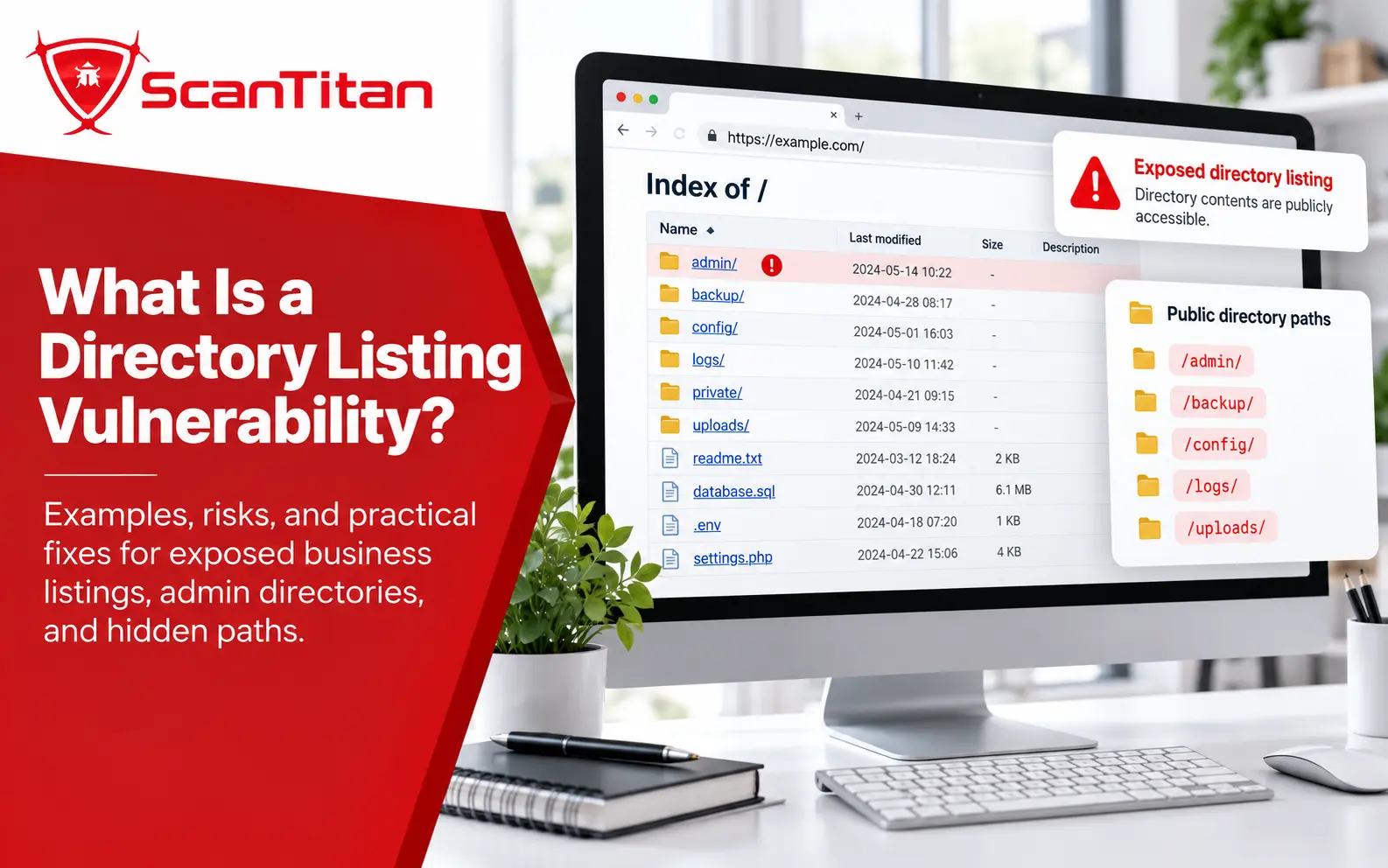
A directory listing vulnerability is a web-server or application configuration issue that causes the contents of a directory to be displayed when a visitor requests the directory path directly.
For example, a request to:
https://example.com/backups/might return a generated index containing:
Index of /backups/

app-backup.zip
database.sql.gz
debug.log
.env.backup
old-site/
The listing gives the visitor information that would otherwise require guessing or prior knowledge. Depending on the files present, that information can range from harmless public assets to highly sensitive application data.
Directory listing is commonly associated with web-server autoindex or directory-browsing features. It may appear because directory indexing was deliberately enabled, inherited from a broader configuration, or left active on a directory that should not be browsable.
How Does Directory Listing Work?
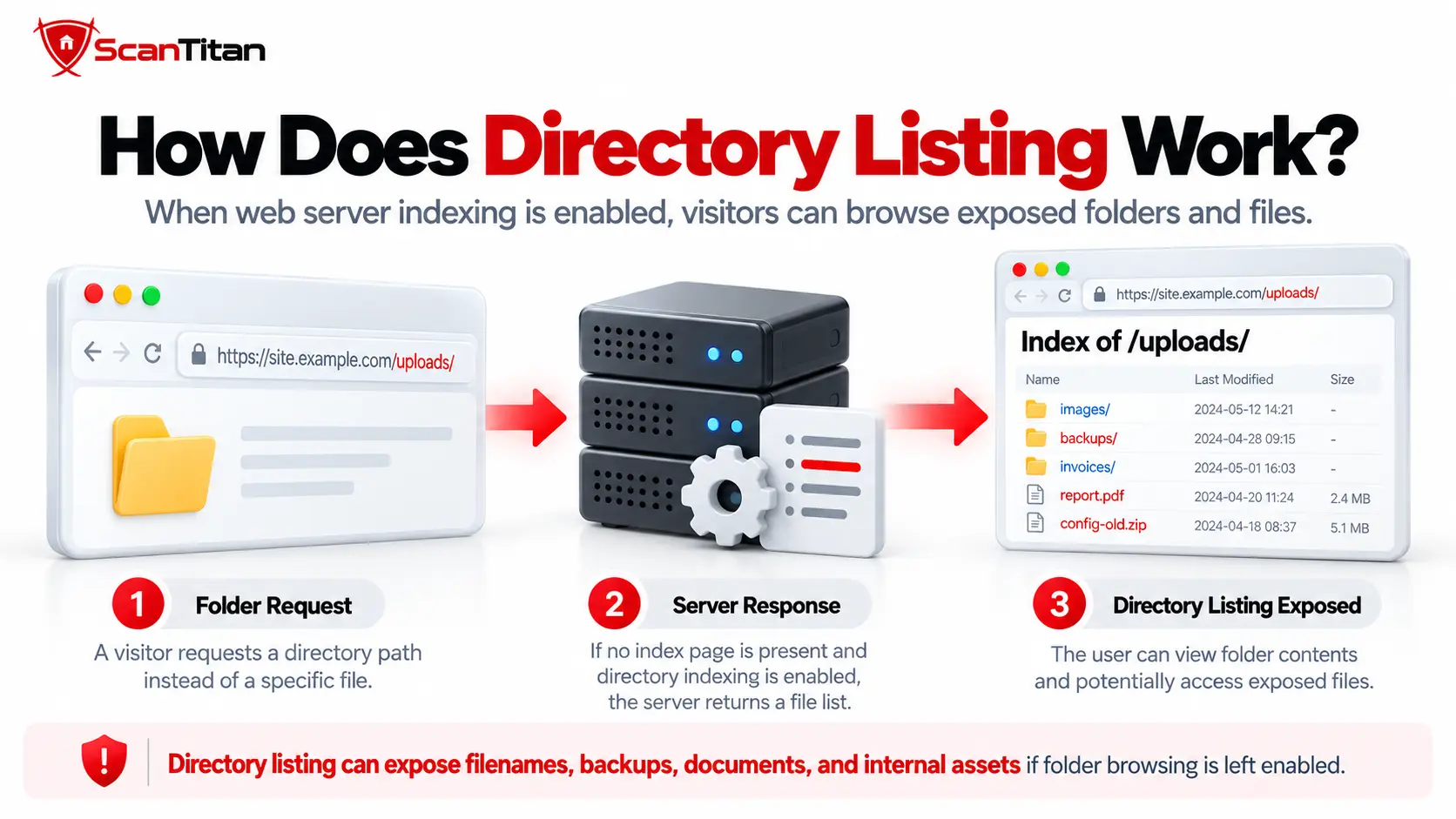
Directory listing usually occurs when a request targets a directory, no configured index document is returned, and the web server is allowed to generate an index of the directory contents.
- A visitor requests a directory path: For example, the browser requests
/uploads/or/backups/. - The server looks for an index resource: The server may look for a configured document such as
index.html,index.php, or another default file. - No suitable index document is returned: If directory browsing or autoindex behavior is enabled, the server may generate a list rather than returning an error.
- The generated page exposes directory contents: The response can reveal file names, folder names, sizes, modification dates, and links to accessible resources.
The exact behavior depends on the server and configuration. Directory indexing is not enabled by default in every modern web server, so the presence of a listing should be investigated as an environment-specific configuration issue rather than assumed to be universal behavior.
Is Directory Listing Always a Vulnerability?
No. A directory listing is not automatically a security vulnerability. Some directories are intentionally browsable, such as public package repositories, open-source release archives, or directories containing files designed for unrestricted download.
The security concern begins when the listing reveals information or resources that users were not intended to discover.
| Directory Listing | Likely Security Meaning |
|---|---|
| Public image directory containing intentionally public images | Usually low-value information exposure |
| Public software release directory | May be intentional and expected |
| Directory names reveal internal project structure | Useful reconnaissance information |
| Backup archives are listed and downloadable | Potentially significant exposure |
| Source-code archives are accessible | Can expose application logic and secrets |
| Configuration or environment files are accessible | May expose credentials, API keys, or internal settings |
| Database dumps or private documents are accessible | Potentially high-impact confidentiality breach |
| Listing is visible but sensitive files require authorization | Lower practical impact, although filenames may still reveal information |
A directory listing by itself is often treated as an informational or low-severity finding when it reveals only resources that are already intended to be public. PortSwigger, for example, lists directory listing with a typical severity of Information. The severity can increase substantially when the listing reveals downloadable backups, credentials, source code, database exports, private documents, or other resources that should not be publicly accessible.
The listing and the exposed resource are separate security questions.A generated index may reveal that a file exists, while authorization determines whether the visitor can actually retrieve it. Both should be evaluated before assigning severity.
Directory Listing Vulnerability Example
A useful directory listing vulnerability example is a publicly browsable backup directory:
https://example.com/backups/The server returns:
Index of /backups/

../
app-2026-09-20.zip
database.sql.gz
.env.backup
debug.log
old-site/
The danger is not simply that the directory has a generated index. Each listed resource can create a different security problem.
| Exposed Resource | Potential Security Impact |
|---|---|
app-2026-09-20.zip |
May expose application source code, dependencies, internal paths, or embedded secrets |
database.sql.gz |
May contain user records, password hashes, tokens, business data, or private application information |
.env.backup |
May expose database credentials, API keys, mail credentials, or environment secrets |
debug.log |
May reveal stack traces, server paths, software versions, identifiers, or sensitive runtime data |
old-site/ |
May expose an outdated application containing old components or vulnerabilities |
In this example, the directory listing is the discovery mechanism. Much of the eventual impact comes from whether the sensitive resources can then be downloaded or otherwise accessed.
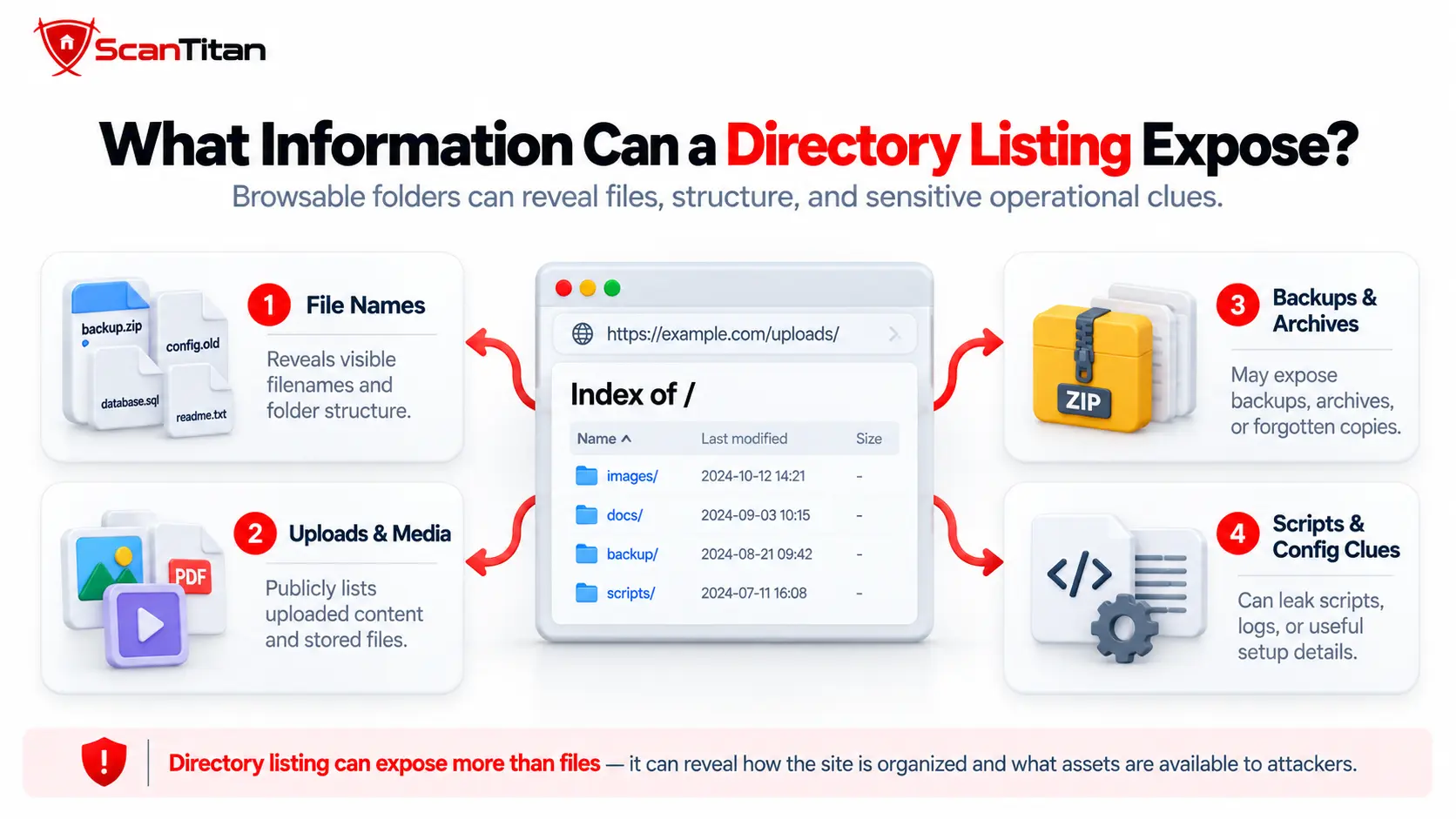
What Information Can a Directory Listing Expose?
A directory listing can expose considerably more than file names. The exact information depends on the server, directory contents, and generated index format.
- Backup files: ZIP, TAR, GZIP, SQL, or database export files created during deployment or maintenance.
- Configuration files: environment backups, application configuration, deployment files, or old configuration versions.
- Source code: archived applications, source directories, scripts, templates, or development copies.
- Log files: debug logs, application logs, error reports, or crash information.
- Temporary files: editor backups, upload remnants, exported reports, or generated data.
- Directory structure: internal application components, administrative locations, development directories, and naming conventions.
- Metadata: filenames, file sizes, modification dates, and subdirectory names.
- Private documents: invoices, internal PDFs, spreadsheets, customer exports, or other business files stored beneath the web root.
Even when none of the files is immediately sensitive, the directory structure can improve reconnaissance by telling an attacker which technologies, deployment patterns, backups, or internal application areas exist.
Directory Listing vs Directory Traversal vs Forced Browsing
Directory listing, directory traversal, forced browsing, and direct file exposure are related to web-resource discovery, but they are not the same vulnerability.
| Issue | What Happens | Typical Example |
|---|---|---|
| Directory listing | The server generates a browsable list of files and subdirectories | Index of /backups/ |
| Directory traversal | An attacker manipulates a path to escape the intended directory | ../../etc/passwd |
| Forced browsing | An attacker requests an unlinked but predictable resource directly | /admin-old/ |
| Direct file exposure | A sensitive file is accessible at a known URL even if directory listing is disabled | /backup/database.sql |
Disabling directory browsing does not make a known file private.If /backups/database.sql.gz remains publicly accessible, an attacker who already knows or guesses that path may still download it after the directory index has been disabled.
What Can Attackers Do With an Exposed Directory Listing?
Attackers can use directory listings to discover resources, understand application structure, identify sensitive files, and gather information for later attacks. What happens next depends entirely on the resources that become visible and accessible.
- Discover forgotten backups: archives may contain source code, database exports, configuration, or credentials.
- Map application structure: directory names can reveal administrative paths, development areas, upload locations, or legacy applications.
- Identify software and versions: filenames can reveal packages, libraries, release versions, and deployment artifacts.
- Download sensitive documents: exposed exports or business files may contain confidential information.
- Review application source code: downloadable source archives can reveal implementation details and potential weaknesses.
- Find secrets: configuration backups and environment files may expose credentials or API tokens.
- Build attack chains: information discovered through the listing may lead to another vulnerability or authentication target.
The listing itself usually provides reconnaissance. The severity rises when that reconnaissance leads directly to resources that should have required authorization or should never have been deployed to the public web directory.
How Do You Detect a Directory Listing Vulnerability?
To detect directory listing, request directory paths that are part of the authorized application and determine whether the server generates an index instead of serving an intended index page or denying access.
Manual Directory Listing Check
- Identify known application directories: Review public resources and application paths for directories such as uploads, assets, backups, downloads, logs, or archived content.
- Request the directory path directly: You can also inspect the response from an authorized target with a simple HTTP request:
curl -i https://example.com/uploads/Review the status code and response body for a generated index containing file names, subdirectories, modification dates, sizes, or recognizable directory-index markup.
- Inspect the response: Look for an auto-generated directory index containing files, subdirectories, file sizes, or modification dates.
- Review the listed resources: Determine whether the files are intentionally public and whether sensitive resources can actually be retrieved.
- Check access controls independently: Do not assume that disabling the index will secure listed files. Verify whether sensitive files require authentication or authorization.
Only test systems you own or are explicitly authorized to assess.
Automated Vulnerability Scanning
Automated vulnerability scanning detects directory listing by requesting discovered directory paths and analyzing the returned HTTP responses for signs of an auto-generated index. A typical automated check follows these steps:
- Discover directory paths:The scanner crawls the website and collects directories from links, scripts, assets, redirects, known application paths, and other reachable URLs.
- Request directory URLs directly:The scanner sends requests to discovered directory paths, usually including slash-terminated URLs such as
/uploads/,/downloads/, or other application directories. - Analyze the HTTP response:The scanner checks the response status, page structure, links, filenames, directory names, file sizes, modification dates, and other patterns commonly associated with automatically generated directory indexes.
- Identify directory-index signatures:The response may contain indicators such as
Index of /, parent-directory links, server-generated file tables, or other markup associated with Apache, Nginx, IIS, or another web server. - Record exposed resources:If a listing is detected, the scanner records the directory and the resources exposed through the generated index so the finding can be reviewed in context.
- Evaluate the finding:The listing should then be reviewed to determine whether it contains intentionally public resources or exposes sensitive files such as backups, logs, configuration files, source archives, database exports, or internal directory structure.
- Re-test after remediation:After directory browsing is disabled or access controls are changed, scan the affected paths again to confirm that the generated index is no longer exposed.
Automated detection does not determine severity by itself.A scanner can confirm that a directory index is exposed, but the practical risk depends on what the listing reveals and whether the listed resources can actually be accessed without authorization.
Can a Vulnerability Scanner Detect Directory Listing?
Yes. Directory listing is well suited to automated web scanning because the behavior is visible in ordinary HTTP responses. A scanner can discover directory paths, request them, and identify responses that resemble server-generated indexes.
| Testing Method | Useful For | Main Limitation |
|---|---|---|
| DAST scanner | Finding browsable directories across a web application | May not know whether the directory was intentionally public |
| Browser/manual review | Confirming what users actually see and evaluating listed files | Slower across large applications |
| Configuration review | Finding autoindex or directory-browsing settings before deployment | May miss runtime overrides and infrastructure layers |
| Manual access-control testing | Determining whether exposed files require authorization | Requires application context |
A scanner finding is the beginning of the severity assessment.A finding such as Index of /images/ containing public assets is very different from Index of /backups/ exposing database dumps. The scanner should identify the listing; the exposed resources determine much of the practical impact.
How Is Directory Listing Classified by CWE and OWASP?
Directory listing is primarily associated with CWE-548: Exposure of Information Through Directory Listing , CWE-548 covers cases where a product exposes a directory index containing resources that should not have been revealed through directory browsing.
A related classification is CWE-538, which concerns sensitive information stored in files or directories that are externally accessible. The distinction is useful:
- CWE-548: the directory index reveals which resources exist.
- CWE-538: a sensitive resource itself is externally accessible.
In OWASP Top 10:2025, directory listing is used as an example of A02: Security Misconfiguration. OWASP describes a scenario where directory listing exposes compiled Java classes that can then be downloaded and reverse engineered.
CWE-548 also appears in OWASP’s CWE mapping for A01: Broken Access Control, which reinforces why the final risk depends not only on server configuration but also on whether sensitive resources are appropriately protected.
Are Directory Listing Vulnerabilities Accepted on HackerOne?
Sometimes. HackerOne recognizes information exposure through directory listing under CWE-548, but whether a report is accepted, rewarded, or considered meaningful depends on the individual program’s scope and the demonstrated security impact.
A person researching a directory listing vulnerability on HackerOne should therefore distinguish between a technically observable listing and a listing that exposes meaningful sensitive information.
| Example | Likely Report Value |
|---|---|
| Intentionally public download directory | May be expected behavior or explicitly out of scope |
| Public image directory containing only published assets | Usually limited security impact |
| Directory exposes internal filenames but files are protected | Potential information disclosure depending on context |
| Directory exposes downloadable backup archives | Potentially significant report if sensitive data is present |
| Directory exposes database dumps or secrets | Potentially serious impact depending on the data and program rules |
Bug-bounty severity should therefore be based on demonstrated impact and the program’s policy rather than on the phrase “directory listing” alone.
How to Fix a Directory Listing Vulnerability
The correct directory listing vulnerability fix is to disable unnecessary directory browsing, remove sensitive resources from publicly reachable directories, and enforce authorization on any file that should not be available anonymously.
Disabling autoindex is important, but it should be only one part of the remediation.
1. Disable Directory Listing in Apache
Apache directory indexes are commonly controlled through the Indexes option. Where automatic indexing is not required, disable it for the relevant directory:
Options -IndexesDepending on the deployment, this setting may be applied in Apache configuration or an allowed .htaccess context.
Also verify that sensitive files are not stored beneath the public document root simply because the generated index has been removed.
2. Disable Directory Listing in Nginx
Nginx controls directory indexing through the autoindex directive. To ensure directory listing is disabled:
autoindex off;Nginx documents autoindex off as the default, so an exposed index may indicate that autoindex was deliberately enabled in a server, location, or inherited configuration.
After modifying the configuration, reload or restart Nginx as appropriate and verify the affected directory again.
3. Disable Directory Browsing in IIS
Microsoft IIS provides a Directory Browsing feature. Where browsing is not required, keep it disabled. The relevant configuration can be represented as:
<system.webServer>
  <directoryBrowse enabled="false" />
</system.webServer>
IIS documentation lists directory browsing as disabled by default, so review site-level, application-level, and inherited configuration if a directory index is unexpectedly available.
4. Disable Directory Listing on Other Web Servers
Other web servers and application containers can expose similar directory-indexing features. If you use Tomcat, LiteSpeed, Lighttpd, or another server, review the active server configuration rather than assuming that adding an index file is sufficient.
| Server | Directory Listing Control |
|---|---|
| Apache Tomcat | Review the default servlet listings setting and keep unnecessary listings disabled. |
| LiteSpeed | Review the Auto Index setting at the applicable server or virtual-host level. |
| Lighttpd | Review the mod_dirlisting configuration and keep directory listing disabled where it is not required. |
After any configuration change, request the affected directory again and verify both that the generated index is gone and that sensitive files cannot still be accessed directly.
Directory Listing Vulnerability Remediation Checklist
Effective directory listing vulnerability remediation should address both the generated directory index and the underlying exposure of sensitive files:
- Disable unnecessary directory indexing: Turn off Apache
Indexes, Nginxautoindex, IIS Directory Browsing, or the equivalent feature in the affected server. - Remove sensitive files from the public web root: Backups, database exports, environment files, private reports, source archives, and logs should not be stored in anonymously reachable locations.
- Apply authentication and authorization: If users genuinely need web access to sensitive resources, protect those resources independently of whether the directory is indexed.
- Review backup and deployment processes: Make sure automated deployments, editors, CI/CD pipelines, and maintenance scripts do not leave temporary or backup files in public directories.
- Review nested directories: A parent directory may be protected while a child directory has different configuration or inherited behavior.
- Check historical and legacy paths: Old applications, staging copies, archived releases, and deprecated upload paths are common sources of forgotten exposure.
- Re-test direct file access: After the listing disappears, verify that sensitive files cannot still be requested directly using known or predictable URLs.
- Monitor requests for exposed and sensitive paths: Review web-server and application logs for repeated requests to backup directories, configuration files, database exports, old deployment paths, and other resources that may indicate automated discovery or reconnaissance.
- Rescan the application: Confirm that directory indexes are no longer exposed and that no equivalent paths remain reachable.
Why Is Adding an index.html File Not Enough?
Adding an index.html file can hide an automatically generated directory listing, but it does not provide access control over the files stored in that directory.
Consider this directory:
/backups/
  index.html
  database.sql.gz
  source.zip
A request to:
/backups/may now display the index page rather than a directory listing. But if these URLs remain public:
/backups/database.sql.gz
/backups/source.zip
the sensitive resources are still exposed.
Hiding file discovery is not the same as protecting the file.Use authorization, remove sensitive resources from web-accessible directories, and disable directory browsing where it is unnecessary.
Check Directory Listing Exposure With ScanTitan
Directory browsing is only one type of web-security misconfiguration. A complete assessment should also look for exposed files, vulnerable application behavior, outdated components, unsafe headers, and other externally visible weaknesses.
Scan your website for security weaknessesUse the ScanTitan Website Vulnerability Scanner to examine your public attack surface and identify web vulnerabilities and security misconfigurations that require investigation.
Directory Listing Vulnerability FAQ
What is a directory listing vulnerability?
A directory listing vulnerability occurs when a web server generates a browsable index that exposes the names of files and subdirectories. Its security impact depends on what information is revealed and whether the listed resources can be accessed without appropriate authorization.
Is directory listing always a vulnerability?
No. Some directories are intentionally public and browsable. Directory listing becomes more concerning when it exposes sensitive resources, internal structure, backups, source code, configuration files, logs, database exports, or other information that users were not intended to discover.
What is a directory listing vulnerability example?
An example is a publicly accessible backup directory that displays files such as database.sql.gz, source.zip, debug.log, or configuration backups. The listing reveals the resources, while the practical impact depends on whether those files can also be downloaded.
What is the difference between directory listing and directory traversal?
Directory listing occurs when the server generates an index of files in a directory. Directory traversal occurs when an attacker manipulates a file path to escape the intended directory and access resources elsewhere on the server.
Can a vulnerability scanner detect directory listing?
Yes. Web vulnerability scanners can request discovered directory paths and identify common auto-generated directory indexes. Additional analysis may still be required to determine whether the listed files are intentionally public or security-sensitive.
How do I fix a directory listing vulnerability?
Disable unnecessary directory browsing on the affected web server, remove sensitive files from web-accessible directories, apply proper authentication and authorization, review deployment and backup processes, and confirm that sensitive files cannot still be accessed directly.
How do I disable directory listing in Apache?
Where directory indexing is not required, Apache can commonly disable it using Options -Indexes in an appropriate server, virtual-host, directory, or permitted .htaccess configuration.
How do I disable directory listing in Nginx?
Use autoindex off; for the relevant Nginx configuration context. Nginx documents autoindex as disabled by default, so unexpected exposure should also prompt a review of inherited or location-specific configuration.
Does adding index.html fix directory listing?
It may prevent the server from showing an automatically generated index, but it does not protect files whose URLs are known or guessed. Sensitive files still need proper authorization or should be removed from publicly accessible directories.
Are directory listing vulnerabilities accepted on HackerOne?
Directory listing is recognized under CWE-548, but individual HackerOne programs decide whether a finding is in scope and whether it has enough security impact to qualify for a reward. An intentionally public download directory is very different from a directory exposing backups, database dumps, or secrets.