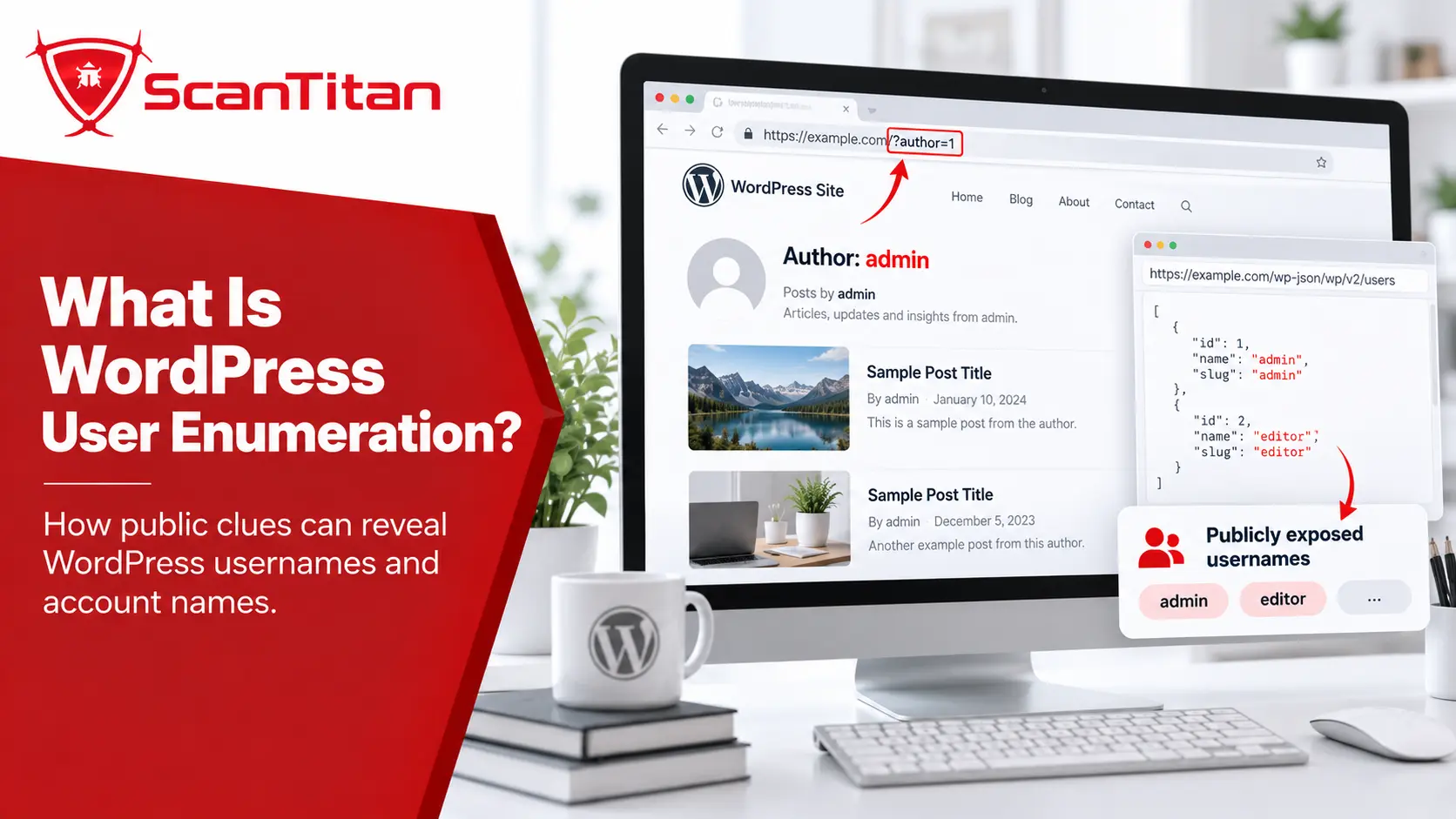
WordPress user enumeration is the process of discovering information that identifies valid WordPress accounts, such as user IDs, display names, author slugs, author URLs, or whether an account exists. WordPress can expose some of this information intentionally through author pages, REST API responses, sitemaps, and login behavior.
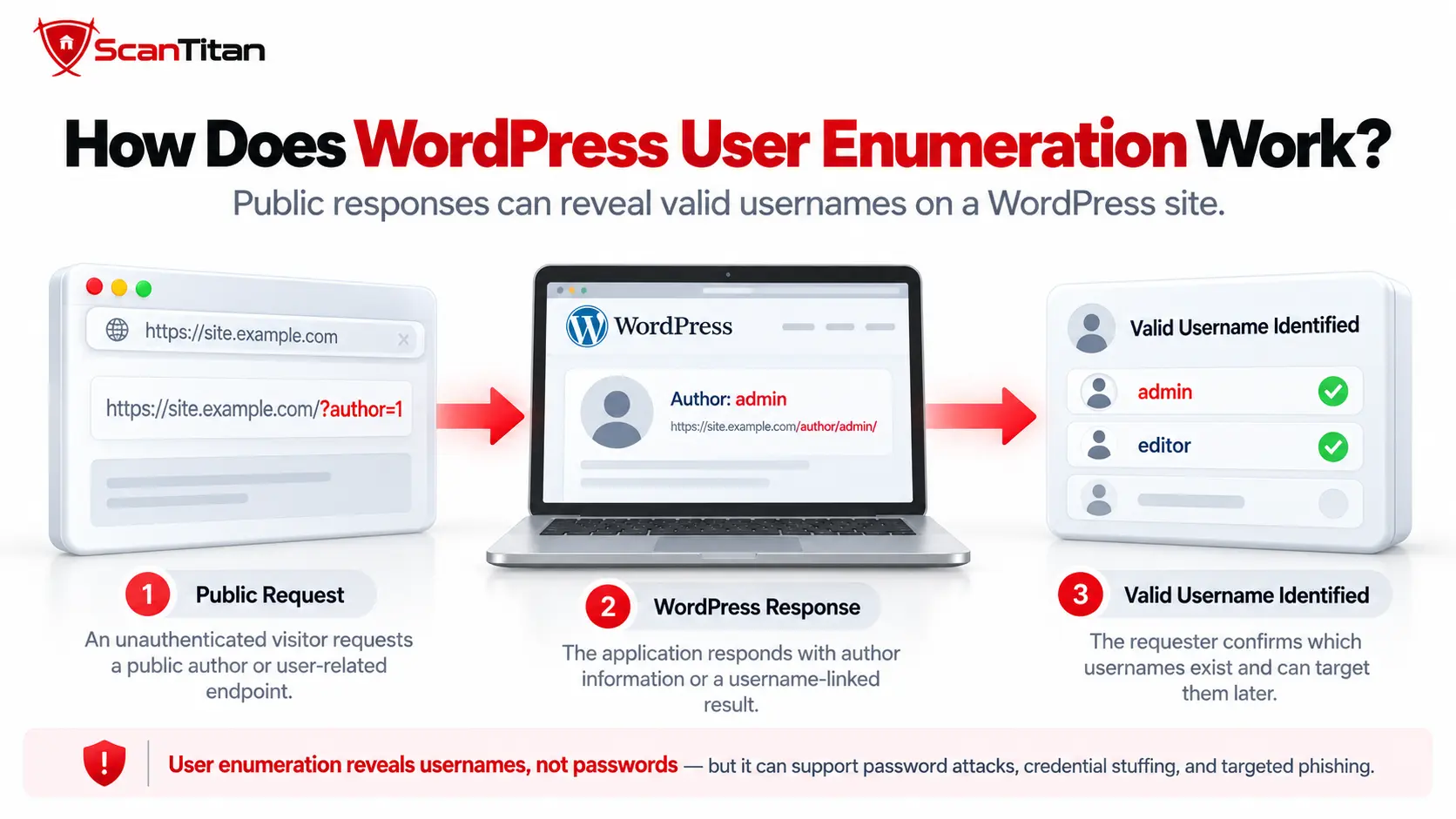
Enumeration does not bypass authentication and does not reveal a password by itself. Its security value is reconnaissance: confirmed account identifiers can make password spraying, credential stuffing, phishing, and other authentication attacks more targeted. The important question is therefore not simply whether WordPress exposes a user, but what identifier is exposed and what an attacker can do with it.
A WordPress display name, author slug, REST API slug, and actual user_login are related but distinct values. A public slug may match the login name on some sites, but it should not automatically be treated as the user’s authentication username.
What Is WordPress User Enumeration?
WordPress user enumeration means identifying valid users or public account identifiers from information the site exposes. Common sources include the WordPress REST API, author archive URLs, the WordPress user sitemap, login responses, and metadata generated by plugins or integrations.
An attacker benefits because knowing which accounts exist removes one unknown from a later authentication attack. Instead of guessing both the username and password, the attacker may be able to focus on known accounts.
That does not make enumeration equivalent to account compromise. A discovered account still requires a valid password, stolen session, authentication flaw, social-engineering success, or another path before an attacker can sign in.
For that reason, user enumeration fits better under information exposure and reconnaissance than under authentication bypass. It often becomes more important when combined with weak credentials, missing multi-factor authentication, or unrestricted login attempts. ScanTitan’s overview of the most common WordPress vulnerabilities covers those wider WordPress attack paths.
What User Information Does WordPress Actually Expose?
WordPress can intentionally publish author information, but the public values are not all equivalent to the login username. Current WordPress REST API documentation separates public user fields from privileged account fields.
| WordPress Value | Can It Be Public? | Is It the Login Username? |
|---|---|---|
| User ID | Yes | No |
| Display name | Yes | No |
Author slug / user_nicename |
Often | No, although it may match it |
| Author URL | Often | No |
REST API slug |
Yes in applicable public responses | No |
REST API username |
Restricted to edit context |
Yes |
| Email address | Restricted in normal core REST user responses | No |
| Roles and capabilities | Restricted to privileged context | No |
The official WordPress REST API user schema lists id, name, link, slug, and several other fields in public view or embed contexts. The actual username field, email address, roles, capabilities, first name, and last name require the more privileged edit context.
If a site’s author slug happens to equal its user_login, enumeration can reveal a useful login identifier. But the two fields are technically distinct, and a scanner should report what it actually discovered.
What Are the Common WordPress User Enumeration Methods?
WordPress users can be discovered through several independent surfaces. Blocking one route does not necessarily stop enumeration because the same author may still appear through an archive, sitemap, REST response, login behavior, or plugin-generated metadata.
- REST API: public user records can expose IDs, names, slugs, author URLs, and related metadata.
- Author archives: numeric author requests can resolve to public author URLs containing a slug.
- User sitemap: WordPress can publish author URLs for users with public posts.
- Login responses: different messages for nonexistent users and valid users with incorrect passwords can reveal account existence.
- Plugins and integrations: custom endpoints, SEO metadata, themes, or external services can expose additional author information.
WordPress REST API User Enumeration
WordPress REST API user enumeration checks public REST user endpoints for author records WordPress allows anonymous visitors to view.
The standard collection endpoint is:
/wp-json/wp/v2/usersWordPress also supports REST routing through query parameters, so installations may expose the same API through a form such as:
/?rest_route=/wp/v2/usersA public response may include data similar to:
{ "id": 4, "name": "Alex Writer", "link": "https://example.com/author/alex/", "slug": "alex" }The important field here is slug. It is an author identifier, not proof that the account’s actual login name is alex.
Current WordPress core also limits unauthenticated user collections. When a requester does not have the list_users capability, the REST users controller restricts results to users with published posts in REST-visible post types. Private users without applicable published content should not simply appear in the anonymous collection because they exist in the database.
This is why a current WordPress assessment should describe the exact data returned instead of making the broad claim that /wp-json/wp/v2/users exposes every account or every login username.
WordPress User Sitemap Enumeration
WordPress user sitemap enumeration occurs when the site’s user sitemap publishes author URLs that identify users with public content. WordPress core includes a user sitemap provider that can list author URLs for users who have published public posts.
The core WP_Sitemaps_Users provider generates URLs using each user’s author-posts URL and queries for authors with published posts in public post types.
This creates an important defensive lesson:
If author URLs still appear in the WordPress user sitemap or public author archives, the same author identities may remain discoverable through another route.
Review the sitemap only in the context of the site’s publishing model. A news site with named authors may want those pages indexed; a private business site with no public-author purpose may not.
Login Error User Enumeration
Login error user enumeration occurs when WordPress returns distinguishable responses for a nonexistent username and a valid username with an incorrect password. Those differences can allow an attacker to confirm whether an account exists.
WordPress exposes filters such as login_errors that allow sites to change the error text shown on the login page. WordPress documentation examples distinguish an invalid username from an incorrect password, which demonstrates why login responses can become an enumeration signal.
A site that wants to reduce this signal can return a generic authentication message such as:
The username or password is incorrect.That change reduces information available through the login response, but it should not be mistaken for an authentication defense. Strong passwords, MFA, rate limiting, and monitoring remain more important because attackers may discover account identifiers from other public sources anyway.
Plugin and Third-Party User Exposure
Plugins and third-party components can create additional WordPress user-enumeration surfaces through custom REST endpoints, AJAX handlers, SEO metadata, theme output, caching layers, and external integrations. These disclosure paths can exist independently of WordPress core.
This matters because disabling one core enumeration path does not control data produced elsewhere. A plugin may register its own API route, a theme may publish author metadata, or an integration may mirror public author information to another service.
CVE-2026-89029 affected Blog2Social for WordPress before version 9.1.0. A low-privileged user with the edit_posts capability could supply arbitrary user IDs to an AJAX handler and map those IDs to WordPress display names, confirming whether accounts existed. The issue shows why user-enumeration testing should include plugin and custom AJAX endpoints rather than checking WordPress core routes alone.
Review custom and third-party components whenever public account exposure does not match WordPress core behavior. ScanTitan’s guide to WordPress plugin vulnerabilities explains why plugin behavior should be treated as a separate part of the WordPress attack surface.
Is WordPress REST API User Enumeration a Vulnerability?
A WordPress REST API user enumeration vulnerability does not exist merely because the API returns public author information. WordPress intentionally exposes some author data. The security concern increases when the information reveals useful authentication identifiers, exposes users that should not be public, or materially improves another attack.
| Observed Behavior | Security Meaning |
|---|---|
| Public author’s display name and author URL are visible | Usually expected publishing behavior |
| REST API exposes a public author slug | Information exposure, but not automatically a login-name leak |
| Public slug exactly matches the user’s login identifier | Enumeration becomes more useful for authentication attacks |
| Non-public or unexpected accounts become enumerable | More significant information exposure |
| Valid account plus weak or reused password | Higher practical risk from credential attacks |
| Valid account protected by strong unique password and MFA | Username knowledge alone provides limited access value |
The right severity therefore depends on the information actually exposed and the authentication controls protecting the account.
What Can Attackers Do With Enumerated WordPress Users?
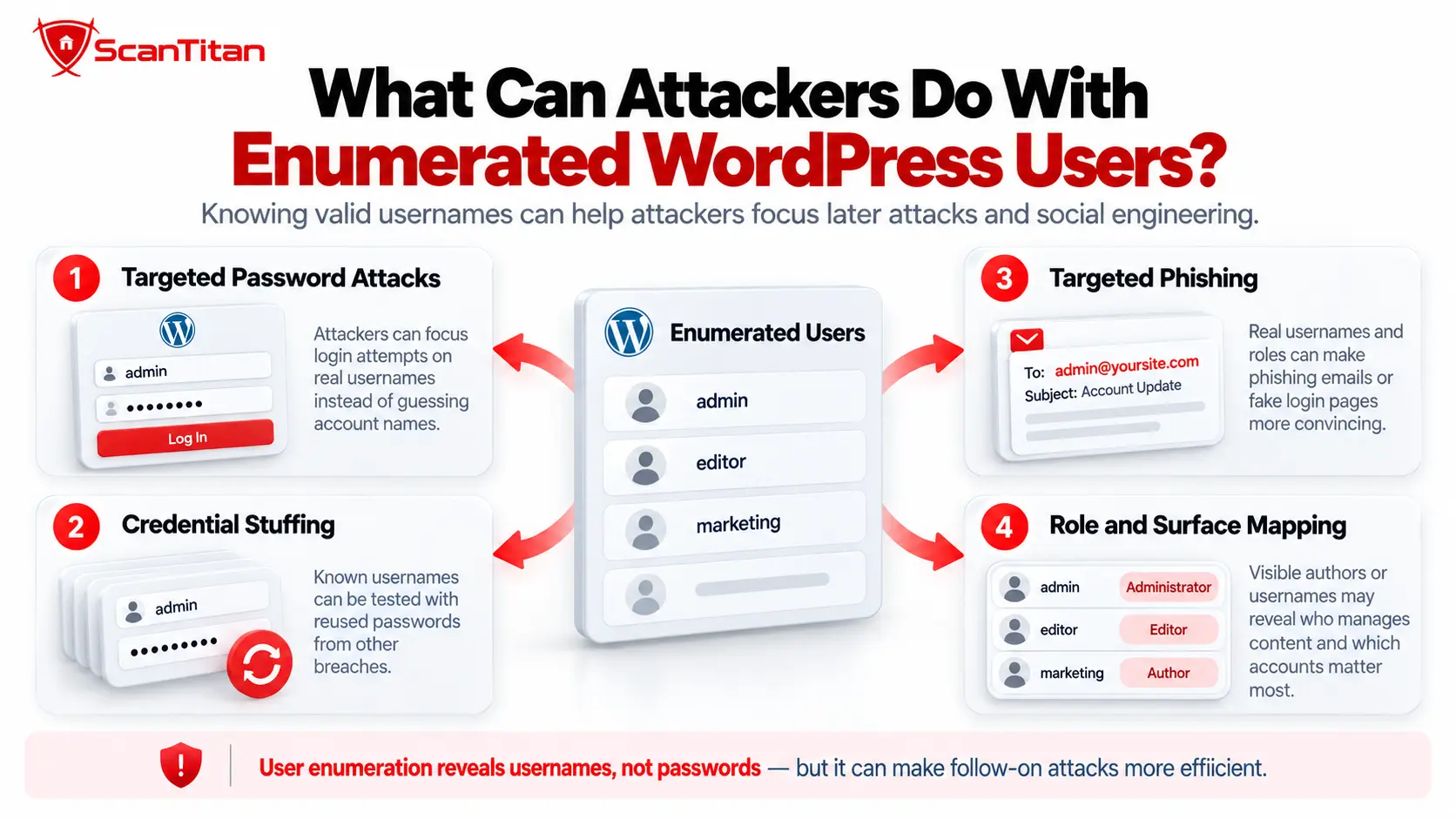
Enumeration mainly improves targeting. A confirmed account name or author identity can be combined with password attacks, leaked credentials, or social engineering, but the enumerated information does not grant access on its own.
- Password spraying: attackers can test a small number of common passwords across many confirmed accounts.
- Credential stuffing: usernames or email-related identities can be compared with credentials leaked from unrelated services.
- Targeted login attacks: automation can focus only on accounts known to exist instead of wasting requests on nonexistent names.
- Phishing: public display names and author identities can help attackers create more convincing messages.
- Privilege targeting: attackers may prioritize users that appear likely to publish, administer, or manage the site.
The practical defense is to make knowledge of the username insufficient: use strong unique passwords, MFA or passkeys where supported, sensible rate limits, and authentication monitoring.
How Do You Check a WordPress Site for User Enumeration?
Check every major disclosure surface and record exactly what identifier each one exposes. Do not stop after testing only the REST API.
- Check the public REST users endpoint.
Request
/wp-json/wp/v2/userswhile logged out and review which records and fields are returned. - Check individual REST user resources.
Do not test only the user collection. WordPress also supports individual user resources such as
/wp-json/wp/v2/users/1. A site may restrict the collection endpoint while an individual user route still returns a public record. Test applicable user IDs while unauthenticated and record exactly which fields are exposed. - Distinguish slug from login username.
Do not label the public
slugasuser_loginunless you have authorized evidence that the values actually match. - Check alternate REST routing.
If REST user access is intentionally restricted, confirm that alternate routing such as
?rest_route=/wp/v2/usersfollows the same policy. - Review author archives.
Test applicable numeric author URLs and determine whether they expose public author slugs.
- Inspect the user sitemap.
Determine whether WordPress publishes author URLs and whether those URLs are necessary for the site’s content model.
- Compare login responses.
Using accounts you are authorized to test, compare the response for a nonexistent account with the response for a valid account using an incorrect password.
- Review plugin and custom endpoints.
Search for author information returned outside WordPress’s core user API.
- Re-test after remediation.
Check all enumeration surfaces again. Removing one route is not enough if another route still publishes the same identity.
How Do Security Scanners Detect WordPress User Enumeration?
Security scanners detect WordPress user enumeration by checking public REST API responses, author archive behavior, login-response differences, exposed user routes, and other signals that can reveal valid account identifiers. However, the exact coverage depends on the scanner and its configuration, and not every detected identifier is necessarily the user’s actual login username.
WordPress-specific scanners can usually test more CMS-specific enumeration paths than generic web scanners, while tools such as Nessus may rely on dedicated plugins and scan-policy settings. Scanner findings should therefore identify what was exposed—such as a user ID, author slug, display name, or confirmed login identifier—before assigning security impact.
Can Nessus Detect WordPress User Enumeration?
Yes. Tenable currently maintains Nessus Plugin ID 90067, WordPress User Enumeration, which remotely checks WordPress sites for user enumeration and reports the issue as information disclosure.
Tenable lists the plugin in the CGI abuses family with Medium severity. Its published description says an unauthenticated remote attacker may be able to learn valid WordPress user names and use that information in further attacks.
If you are researching WordPress user enumeration Nessus results, check the exact plugin output and current scan configuration rather than assuming every WordPress scan runs the same checks. Nessus allows plugin families and individual checks to be enabled or disabled, and Tenable notes that CGI scanning must be enabled for the WordPress enumeration plugin.
Scanner output should still be interpreted carefully. A tool may report a discovered author identifier as a username even when the public value is technically a slug or display name. Confirm exactly what WordPress exposed before assigning impact.
Can WPScan Detect WordPress User Enumeration?
Yes. WPScan explicitly supports WordPress username enumeration as part of its remote security testing functionality.
The official WPScan documentation lists username enumeration among its checks and supports explicit user enumeration. Because WPScan is WordPress-specific, it is useful for finding multiple WordPress exposure patterns that a generic web scanner may not emphasize.
That still does not change the interpretation requirement: enumeration tells you which identifiers are discoverable, not whether the accounts use weak passwords or whether the discovered public slug equals the actual authentication username.
What Can a WordPress Vulnerability Scanner Detect?
A WordPress vulnerability scanner can detect REST API exposure, author enumeration behavior, login-response differences, exposed user routes, and other public signals associated with user enumeration. A useful finding should also explain exactly which identifier was exposed and whether it represents a public author slug, display name, user ID, or actual authentication identifier.
| Testing Method | Useful For | Main Limitation |
|---|---|---|
| WordPress-specific scanner | REST, author and WordPress-specific enumeration patterns | May describe a public slug broadly as a username |
| Generic DAST scanner | Login-response differences and exposed HTTP endpoints | May miss WordPress-specific discovery surfaces |
| Nessus | Dedicated WordPress user-enumeration check through Plugin 90067 | Coverage depends on scan configuration and plugin execution |
| WPScan | Dedicated WordPress username and component enumeration | Enumeration does not prove password weakness or account compromise |
| Manual review | Determining what each exposed value actually represents | Slower and requires WordPress context |
ScanTitan’s WordPress Vulnerability Scanner can be used as part of a broader review of exposed WordPress attack surface, vulnerable components, and application behavior. Enumeration findings should be assessed together with authentication controls rather than treated as account compromise on their own.
How to Prevent WordPress User Enumeration
To prevent or reduce WordPress user enumeration, remove unnecessary public account exposure from each surface separately and strengthen authentication so that any remaining public author identity has little security value.
1. Decide Which Users Actually Need to Be Public
A publishing site may intentionally expose authors. A corporate site with one generic editorial account may have no reason to publish personal author pages. Start with the site’s actual content requirements instead of trying to hide every WordPress user indiscriminately.
2. Do Not Rely on a Public Author Slug as a Secret Login Identifier
If the public author slug and the login username are identical, discovery of the author URL may also reveal a useful authentication identifier. Keeping public author identity separate from authentication identity reduces that correlation.
This should be treated as defense in depth, not as a replacement for strong authentication. A username is not a password.
3. Restrict Unnecessary REST User Exposure
If anonymous visitors do not need REST user records, restrict public access to the user routes while preserving REST functionality required by WordPress, plugins, editors, and integrations.
Do not assume that blocking only the literal URL /wp-json/wp/v2/users is enough. WordPress supports alternate REST routing, and application-level permission controls are more reliable than a brittle URL-only rule.
Do not rely on a case-sensitive URL or WAF rule alone. WordPress core matches REST routes case-insensitively, so a filter written for only one exact lowercase path may not represent the application’s actual routing behavior. Enforce access through WordPress permissions or endpoint-level controls, then re-test alternate route forms after the change.
4. Review Author Archives
If author pages provide no editorial or SEO value, remove or redirect them appropriately. If they are required, understand that author identity is part of the site’s public publishing model and focus on separating it from sensitive authentication identifiers.
5. Review the WordPress User Sitemap
Determine whether author URLs need to appear in the sitemap. If public author discovery is unnecessary, adjust the sitemap behavior together with the author-archive strategy rather than hiding one while leaving the other exposed.
6. Normalize Login Error Messages
Use a generic authentication failure message when revealing whether a specific account exists provides no usability benefit.
Incorrect username or password.Keep the message consistent for nonexistent accounts and incorrect passwords.
7. Review Plugin and Custom API Output
After restricting core exposure, inspect plugins, themes, custom endpoints, SEO metadata, and external integrations for the same user information. Otherwise the mitigation simply moves the enumeration path instead of removing it.
8. Protect Accounts Even If Usernames Remain Public
Some sites legitimately publish author identities and cannot eliminate enumeration completely. In that case, make the enumerated information low value:
- require strong, unique passwords;
- enable multi-factor authentication or passkeys where available;
- rate-limit repeated authentication attempts;
- monitor failed-login patterns and attacks targeting many users;
- remove dormant administrator accounts;
- avoid password reuse across services;
- investigate credential-stuffing alerts quickly.
These controls may not stop enumeration itself, but they sharply reduce the chance that enumeration leads to successful authentication.
Should You Disable the WordPress REST API to Stop User Enumeration?
Usually no. Disable or restrict the unnecessary user exposure rather than disabling the entire WordPress REST API unless the site has a specific reason to remove REST functionality completely.
WordPress core, the block editor, plugins, mobile applications, and integrations can depend on REST endpoints. Disabling the entire API can break legitimate functionality while still leaving author identities exposed through archives, sitemaps, login responses, or third-party components.
A better approach is to identify the disclosure surface you do not need and restrict that surface specifically.
When Should WordPress User Enumeration Be Treated as Higher Risk?
User enumeration deserves more attention when it materially reduces the work required for another attack.
| Condition | Why Risk Increases |
|---|---|
| Public slug equals actual login username | The attacker obtains a confirmed authentication identifier |
| Administrator or privileged accounts are identifiable | Attackers can prioritize high-value identities |
| No MFA | A correct password may be sufficient for compromise |
| Weak or reused passwords | Password spraying or credential stuffing becomes more effective |
| No login throttling | Attackers can perform more authentication attempts |
| Unexpected private users are exposed | The enumeration reveals information beyond the intended publishing model |
A public author name on a well-protected publishing account is therefore a very different security situation from an exposed administrator login on a site with password reuse and no second factor.
Check Your WordPress Attack Surface With ScanTitan
If you are unsure what your WordPress site exposes publicly, the useful question is not only whether users can be discovered. You also need to know which plugins and themes are exposed, which versions are vulnerable, what application behavior can be reached anonymously, and whether the authentication surface has weaknesses that make reconnaissance more valuable.
Use the ScanTitan WordPress Vulnerability Scanner to identify exposed WordPress components and security weaknesses, then prioritize findings based on actual exposure and exploitability.
WordPress User Enumeration FAQ
What is WordPress user enumeration?
WordPress user enumeration is the discovery of valid accounts or public account identifiers such as user IDs, display names, author slugs, author URLs, or account existence. It is primarily a reconnaissance technique and does not bypass authentication by itself.
Is WordPress user enumeration a vulnerability?
Not always. WordPress intentionally publishes some author information. Enumeration becomes more security-relevant when it exposes unexpected users, reveals actual login identifiers, or makes password spraying, credential stuffing, phishing, or another authentication attack easier.
Does /wp-json/wp/v2/users expose WordPress usernames?
The public WordPress REST API can expose user IDs, display names, author links, slugs, and other public fields for applicable users. The official REST schema restricts the actual username field to edit context, so a public slug should not automatically be described as the user’s login username.
How do I check for WordPress user enumeration?
Review the public REST users endpoint, alternate REST routing, author archives, the WordPress user sitemap, login error behavior, and user information exposed by plugins or custom APIs. Record exactly which identifier each surface reveals.
How do I prevent WordPress user enumeration?
Restrict unnecessary REST user exposure, review author archives and the user sitemap, normalize login errors where appropriate, audit plugin and custom endpoint output, separate public author identity from login identifiers, and protect accounts with strong unique passwords, MFA, and rate limiting.
Can author archives expose WordPress usernames?
Author archives can expose a public author slug associated with a valid user ID. That slug may match the login username on some sites, but WordPress stores the public author nicename and login username as distinct values.
Can WordPress sitemaps expose users?
Yes. WordPress core includes a user sitemap provider that can publish author URLs for users with public posts. Whether this is a security concern depends on whether those author identities are intended to be public and whether the exposed slug corresponds to a sensitive login identifier.
Does disabling the REST API stop WordPress user enumeration?
No. Even if REST user endpoints are restricted, author archives, user sitemaps, login responses, plugins, themes, or third-party integrations may still reveal author identities. Restrict the unnecessary exposure at each relevant surface rather than relying on one blocked URL.
Can Nessus detect WordPress user enumeration?
Yes. Tenable maintains Nessus Plugin ID 90067 for WordPress User Enumeration. The check is part of the CGI abuses plugin family, and coverage depends on the scan policy and required CGI scanning configuration.
Does user enumeration allow an attacker to log in?
No. Enumeration can reveal a valid account identifier but does not provide the password or bypass authentication. Account compromise still requires valid credentials, an authentication flaw, session theft, social engineering, or another attack path.