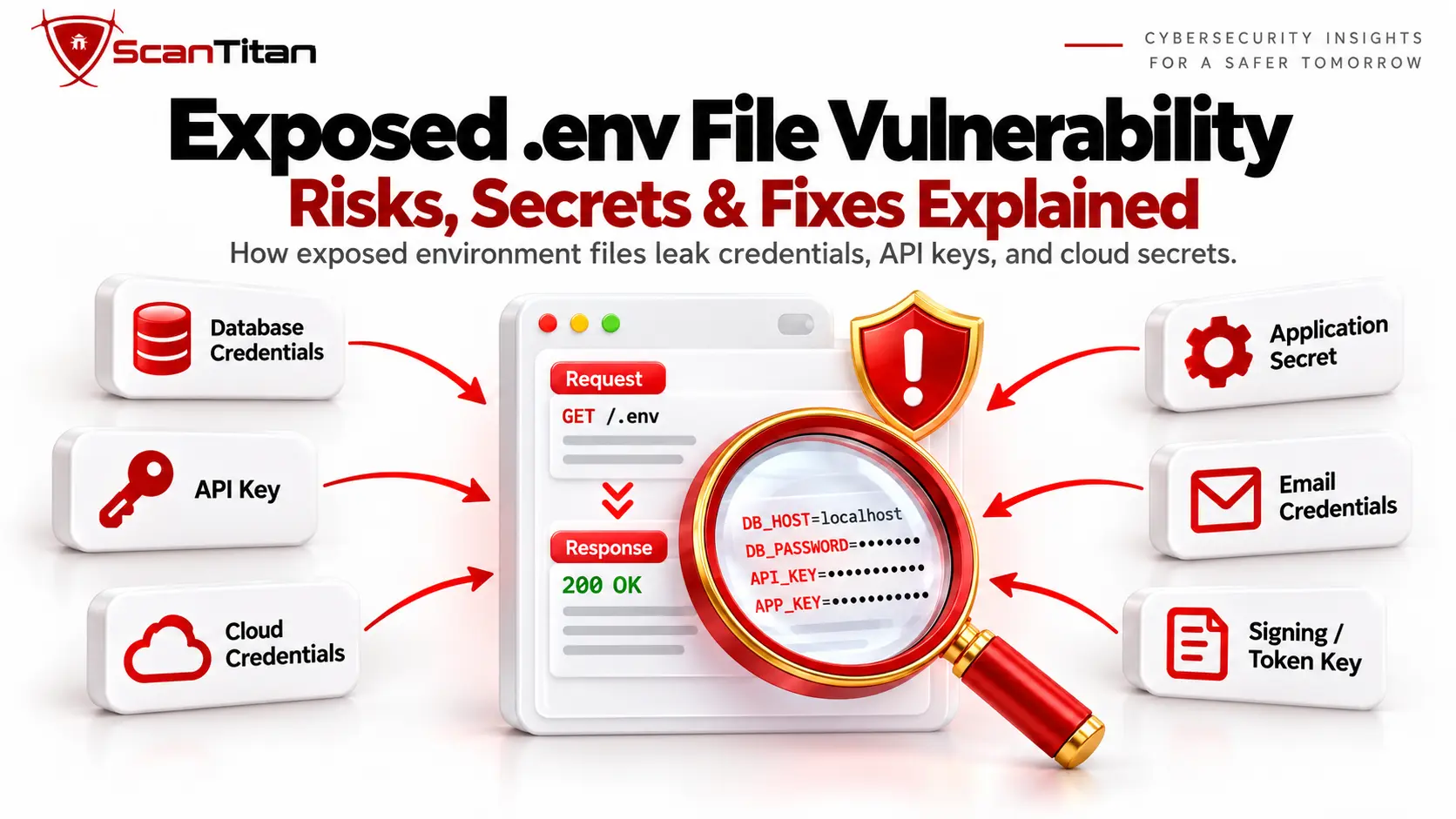
.env file can reveal database credentials, API keys, application secrets, cloud credentials, mail passwords, signing keys, and other configuration values that were intended to remain server-side.The severity depends on what the file contains and whether the exposed credentials are still valid. An empty development file may have little impact, while a production .env containing active database, cloud, payment, or signing credentials can create a serious compromise path.
Blocking the .env URL stops future direct access, but it does not invalidate secrets that may already have been copied.If an exposed environment file contained active credentials, tokens, keys, or certificates, those values should be assessed and rotated or revoked where necessary.
What Is an Exposed .env File Vulnerability?
An exposed .env file vulnerability is an information-disclosure weakness in which a server returns an environment configuration file to a user who should not be able to access it. Applications commonly use .env files to keep environment-specific configuration outside normal application code.
A file may contain values such as:
APP_ENV=production
APP_KEY=example-secret
DB_HOST=db.internal
DB_USERNAME=app_user
DB_PASSWORD=example-password
MAIL_USERNAME=mailer
MAIL_PASSWORD=example-mail-password
API_SECRET=example-api-secret
The problem is not the use of a .env file itself. The vulnerability appears when the file is stored beneath a publicly served path or the web server is configured in a way that allows it to be downloaded.
For direct public file exposure, CWE-538: Insertion of Sensitive Information into Externally-Accessible File or Directory is a relevant classification because sensitive configuration has become accessible outside its intended audience.
What Does a .env File Contain?
A .env file typically contains environment-specific configuration values and may include credentials or secrets required by the application at runtime. The exact variables depend on the framework, infrastructure, and services used by the application.
| Configuration Type | Example Variables | Possible Exposure |
|---|---|---|
| Database configuration | DB_HOST, DB_USERNAME, DB_PASSWORD |
Database connection details and credentials |
| Application secrets | APP_KEY, SECRET_KEY |
Framework or application cryptographic secrets |
| API credentials | API_KEY, provider-specific secret keys |
Access to third-party services or APIs |
| Cloud credentials | Cloud access keys and secret values | Potential access to cloud resources depending on permissions |
| Mail configuration | MAIL_USERNAME, MAIL_PASSWORD |
Email-service credentials |
| OAuth configuration | Client IDs and client secrets | Application integration credentials |
| Signing or token secrets | JWT or application signing keys | Potential token or authentication impact depending on implementation |
| Internal services | Redis, queue, cache, or private service URLs | Internal infrastructure details and possibly credentials |
Not every variable is secret. Values such as environment names or non-sensitive hostnames may only provide reconnaissance value, while passwords, private keys, API credentials, and signing secrets can have much greater impact.
Why Do .env Files Become Publicly Accessible?
.env files usually become public because the web server or deployment process exposes more of the application directory than intended. Common causes include:
- Incorrect document root: the server points to the application project root instead of a dedicated public directory.
- Shared-hosting deployment: the entire project, including
.env, is copied intopublic_htmlor another web-accessible folder. - Missing dotfile restrictions: the server allows hidden files beginning with a dot to be served like ordinary static resources.
- Static-file misconfiguration: an application or middleware exposes a directory containing environment configuration.
- Container or build mistakes: deployment artifacts copy development configuration into a publicly served image or directory.
- Backup copies: files such as
.env.bak,.env.old, or.env.backupremain reachable after maintenance. - Source-control mistakes: a real environment file is committed to a repository and later copied into a deployment artifact or otherwise exposed outside its intended environment.
Laravel’s deployment documentation, for example, recommends directing requests through the application’s public directory rather than serving the project root because doing so can expose sensitive configuration files. See the Laravel deployment documentation.
If the exposed resource is a stale copy such as .env.bak rather than the active environment file, it also overlaps with an Exposed Backup Files Vulnerability.
Exposed .env File Vulnerability Example
A typical exposed .env vulnerability occurs when a production environment file remains inside a directory that the web server can return directly.
For example, an application may respond to:
GET /.envwith environment configuration resembling:
APP_ENV=production
DB_HOST=db.internal
DB_USERNAME=production_app
DB_PASSWORD=[redacted]
PAYMENT_API_KEY=[redacted]
The attacker does not need code execution to benefit from the disclosure. The HTTP response itself has already revealed server-side configuration.
The practical impact then depends on the values. An internal database hostname may provide only architectural information, while valid database or payment-service credentials may enable unauthorized access to another system.
Do not publish real secrets when documenting an exposure.Security reports and scanner output should identify the affected variables while masking sensitive values whenever the full secret is not required to demonstrate the issue.
How Dangerous Is an Exposed .env File?
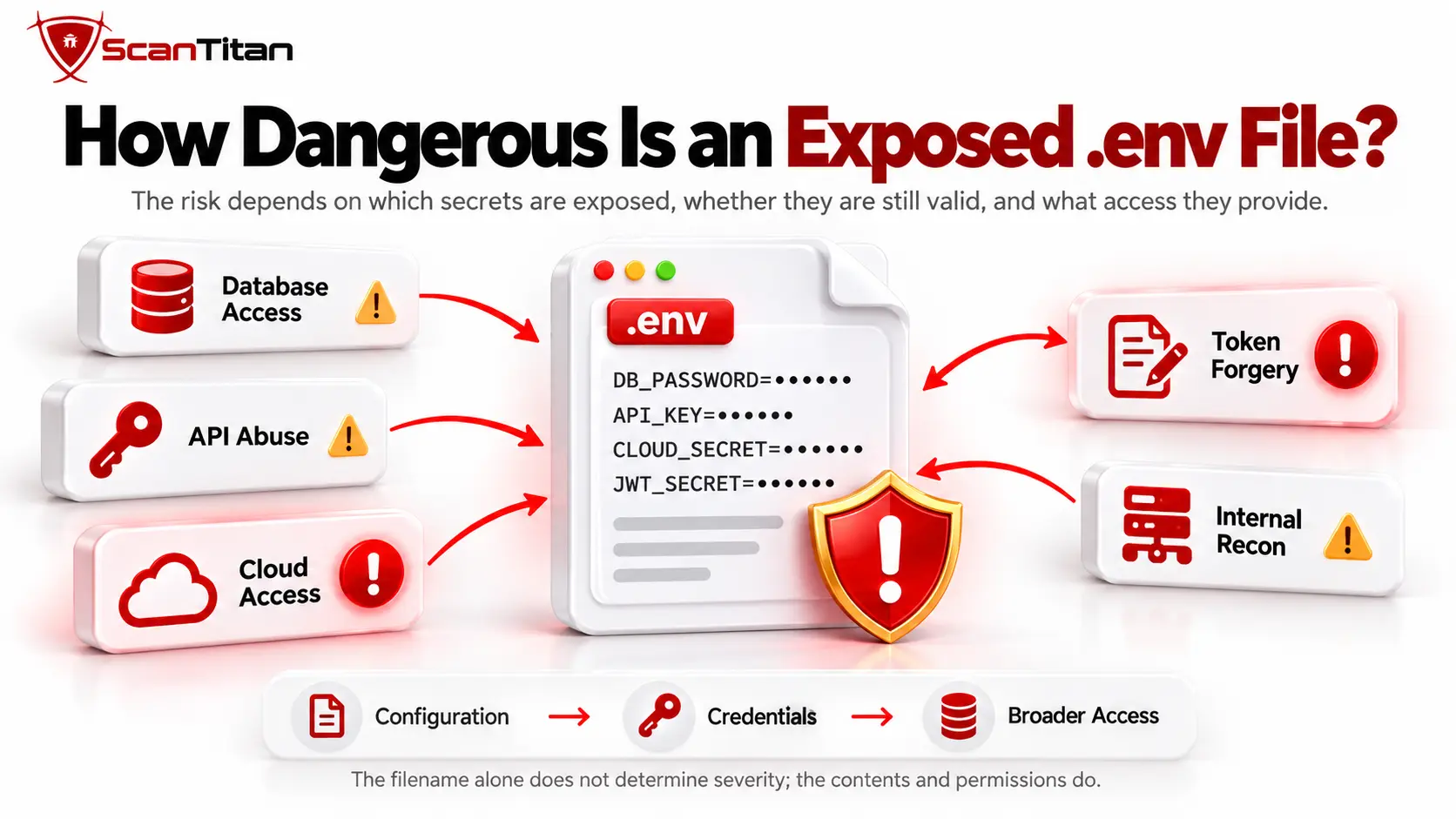
An exposed .env file can range from low-impact configuration disclosure to a serious credential compromise depending on the values inside it. The presence of the filename alone should not determine severity.
| Exposed Contents | Likely Security Impact |
|---|---|
| Empty or test configuration | Low practical impact |
| Environment names and non-sensitive settings | Information disclosure and reconnaissance |
| Internal hosts or service names | Infrastructure information disclosure |
| Valid database credentials | Potential unauthorized database access |
| Live API or payment credentials | Potential third-party service abuse |
| Cloud credentials | Potential cloud-resource compromise depending on permissions |
| Signing, encryption, or authentication secrets | Potentially severe application-specific compromise |
Real-World Example: Exposed .env Files Used for Cloud Access
Exposed .env files have been used as an initial-access path in real cloud compromises. Unit 42 documented a large-scale cloud extortion campaign in which attackers searched for exposed environment files containing credentials and other sensitive variables.
The attack infrastructure scanned more than 230 million unique targets and targeted approximately 110,000 domains, resulting in more than 90,000 unique environment variables being collected. Unit 42 also identified thousands of variables associated with cloud services.
The campaign illustrates why an exposed .env file should not receive a severity rating based only on its filename. Long-lived credentials and excessive permissions helped turn some leaked values into paths for broader cloud access, data theft, and extortion.
A useful severity assessment therefore asks three questions: Is the value actually sensitive? Is it still valid? What access does it provide? Those answers matter more than whether the file is simply named .env.
.env vs .env.example: What Is the Difference?
A .env file normally contains environment-specific values, while .env.example should contain variable names and safe placeholders rather than real production secrets.
For example:
# .env.example
DB_HOST=
DB_USERNAME=
DB_PASSWORD=
API_KEY=
This template helps developers understand which configuration values the application requires without distributing the real production credentials.
An exposed .env.example is therefore not automatically equivalent to an exposed production .env. It can still reveal useful information such as service names, integration types, framework conventions, or expected configuration variables, but the impact is usually much lower if all values are safe placeholders.
A .env.example file should never contain real credentials.If production secrets have been copied into the example file, assess those values as exposed secrets regardless of the filename.
Direct .env Exposure vs Debug Environment Leakage
Direct .env exposure returns the environment file itself, while debug leakage reveals environment values through another application response. They can expose similar information but have different root causes.
| Issue | Example | Root Cause |
|---|---|---|
Direct .env exposure |
GET /.env returns configuration |
Public file placement or web-server access configuration |
| Debug environment leakage | An error page displays environment values | Unsafe debug or error handling |
Fixing one does not automatically fix the other. Blocking requests to /.env will not prevent an application from printing environment values in a debug response, and disabling debug output does not protect a directly downloadable file.
How Do You Detect an Exposed .env File?
Detect an exposed .env file by checking whether environment-file paths return genuine configuration content without authorization. Testing should be performed only on systems you own or are explicitly authorized to assess.
Manual .env File Check
Manually check for .env exposure by requesting the expected environment-file path and verifying the returned content.
- Request the expected path: check the relevant
/.envlocation on the authorized application. - Inspect the HTTP response: record the status code, content type, response body, and redirects.
- Confirm the content: determine whether the response actually resembles environment configuration such as meaningful
KEY=VALUEpairs. - Compare normal error behavior: ensure the response is not a custom 404 or application fallback page.
- Assess sensitive variables: identify whether the file contains credentials or secrets without unnecessarily reproducing their complete values.
Automated Vulnerability Scanning
Automated scanners detect exposed .env files by requesting relevant environment-file paths and validating whether the responses contain genuine configuration data.
- Identify candidate paths: check relevant files such as
/.envand environment-specific or stale variants where appropriate. - Request each candidate: collect HTTP status, headers, response size, content type, and body characteristics.
- Compare error responses: distinguish actual files from soft-404 pages that return
200 OK. - Validate structure: look for convincing environment-file patterns rather than treating any response containing an equals sign as a finding.
- Report safely: identify the affected variables while avoiding unnecessary storage or display of full secret values.
Because /.env is a predictable path, exposure can also be discovered at large scale. Unit 42 observed automated infrastructure scanning hundreds of millions of targets for sensitive environment information, demonstrating why externally verifying that environment files are not reachable is important.
A 200 OK response does not prove that a .env file is exposed.Applications can return generic pages or soft-404 responses with a successful HTTP status. Reliable detection should confirm that the response actually contains environment configuration.
How Is .env File Exposure Classified?
Direct public exposure of a sensitive .env file is appropriately represented by CWE-538 because sensitive information has been placed in an externally accessible file or directory.
MITRE CWE-538 describes cases where sensitive information is placed in files or directories accessible to actors who should not have access to that information.
CWE-526: Cleartext Storage of Sensitive Information in an Environment Variable is related but describes a different weakness: sensitive information being stored in environment variables where other processes or contexts may expose it. It is not the same root cause as an HTTP request directly retrieving a .env file.
From an attacker-behavior perspective, credentials recovered from environment files are also relevant to MITRE ATT&CK T1552.001: Credentials In Files. ATT&CK describes adversaries searching files such as configuration files for reusable credentials, and its current detection guidance specifically includes .env files as an example of credential-bearing files.
CWE and MITRE ATT&CK describe different things.CWE-538 describes the software weakness that exposes sensitive information, while ATT&CK T1552.001 describes credential-access behavior that may occur when attackers search files for credentials.
How to Fix an Exposed .env File Vulnerability
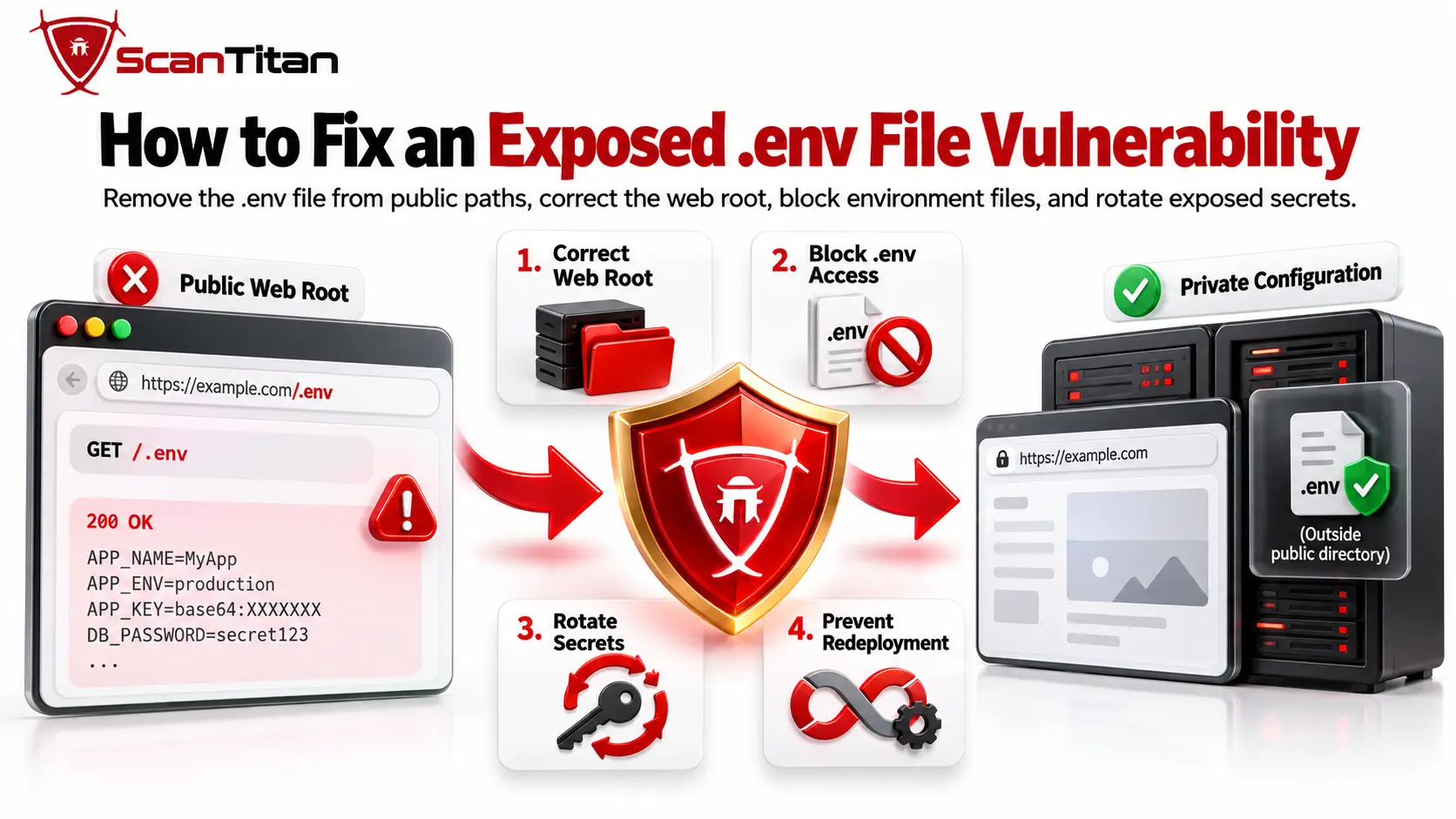
Fix an exposed .env file by removing it from publicly served paths, correcting the web root, blocking environment files at the server layer, and rotating any secrets that may already have been exposed.
1. Correct the Web Server Document Root
Configure the document root so the server exposes only files intended to be public. Framework applications should normally publish a dedicated public directory rather than the entire project tree.
This architectural control is stronger than trying to maintain a growing blacklist of sensitive filenames.
2. Keep .env Outside Publicly Served Directories
Store the .env file outside directories that the web server can serve directly whenever the application architecture allows it. The runtime can still read configuration without making the file downloadable over HTTP.
3. Block .env Files at the Web Server
Use web-server access rules as defense in depth so accidental deployment does not automatically make environment files downloadable.
For Apache, an appropriate rule can deny .env and related environment-file variants. See the Apache file-matching documentation:
<FilesMatch "^\.env(?:\..*)?$">
    Require all denied
</FilesMatch>
For Nginx, an appropriate location rule can prevent environment files from being served:
location ~ /\.env {
    deny all;
}
Server rules are a secondary control, not a substitute for correct file placement.The safer design is to avoid placing sensitive configuration inside the public document root at all.
4. Prevent .env Files From Reaching Public Deployment Artifacts
Update the deployment process so environment files, backup variants, and committed secrets cannot be copied into publicly served build artifacts.
- exclude
.envfiles from public build output; - exclude
.env.bak,.env.old,.env.backup, and similar copies; - keep real .env files out of source control: use repository ignore rules for local environment files, and remember that adding a file to
.gitignoredoes not remove a secret that was already committed; previously committed secrets should be treated as exposed and rotated where necessary; - keep real production secrets out of
.env.exampleand other configuration templates; - validate container, CI/CD, and static-file copy rules before deployment;
- scan externally after deployments or configuration changes.
For ongoing verification, see how to set up continuous vulnerability scanning.
5. Use Appropriate Secrets Management for Production
Use a dedicated secrets-management approach when production scale or risk makes static configuration files difficult to control safely. Centralized secret stores can improve access control, auditing, rotation, revocation, and credential lifecycle management.
The OWASP Secrets Management Cheat Sheet recommends controls such as secret rotation, revocation, expiration, auditing, and least-privilege access.
Where the platform supports them, short-lived or dynamically generated credentials can further reduce the period in which a stolen secret remains useful.
What Should You Do If Your .env File Was Already Exposed?
If a .env file was already public, remove access immediately and treat sensitive values inside it as potentially compromised until you have assessed them.
- Remove public access:
Correct the file location or server configuration so the environment file can no longer be downloaded. - Inventory exposed values:
Identify database passwords, API keys, tokens, cloud credentials, signing secrets, mail credentials, certificates, and other sensitive configuration. - Review web and downstream service logs:
Check whether the exposed.envpath was requested, then review relevant database, cloud, API, email, and identity-provider audit logs for suspicious use of credentials contained in the file. - Rotate or revoke reusable secrets:
Replace sensitive values that may have been copied, prioritizing credentials with broad permissions, long lifetimes, or access to high-value systems. - Update dependent systems:
Ensure applications and integrations use the replacement credentials and confirm that the previous values no longer authenticate successfully. - Reduce the blast radius of replacement credentials:
Where supported, use least-privilege permissions and short-lived credentials so a future credential exposure provides less access and remains usable for less time. - Check related files:
Verify that.env.bak,.env.old, environment-specific copies, deployment archives, repository artifacts, and other duplicates are not exposed. - Re-scan externally:
Confirm that the original file and relevant variants can no longer be retrieved from the public application.
Deleting the .env file does not invalidate a stolen credential.Secrets that may have been exposed should be rotated or revoked according to their function, permissions, lifetime, and potential impact.
Check .env File Exposure With ScanTitan
ScanTitan can be used as part of an external assessment to identify publicly reachable web vulnerabilities and security misconfigurations. External scanning helps test the application from the perspective of an unauthenticated visitor instead of relying only on local server configuration.
Check your public attack surfaceUse the ScanTitan Website Vulnerability Scanner to check your website for exposed resources, web vulnerabilities, and security misconfigurations.
Exposed .env File Vulnerability FAQ
These answers cover the most common questions about identifying, assessing, and fixing publicly accessible .env files.
What is an exposed .env file vulnerability?
An exposed .env file vulnerability occurs when unauthorized users can retrieve an application’s environment configuration file. The file may disclose database credentials, API keys, application secrets, cloud credentials, or other server-side configuration.
What information can an exposed .env file reveal?
An exposed .env file can reveal any configuration values stored inside it. Common examples include database passwords, API credentials, mail credentials, cloud keys, internal service addresses, OAuth secrets, and application signing keys.
Is .env.example dangerous to expose?
A properly maintained .env.example is usually much less sensitive because it should contain placeholders rather than real credentials. It can still reveal configuration structure and service names, and it becomes sensitive if real production values were mistakenly added.
Can a vulnerability scanner detect an exposed .env file?
Yes, a web vulnerability scanner can detect many exposed .env files by requesting relevant paths and validating the returned content. Reliable scanning should distinguish genuine environment configuration from custom error pages and soft-404 responses.
Is a 200 OK response enough to confirm .env exposure?
No, a 200 OK response alone does not confirm that a .env file is exposed. Websites may return successful status codes for fallback pages or custom errors, so the response should be validated to confirm that it contains genuine environment configuration.
How do I fix an exposed .env file?
Remove the file from publicly served directories, correct the document root, block environment files at the web-server layer, and prevent them from entering public deployment artifacts. If secrets were exposed, rotate or revoke them as necessary.
What should I do if my .env file contained passwords or API keys?
Assume sensitive values may have been copied and assess them for rotation or revocation. Remove public access, review web and downstream service logs, replace affected credentials, update dependent services, and verify that no backup or environment-file variants remain exposed.