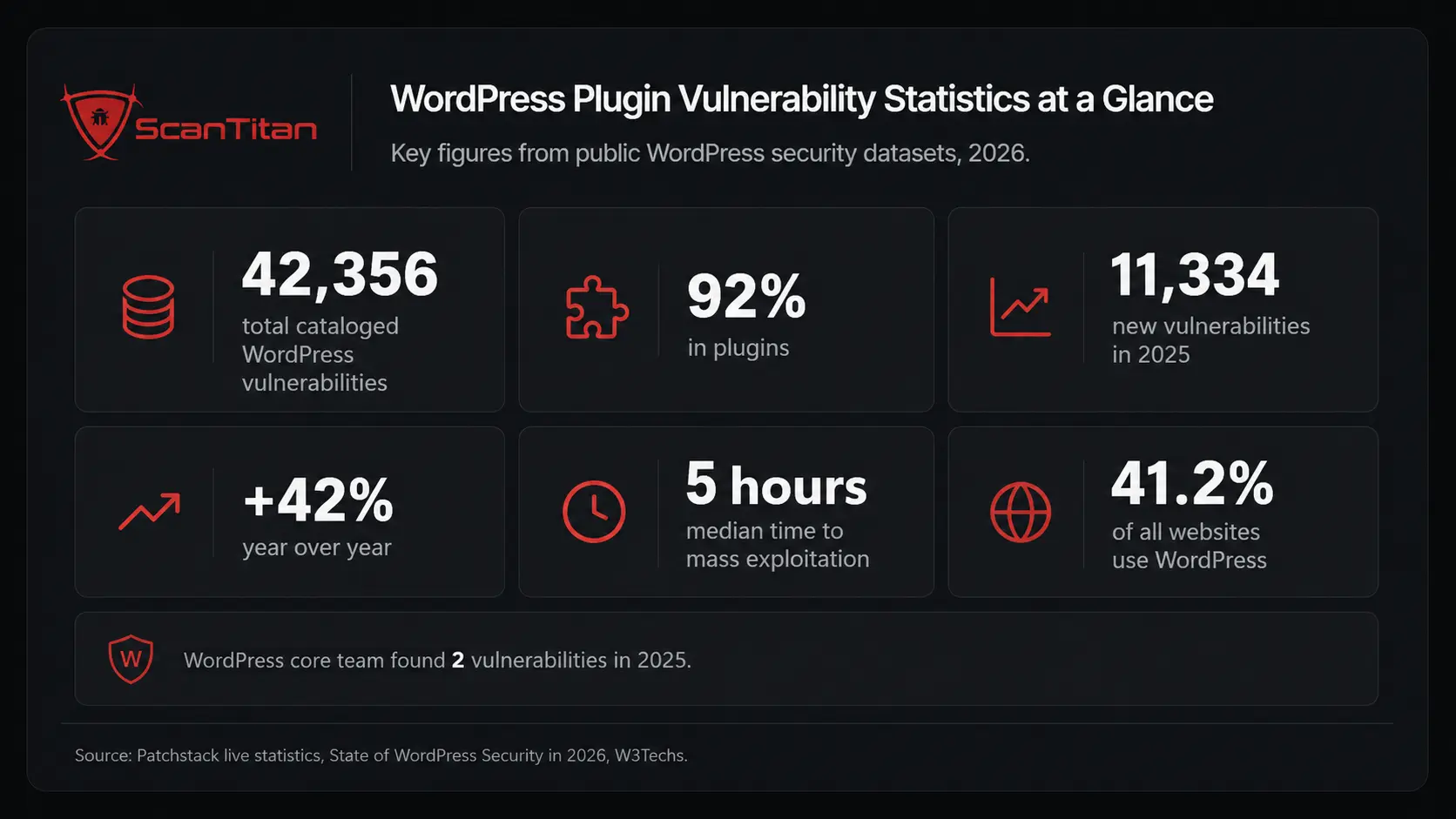
WordPress plugin vulnerability statistics tell a blunt story: plugins, not the WordPress core, are where almost every security flaw lives. Across more than 42,000 disclosures cataloged by Patchstack, 92% trace back to plugins, and in 2025 alone researchers recorded 11,334 new WordPress vulnerabilities, a 42% jump in a single year. This report reconciles the public data from Patchstack, WPScan, and Wordfence into one picture, explains what each number means for a lean security team, and shows exactly where your real exposure sits.
WordPress plugin vulnerability statistics at a glance
Here are the headline figures every WordPress site owner should know, drawn from the public vulnerability databases and reconciled for this report. A plugin vulnerability is a security flaw in a third-party plugin’s code that lets an attacker do something the plugin never intended: inject a script, read the database, bypass a login, or run code on the server. Because the average WordPress install runs 20 to 30 plugins, each one widens the attack surface. The numbers below explain why plugins dominate every WordPress breach conversation in 2026.
| Metric | Figure | Source |
|---|---|---|
| Total cataloged WordPress vulnerabilities (all time) | 42,356 | Patchstack live statistics |
| Share sitting in plugins | 92% | Patchstack live statistics |
| New WordPress vulnerabilities in 2025 | 11,334 (up 42% YoY) | Patchstack, State of WordPress Security in 2026 |
| Median time from disclosure to mass exploitation | 5 hours | Patchstack, State of WordPress Security in 2026 |
| Vulnerabilities with no patch at disclosure | Nearly half | Patchstack, State of WordPress Security in 2026 |
| Core vulnerabilities found by the WordPress team in 2025 | 2 | Patchstack, State of WordPress Security in 2026 |
| WordPress share of all websites | 41.2% | W3Techs, August 2026 |
Plugins versus themes versus core: where the risk actually concentrates
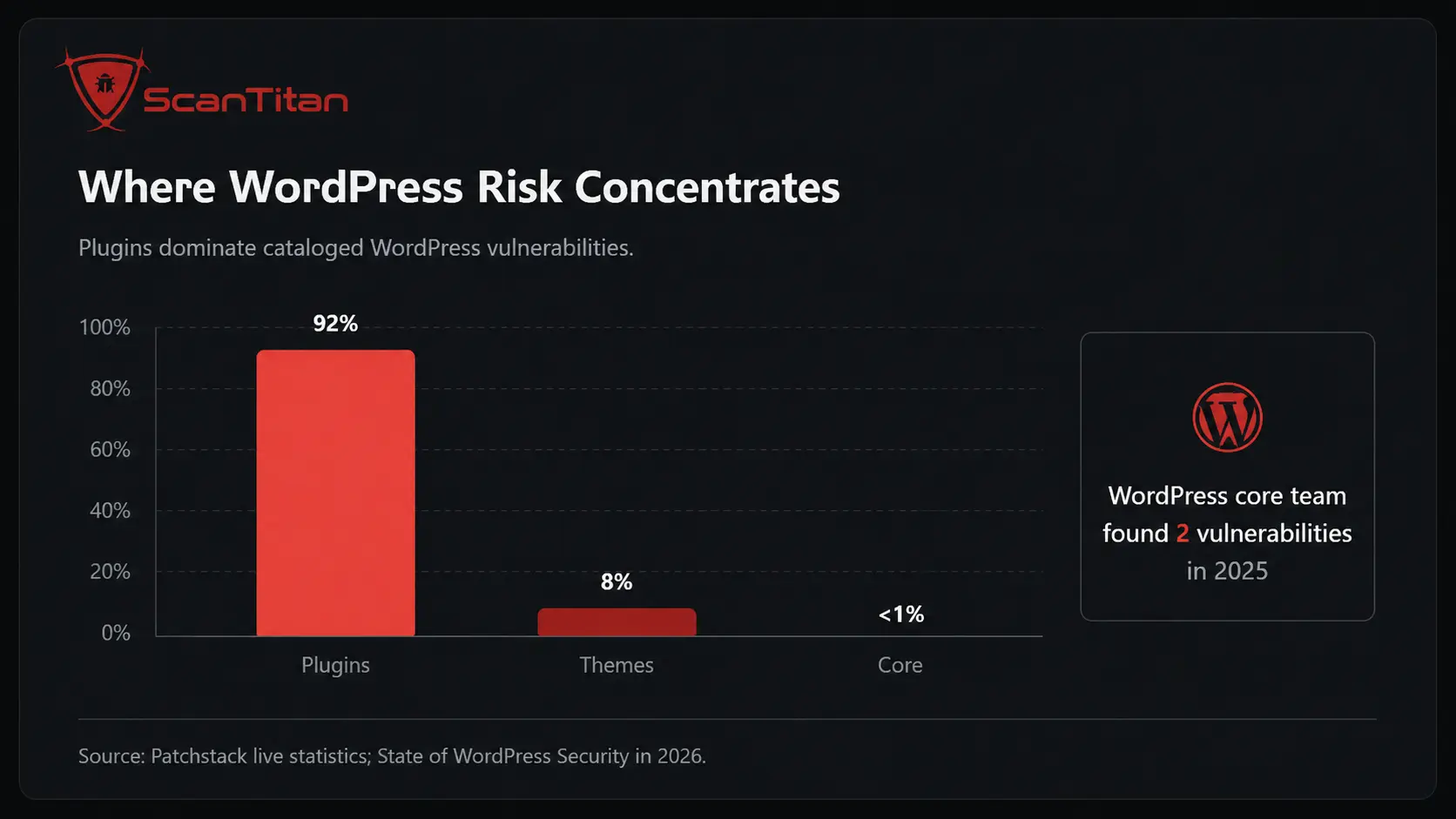
The single most important statistic in this entire report is the split by software type. Patchstack’s cataloged data attributes 92% of all WordPress vulnerabilities to plugins, 8% to themes, and roughly 1% to WordPress core. The WordPress core team found exactly two vulnerabilities in the entire codebase across all of 2025. That gap reframes the whole security conversation: WordPress core is not your problem. Your plugins are. A default WordPress install is comparatively hardened, but every plugin you add is third-party code running with wide privileges inside your site, and most site owners install dozens without reviewing a single line.
Why plugins carry almost all the risk
Plugins concentrate risk because they combine three dangerous properties at once. First, they run with high privilege inside WordPress, so a flaw in a booking or forms plugin can reach the database or the admin account directly. Second, they are written by thousands of independent developers with wildly different security maturity, from full-time vendors to hobbyists who shipped once and moved on. Third, they accept untrusted input constantly: forms, uploads, REST API calls, and query parameters. When a developer skips input validation on a REST endpoint, an attacker turns that endpoint into a privilege escalation. The result is that plugins, not core, drive nearly every WordPress compromise.
The 69,000-plugin problem
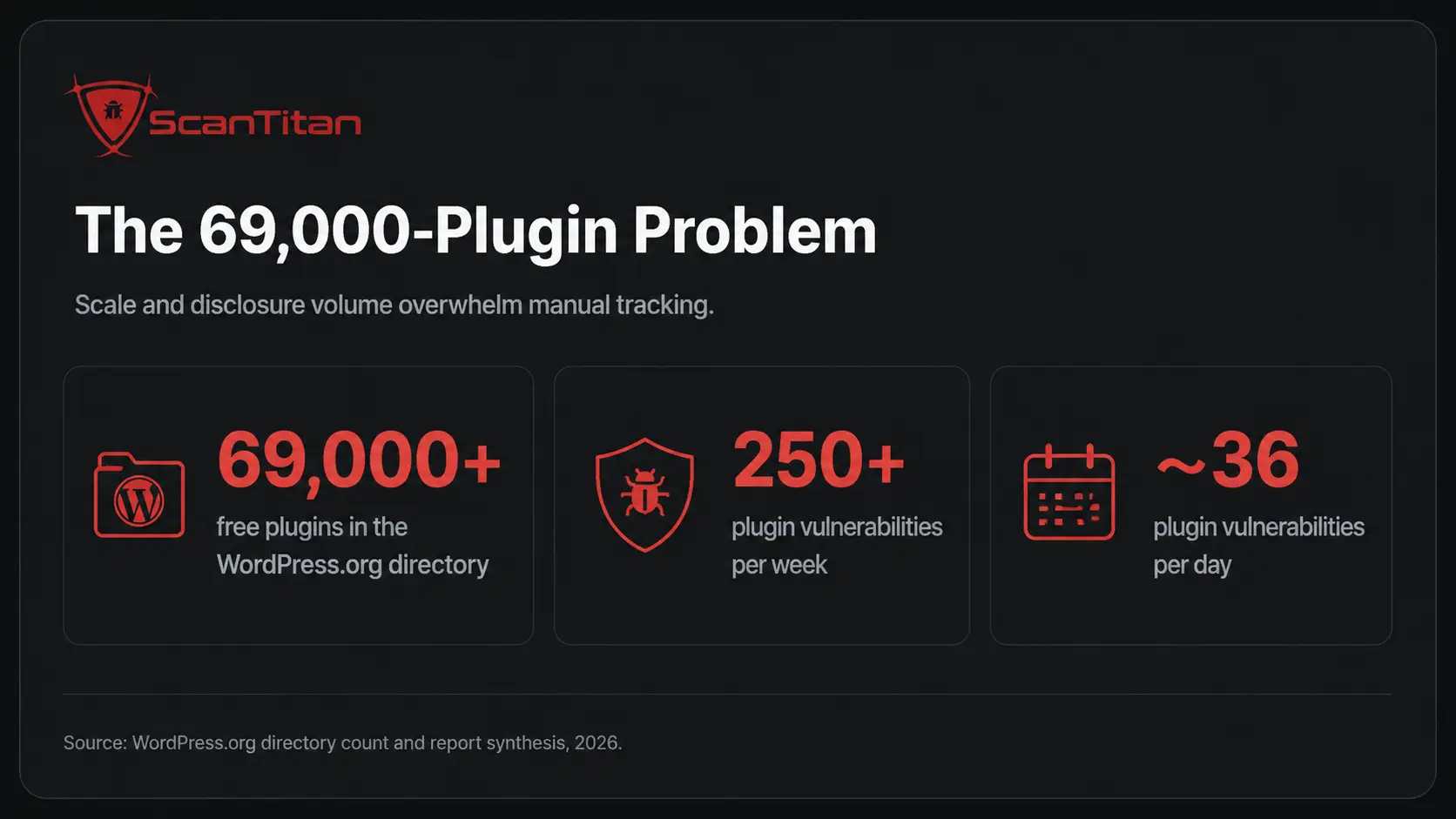
Scale amplifies the risk. The WordPress.org directory alone lists more than 69,000 free plugins, and that count excludes the vast commercial and premium market sold through third-party marketplaces. Every one of those plugins is a candidate for a future CVE, and the weekly disclosure rate heading into 2026 sits above 250 plugin vulnerabilities per week, roughly 36 every day. For a lean team managing several client sites, that volume is impossible to track manually. You cannot read 36 advisories a day, cross-reference them against your installed plugins, and patch before an attacker moves. That mismatch between disclosure volume and human capacity is the core operational problem this data exposes.
The vulnerability types that dominate WordPress plugins
WordPress plugin flaws cluster into a predictable handful of vulnerability classes, and knowing the distribution tells you what to test for first. Cross-Site Scripting (XSS) leads by a wide margin, followed by broken access control, Cross-Site Request Forgery (CSRF), and SQL injection (SQLi). These map almost directly onto the OWASP Top 10, which means a scanner tuned for OWASP categories catches the majority of what actually gets disclosed. The table below shows the reconciled distribution from Patchstack’s cataloged data.
| Vulnerability type | Share of disclosures | What an attacker gains |
|---|---|---|
| Cross-Site Scripting (XSS) | 40.6% | Injects scripts that hijack sessions or admin actions |
| Broken Access Control | 13.2% | Reaches functions or data without permission |
| Cross-Site Request Forgery (CSRF) | 12.9% | Tricks a logged-in admin into an unwanted action |
| SQL Injection (SQLi) | 6.6% | Reads or alters the site database directly |
| Sensitive Data Exposure | 5.3% | Leaks credentials, keys, or personal data |
| Arbitrary File Upload | 2.7% | Plants a webshell and executes server code |
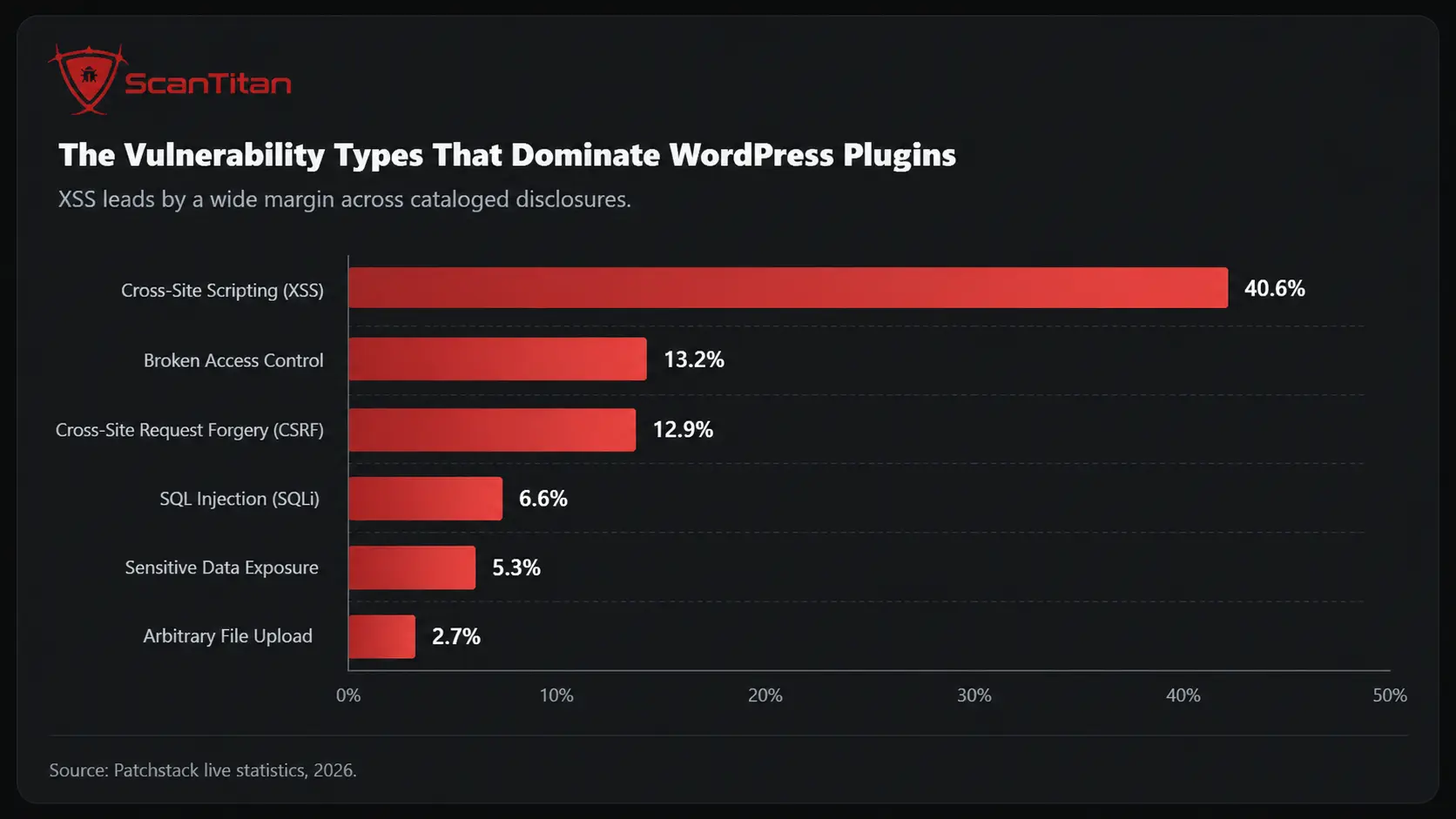
Cross-Site Scripting still leads every category
Cross-Site Scripting accounts for roughly 40% of all disclosed WordPress plugin vulnerabilities, which makes it the single most common flaw class by a large margin. XSS lets an attacker inject malicious JavaScript that runs in another user’s browser, and in a WordPress context that usually means stealing an administrator’s session or forcing a privileged action. Many plugins introduce XSS through form fields, shortcodes, or widget settings that render user input without sanitizing it. Detectify and PortSwigger both rank XSS among the most consistently exploited web flaws, and WordPress plugin data confirms the pattern. If you test one thing on a plugin, test how it handles untrusted output.
Broken access control and CSRF punch above their weight
Broken access control and CSRF together make up more than a quarter of disclosures, and they are dangerous out of proportion to their frequency. Broken access control means a plugin fails to check whether the current user is allowed to perform an action, so an unauthenticated visitor reaches functions reserved for administrators. A recent example is the Amelia booking plugin (versions 8.0 to 9.6.2), which carried an unauthenticated privilege escalation to administrator via an externalId parameter, rated CVSS 9.8. CSRF, by contrast, tricks a logged-in administrator into submitting a forged request. Attackers chain CSRF with a batch API endpoint to create rogue admin accounts, which is exactly how several 2026 WooCommerce disclosures worked in practice.
Read More: WooCommerce Vulnerability Statistics 2026: The Latest Security Data
The patch gap: why so many plugin flaws ship with no fix
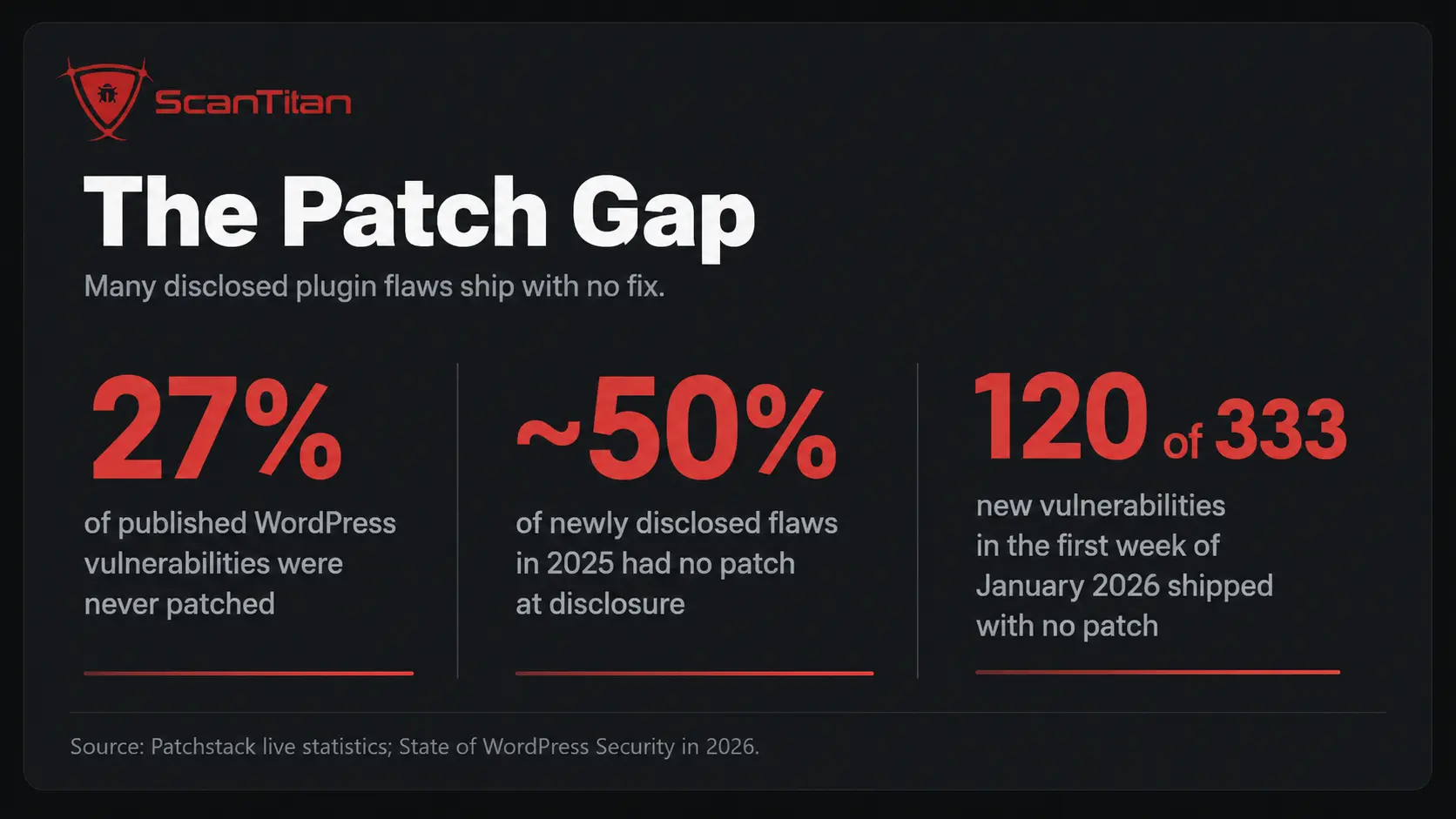
The most alarming statistic for defenders is not how many vulnerabilities exist, but how many arrive with no fix attached. Across Patchstack’s cataloged data, 27% of published WordPress vulnerabilities were never patched, and in the 2025 annual data, nearly half of newly disclosed flaws had no patch available at the moment they went public. That means the standard advice to simply keep plugins updated fails at the exact moment you need it, because there is nothing to update to. In the first week of January 2026 alone, researchers disclosed 333 new vulnerabilities, and 120 of them shipped with no patch.
What the patch gap means when a disclosure drops
When a plugin vulnerability goes public without a patch, your update button is useless and your only options are mitigation or removal. This is where a virtual patch matters. A Web Application Firewall (WAF) can block the specific request pattern that exploits a flaw before the vendor ships code, which buys you time. Patchstack’s own data shows that only 26% of vulnerability attacks were blocked at the hosting layer in a large-scale pentest of popular hosts, so you cannot assume your host has you covered. For a lean team, the practical response is to identify whether the vulnerable plugin is even active, and if a fix does not exist, deactivate it rather than wait.
How fast attackers exploit a disclosed plugin vulnerability
Speed is the statistic that should change how you operate. According to Patchstack’s 2026 research, the weighted median time from public disclosure to mass exploitation is five hours. Attackers run automated scanners that identify newly disclosed CVEs and hit every exposed site running the affected plugin, often before the vendor has finished writing the patch notes. Relying on plugin updates as your primary defense is no longer viable when the window between disclosure and attack is measured in hours. The timing breakdown below shows how compressed that window has become.
| Time after disclosure | Share of heavily exploited flaws already under attack |
|---|---|
| Within 6 hours | 20% |
| Within 24 hours | 45% |
| Within 7 days | 70% |
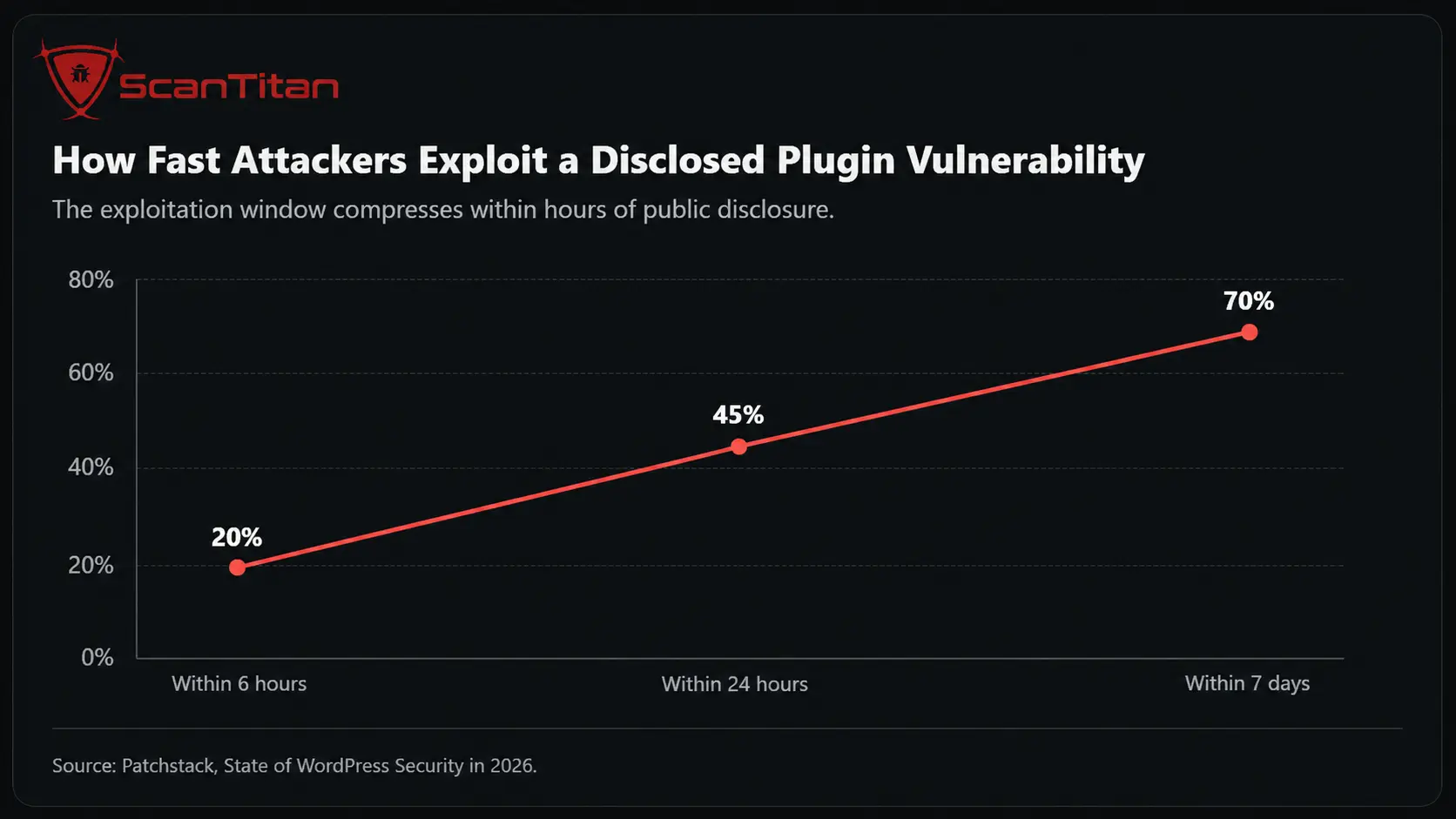
The real-world exploitation timeline
The abstract numbers become concrete when you watch a single disclosure play out. In July 2026, a WordPress plugin flaw tracked publicly as a critical remote code execution chain was reportedly exploited within roughly ninety minutes of going public, far faster than the five-hour median. Highly exploitable vulnerabilities, the ones attackers can weaponize easily for serious impact, rose 113% year on year in 2025, and more high-severity flaws surfaced that year than in the previous two years combined. For an SMB with no dedicated security team, that pace is brutal. You cannot manually triage a disclosure, confirm your exposure, and patch inside a five-hour window while also running the rest of the business.
The 2025 surge in context
WordPress plugin vulnerability statistics did not just tick up in 2025, they broke records. Patchstack recorded 11,334 new vulnerabilities across the WordPress ecosystem, a 42% increase over 2024’s 7,966. Of those, 1,966 (about 17%) were rated high severity, meaning attackers were likely to target them in mass automated campaigns. This was not a blip. The trend line has climbed every year, driven by a growing plugin ecosystem and by researchers, both ethical and hostile, getting faster at finding flaws. The following breakdown by CVSS severity shows how the cataloged data distributes across risk levels.
| CVSS severity band | Share of cataloged vulnerabilities |
|---|---|
| Critical (9.0 to 10.0) | 8% |
| High (7.0 to 8.9) | 32% |
| Medium (4.0 to 6.9) | 60% |
| Low (0.1 to 3.9) | 1% |
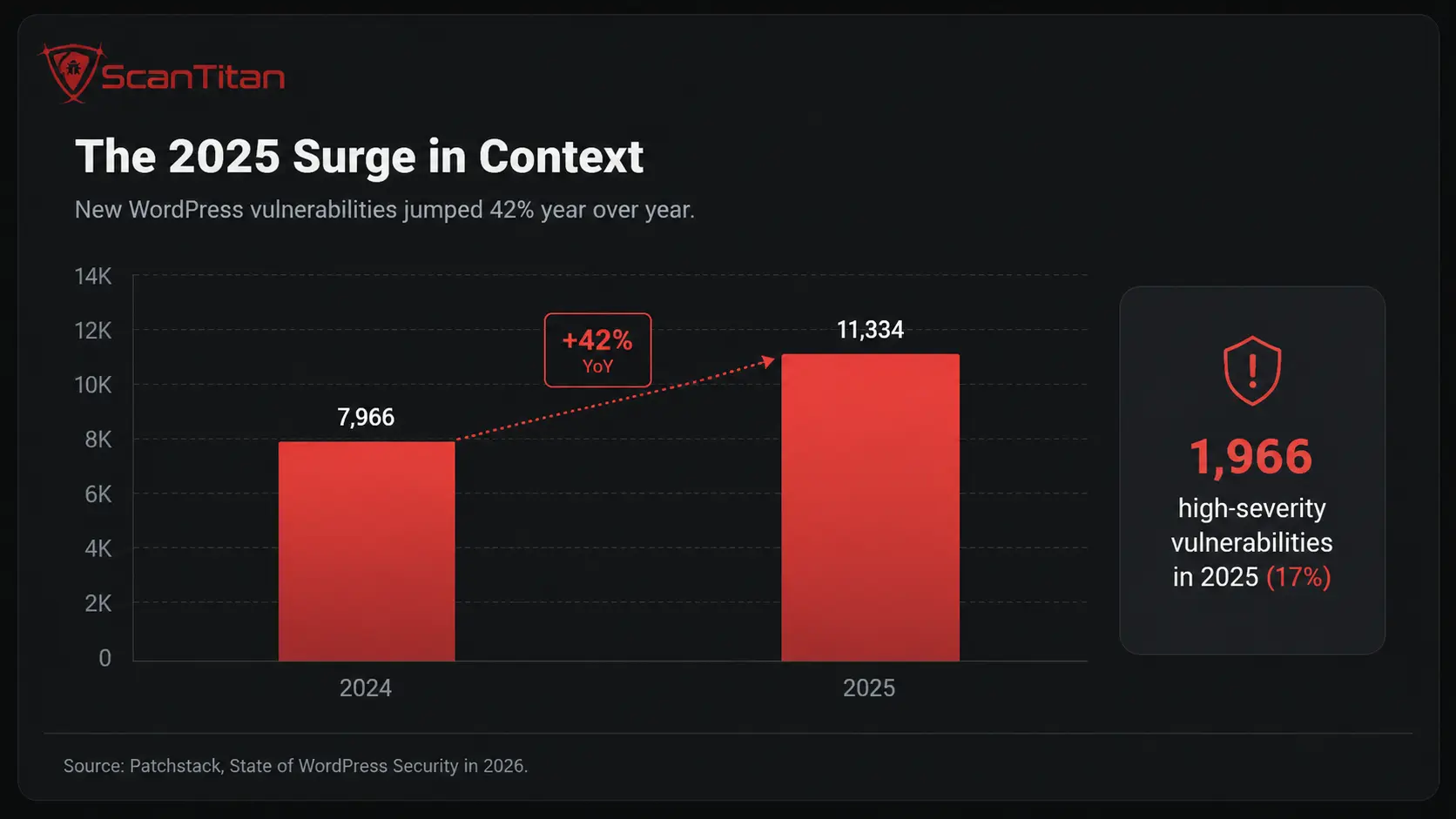
Why the numbers keep climbing
Three forces push the count higher every year. First, the ecosystem keeps growing, so there is simply more third-party code to break. Second, vulnerability research has professionalized: programs run by Patchstack and Wordfence pay bounties, which draws thousands of researchers who file disclosures at scale. Patchstack’s own leaderboard shows individual researchers filing thousands of reports each. Third, attackers now use AI tooling that can autonomously probe plugins for flaws, which compresses the discovery cycle further. None of this means WordPress is uniquely insecure. It means the platform’s dominance, powering 41.2% of all websites per W3Techs, makes it the largest possible target, and the data reflects that scale.
What these numbers mean for a lean WordPress team
Statistics are only useful if they change what you do on Monday morning. If you run a handful of WordPress sites with a small team, the data above points to a clear, prioritized playbook rather than a vague call to be careful. The goal is to close the gap between the five-hour exploitation window and your real capacity to respond. Focus on these actions in order.
- Inventory every plugin across every site you manage, including version numbers, because you cannot defend what you have not counted. An accurate plugin inventory is the precondition for everything else.
- Prioritize by exposure and CVSS together, not CVSS alone. A CVSS 7.0 flaw on an internet-facing checkout plugin outranks a CVSS 9.0 flaw in an admin-only tool that attackers cannot reach without a login.
- Remove abandoned and unused plugins on sight. A plugin that has shown no update in a year while its category peers ship regularly is either abandoned or a liability, and every dormant plugin is still executable attack surface.
- Deploy a WAF or virtual patching layer so you have a defense during the window when a flaw is public but unpatched. This directly addresses the near-half of disclosures that arrive with no fix.
- Monitor the disclosure feeds from Patchstack, Wordfence, and WPScan, or use a scanner that watches them for you and matches new CVEs against your installed plugins automatically.
- Scan continuously rather than quarterly, because a quarterly cadence guarantees you learn about a five-hour-exploitation flaw months after attackers did.
With no dedicated security staff, an automated website scanner on a weekly schedule replaces the manual advisory review this data shows most teams never complete.
The honest limit of “just update your plugins”
The most common security advice for WordPress, keep everything updated, is necessary but no longer sufficient, and the data proves it. Updates fail as a primary defense in two documented ways. When nearly half of disclosures ship with no patch, there is nothing to update to for hours or days. And when the median exploitation time is five hours, even a same-day patch can land after an automated campaign has already reached your site. Updating remains your baseline hygiene, and you should absolutely automate minor updates. But treat it as the floor, not the ceiling. Pair it with continuous monitoring, virtual patching, and fast malware detection so a missed window does not become a breach.
How we compiled and verified these WordPress plugin vulnerability statistics
Every figure in this report traces to a named primary source with a publication year and a live URL, and we reconciled overlapping numbers across databases rather than repeating a single vendor’s press figure. This section documents the method so you can audit any claim yourself.
Primary sources used
We drew on four public datasets, each maintained by an organization that curates WordPress vulnerability data directly. Patchstack’s live statistics dashboard supplied the all-time distribution by software type, vulnerability class, patch status, and CVSS band. Patchstack’s annual whitepaper, State of WordPress Security in 2026, published on 25 February 2026 in partnership with Monarx, supplied the yearly totals, the exploitation-speed timing, and the severity trend. WPScan, maintained by Automattic, and Wordfence Intelligence, which offers a free vulnerability database and API, served as corroborating sources for the plugin-versus-theme distribution. Market-share context came from W3Techs. Where a figure appeared in only one database, we labeled it as that vendor’s telemetry rather than presenting it as an ecosystem-wide fact.
How to read vendor telemetry honestly
Vulnerability databases count what they catalog, and their totals differ because their scope and methodology differ, so a responsible reading treats each number as a measurement, not an absolute truth. Patchstack’s cumulative count reflects its own database plus contributions from its researcher alliance and other sources. Wordfence curates a separate database with its own inclusion criteria. Neither figure is wrong, but they are not interchangeable, and stacking them would double-count. We therefore anchored structural percentages, like the 92% plugin share, to a single consistent source and used the others to confirm the direction rather than to inflate the totals. When you cite these statistics elsewhere, name the specific database and the date you pulled the number.
Frequently asked questions
What percentage of WordPress vulnerabilities are in plugins?
Roughly 92% of cataloged WordPress vulnerabilities sit in plugins, according to Patchstack’s live statistics. Themes account for about 8%, and WordPress core for roughly 1%. The WordPress core team found only two vulnerabilities in core across all of 2025, which confirms that third-party plugins, not core, drive nearly every WordPress compromise.
How many WordPress vulnerabilities were found in 2025?
Researchers recorded 11,334 new WordPress vulnerabilities in 2025, a 42% increase over the 7,966 found in 2024, according to Patchstack’s State of WordPress Security in 2026. Of those, about 1,966, or 17%, were rated high severity, meaning attackers were likely to target them in mass automated campaigns.
How fast do attackers exploit a WordPress plugin vulnerability?
The weighted median time from public disclosure to mass exploitation is five hours, according to Patchstack’s 2026 research. Around 20% of heavily exploited flaws are attacked within six hours, 45% within 24 hours, and 70% within seven days. This is why relying on plugin updates alone is no longer a viable primary defense.
Is WordPress core safe to use?
WordPress core is comparatively hardened. The core team found only two vulnerabilities in core during all of 2025, and core accounts for roughly 1% of cataloged WordPress vulnerabilities. The risk lives almost entirely in third-party plugins and themes, so a default WordPress install is far safer than the same install loaded with unvetted plugins.
Why do so many plugin vulnerabilities have no patch?
Across cataloged data, 27% of published WordPress vulnerabilities were never patched, and in 2025 nearly half of newly disclosed flaws had no fix at the moment of disclosure. When no patch exists, updating cannot help, so defenders need virtual patching through a WAF or must deactivate the affected plugin until a fix ships.
How can I check if my WordPress plugins are vulnerable?
Scan your site with a tool that matches your installed plugins and versions against known CVE data, then prioritize by exposure and CVSS. Continuous scanning beats a quarterly check, because the median exploitation window is five hours. ScanTitan’s WordPress vulnerability scanner checks your plugins against known vulnerabilities and flags what needs action.
Secure your WordPress site before the next disclosure hits
The data is unambiguous: your plugins are the attack surface, the exploitation window is five hours, and nearly half of disclosures arrive with no patch. Manual tracking cannot keep pace with 36 new plugin vulnerabilities a day. ScanTitan’s WordPress vulnerability scanner watches the disclosure feeds for you, matches new CVEs against your installed plugins, and flags exposure with documented evidence and a clear fix. If a site is already compromised, our website malware removal team handles cleanup and blocklist recovery. Start with a scan and close the gap between disclosure and defense.