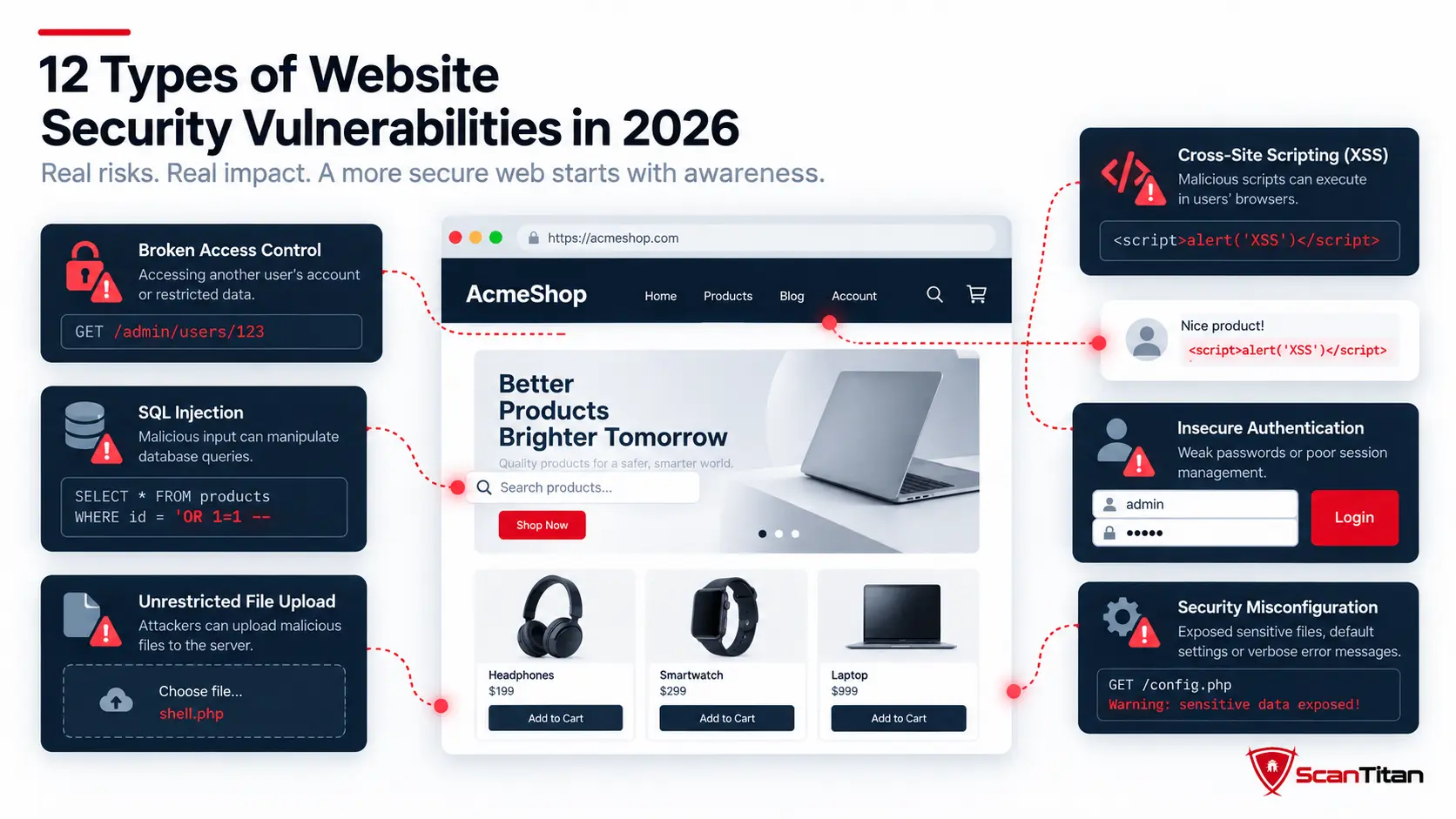
Types of website security vulnerabilities are easier to understand when you separate the broad cybersecurity taxonomy from the weaknesses that actually affect a public web application. That distinction matters in 2026: Verizon reports that vulnerability exploitation caused 31% of breaches in its latest DBIR, making software flaws the leading breach entry point in that dataset. This guide focuses on 12 practical website vulnerability types, then maps them to OWASP Top 10:2025, CWE Top 25:2025, and the controls used to find and fix them.
Quick answerThe main website security vulnerabilities include broken access control, security misconfiguration, software supply-chain failures, cryptographic failures, SQL injection, cross-site scripting, authentication and session failures, CSRF, SSRF, path traversal, dangerous file upload or code execution, and insecure design or business-logic flaws. There is no single universal vulnerability taxonomy, so the same weakness can also be described by its environment, CWE root cause, OWASP category, or a specific CVE.
What Is a Website Security Vulnerability?
A website security vulnerability is a weakness in a website, web application, API, component, or configuration that can be exploited to bypass an intended security control. The weakness may exist in custom code, a CMS or plugin, an authentication flow, a server setting, a dependency, or the way the application handles user input. A vulnerability is not the same thing as an attack: it is the condition that makes an attack possible.
| Term | Meaning | Website example |
|---|---|---|
| Vulnerability | A weakness that can be abused | An endpoint fails to check whether the user owns the requested record |
| Threat | An actor or event capable of causing harm | An attacker probing public account endpoints |
| Exploit | A technique or code path that takes advantage of a weakness | Changing an object ID to read another user’s record |
| Risk | The potential loss created by likelihood and impact | Exposure of customer data from a reachable authorization flaw |
For the broader cybersecurity definition, including network, operating-system, and human vulnerabilities, see ScanTitan’s guide to vulnerabilities in cyber security. This page stays focused on weaknesses that affect websites and web applications.
What Are the Main Types of Security Vulnerabilities?
There is no single official list of four vulnerability types. One common high-level model groups cybersecurity vulnerabilities into network, operating-system or software, application, and human or process vulnerabilities. Other frameworks use different boundaries, so the classification should be treated as a teaching model rather than an industry standard. Website vulnerabilities sit mainly inside the application category, although server, network, cloud, third-party, and human weaknesses can still affect a website’s real security posture.
Why lists differA SQL injection flaw can be described as an application vulnerability, CWE-89, OWASP A05 Injection, and a specific CVE if it appears in a published product. Those labels are not competing answers; they describe the same weakness from different viewpoints.
12 Types of Website Security Vulnerabilities
The twelve categories below are organized for practical website security, not presented as a universal prevalence ranking. Each section explains the weakness, how it appears on a website, its likely impact, its current OWASP Top 10:2025 mapping, relevant CWE identifiers, and the control that normally fixes the root cause.
1. Broken Access Control
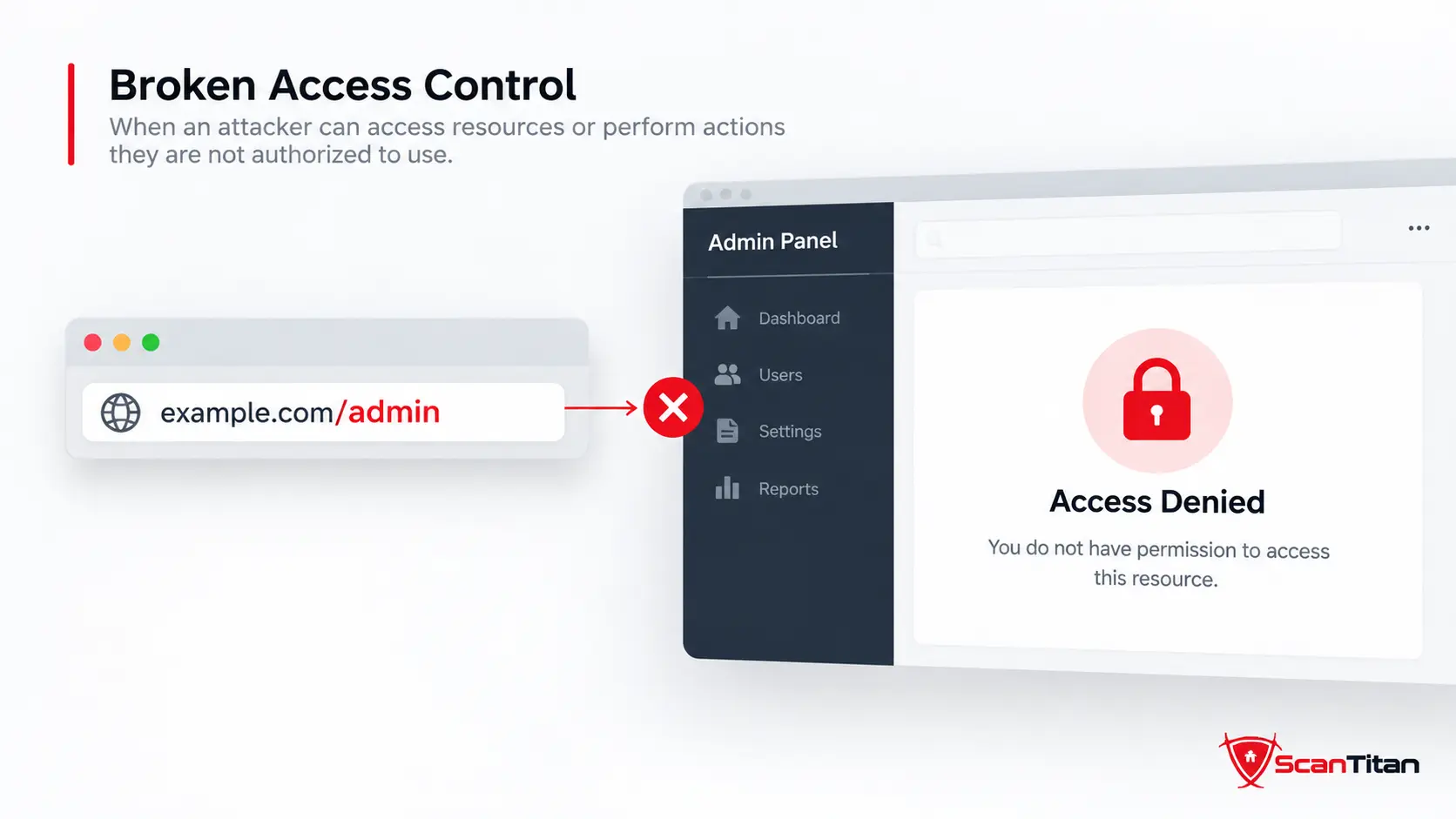
What it is: Broken access control occurs when a website fails to enforce what an authenticated or unauthenticated user is allowed to view or do. Common forms include insecure direct object references, broken object-level authorization, privilege escalation, forced browsing, and missing server-side permission checks. A typical example is an account page that accepts ?invoice=1042 and returns invoice 1043 when the user changes the number, without verifying ownership.
Why it matters: The impact can include unauthorized data disclosure, account takeover, modification of records, or access to administrator functions. OWASP ranks Broken Access Control as A01:2025. Relevant weakness classes include CWE-862 Missing Authorization, which ranks #4 in the 2025 CWE Top 25, and CWE-639 Authorization Bypass Through User-Controlled Key, which ranks #24.
How to fix it: Enforce authorization on the server for every protected object and action, deny access by default, use least privilege, avoid relying on hidden buttons or client-side checks, and test the same endpoint with users at different privilege levels, At the CWE-mapping level, OWASP Top 10:2025 also includes open redirect vulnerabilities (CWE-601) under A01 Broken Access Control. Open redirects differ from authorization bypasses in how they work, but they can become more significant when combined with authentication, OAuth, SSRF, or other security-sensitive workflows.
2. Security Misconfiguration
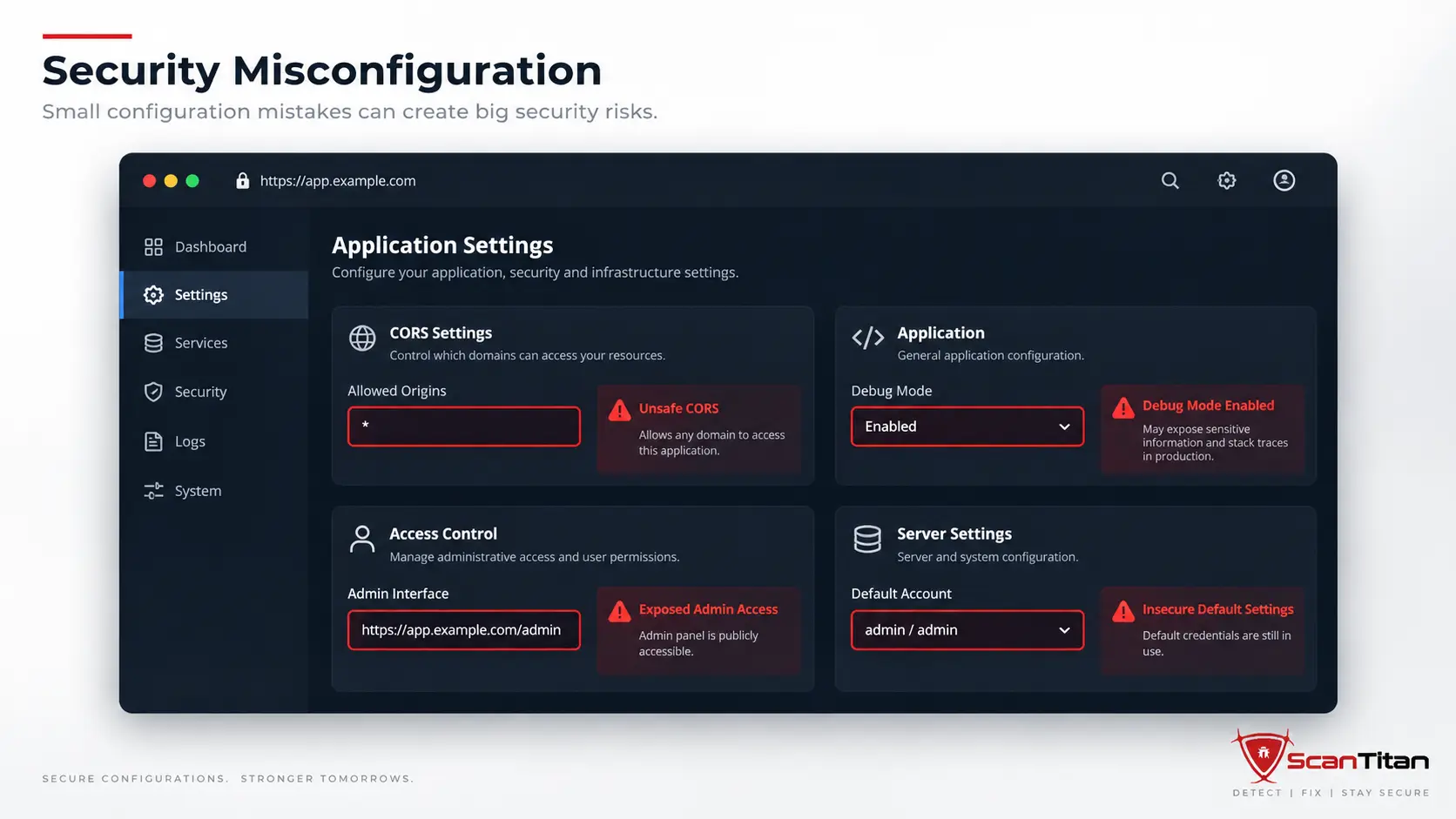
What it is: Security misconfiguration is an unsafe setting rather than a flaw in business logic or memory handling. Examples include public administration panels, default credentials, verbose stack traces, directory listing, permissive CORS rules, exposed backups, unnecessary services, unsafe cloud storage permissions, and production systems running with development settings. These weaknesses often appear because a secure default was never applied or because a once-safe configuration drifted over time.
Why it matters: Misconfiguration can expose data directly or make another vulnerability easier to exploit. OWASP moved Security Misconfiguration to A02:2025, reflecting how much application behavior now depends on configuration. A misconfiguration may have no CVE at all, so software version matching alone cannot find every case.
How to fix it: Use hardened baselines, remove unused services and sample content, disable debug output, restrict CORS and administration paths, protect backups, apply least privilege to cloud and server settings, and continuously review configuration changes rather than treating hardening as a one-time deployment task.
3. Software Supply Chain Failures and Vulnerable Components
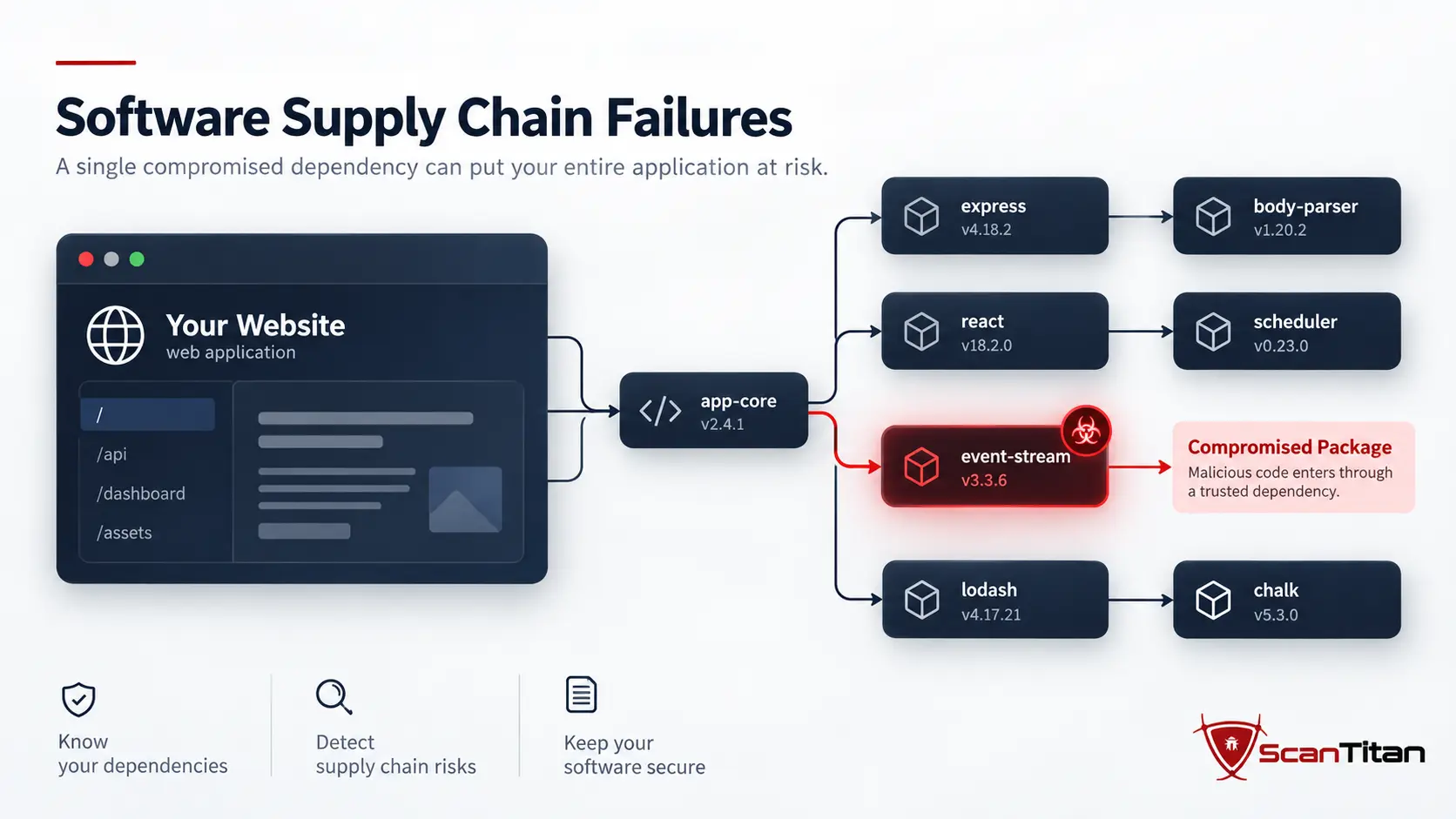
What it is: A website inherits risk from the code and infrastructure it depends on. That includes CMS plugins, themes, JavaScript packages, server libraries, container images, package registries, build tools, CI/CD systems, and update channels. A vulnerable dependency can introduce a known flaw, while a compromised dependency or build pipeline can deliver malicious code even when the application developers did nothing wrong in their own source.
Why it matters: OWASP expanded the old “Vulnerable and Outdated Components” category into A03:2025 Software Supply Chain Failures. The current category covers dependencies, build systems, and distribution infrastructure rather than only unpatched libraries. This matters particularly for CMS and ecommerce sites assembled from many third-party extensions. Current numbers on malicious packages, CI/CD attacks and vulnerable dependencies are in our software supply chain attack statistics.
How to fix it: Maintain an inventory of dependencies, remove unsupported components, use software composition analysis, monitor security advisories, protect repositories and build pipelines with MFA and least privilege, verify update integrity, and keep a software bill of materials where it provides operational value.
4. Cryptographic Failures

What it is: Cryptographic failures happen when sensitive data is transmitted, stored, or protected with inadequate cryptographic controls. Common examples include missing HTTPS, obsolete TLS settings, weak password hashing, hard-coded encryption keys, predictable tokens, exposed secrets, or sensitive information stored in plaintext. The vulnerability is often not “encryption is broken” but that the application never used the right cryptographic protection in the first place.
Why it matters: Successful exploitation can expose passwords, session tokens, payment data, personal information, API credentials, or internal secrets. OWASP classifies these weaknesses as A04:2025 Cryptographic Failures. The practical risk depends heavily on what data is exposed and whether an attacker can reach the affected path.
How to fix it: Enforce HTTPS, use maintained TLS configurations, never design custom cryptography for routine application needs, store passwords with modern adaptive hashing, protect secrets outside source code, rotate compromised keys, and minimize collection of sensitive data so there is less to protect in the first place.
5. SQL Injection
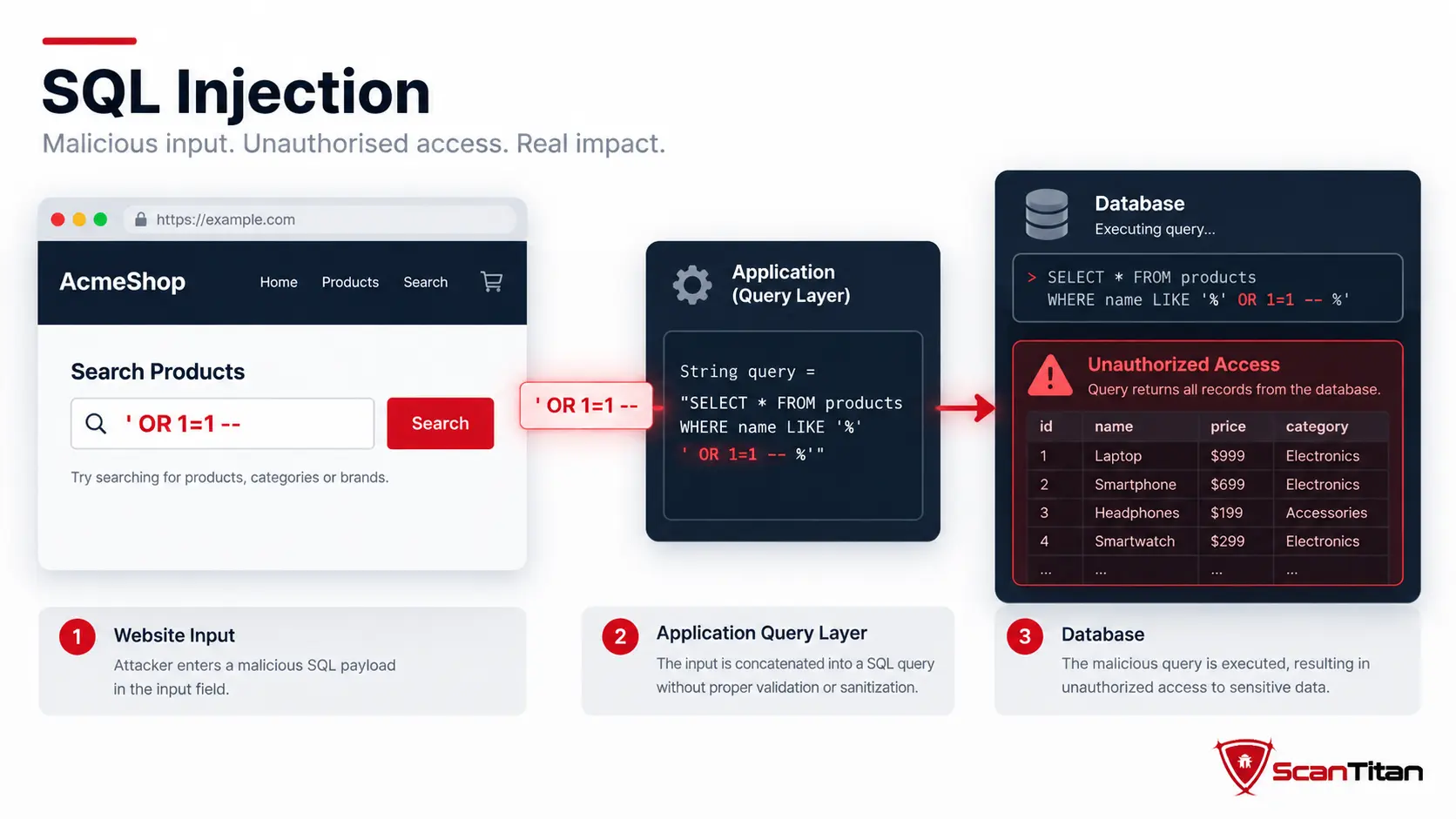
What it is: SQL injection occurs when untrusted input is incorporated into a database query in a way that lets the attacker change the query’s meaning. A vulnerable login, search field, filter, cookie, header, or API parameter can become an injection point if the application builds SQL by concatenating user-controlled values. Blind variants may reveal almost no visible database errors and instead use boolean or time differences to infer whether an injected condition ran.
Why it matters: SQL injection can expose or modify database records, bypass authentication, destroy data, and in some environments contribute to wider server compromise. CWE-89 SQL Injection ranks #2 in the 2025 CWE Top 25. It maps to OWASP A05:2025 Injection.
How to fix it: Use parameterized queries or prepared statements, keep database accounts least-privileged, validate expected input formats, and avoid trying to escape user input as the primary defense. Scan and test every input path, including authenticated areas. For deeper testing guidance, see how to test for SQL injection vulnerabilities.
6. Cross-Site Scripting
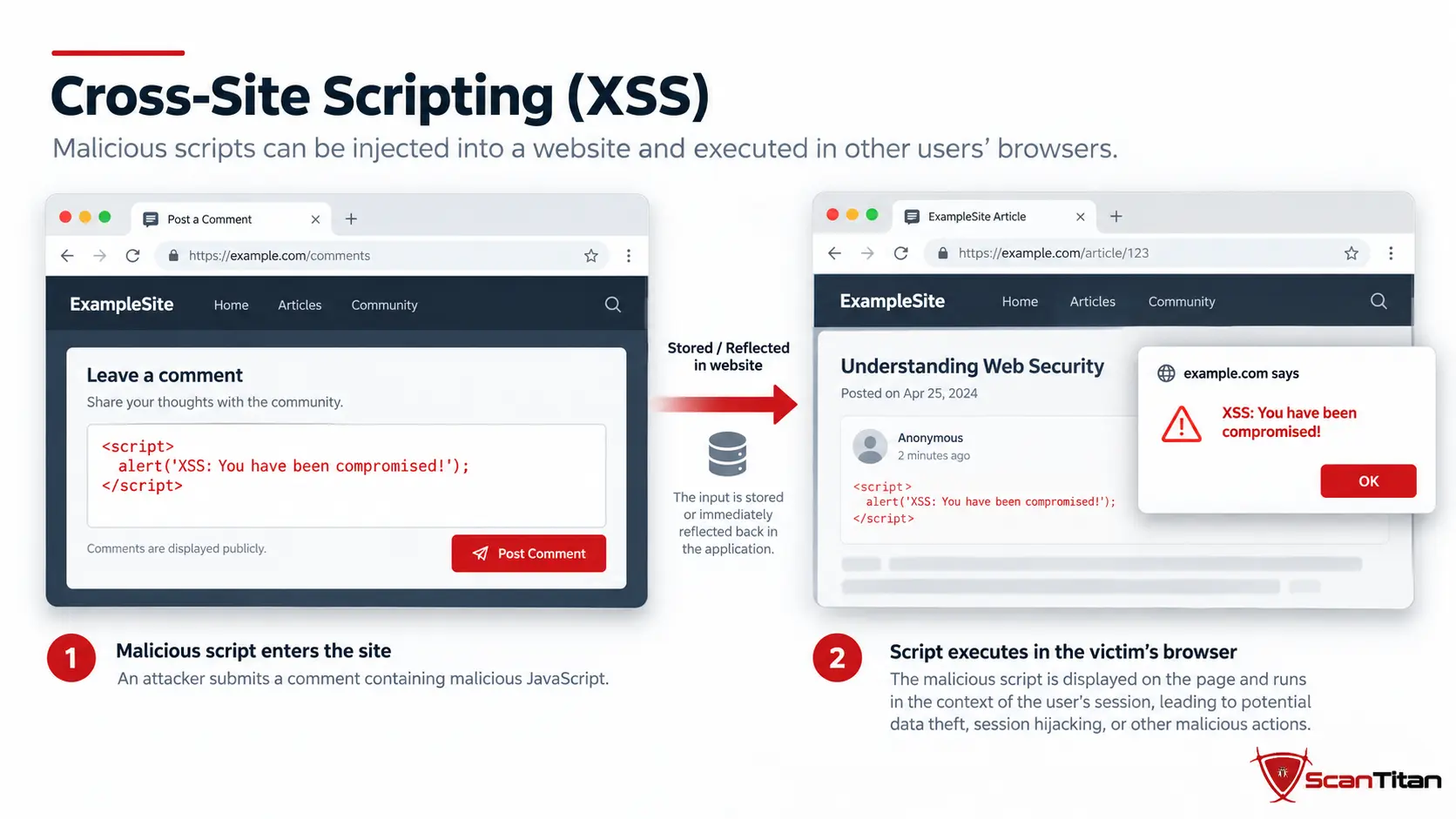
What it is: Cross-site scripting, or XSS, occurs when attacker-controlled content reaches a page and executes as script in another user’s browser. Stored XSS persists in data such as comments or profile fields, reflected XSS returns input immediately in a response, and DOM-based XSS occurs when client-side JavaScript moves unsafe data into a dangerous browser sink. The root problem is usually failure to encode output for the context where it is rendered.
Why it matters: XSS can modify page content, perform actions in a victim’s session, steal accessible tokens, redirect users, or become part of an account-compromise chain. CWE-79 Cross-Site Scripting ranks #1 in the 2025 CWE Top 25 and maps to OWASP A05:2025 Injection.
How to fix it: Apply context-aware output encoding, use frameworks that escape by default, sanitize only where rich HTML is intentionally supported, avoid unsafe DOM sinks, and deploy a carefully tested Content Security Policy as a defense-in-depth control rather than a replacement for fixing the vulnerable output path.
7. Authentication and Session Failures
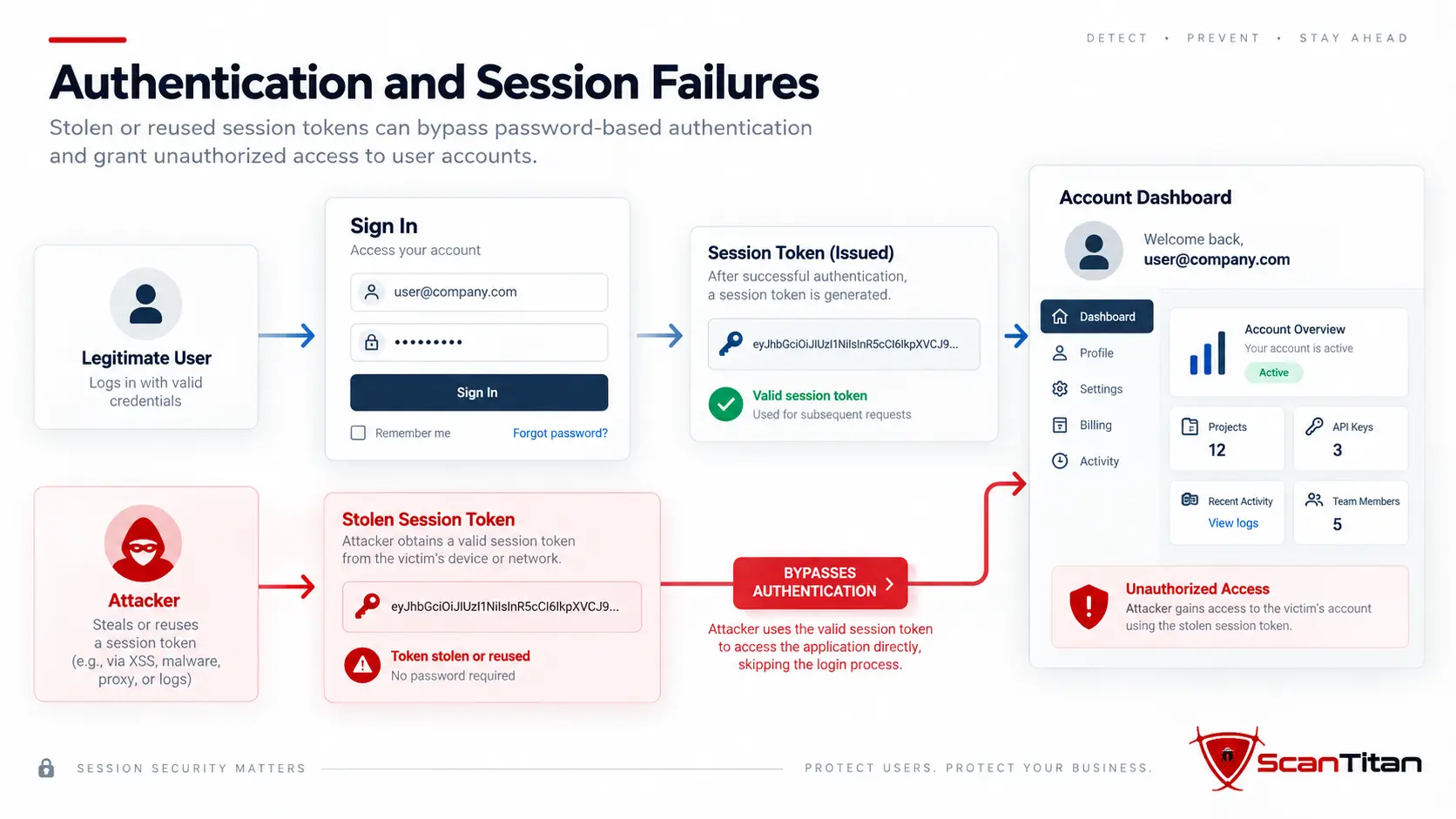
What it is: Authentication failures allow an attacker to impersonate a user or keep a session they should not control. Examples include weak password reset flows, missing rate limits, predictable session identifiers, tokens exposed in URLs, sessions that remain valid after password changes, broken logout, weak MFA recovery, and critical functions with no authentication at all. Credential stuffing becomes especially effective when websites accept reused passwords without additional controls.
Why it matters: Authentication flaws can lead directly to account takeover and access to every action the compromised account is allowed to perform. OWASP classifies them as A07:2025 Authentication Failures. CWE-306 Missing Authentication for Critical Function ranks #21 in the 2025 CWE Top 25.
How to fix it: Enforce MFA for privileged accounts, rate-limit and monitor login attempts, use secure password reset and recovery flows, rotate session identifiers after authentication, use secure cookie attributes, revoke sessions after meaningful account changes, and protect tokens from browser storage or URLs where they can leak.
8. Cross-Site Request Forgery
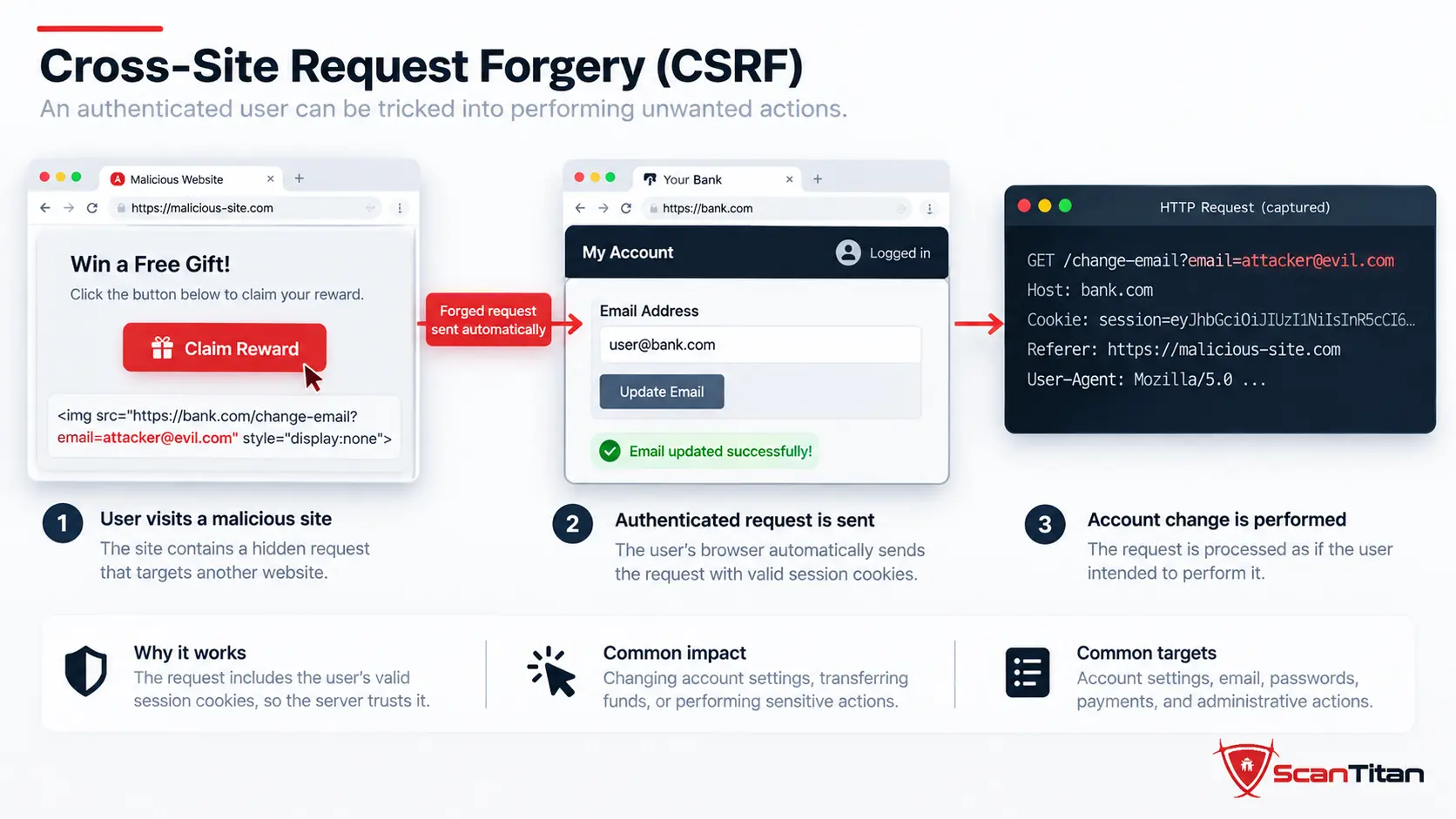
What it is: Cross-site request forgery, or CSRF, tricks a user’s browser into sending an unwanted state-changing request to a site where that user is already authenticated. The attack works when the website trusts the browser’s existing cookies but does not verify that the action genuinely originated from its own interface. Changing an email address, adding a payment recipient, or modifying account settings are classic targets.
Why it matters: CSRF can perform actions with the victim’s privileges without stealing the password first. CWE-352 CSRF ranks #3 in the 2025 CWE Top 25. OWASP 2025 maps CSRF into A01 Broken Access Control rather than giving it a standalone Top 10 category.
How to fix it: Use framework-provided anti-CSRF tokens for state-changing browser requests, validate the token server-side, use appropriate SameSite cookie settings, reject unsafe cross-origin requests, and require re-authentication or step-up verification for especially sensitive actions.
9. Server-Side Request Forgery
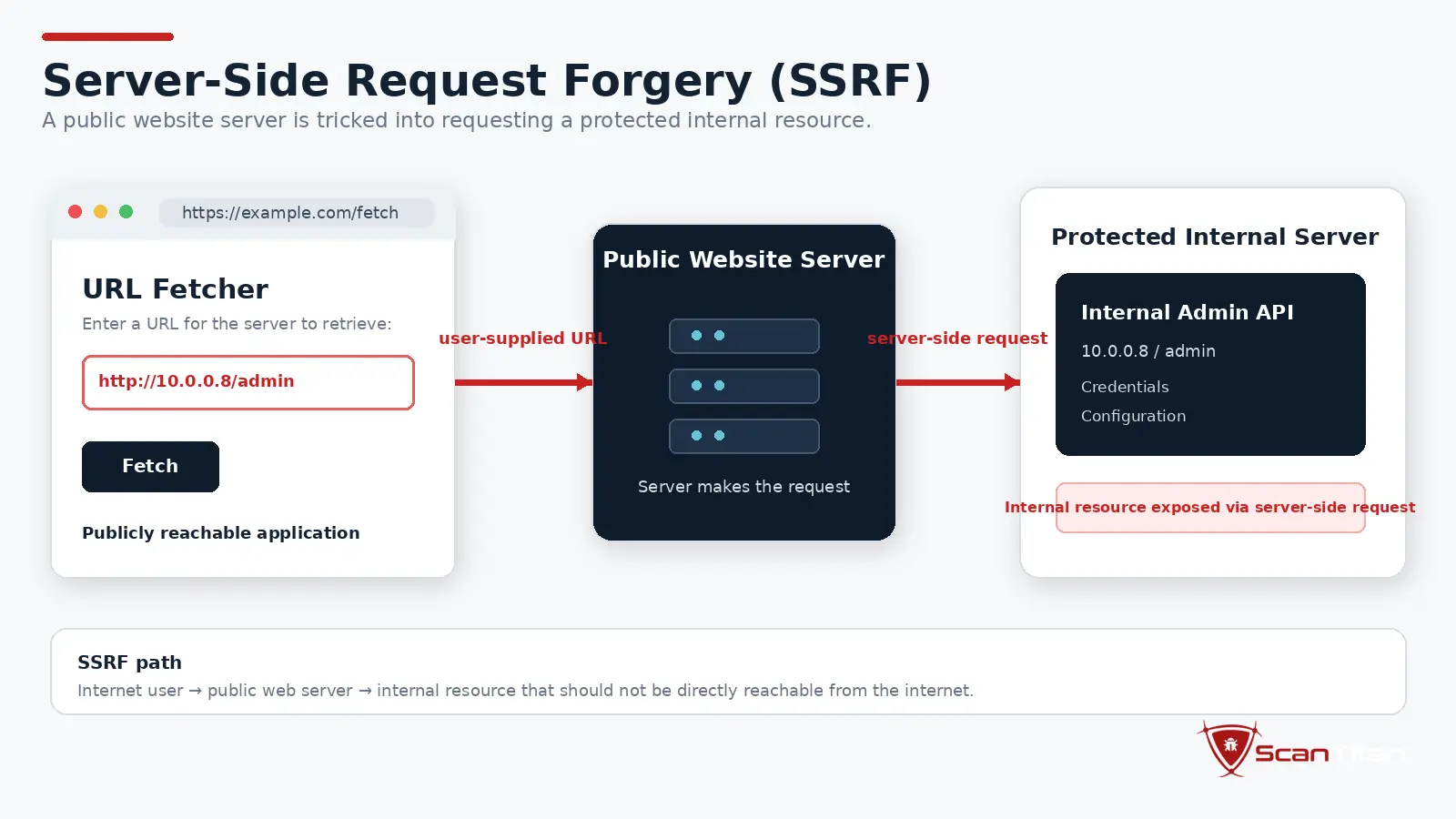
What it is: Server-side request forgery, or SSRF, occurs when an attacker can make the server send a request to a destination the attacker controls or selects. Common entry points include URL preview tools, webhook testers, remote-image importers, PDF generators, and integrations that fetch user-supplied URLs. The website becomes a proxy, which can give the attacker access to internal services that are not reachable directly from the internet.
Why it matters: SSRF can expose cloud metadata, internal APIs, administrative services, or credentials available only from trusted network locations. CWE-918 SSRF ranks #22 in the 2025 CWE Top 25. In OWASP Top 10:2025, SSRF was consolidated into A01 Broken Access Control.
How to fix it: Allowlist permitted destinations and protocols where possible, resolve and validate hostnames carefully, block private and link-local address ranges, separate fetch services from sensitive internal networks, restrict egress, and avoid sending raw user-supplied URLs to server-side network clients.
10. Path Traversal and File Inclusion
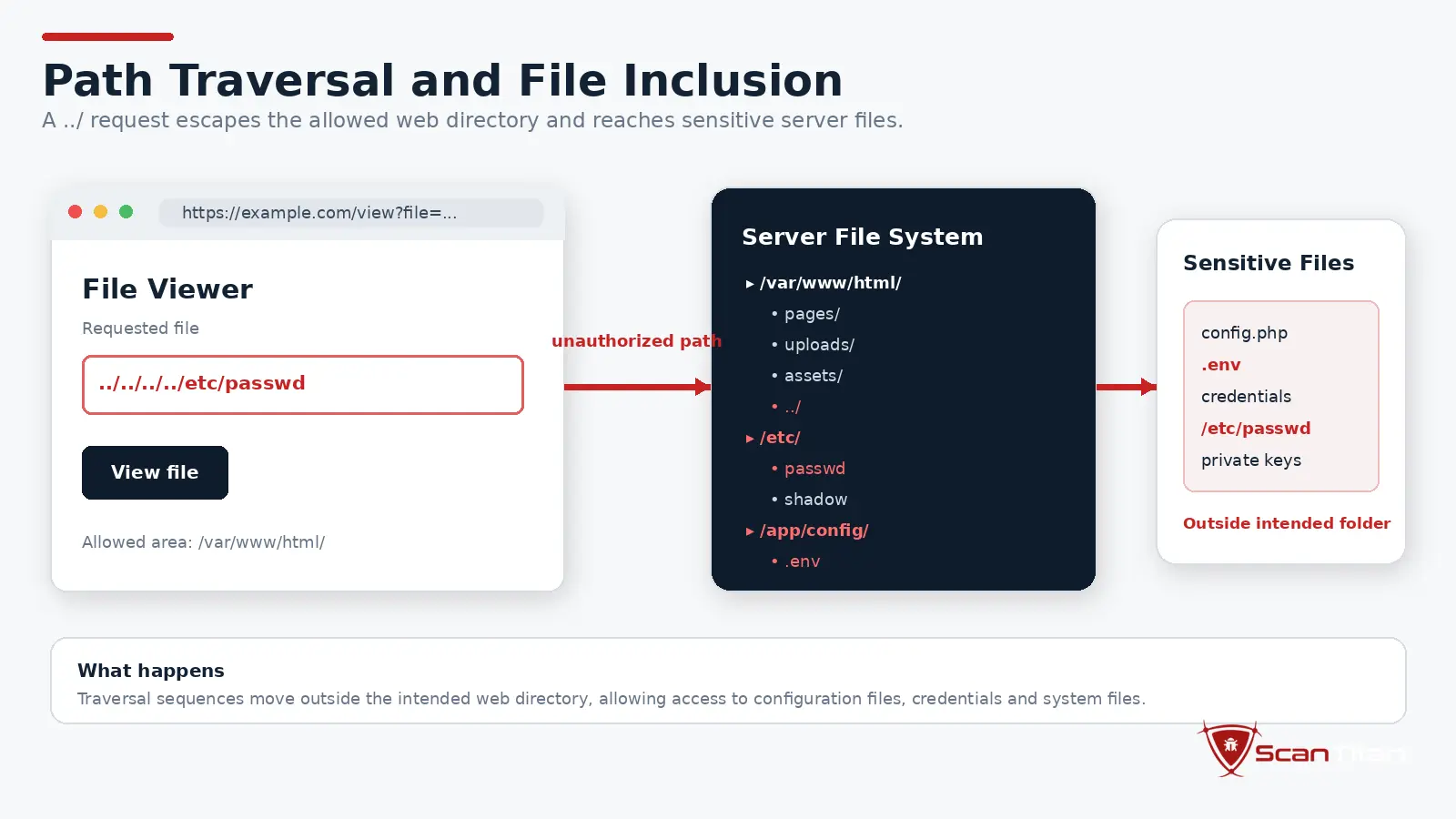
What it is: Path traversal occurs when an application lets user-controlled input influence a filesystem path without properly restricting it to the intended directory. Sequences such as ../, encoded variants, symlinks, or platform-specific path behavior may let an attacker move outside an upload, download, or template directory. File inclusion weaknesses can turn a path-control problem into code execution when the chosen file is interpreted rather than simply read.
Why it matters: Successful exploitation can expose configuration files, credentials, source code, application secrets, or other users’ data. In more dangerous cases it can help overwrite or execute files. CWE-22 Path Traversal ranks #6 in the 2025 CWE Top 25 and had ten CVEs linked to CISA KEV in that dataset.
How to fix it: Map user choices to server-side identifiers rather than accepting raw paths, normalize paths before comparison, enforce a fixed base directory, apply strict allowlists, keep sensitive files outside web-accessible directories, and avoid dynamically including files based on user-controlled values.
11. Unrestricted File Upload, Command Injection, and Remote Code Execution
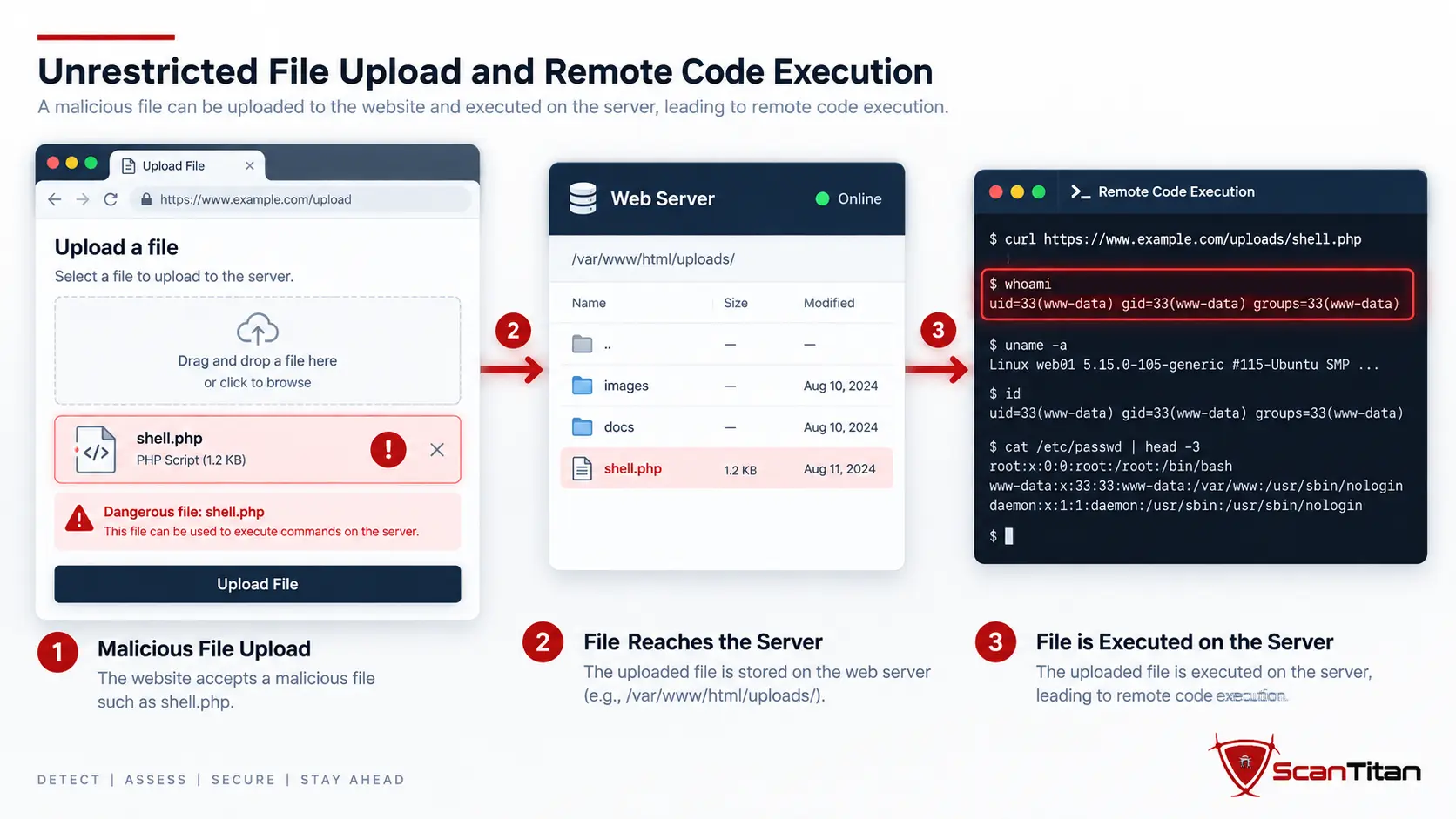
What it is: Dangerous file upload vulnerabilities allow users to upload executable or otherwise unsafe file types, while command or code injection lets user-controlled data influence an operating-system command, interpreter, or generated code path. These weaknesses can converge: an attacker uploads a file that the server later executes, or uses an injection flaw to write and run code. The exact root cause differs, but the result can be server-side execution.
Why it matters: Remote code execution can give an attacker application or operating-system privileges, making this one of the highest-impact outcomes for a public website. CWE-434 Unrestricted Upload of File with Dangerous Type ranks #12 in the 2025 CWE Top 25, while OS Command Injection ranks #9 and Code Injection ranks #10.
How to fix it: Store uploads outside executable directories, rename files server-side, verify content and type rather than trusting extensions, block executable formats, run upload processing with minimal privileges, avoid shell construction with user-controlled input, and use safe APIs instead of passing input into commands or interpreters.
12. Insecure Design and Business Logic Vulnerabilities
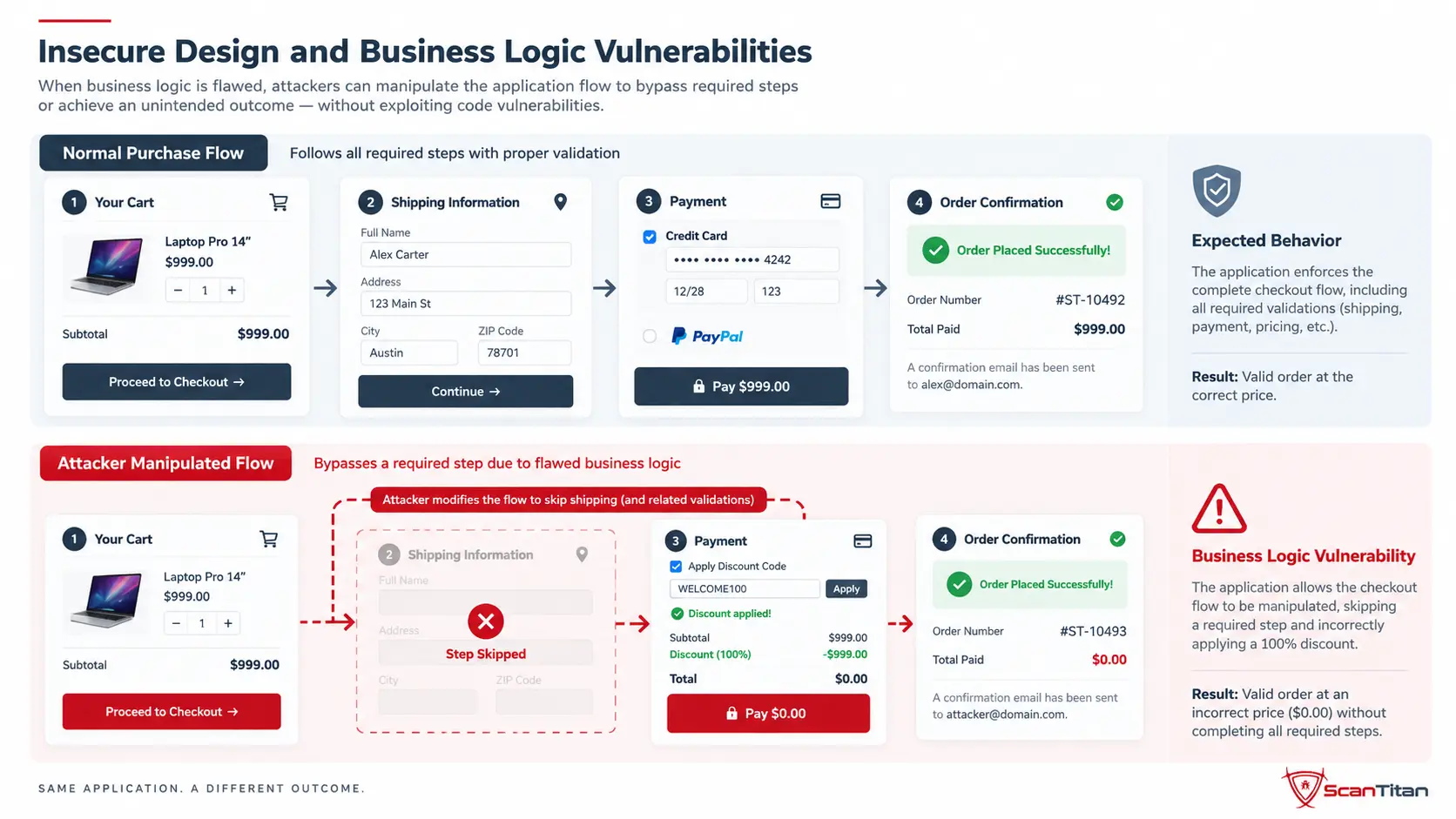
What it is: Insecure design is a weakness in the intended security model rather than a coding mistake in one line. Business-logic vulnerabilities appear when the application technically behaves as designed but the workflow can be abused. Examples include applying the same discount repeatedly, bypassing an approval step, purchasing at a manipulated price, racing two requests to spend the same balance, or reaching a privileged action through an unexpected sequence.
Why it matters: These flaws can cause fraud, unauthorized actions, inventory abuse, account takeover, or data exposure while producing no obvious SQLi or XSS signature. OWASP classifies this root-cause family as A06:2025 Insecure Design. Exceptional-condition problems can also overlap with A10:2025 Mishandling of Exceptional Conditions when a failure causes the application to fail open or enter an unsafe state.
How to fix it: Threat-model important workflows before implementation, define abuse cases, enforce security invariants on the server, rate-limit actions with economic value, use idempotency and transaction controls where needed, and include manual testing because business-logic flaws are often contextual and difficult for generic scanners to discover reliably.
How Do Website Vulnerabilities Map to OWASP Top 10:2025?
The OWASP Top 10 is a risk-category framework, not a one-to-one list of exploit names. One category can contain many CWEs, while a familiar attack such as SSRF or CSRF may sit inside a broader root-cause category. The 2025 release also changed the structure materially from 2021, so older mappings should not be reused without review.
| OWASP 2025 | Category | Website examples |
|---|---|---|
| A01 | Broken Access Control | IDOR, BOLA, authorization bypass, CSRF, SSRF |
| A02 | Security Misconfiguration | Unsafe CORS, debug mode, exposed admin tools, default settings |
| A03 | Software Supply Chain Failures | Vulnerable dependencies, malicious packages, compromised build/update systems |
| A04 | Cryptographic Failures | Weak TLS, poor password storage, exposed secrets, unsafe key management |
| A05 | Injection | SQL injection, XSS, command injection, code injection |
| A06 | Insecure Design | Business-logic abuse, missing security controls in workflow design |
| A07 | Authentication Failures | Weak recovery, insecure sessions, missing authentication, credential abuse |
| A08 | Software or Data Integrity Failures | Unsafe deserialization, unverified updates, integrity assumptions |
| A09 | Security Logging and Alerting Failures | Missing audit trails, no detection of suspicious authentication or admin activity |
| A10 | Mishandling of Exceptional Conditions | Fail-open behavior, unsafe error paths, resource exhaustion, inconsistent state |
OWASP says Broken Access Control remains #1 in 2025, Security Misconfiguration moved to #2, and Software Supply Chain Failures expanded the old vulnerable-components category to cover dependencies, build systems, and distribution infrastructure. That makes the 2025 framework much closer to how modern websites are actually assembled and operated than a simple list of coding bugs.
Which Website Weaknesses Rank Highest in CWE Top 25:2025?
MITRE’s 2025 CWE Top 25 analyzed 39,080 CVE records to rank dangerous software weakness classes. That methodology is useful because it gives us a current evidence-based view of recurring root causes. It should not be misread as a ranking of which flaws compromise the most websites, because the denominator is CVE records and the scoring model also uses severity and exploitation information. For how those rankings compare with weaknesses actually exploited, see our web application attack statistics: cross-site scripting leads the CWE list, while OS command injection has the most entries among the web weaknesses in CISA’s known-exploited catalog.
| Rank | CWE | Weakness | Why it matters to websites |
|---|---|---|---|
| #1 | CWE-79 | Cross-Site Scripting | Browser-side code execution through unsafe output |
| #2 | CWE-89 | SQL Injection | Database queries altered by untrusted input |
| #3 | CWE-352 | Cross-Site Request Forgery | Unwanted actions sent with a victim’s authenticated browser state |
| #4 | CWE-862 | Missing Authorization | Protected data or functions reachable without permission checks |
| #6 | CWE-22 | Path Traversal | Reads or writes files outside the intended directory |
| #9 | CWE-78 | OS Command Injection | User input influences a system command |
| #10 | CWE-94 | Code Injection | Attacker-controlled data becomes executable code |
| #12 | CWE-434 | Dangerous File Upload | Unsafe files can be stored or executed by the application |
| #15 | CWE-502 | Deserialization of Untrusted Data | Untrusted serialized objects influence application behavior |
| #21 | CWE-306 | Missing Authentication for Critical Function | Sensitive function lacks an identity check |
| #22 | CWE-918 | Server-Side Request Forgery | Server fetches an attacker-selected internal or external destination |
| #24 | CWE-639 | Authorization Bypass Through User-Controlled Key | Changing an identifier bypasses authorization logic |
CWE vs CVE vs CVSS vs KEV vs EPSS
These identifiers answer different security questions. Mixing them leads to poor prioritization because a weakness type, a specific vulnerability, a severity score, and evidence of exploitation are not interchangeable.
| Term | What it tells you | Example use |
|---|---|---|
| CWE | The weakness class or root cause | CWE-89 identifies SQL injection as a type of weakness |
| CVE | One publicly disclosed vulnerability in a product or component | A specific CMS or library flaw receives a CVE ID |
| CVSS | Technical severity | Helps estimate how damaging exploitation could be under defined conditions |
| CISA KEV | Known exploitation evidence | Signals that a specific CVE has evidence of exploitation in the wild |
| EPSS | Probability model for exploitation activity in the next 30 days | Adds likelihood information to a CVE prioritization decision |
FIRST explicitly notes that EPSS is not a complete risk score because it does not know whether a vulnerable product exists in your environment, whether it is internet-reachable, what compensating controls are present, or what business impact exploitation would create. That environmental context still belongs in the final remediation decision.
How Do Attackers Find Website Vulnerabilities?
Attackers do not need one fixed sequence. Automated tooling can discover public domains and endpoints, fingerprint software, probe common input locations, test known exploit paths, enumerate APIs, and revisit newly disclosed CVEs at scale. Manual attackers can then focus on authorization, workflow, identity, and business-logic weaknesses that require more context. A public website is reachable by design, so the discovery problem is easier for the attacker than it would be for an internal-only system.
Many attacks also chain weaknesses. A misconfiguration may expose a management endpoint, weak authentication may provide an account, broken access control may expand that account’s reach, and a file-upload or command-injection flaw may provide server execution. This is why counting vulnerabilities alone does not describe actual attack paths: the combination and reachability can matter more than the raw number of findings.
How Can You Find Vulnerabilities on Your Website?
No single testing method covers every vulnerability type. OWASP describes web application vulnerability scanners as DAST tools that test running applications from the outside for issues such as XSS, SQL injection, command injection, path traversal, and insecure server configuration. Static and composition analysis inspect different layers, while human testing remains important for business logic and complex authorization.
Manual review catches logic flaws, but it does not scale across a whole site. A website security scanner tests every reachable page, parameter and endpoint against the vulnerability classes above and returns them ranked by severity.
| Method | Best at finding | Main limitation |
|---|---|---|
| DAST | Running-site weaknesses, input handling, misconfiguration, exposed behavior | May miss unreachable code or logic requiring complex context |
| Authenticated scanning | Issues behind login and role-specific application paths | Coverage depends on identities, permissions, and reachable workflows |
| SAST | Potential weaknesses in source code before deployment | Can produce findings that are not reachable in production |
| SCA | Known vulnerabilities and support status in third-party dependencies | Does not test custom business logic |
| API testing | Endpoint authorization, authentication, object access, schema and input issues | Needs endpoint inventory and authentication context |
| Manual penetration testing | Logic flaws, chaining, authorization abuse, context-specific attacks | Point-in-time and narrower than continuous automation |
A website vulnerability scanner is useful for continuously checking the public application surface, but it should sit inside a broader testing program. ScanTitan’s comparison of vulnerability scanning vs penetration testing explains why automated breadth and human depth solve different problems. If the application exposes REST or GraphQL endpoints, use an API-specific workflow rather than assuming ordinary page crawling covers them; see how to scan an API for vulnerabilities.
Which Website Vulnerabilities Should You Fix First?
Severity matters, but it is not enough on its own. Verizon’s 2026 DBIR reports that 31% of breaches began with vulnerability exploitation, making exploited software flaws the leading breach entry point in that dataset. The operational question is therefore not only “How severe is this flaw?” but also “Can an attacker reach it, is there evidence or likelihood of exploitation, and what happens if they succeed?”
- Severity: CVSS helps estimate technical impact and exploit conditions.
- Exposure: An internet-facing vulnerable endpoint deserves more urgency than the same flaw on an isolated test system.
- Exploit evidence: CISA KEV indicates that exploitation has been observed for specific CVEs.
- Exploit probability: EPSS estimates the probability of exploitation activity in the next 30 days for publicly disclosed CVEs.
- Asset context: Authentication level, privileges, sensitive data, business function, and compensating controls change the real consequence.
A moderate vulnerability on a public checkout, login, or administrator endpoint can deserve action before a technically critical flaw that is unreachable in your environment. ScanTitan’s guide to prioritizing vulnerability remediation covers the full risk-based workflow, while the Vulnerability Statistics research separates disclosure volume from actual exploitation evidence.
How Do You Prevent Website Security Vulnerabilities?
Prevention works best when controls are tied to the weakness that creates the risk. Parameterized queries stop SQL injection because they separate data from instructions. Output encoding stops many XSS paths because attacker-controlled text is no longer treated as executable markup. Server-side authorization prevents IDOR because every request is checked against the current user’s permissions. Dependency inventory and update processes reduce supply-chain exposure because unsupported and vulnerable components are identified before they remain forgotten in production.
Reduce the attack surface.
Remove unused software, endpoints, plugins, services, test environments, and privileged accounts. Every unnecessary component creates another place that must be configured, monitored, and patched.
Build security into the application.
Use secure framework defaults, server-side authorization, parameterized queries, safe output handling, threat modeling, and secure session design rather than relying on a WAF to compensate for vulnerable code.
Control third-party risk.
Track dependencies, remove abandoned packages, protect repositories and build systems, and monitor advisories so the application does not remain exposed through code the team did not write.
Test continuously.
Run automated tests often enough to catch newly exposed endpoints and newly disclosed component vulnerabilities, then add authenticated and manual testing where automation cannot model roles, workflows, or business logic accurately.
Prioritize and verify fixes.
Combine technical severity with reachability, exploitation evidence, business impact, and compensating controls. Retest after remediation instead of assuming a patch, configuration change, or code change fully removed the original weakness.
For environments that change frequently, continuous vulnerability scanning helps keep discovery aligned with the current attack surface rather than a point-in-time inventory.
Frequently Asked Questions
What are the main types of website security vulnerabilities?
The main website vulnerability types include broken access control, security misconfiguration, software supply-chain failures, cryptographic failures, SQL injection, cross-site scripting, authentication and session failures, CSRF, SSRF, path traversal, dangerous file upload or code execution, and insecure design or business-logic flaws. Different frameworks may group the same weakness differently.
What are the 4 main types of vulnerability in cyber security?
There is no single official four-type taxonomy. One common high-level model groups vulnerabilities into network, operating-system or software, application, and human or process vulnerabilities. Website security vulnerabilities belong mainly to the application category, although server, cloud, network, and human weaknesses can still affect a website.
What is the most common website vulnerability?
There is no universal prevalence figure for every website. In OWASP Top 10:2025, Broken Access Control is the #1 web application risk category. In the 2025 CWE Top 25, Cross-Site Scripting ranks #1, SQL Injection #2, CSRF #3, and Missing Authorization #4. Those frameworks use different methodologies, so their rankings should not be treated as a global website-compromise rate.
What is the difference between a threat and a vulnerability?
A vulnerability is a weakness that can be exploited. A threat is the actor, event, or capability that may exploit it. An exploit is the technique used to take advantage of the weakness, while risk describes the potential loss created by likelihood and impact.
Is a security misconfiguration a vulnerability?
Yes. A misconfiguration can create an exploitable weakness even when no software bug or CVE exists. Examples include public administration interfaces, unsafe CORS rules, exposed backups, verbose error messages, default credentials, and excessive cloud permissions.
Is SQL injection still a website security risk in 2026?
Yes. SQL injection remains relevant and ranks #2 in the 2025 CWE Top 25. Modern frameworks and parameterized queries have reduced the risk in well-built applications, but vulnerable custom code, legacy applications, plugins, APIs, and dynamically constructed queries can still expose injectable paths.
What is the difference between CVE and CWE?
CWE describes a type or root cause of weakness, such as SQL injection or missing authorization. CVE identifies a specific publicly disclosed vulnerability in a product or component. Multiple CVEs can share the same CWE because the same weakness can appear in many different products.
What is the difference between a vulnerability and an exploit?
A vulnerability is the weakness. An exploit is the code, request pattern, or technique used to take advantage of that weakness. A vulnerability can exist before an exploit is public, while an exploit is only useful when the target is actually affected and reachable.
How do I find vulnerabilities on my website?
Use a combination of DAST or website scanning, authenticated testing, software composition analysis, source-code analysis where available, API testing, configuration review, and periodic manual penetration testing. Different methods cover different layers, so no single scanner finds every possible vulnerability.
Can a vulnerability scanner find every website vulnerability?
No. Automated scanners are effective for many known web weaknesses, exposed components, input-handling flaws, and misconfigurations, but they can miss business-logic flaws, complex authorization problems, chained attacks, and context-specific abuse. Manual testing and secure design review are still necessary for those classes.
Sources and Review Method
This 2026 refresh prioritizes current primary sources rather than copying older vulnerability lists. OWASP Top 10:2025 provides the web application risk framework, MITRE’s 2025 CWE Top 25 provides the current software-weakness rankings, Verizon’s 2026 DBIR supplies the breach-entry statistic, FIRST defines EPSS, and OWASP’s vulnerability-scanning guidance describes the scope of DAST tools. Competitor pages were used to understand search intent and content gaps, not as the authority for current framework mappings.