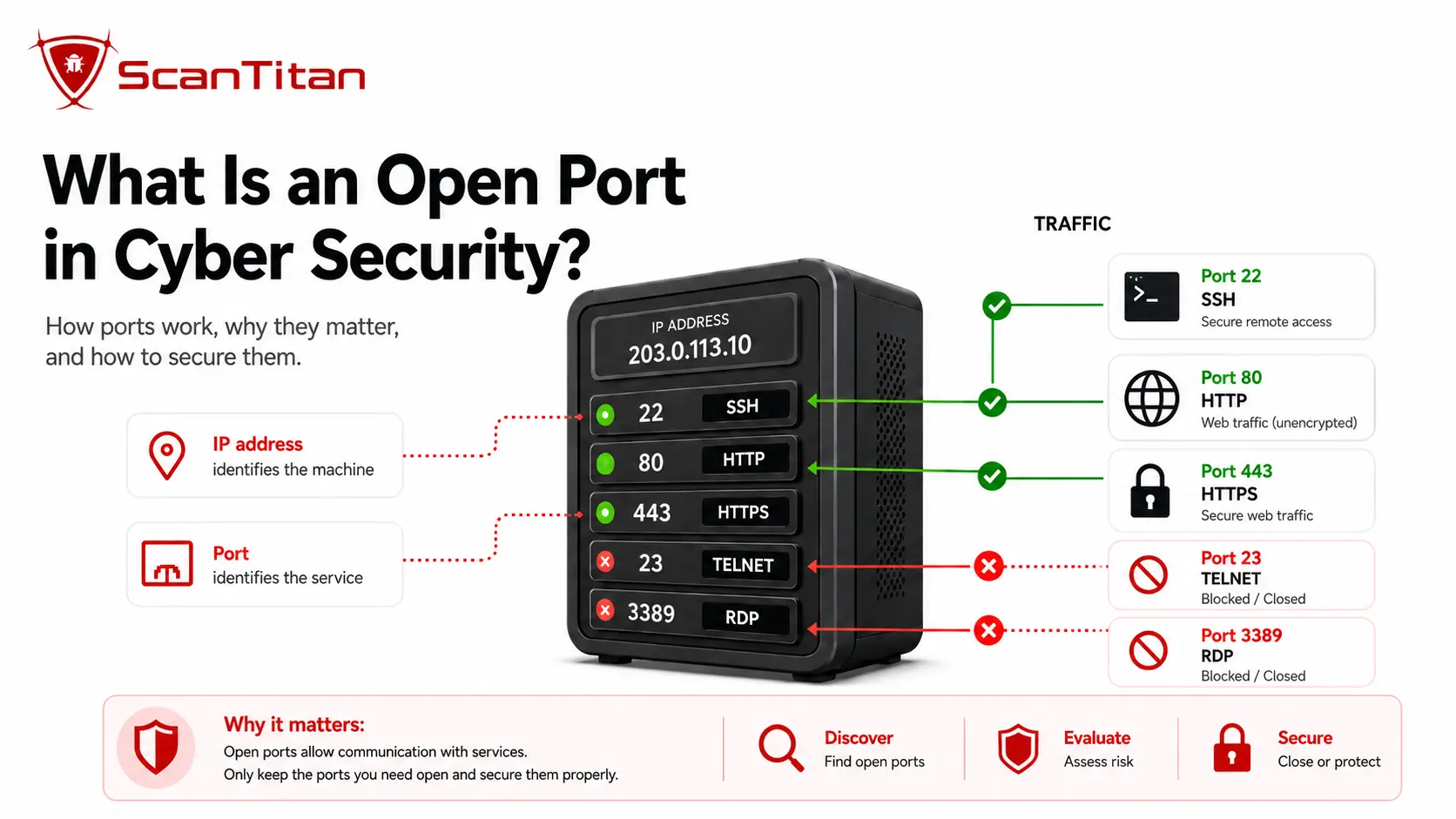
If your question is what is open port in cyber security, the answer is simple: an open port is a TCP or UDP endpoint where a service is listening and reachable from the network position testing it. Open ports are necessary for services such as HTTPS, DNS, SSH, and email. They create risk when a service is unnecessary, internet-facing, outdated, misconfigured, or weakly protected. This guide explains how open ports work, why attackers scan them, which exposures deserve attention, and how to secure them.
Short answer: An open port is not automatically a vulnerability. It shows that a network service is accepting traffic. Security risk comes from what is listening behind that port, who can reach it, whether the service has known vulnerabilities, and whether the exposure matches a real business need.
What Is Open Port in Cyber security?
An open port is a numbered TCP or UDP endpoint that a service is actively using to receive network traffic. The IP address identifies the host, while the port number helps the operating system deliver traffic to the correct service. TCP and UDP each have port numbers from 0 through 65,535, so TCP 53 and UDP 53 are separate endpoints even though both are commonly associated with DNS. The IANA Service Name and Transport Protocol Port Number Registry divides ports into System Ports from 0 to 1023, User Ports from 1024 to 49151, and Dynamic or Private Ports from 49152 to 65535. IANA also warns that traffic on a registered port does not prove the assigned service is actually running there.
| Range | IANA category | Typical role |
|---|---|---|
| 0 to 1023 | System Ports | Common standardized services such as SSH, DNS, HTTP, and HTTPS |
| 1024 to 49151 | User Ports | Registered application and vendor services |
| 49152 to 65535 | Dynamic or Private Ports | Temporary client sessions and private application use |
What Is the Difference Between an Open Port and a Closed Port?
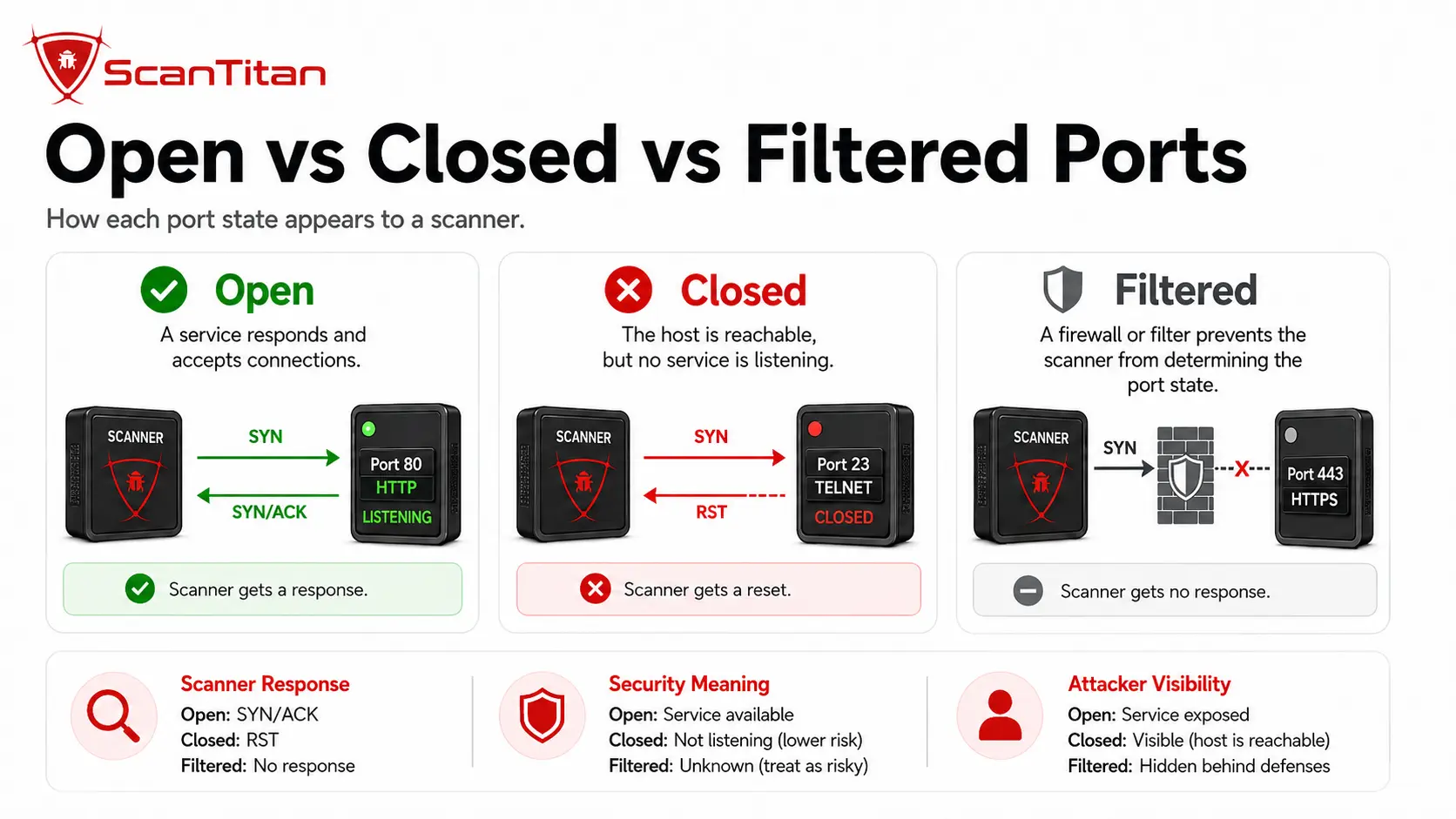
An open port has a service accepting traffic from the scanner’s network position. A closed port means the host is reachable, but no application is accepting traffic on that port. A filtered port is different from both: a firewall, access control list, security group, or other network control prevents the scanner from determining whether a service would otherwise accept the probe. The official Nmap port-state documentation uses these states to describe what the scanner can determine, not whether the underlying service is secure. Nmap can report six states in total, so teams should preserve the full scan result instead of simplifying every non-open result to “closed.”
| Nmap state | What it means | Defensive interpretation |
|---|---|---|
| Open | An application is accepting traffic on the port | Verify the service, version, access controls, and business need |
| Closed | The host is reachable, but no service is accepting traffic | No current listener on that port, although the host remains reachable |
| Filtered | A firewall or network control prevents a definitive result | Filtering reduces reachability or visibility but does not prove the service is secure |
| Unfiltered | The port is reachable, but the scan type cannot decide whether it is open or closed | Use another scan technique if classification matters |
| Open|Filtered | The scanner cannot distinguish open from filtered | Common with some UDP and stealth scan techniques |
| Closed|Filtered | The scanner cannot distinguish closed from filtered | Treat as inconclusive until validated from another viewpoint |
How Do TCP and UDP Affect Open Ports?
TCP and UDP use the same numerical port range, but they behave differently on the network and can produce different scan results. TCP establishes a connection and provides acknowledgments, retransmission, ordering, and flow control. A TCP scanner can often classify a listening service more directly because the protocol returns clear connection responses. UDP does not establish the same connection state, so a silent response may mean the service is open, the packet was dropped, or a firewall filtered the probe. That is why UDP scanning can take longer and produce open|filtered results more often. Defenders should inventory TCP and UDP separately, because opening TCP 53 does not automatically expose UDP 53, and many services depend on one transport more heavily than the other.
What Is the Difference Between Local, Internal, and Internet-Exposed Ports?
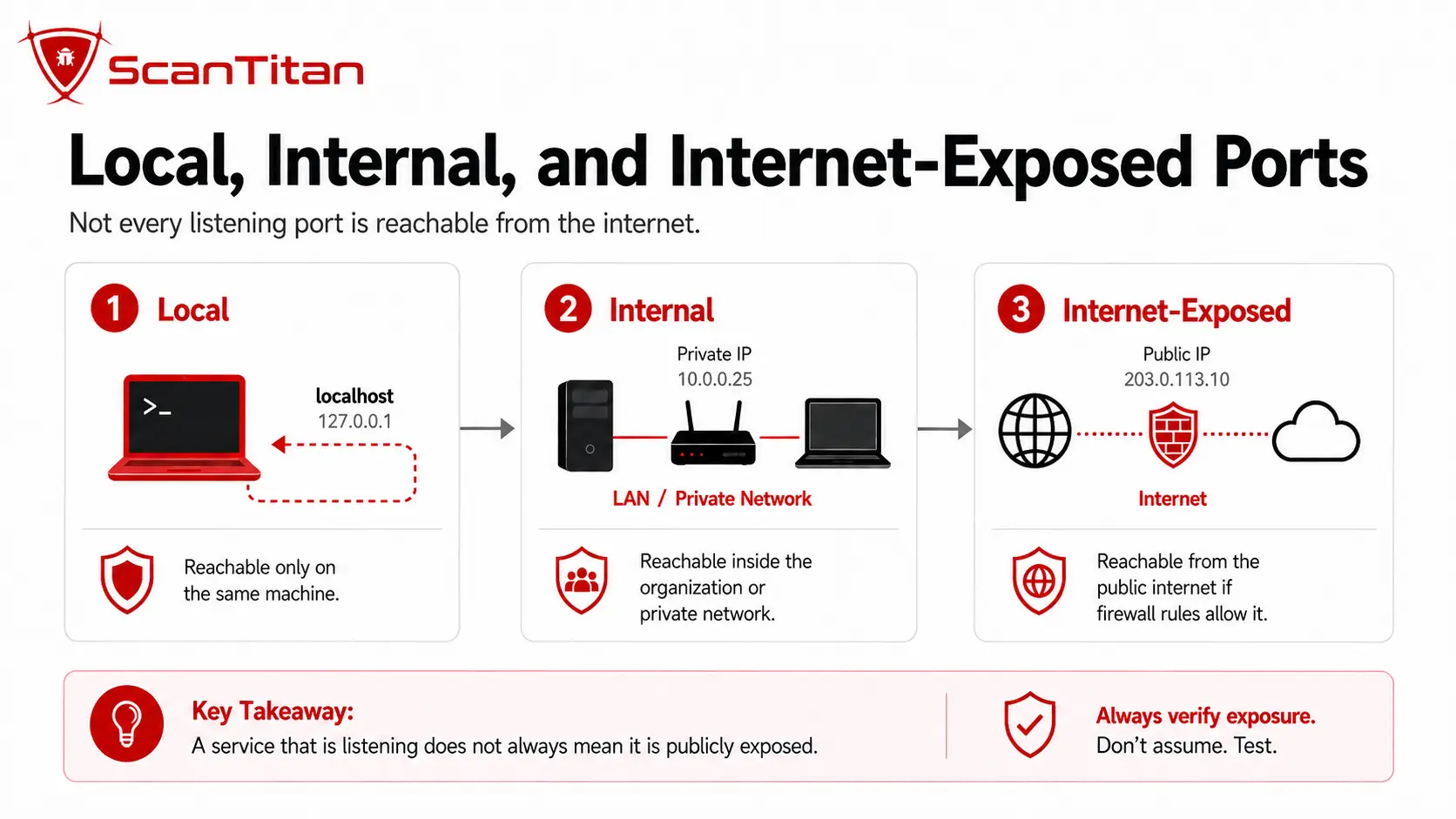
A listening service is not automatically reachable from everywhere. Exposure depends on the address the service binds to, network routes, firewalls, access control lists, security groups, load balancers, and port-forwarding rules. A local-only service may bind to 127.0.0.1 or ::1, which limits normal access to the same device. An internally reachable service may accept traffic only from a corporate subnet or trusted segment. An internet-exposed service can be reached through a public IP address or another public-facing network path. This distinction changes risk dramatically. An internal database listener may be necessary for an application, while the same service exposed to the public internet may create unnecessary authentication and exploit surface. Always describe a port together with where it is reachable from.
What Are the Most Common Network Ports and Services?
Common ports help analysts form an initial hypothesis about the service behind an endpoint, but the port number is not proof of the application. IANA registrations describe conventional use, while administrators can move services to non-standard ports or place several applications behind proxies and load balancers. Service detection is therefore more important than memorizing a port list. The examples below cover the network services users most often encounter during open port identification in cyber security.
| Port | Protocol | Common service | Typical use |
|---|---|---|---|
| 21 | TCP | FTP | Legacy file transfer control |
| 22 | TCP | SSH | Encrypted remote administration and file transfer |
| 25 | TCP | SMTP | Mail transfer between servers |
| 53 | TCP and UDP | DNS | Name resolution and DNS operations |
| 80 | TCP | HTTP | Unencrypted web traffic |
| 143 | TCP | IMAP | Mailbox access |
| 161 | UDP | SNMP | Network-device monitoring and management |
| 443 | TCP and UDP | HTTPS / HTTP/3 | Encrypted web traffic; HTTP/3 commonly uses QUIC over UDP |
| 445 | TCP | SMB | Windows file and printer sharing |
| 3306 | TCP | MySQL | Database connections |
| 3389 | TCP and UDP | RDP | Windows Remote Desktop |
| 5432 | TCP | PostgreSQL | Database connections |
| 5900 | TCP | VNC | Remote desktop sharing |
The IANA Service Name and Transport Protocol Port Number Registry is the authoritative reference for registered service names and ports. Treat the registry as a mapping reference, not a security rating.
Why Are Open Ports Dangerous?
Open ports are dangerous when they expose a service that attackers can identify, authenticate to, misconfigure, or exploit. The port itself is only the network path. The service behind it determines the real risk. An internet-facing HTTPS service on port 443 may be required and well protected, while an exposed SMB service on port 445 may create severe risk if the host runs a vulnerable SMB implementation. Microsoft documented this pattern in MS17-010, where flaws in SMBv1 could allow remote code execution. The open port made the service reachable; the vulnerable software created the exploit condition. Defenders should therefore judge open ports by exposure, service identity, version, authentication, privilege, known CVEs, and whether the service needs to be reachable from that network.
When Does an Open Port Become a Vulnerability?
An open port becomes a security finding when the exposure creates an exploitable or unnecessary condition, but the port number alone is not the vulnerability. The problem may be an unpatched service, weak authentication, unsafe default settings, excessive network reachability, insecure encryption, or a management interface exposed to users who do not need it. This distinction matters for any open ports vulnerability review. A scanner that reports only “port 445 is open” has identified reachability. A vulnerability scanner should continue by identifying the SMB version, checking configuration, matching relevant CVEs, and deciding whether the service is reachable from a risky network. That is also why vulnerability priority should reflect both the software weakness and the exposure path that makes exploitation possible.
What Can Someone Do With Open Ports?
An attacker cannot take control of a system merely because a port is open, but an exposed service gives them a place to start. Port scanning reduces uncertainty by showing which systems respond and which services may be worth deeper investigation. The useful defensive question is not “Can attackers see a port?” but “What can they learn or attempt once the service answers?”
- Identify the service that appears to be listening, such as SSH, SMB, RDP, DNS, a database, or a web server.
- Fingerprint the software and version through banners, protocol negotiation, certificates, or service-detection probes.
- Attempt authentication attacks against exposed login services when password, key, or multifactor controls are weak.
- Compare the detected software with published CVEs, exploit intelligence, and known configuration weaknesses.
- Reach administrative, file-sharing, database, or application functionality when the service is exposed more broadly than intended.
- Chain a reachable service with another weakness, such as stolen credentials or a software vulnerability, to increase impact.
Why Do Attackers Scan for Open Ports?
Port scanning is a reconnaissance technique that reduces uncertainty before deeper enumeration or exploitation. Attackers, administrators, and penetration testers can all use the same basic discovery methods; intent and authorization are what differ. A scanner may first identify responsive hosts and port states, then use service and version detection, protocol negotiation, certificate data, banners, or scripts to learn more about the listener. The attacker can compare that information with public CVEs, known default credentials, exposed administrative interfaces, and common configuration weaknesses. Search engines such as Shodan also index many internet-exposed services, which means a service can be discoverable without an attacker scanning it directly. Defenders should expect public services to be enumerated and focus on minimizing unnecessary exposure, patching required services, and monitoring changes.
Which Ports Should Not Be Open to the Internet?
There is no universal list of port numbers that must always be closed. A port number is only a label, and administrators can run services on non-standard ports. The stronger rule is to avoid exposing services that do not need public access. Remote administration, file sharing, databases, and legacy clear-text protocols deserve especially strict review. The table below works as an open port vulnerabilities list for triage, not as a claim that the port number itself is vulnerable. If your team already knows which services are exposed and needs to rank them by exploitability and business impact, use an open ports security risk assessment rather than treating every open port as equal.
| Port | Common service | Why public exposure deserves review | Safer approach |
|---|---|---|---|
| 21/TCP | FTP | Credentials and data may be exposed in legacy deployments | Replace with an encrypted transfer method or tightly restrict access |
| 22/TCP | SSH | Password spraying, stolen keys, and vulnerable SSH software can be targeted | Restrict source networks, use strong keys or phishing-resistant authentication, patch the service |
| 23/TCP | Telnet | Clear-text remote administration exposes credentials and sessions | Disable Telnet and use an encrypted alternative |
| 161/UDP | SNMP | Weak community strings and device information can expose management data | Limit to management networks and use secure configurations |
| 445/TCP | SMB | File sharing and historical remote-code-execution flaws make direct internet exposure high risk | Block internet exposure and segment internal access |
| 1433/TCP | Microsoft SQL Server | A public database listener expands authentication and exploit exposure | Keep database access private or tightly allowlisted |
| 3306/TCP | MySQL | Direct database exposure can invite credential and software attacks | Restrict to application and administration networks |
| 3389/TCP and UDP | RDP | Internet-facing remote desktop services attract credential attacks and exploit attempts | Place behind controlled remote access and restrict source access |
| 5432/TCP | PostgreSQL | Public database access exposes authentication and service attack surface | Keep private unless a documented exception requires exposure |
| 5900/TCP | VNC | Remote desktop exposure can create authentication and configuration risk | Restrict to trusted management paths |
| 80/TCP and 443/TCP | HTTP and HTTPS | Public web services are normally required, but the applications behind them can still be vulnerable | Keep required web ports open, patch the stack, and test the application separately |
Port 445 deserves deeper treatment because the service behind it has a long history of high-impact flaws. Our guide to Port 445 vulnerabilities covers SMB-specific CVEs, exposure risk, and firewall remediation.
How Can Open Ports Affect Confidentiality, Integrity, and Availability?
Open ports can contribute to all three parts of the confidentiality, integrity, and availability model when the listening service is vulnerable or exposed incorrectly. Confidentiality can be affected when a service reveals banners, certificates, software versions, credentials, files, or application data. Integrity can be affected when unauthorized users gain permission to change records, upload files, alter configurations, or execute privileged functions. Availability can be affected when attackers abuse a reachable service with denial-of-service traffic, resource exhaustion, destructive commands, or an exploit that crashes the application or host. The port does not create those impacts by itself. It creates the reachable path. Defenders reduce impact by minimizing unnecessary reachability, hardening required services, restricting privileges, and detecting changes in exposure before attackers can use them.
How Do You Identify Open Ports in Cybersecurity?
Open port identification in cyber security should combine external, internal, and local evidence because each viewpoint answers a different question. An external scanner shows what an internet user can reach. An internal scan shows what one network segment can reach. Local inspection shows which services are listening on the host, even when a firewall blocks them from other systems. A complete workflow compares these views with firewall rules, cloud security groups, load balancers, network address translation, and port-forwarding rules. Scan only assets you own or have explicit authorization to test. For ongoing infrastructure assessment, a network vulnerability scanner should go beyond raw port discovery by identifying the service, version, and vulnerability context behind each reachable endpoint.
Finding port 443 open tells you little on its own. scan the website running on it to learn whether the application behind the port is the real risk.
Scan the Target From the Network Position That Matters
Use a scanner from the same trust zone you want to evaluate. An internet-facing test answers whether an outside user can reach the service, while an internal scan can reveal management or lateral-movement paths that the public internet cannot see. Nmap can perform service detection with -sV, which helps distinguish the actual listener from the port number you expected. OWASP also recommends service recognition when web applications may run on non-standard ports. A basic authorized example is nmap -sV <target>. For a broader TCP inventory, define the port range explicitly with -p. Treat the result as evidence from that scanner location, because a firewall or routing change can produce a different answer from another segment.
Inspect Listening Services on the Host
Use local operating-system tools to confirm which processes are actually listening. On Linux, ss -lntup can show listening TCP and UDP sockets with process information when permissions allow it. On Windows, Get-NetTCPConnection -State Listen lists listening TCP endpoints, while Get-NetUDPEndpoint shows UDP endpoints. Local inspection can reveal a service that external scanning cannot see because the host firewall blocks it or the service binds only to loopback. That difference matters during remediation. Closing a firewall rule reduces network exposure, but disabling an unnecessary service removes the listener itself. Compare the listening process, bind address, service owner, and business purpose before deciding whether to close, restrict, or retain the port.
Review Firewalls, Cloud Rules, and Port Forwarding
Check the controls that decide who can reach a listening service. On-premises networks may use perimeter firewalls, host firewalls, access control lists, virtual private networks, and segmentation rules. Cloud environments add security groups, network security groups, load balancers, public IP assignments, and managed firewall policies. Consumer and small-business networks may expose services through router port forwarding or automatic protocols such as UPnP. Review source ranges as carefully as destination ports. A rule allowing TCP 22 from one management subnet is different from a rule allowing TCP 22 from 0.0.0.0/0. Reconcile the approved architecture with the actual rule set, then re-scan from outside the trust boundary to prove the exposure changed.
Choose the Right Tool for the Question
Different tools answer different questions, so do not treat every network utility as a port scanner. Nmap discovers hosts, classifies port states, and can perform service, version, operating-system, and script-based detection when requested. Wireshark captures traffic visible to an interface and helps confirm which ports are exchanging observed traffic, but it does not provide a complete listening-port inventory by itself. Netcat is useful for validating whether a specific TCP or UDP endpoint is reachable. Local operating-system commands reveal listening sockets and associated processes even when network filtering blocks remote access. For a broader explanation of scanner scope and infrastructure coverage, see what network vulnerability scanning is and internal vs external vulnerability scanning.
What Does OWASP Say About Open Ports?
OWASP does not classify an open port itself as a vulnerability. For an open ports vulnerability review, OWASP focuses on the service, configuration, and attack surface behind the reachable endpoint. Its Web Security Testing Guide treats open-port discovery as part of attack-surface identification and infrastructure configuration testing. The guide recommends identifying which ports and services an application actually requires, placing that requirement under change control, and testing exposed services for insecure configuration or known vulnerabilities. OWASP also notes that web applications and administrative interfaces can run on non-standard ports, so testers may need service detection across a wider TCP range instead of checking only ports 80 and 443. The OWASP attack-surface identification guidance specifically references Nmap service recognition for this purpose. The practical lesson is simple: inventory the required exposure, identify the actual service, then test the software and configuration behind it.
What Do CIS Controls Say About Open Ports?
The CIS Controls reinforce the same principle as OWASP: expose only the network services that the business actually requires, then manage their configuration continuously. CIS guidance on network infrastructure warns that default configurations can leave unnecessary ports, services, accounts, and older protocols enabled. Its port-management guidance calls for associating active ports and services with an asset inventory, ensuring only approved services are running, performing regular automated port scans, and applying host-based firewall or port-filtering controls. The practical takeaway is global rather than product-specific: maintain an approved service inventory, compare it with what scans discover, investigate unauthorized listeners, and revalidate the configuration when the environment changes. See the CIS Controls network infrastructure guidance for the current control set.
How Do You Secure Open Ports?
How to secure open ports starts with proving which exposure is required, then reducing everything else. Closing ports blindly can break production services, while leaving every historical firewall exception in place creates avoidable attack surface. Use a controlled sequence so the team can explain each decision and verify the result.
- Inventory every listening and reachable service from external, internal, and local viewpoints.
- Validate the business owner, purpose, required protocol, users, and source networks for each exposed service.
- Close unnecessary services and remove firewall, security-group, and port-forwarding rules that no longer support a documented need.
- Restrict necessary administrative and database services to approved source networks, identities, and management paths.
- Patch the operating system, service, library, and network device behind every required port, then remove obsolete protocols such as Telnet where possible.
- Harden authentication, encryption, least privilege, logging, and rate controls for services that must remain reachable.
- Monitor the exposure continuously and re-scan after firewall, cloud, migration, or application changes to catch configuration drift.
- Prioritize reachable services with exploitable CVEs, weak credentials, broad internet exposure, or critical business impact before lower-risk findings.
Open Port FAQ
Should every open port be closed?
Keep only the ports and services that support an approved business function, and restrict their reachability to the users and networks that need them. Web servers normally require public HTTPS access, while database and management services usually do not. The target is not zero open ports. The target is minimum necessary exposure with a secure service behind every required port.
Is port 443 safe to leave open?
Treat port 443 as a normal requirement for a public HTTPS service, not as proof that the website is secure. TLS protects network traffic, but the web application behind 443 can still contain SQL injection, cross-site scripting, broken access control, authentication flaws, or vulnerable server software. A website vulnerability scanner tests application-layer weaknesses that a port scan cannot identify.
Does changing a port number make a service secure?
Use a non-standard port only as an operational choice, not as a primary security control. Moving SSH from 22 to another port can reduce low-effort automated noise, but scanners can still discover the service through broad port scans and service fingerprinting. Real protection comes from access restrictions, strong authentication, current software, least privilege, and monitoring.
Are open ports a risk?
Assess each open port as attack-surface exposure rather than an automatic vulnerability. Risk rises when the service is publicly reachable, unnecessary, poorly authenticated, misconfigured, privileged, or affected by a known exploit. A required and well-restricted service can be acceptable, but the team should still monitor it because service versions, firewall rules, and threat intelligence change over time.
Check Your Internet-Exposed Ports
An open port is useful information only when you know what is listening behind it and why that service is reachable. Start with the external view, identify the actual service and version, compare the exposure with your approved architecture, then investigate vulnerabilities and weak controls on the services that remain open.
ScanTitan helps teams discover reachable services during authorized scans and connect those findings with vulnerability context so a raw port list becomes an actionable review queue. For the assessment workflow behind that process, see open ports security risk assessment. Re-scan after each change to confirm that the unnecessary exposure is gone and the required service still works as intended.
Start a free scan to review reachable services in your authorized scope.