Network vulnerability scanning is the automated process of probing every host on a network, identifying the service behind each open port, and matching what it finds against a database of known vulnerabilities. It is the cheapest reliable way to see your infrastructure the way an attacker sees it. It is also widely oversold. A scan is a snapshot, not an assessment, and the list it produces is a set of candidates, not a verdict. This guide covers how scanning works, what it catches, what it cannot catch, and how often to run it.
What is network vulnerability scanning?
Network vulnerability scanning is an automated security test that discovers the live hosts on a network, enumerates their open ports, fingerprints the service and version running behind each one, and compares those versions and configurations against known vulnerability data to report which hosts carry exploitable weaknesses.
That definition matters because of what it excludes. A scanner reads evidence and infers a conclusion. It sees that a host answers on TCP 445, that the banner and protocol negotiation match Windows Server 2016 at a given patch level, and that this combination is associated with a published CVE. In most cases it does not exploit anything to prove the point, which is exactly why scanning is safe to run weekly and a penetration test is not.
NIST SP 800-115 places vulnerability scanning inside technical security testing as one technique alongside network discovery and penetration testing, each with different costs and different blind spots. Treat it as one instrument, not the whole program.
Three things a network vulnerability scan is not:
- Confirms exploitability by default: most checks are inference, so a finding is a strong lead rather than proof unless the tool validates it
- Covers assets you did not tell it about: the scan tests the ranges you define, and nothing else
- Replaces a penetration test: no scanner chains three medium findings into domain admin
The practical version of all this lives in our network vulnerability scanner, which runs the same six stages described below across internal and external IP ranges.
Why network vulnerability scanning matters more in 2026 than it did in 2024
The case for scanning used to be theoretical. It is not any more. In the Verizon 2026 DBIR, which analyzed more than 22,000 confirmed breaches across 145 countries, exploitation of a known vulnerability became the single most common initial access vector for the first time in the report’s nineteen year history, accounting for 31 percent of breaches and overtaking credential abuse at 13 percent. A year earlier the figure was 20 percent.
Two supporting numbers from the same dataset explain why this is a scanning problem rather than a patching problem alone. Median time to patch rose from 32 days to 43 days. And of the vulnerabilities CISA has confirmed are being actively exploited in the wild, only 26 percent were fully remediated during 2025, down from 38 percent the year before.
That gap is the whole argument. Organizations are not losing because the fix is unavailable. They are losing because nobody knew the vulnerable service was running, or knew and could not tell it apart from the four thousand other findings in the queue. Scanning solves the first problem. Prioritization, covered further down, solves the second.
The volume pressure is real too. Roughly 48,000 CVEs were published in 2025, which our 2026 vulnerability statistics breaks down in detail. A host that scanned clean last month can be exploitable today without anyone touching it, because a vulnerability was published in software it was already running, For the wider breach context behind that 31% figure—including ransomware, third parties, costs and industry exposure—see our Data Breach Statistics 2026 research.
How a network vulnerability scan actually works
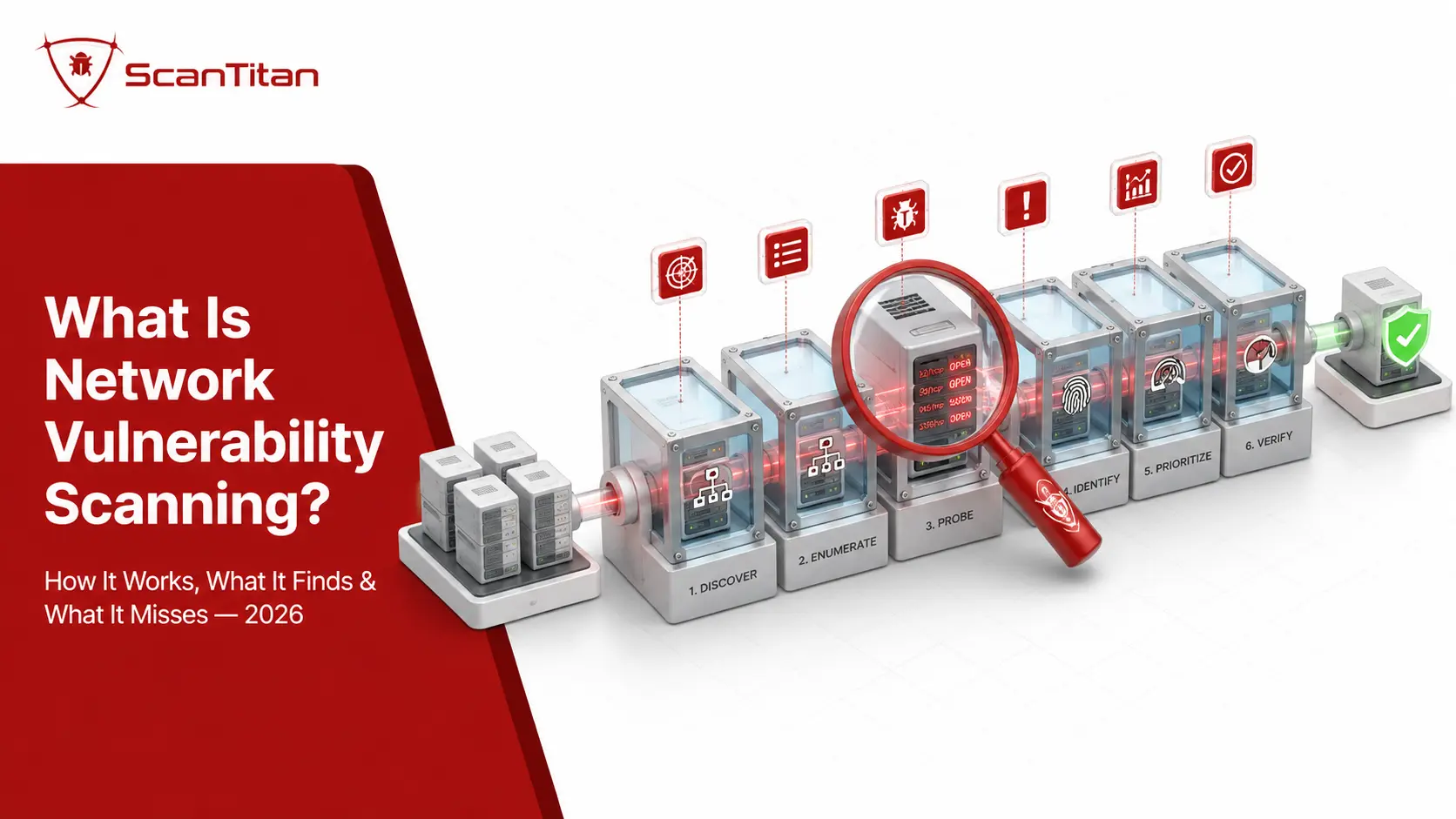
Six stages, in order. Each one has a characteristic failure mode, and knowing them tells you more about scanner quality than any feature list.
Host discovery
The scanner sweeps the IP ranges you define to separate live systems from empty address space, usually with a mix of ICMP echo, TCP SYN probes to common ports, and ARP requests on local segments. Dead space gets dropped so the expensive work only runs against real hosts. The failure mode here is silent and expensive: hosts configured to ignore ping, or sitting in a subnet nobody documented, simply never enter the scan. Discovery only covers the ranges you supply, which is why the accuracy of your asset inventory sets a hard ceiling on the value of everything downstream. If you only need to check one public address, a focused scan of a single public IP skips this stage entirely.
Port scanning and service fingerprinting
For every live host the scanner establishes which TCP and UDP ports accept connections, then works out what is actually listening. Fingerprinting goes well beyond reading a banner, because banners lie and are frequently stripped. A good scanner sends deliberately crafted probes and reads the shape of the response: TCP options, window sizes, time to live values, protocol negotiation quirks. The pattern of replies is compared against a signature set to produce a best confidence identification of the software and version. This stage is where accuracy is won or lost. Get the version wrong by one minor release and every CVE match downstream inherits the error.
Matching against vulnerability data
Each identified service and version is cross-referenced against vulnerability data, typically the National Vulnerability Database and CVE records plus vendor advisories and the scanner vendor’s own research. An outdated OpenSSH build becomes a named CVE with a severity score attached. This is straightforward version matching, and it is also where false positives are born, because backported security fixes are extremely common on enterprise Linux distributions. A package can report an old version number while carrying the patch, and a naive scanner will flag it anyway. Judging a scanner by raw finding count rewards exactly the wrong behavior.
Authenticated checks
Give the scanner credentials and it stops guessing. Instead of inferring a patch level from a network response, it logs in and reads the installed package list, registry keys, configuration files, and kernel version directly. This is the single largest coverage improvement available to any scanning program, and it converts a large share of maybes into confirmed yes or confirmed no. It also unlocks a class of finding that is invisible from outside: local privilege escalation paths, insecure service configurations, weak file permissions, and benchmark checks against CIS and NIST baselines. The cost is credential management, which is a real operational burden and the usual reason teams skip it.
Validation and evidence
Better scanners do not ship every inference straight to your dashboard. They run a safe confirmation check and attach the request and response that triggered the finding, so you or your auditor can reproduce it. The distinction matters more than it sounds. A finding that says “this host may be vulnerable to CVE-2023-4966” costs an engineer twenty minutes of investigation. A finding that shows the exact traffic that proved it costs zero. Across a thousand findings that difference is the entire difference between a scanning program that survives its first quarter and one that quietly gets ignored.
Prioritization, reporting, and rescan
The scanner ranks what it found, produces a report for two different readers, and gives you a way to verify fixes. Those readers want different things: the engineer needs the host, port, CVE, and the specific remediation step, while the manager or auditor needs severity distribution, trend, and evidence that findings were closed. The rescan is the part teams most often skip and the part compliance most often demands, because a remediation you have not verified is a remediation you are guessing about. PCI DSS in particular requires passing rescans for high risk findings, not just a patch ticket marked done.
Types of network vulnerability scans
Four axes, and they are independent. A scan can be external, unauthenticated, active, and network based all at once. Most guides present these as one list of four or five options, which is where the confusion starts.
| Axis | Option A | Option B | The real trade-off |
|---|---|---|---|
| Vantage point | External | Internal | Attacker’s first view vs what happens after a foothold |
| Access | Unauthenticated | Authenticated | Breadth and speed vs depth and accuracy |
| Method | Active | Passive | Complete data vs zero network impact |
| Delivery | Network based | Agent based | Reaches network devices vs reaches roaming laptops |
Internal vs external vulnerability scanning
External scanning tests your internet facing IP addresses from outside the perimeter, which is the view a remote attacker gets before they have anything. It surfaces exposed services, unpatched perimeter software, expired or weak TLS, and management interfaces that were never meant to face the internet. Internal scanning runs from inside the network and tests what is reachable once someone is already in through a phished laptop or a stolen credential, which is where lateral movement lives: default credentials on a switch, an unpatched file server, a flat segment that should have been split. Neither substitutes for the other. External scanning tells you how they get in, internal scanning tells you how far they get afterwards, and the DBIR finding that edge device exploitation jumped from 3 percent to 22 percent of exploitation driven breaches is a strong argument for taking both seriously.
Read More: Internal vs External Vulnerability Scanning: What Each One Finds?
Authenticated vs unauthenticated scanning
An unauthenticated scan probes a host with no credentials and reports what any attacker on that network segment would see. An authenticated or credentialed scan logs in and inspects the system from the inside. These are two names for one distinction, not two separate scan types, which is worth stating plainly because several widely read guides list “credentialed” and “authenticated” as though they were different things. Authenticated scanning finds substantially more and produces far fewer false positives, because it reads facts instead of inferring them. Run unauthenticated externally, because that is the honest attacker view, and authenticated internally, because that is where depth pays. CIS Control 7.5 asks for both against internal assets, and PCI DSS v4.0.1 made authenticated internal scanning an explicit requirement under 11.3.1.2.
Read More: Authenticated Scan vs Unauthenticated Vulnerability Scan: Which Do You Need?
Active vs passive scanning
Active scanning sends packets at targets and reads what comes back. It produces complete, current data and it is what almost everyone means by vulnerability scanning. Passive scanning observes traffic already crossing the network and infers what exists from what it sees, touching nothing. Passive is genuinely useful in environments where active probing is risky, which in practice means operational technology, industrial control systems, and medical devices, where a fragile embedded TCP stack can be knocked over by an aggressive port sweep. The honest trade-off is that passive scanning only discovers assets that talk during the observation window and cannot determine a patch level with any confidence. Use passive to map sensitive segments safely, then scan actively where it is safe to do so.
Read More: Active vs Passive Vulnerability Scanning: What’s the Difference?
Network based vs agent based scanning
Network based scanning reaches hosts over the wire from a scanner or connector. Agent based scanning installs software on each endpoint and reports back. Agents win on roaming laptops that are rarely on the corporate network and on cloud instances that spin up and down, since coverage follows the device. Network based scanning wins on everything you cannot install software on, which is a longer list than most teams expect: routers, switches, firewalls, printers, IP cameras, storage appliances, building management systems, and medical devices. Those are precisely the devices that sit on default credentials for years. A program built only on agents has a structural blind spot shaped exactly like its network hardware, and extending the same checks to cloud and hybrid hosts keeps the estate in one view rather than three.
What a network vulnerability scan finds
Six recurring categories. The vulnerabilities that cause real breaches are rarely exotic.
| Category | Typical finding | Worked example |
|---|---|---|
| Known CVEs in services | Unpatched internet facing software | Log4Shell, CVE-2021-44228, CVSS 10.0 |
| Exposed services | Management protocol reachable from the internet | RDP on 3389 exposed to BlueKeep, CVE-2019-0708 |
| Default and weak credentials | Network device on factory login | Switch management panel on admin and admin |
| Encryption weakness | Deprecated protocol or expired certificate | SSLv3 or early TLS still negotiable |
| Misconfiguration | Service running that nobody needs | Database bound to a public interface |
| End of life software | Unsupported version, no patches coming | A server on an OS past its support date |
That last row is worth pausing on. End of life software often carries no critical CVE today, so severity based tooling ranks it low, and yet it is a guaranteed future critical with no fix available when it arrives. It belongs on the roadmap, not in the backlog.
Open ports and exposed services
Every open port is a service accepting input from somewhere, and a security risk assessment of open ports is really an assessment of three things together: what is listening, who can reach it, and whether that service is current. An open port is not a vulnerability by itself. Port 443 is open on every website on the internet. The risk appears when a port that should be reachable only from a trusted segment is reachable from everywhere, when the service behind it is unpatched, or when nobody remembers turning it on. That last case is the common one. Ports get opened for a migration, a vendor integration, or a debugging session, and the firewall rule outlives the reason by years. Continuous network port and exposure monitoring catches the change at the moment it happens rather than at the next quarterly scan, which is the difference between a two day exposure and a ninety day one.
Port 445 Vulnerability is the textbook case. It carries SMB, the Windows file and printer sharing protocol, and it has no business being reachable from the internet under any circumstances. The reason is CVE-2017-0144, better known as EternalBlue, a pre authentication remote code execution flaw in SMBv1 that Microsoft patched as MS17-010 in March 2017 and that WannaCry and NotPetya then used to spread automatically between hosts. The patch has been available for nine years. Scanners still find vulnerable SMB services on forgotten internal servers, because backups get restored from old snapshots, machines get rebuilt from stale images, and nobody rescans. Internally, the same port is the classic lateral movement path once an attacker has one foothold. If a scan shows 445 open to the internet, that is not a ticket, it is an incident.
What network vulnerability scanning cannot find?
This section is the one most guides skip, and it is the one that determines whether your program is honest.
Network scanning stops at the port. Application-layer flaws such as XSS, SQL injection and broken access control sit above it and need a website scanner that actually crawls and tests the application.
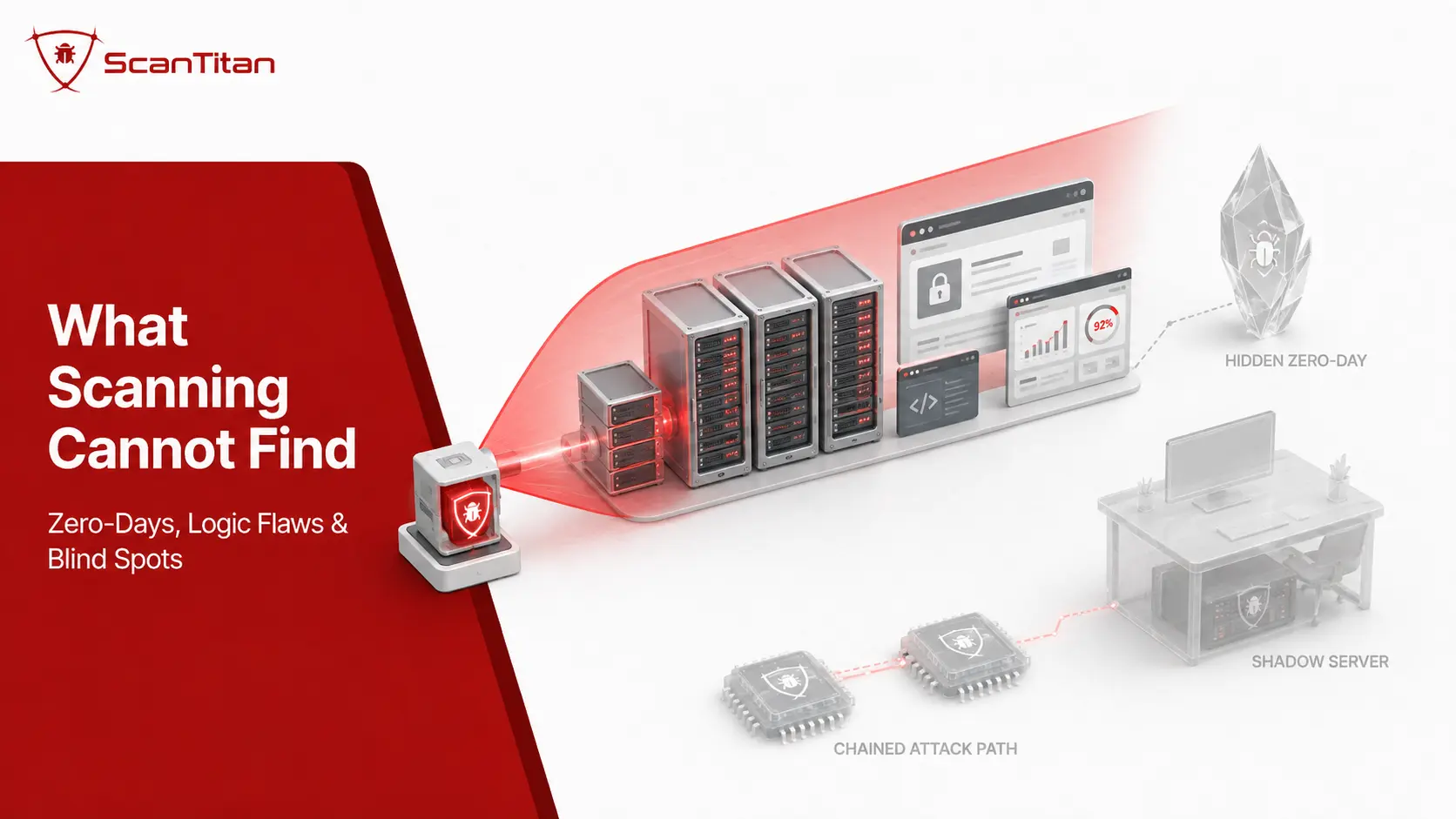
- Zero-days. Scanning is signature matching against published vulnerability data. A flaw with no CVE and no detection logic is invisible by construction, no matter how good the scanner is.
- Business logic flaws. A scanner cannot tell that changing an order ID in a request returns another customer’s invoice. That requires understanding intent, which is a human job and part of why penetration testing exists as a separate discipline.
- Chained attack paths. Scanners score findings one at a time. An attacker combines a medium severity information disclosure with a low severity misconfiguration and reaches domain admin. No individual finding in that chain would have alarmed you.
- Application layer vulnerabilities. A network scan fingerprints the web server, not the application on top of it. SQL injection, cross site scripting, and broken access control need web application scanning or manual testing.
- Assets you never told it about. This is the largest gap in practice. The forgotten staging subdomain, the decommissioned cloud instance still running, the shadow IT server under a desk. Discovering those is external attack surface management work, and it has to happen before scanning is meaningful. A 2023 research study confirmed 10,351 subdomains under the Tranco Top 1M domains as vulnerable to takeover, using data from 2021 and 2022.
- Whether a finding matters to your business. A CVSS 9.8 on an isolated lab host with no data is less urgent than a CVSS 7.5 on the server holding your customer records. The scanner does not know the difference. You do.
Vulnerability scanning vs vulnerability assessment vs penetration testing
These three get used interchangeably and they are not the same thing. The confusion has real cost, because buying one when you needed another is how compliance deadlines get missed.
| Vulnerability scan | Vulnerability assessment | Penetration test | |
|---|---|---|---|
| What it is | Automated data gathering | Scan plus human interpretation | Human led simulated attack |
| Output | Candidate findings list | Validated, prioritized findings | Proven attack paths and impact |
| Exploitation | No, by design | No | Yes, controlled |
| Finds unknown flaws | No | Rarely | Yes |
| Typical cadence | Continuous to monthly | Quarterly | Annually or after major change |
| PCI DSS reference | Requirement 11.3 | Requirement 11.3 | Requirement 11.4 |
Scanning is the automated step. An assessment interprets the output, removes false positives, applies business context, and recommends remediation. A penetration test starts where both stop, chaining findings and proving impact. PCI DSS puts scanning and penetration testing in separate requirements precisely because they answer different questions, and satisfying 11.3 does nothing for 11.4.
How to prioritize what the scanner returns
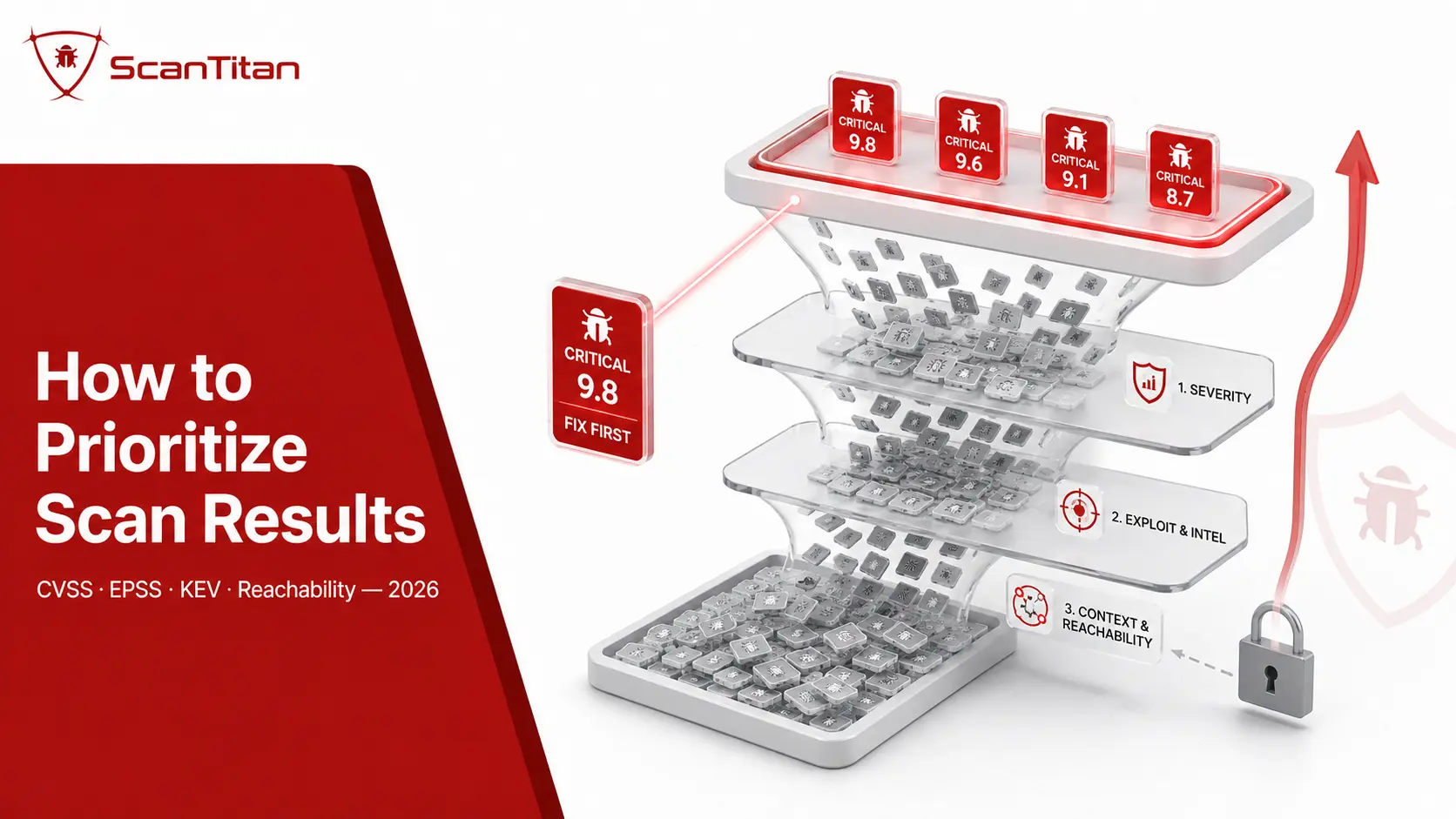
A scan of a mid-sized network returns thousands of findings. You will never fix them all, and the good news is that you do not need to. The prioritization stack that works in 2026 has four layers, and severity is only the first.
- Severity, from CVSS. How bad is it if exploited. Useful, and no longer sufficient on its own. Something changed here in June 2026 that most guides have not caught up with: CISA’s BOD 26-04 revoked and replaced BOD 22-01 and BOD 19-02, and in doing so removed the federal requirement to use CVSS for prioritization at all. The new directive ranks on asset exposure, whether the CVE appears in the KEV catalog, and whether an adversary can automate every step of exploitation. When all of those line up, federal agencies get three days. Nobody outside the federal civilian branch is bound by that, but it is the clearest signal yet of where expectations are heading. ScanTitan’s open ports statistics set out what BOD 26-04 and BOD 26-02 require and how many exploited flaws sit in edge devices.
- Exploitation evidence, from KEV. CISA’s Known Exploited Vulnerabilities Catalog lists vulnerabilities with confirmed active exploitation. If a finding in your report is on that list, it stops being a queue item and becomes work for this week.
- Exploitation probability, from EPSS. FIRST’s EPSS model gives every CVE a probability between 0 and 1 that it will be exploited in the next 30 days, updated daily and now in its fourth version. This is the layer that produces counterintuitive but correct decisions. A CVSS 7.0 on an internet facing service with an EPSS score of 0.9 and public exploit code genuinely outranks a CVSS 9.0 on an internal host that no exploit exists for. Pair it with exploit intelligence on whether working code is circulating.
- Reachability and business context, from you. Can an attacker actually get to this host, and what does it hold. No external data source knows this.
One caveat that affects the severity layer directly and is worth understanding before you trust a scan report’s color coding. The NVD has carried an enrichment backlog since early 2024 and has not cleared it. NIST announced in April 2026 that from 15 April it would prioritize enrichment for CVEs in the KEV catalog, software used across the federal government, and critical software under Executive Order 14028. Everything outside those categories waits longer for its official CVSS vector. In practice that means a recent CVE in your report may show no score, or a vendor supplied one, rather than an NVD analyzed one. Treating an unscored finding as low risk is a mistake with a clear origin.
Where AI and LLMs Fit Into Network Vulnerability Scanning
AI and large language models are becoming an important layer in modern vulnerability management, but they do not replace the scanner itself. Network vulnerability scanners still discover hosts, identify open ports and services, check configurations, and match evidence against CVEs and vendor advisories. AI is most useful after those findings exist, helping analysts understand, prioritize, and remediate them faster.
The strongest use cases are practical ones:
- Finding summarization: turning technical scan output into clear explanations for engineers, managers, and auditors.
- Risk prioritization: combining CVSS, CISA KEV, EPSS, internet exposure, reachability, and asset criticality to highlight what deserves attention first.
- Remediation guidance: explaining patches, configuration changes, and compensating controls using vendor and vulnerability data.
- Natural-language investigation: allowing analysts to ask questions such as show internet-facing KEV findings on production servers.
- Correlation and deduplication: grouping repeated findings across assets and exposing patterns that are difficult to see in a flat report.
AI should remain an interpretation layer rather than the source of truth. An LLM can hallucinate a CVE, confuse affected and fixed versions, or recommend the wrong remediation. Findings should stay grounded in authoritative sources such as vendor advisories, CVE records, the NVD, CISA KEV, and FIRST EPSS. Retrieval-augmented generation, or RAG, is especially useful here because it lets the model work from current scanner evidence and vulnerability intelligence instead of relying only on model memory.
There is also a data-security concern. Vulnerability reports may contain private IP addresses, hostnames, software versions, open ports, network architecture, and request or response evidence. Before sending that information to an external AI service, organizations should understand how the data is stored, retained, accessed, and used.
The practical 2026 workflow is:
scanner → verified finding → CVE and exploit intelligence → business context → AI-assisted triage and remediation → human approval → rescan
AI can make network vulnerability scanning faster and easier to operate. It should not replace the evidence, validation, or human oversight that makes the findings trustworthy.
How often should you run a network vulnerability scan?
Continuously if you can, and on a defined schedule plus event triggers if you cannot. The frameworks are more specific than most summaries suggest.
| Source | Internal assets | External assets |
|---|---|---|
| CIS Controls v8.1 | Quarterly or more often, safeguard 7.5, authenticated and unauthenticated, SCAP compliant tool | Monthly or more often, safeguard 7.6 |
| PCI DSS v4.0.1 | At least every 3 months, requirement 11.3.1, authenticated under 11.3.1.2 | At least every 3 months by an ASV, requirement 11.3.2 |
| Practical baseline | Weekly on critical servers, monthly on the wider estate | Continuous or weekly |
Treat every one of those as a floor rather than a target. A quarterly external scan leaves an average exposure window of roughly 45 days for anything published the day after your scan finishes, against a threat environment where edge device exploitation now drives 22 percent of exploitation driven breaches.
Calendar cadence also misses the events that actually change your risk, so add triggers. Rescan after any change to internet facing services, after a firewall or network change, when a new host or subnet appears, when a major CVE lands in software you run, and after every remediation to verify it worked. PCI DSS encodes two of these explicitly as requirements 11.3.1.3 and 11.3.2.1, which mandate rescans after significant changes. Our scanning plans and pricing are built around scheduled plus event driven scanning for exactly this reason.
What compliance frameworks actually require
“Helps with compliance” is a claim you should never accept without a requirement number. Here are the numbers.
| Framework | What it requires | Notes |
|---|---|---|
| PCI DSS v4.0.1 | 11.3.1 internal scans every 3 months; 11.3.1.2 authenticated; 11.3.1.3 after significant change; 11.3.2 external ASV scans every 3 months; 11.3.2.1 external rescan after change | 11.4 penetration testing is separate |
| CIS Controls v8.1 | Control 7, safeguards 7.5 and 7.6, plus 7.7 remediation monthly or more often | The clearest cadence guidance available |
| NIST SP 800-53 Rev 5 | RA-5 vulnerability monitoring and scanning, SI-2 flaw remediation | The federal control baseline |
| ISO 27001:2022 | Annex A 8.8, management of technical vulnerabilities | Requires a defined process, not a fixed frequency |
| SOC 2 | CC7.1, detection of configuration changes and vulnerabilities | Auditors typically accept scan history as evidence |
| HIPAA Security Rule | Risk analysis and evaluation under the administrative safeguards | Scanning is how most covered entities evidence it |
| NIS2 | Vulnerability handling and disclosure as a baseline risk measure | Relevant to EU entities in scope |
Two details are worth flagging because they catch people out. First, only a PCI SSC Approved Scanning Vendor can produce the attestation that satisfies requirement 11.3.2, so running your own external scan does not close that requirement no matter how good the tool. Second, SAQ A merchants are now in scope for ASV scanning for the first time, which the PCI Security Standards Council covers in its ASV resource guide. A great many small e-commerce merchants who never scanned anything are now required to.
Network vulnerability scanning tools, and a category error worth correcting
Three tools get named constantly in guides on this topic, and two of them are not vulnerability scanners.
Nmap is a port scanner and network mapper. It is superb at host discovery and service fingerprinting, which are stages one and two above, and its scripting engine includes some vulnerability detection scripts such as the SMB check for MS17-010. That does not make it a vulnerability scanner. It has no maintained CVE database behind it and no prioritization. Wireshark is a packet analyzer for inspecting traffic. It finds nothing on its own. Metasploit is an exploitation framework used after you know what is vulnerable. Listing these three as network vulnerability scanning tools, which several of the top ranking guides on this keyword do, is a category error that misleads anyone trying to build a program from the advice.
The actual scanners are OpenVAS and Greenbone, free and capable but demanding real setup, tuning, and ongoing maintenance, and Nessus, the deep commercial reference that assumes an analyst to triage its output. Cloud platforms ship their own limited scanning for their own resources. The honest selection question is not which tool is best. It is which tool your team will still be running in six months, because a scanner nobody maintains produces a report nobody reads.
Common network vulnerability scanning mistakes
The failure modes are consistent across organizations of every size.
- Scanning only what you already know about. Coverage is capped by your asset inventory. Discovery has to come first and has to be continuous, because the assets that hurt you are the ones nobody remembers.
- Running unauthenticated scans and calling it done. Unauthenticated internal scanning misses a large fraction of what is actually there. It is the skin, not the organs.
- Prioritising on CVSS alone. Severity without exploitation evidence and reachability produces a queue sorted by the wrong thing, which is how teams end up patching theoretical criticals while a KEV listed medium sits open.
- Never verifying the fix. A remediation you have not rescanned is a guess. This is also a compliance failure under PCI DSS.
- Scanning quarterly because a framework said quarterly. Those numbers are minimums written for auditors, not risk based recommendations.
- Ignoring findings on devices nobody owns. Printers, cameras, and switches have no obvious owner, so their findings age forever. They are also where default credentials live, a pattern our small business security data shows repeatedly.
- Treating the report as the outcome. The output of a scan is a work queue. Nothing improves until something gets fixed, and the metric that matters is time to remediate, not findings discovered. Reducing security exposure is the goal; the report is just the map.
Frequently asked questions
What is the primary objective of network vulnerability scanning?
To find known security weaknesses across every host on a network before an attacker does, and to produce a prioritized, actionable list of what to fix first. The objective is risk reduction through remediation, not the report itself. A scan that nobody acts on has achieved nothing.
What can network vulnerability scanners not do?
They cannot find zero-days, business logic flaws, or chained attack paths, and they cannot assess assets you never told them about. They also cannot judge whether a finding matters to your business. Scanners detect known weaknesses in known systems, which is valuable but bounded.
Does Nmap scan for vulnerabilities?
Not really. Nmap is a port scanner and network mapper that excels at host discovery and service fingerprinting. Its scripting engine includes a limited set of vulnerability checks, such as detecting MS17-010 over SMB, but it has no maintained CVE database or prioritization behind it.
How do vulnerability scanning tools differ from network scanning tools?
Network scanning tools map what exists: live hosts, open ports, running services. Vulnerability scanning tools take that inventory and add the judgment layer, matching each identified service and version against known vulnerability data to report which ones carry exploitable flaws.
Is network scanning legal?
Scanning infrastructure you own or have written authorization to test is legal. Scanning systems you do not own without permission is not, and unauthorized scanning breaches computer misuse laws in most jurisdictions. Always confirm scope and authorization in writing before testing anything, including third party hosted assets.
Should systems be scanned monthly?
Monthly is a reasonable minimum for internet facing assets and matches CIS safeguard 7.6, but it is a floor. Critical servers benefit from weekly authenticated scans, and any scan schedule should be supplemented with event driven rescans after changes, new CVE disclosures, and remediation.
What is the difference between internal and external vulnerability scanning?
External scanning tests your internet facing addresses from outside the perimeter, showing what a remote attacker sees first. Internal scanning tests hosts behind the firewall, showing what becomes reachable after a foothold. External finds the way in; internal finds how far an intruder gets.
Will a network scan break anything or set off alarms?
Standard scanning is non-destructive and confirms weaknesses without exploiting them. Aggressive enumeration generates significant traffic and can affect fragile embedded devices, so schedule deep scans off peak. Scans will trigger intrusion detection alerts, which is expected, so notify your team before running one.
Where to start
If you have never scanned your network, the first useful step is not choosing a tool. It is writing down every IP range, domain, and cloud account you own, then accepting that the list is incomplete. Scan what you know about, run discovery to find what you do not, and prioritize the results by exploitation evidence rather than severity alone. Fix the exploitable few, verify the fix, and repeat on a schedule short enough that a clean result still means something.
ScanTitan runs internal and external network scans against 100,000 plus CVEs, confirms findings with the request and response evidence that proves them, and ranks what it finds by CVSS, EPSS, and reachability so a two person team fixes the right things first. You can run a free scan on your own ranges without installing anything.