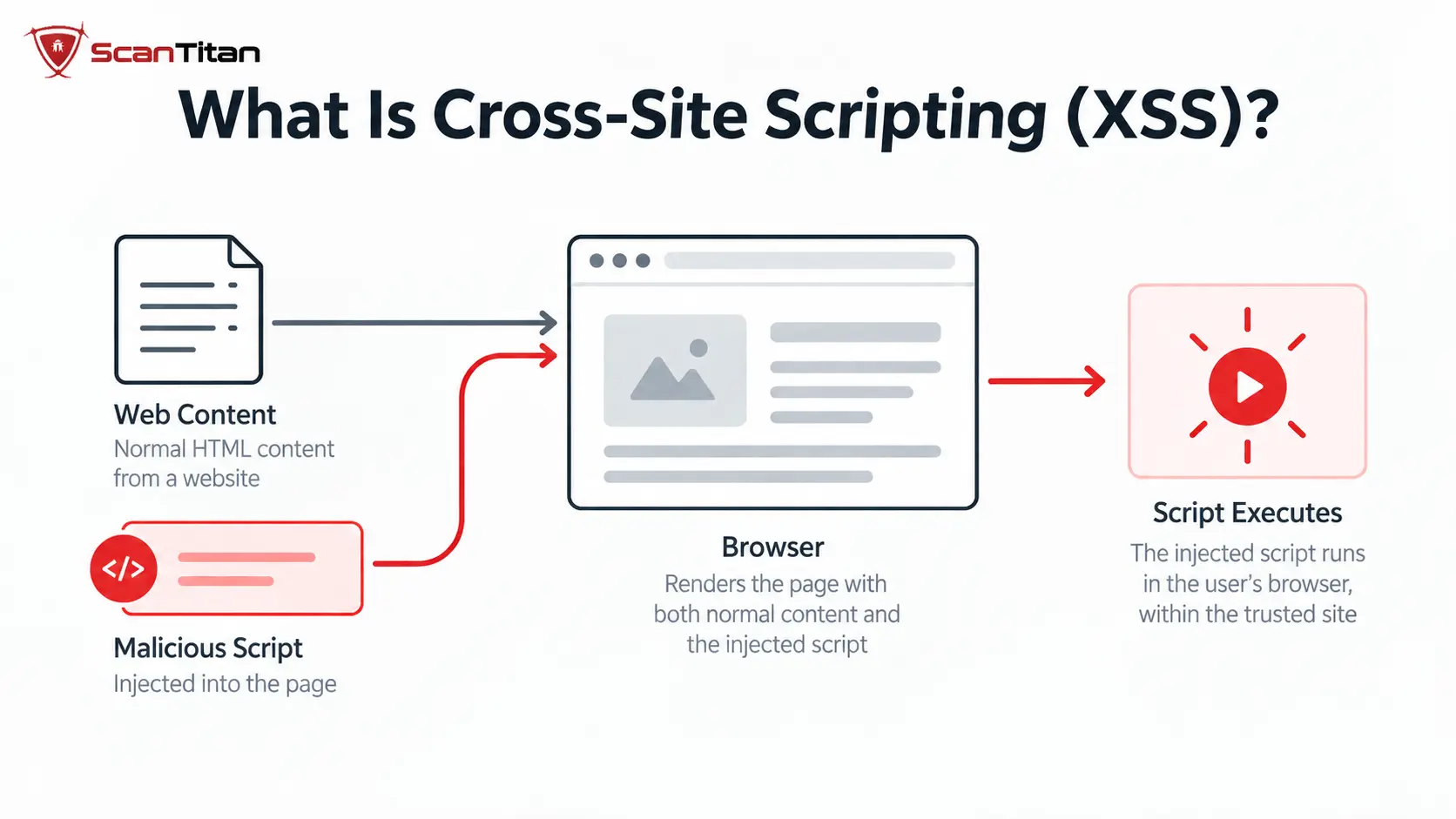
Key distinctionXSS is the vulnerability that lets untrusted content become executable in a browser. The injected script is the payload, and the actions performed after execution are the attack. Keeping those terms separate makes detection and remediation much clearer. When the script is already stored on your site instead of typed into a flaw, it is malicious JavaScript on a website, and removing it takes a different fix.
What Is Cross-Site Scripting (XSS)?
Cross-site scripting occurs when an application crosses a trust boundary incorrectly: attacker-influenced data is treated as code or active markup when it should have remained data. The classic case is a server that inserts a search term, comment, profile value, or other user-controlled input into an HTML response without applying the output encoding required for that exact context. A related client-side case occurs when JavaScript reads attacker-controllable data and passes it into an unsafe DOM API such as innerHTML.
The browser is the component that ultimately executes the injected code. Because the code appears inside the vulnerable site’s origin, the browser can treat it like the site’s own JavaScript. This is why XSS is closely related to the browser’s same-origin security model: a successful attack runs code with access to the resources and actions available to that origin.
A different browser trust problem appears when an application intentionally relaxes the same-origin boundary for external websites. If that trust is too broad, a CORS misconfiguration can allow an attacker-controlled origin to read cross-origin responses it should not be able to access.
XSS belongs to the broader family of web application vulnerabilities, but it should not be confused with server-side code execution. XSS normally executes in the victim’s browser, not as operating-system commands on the web server.
How Does Cross-Site Scripting Work?
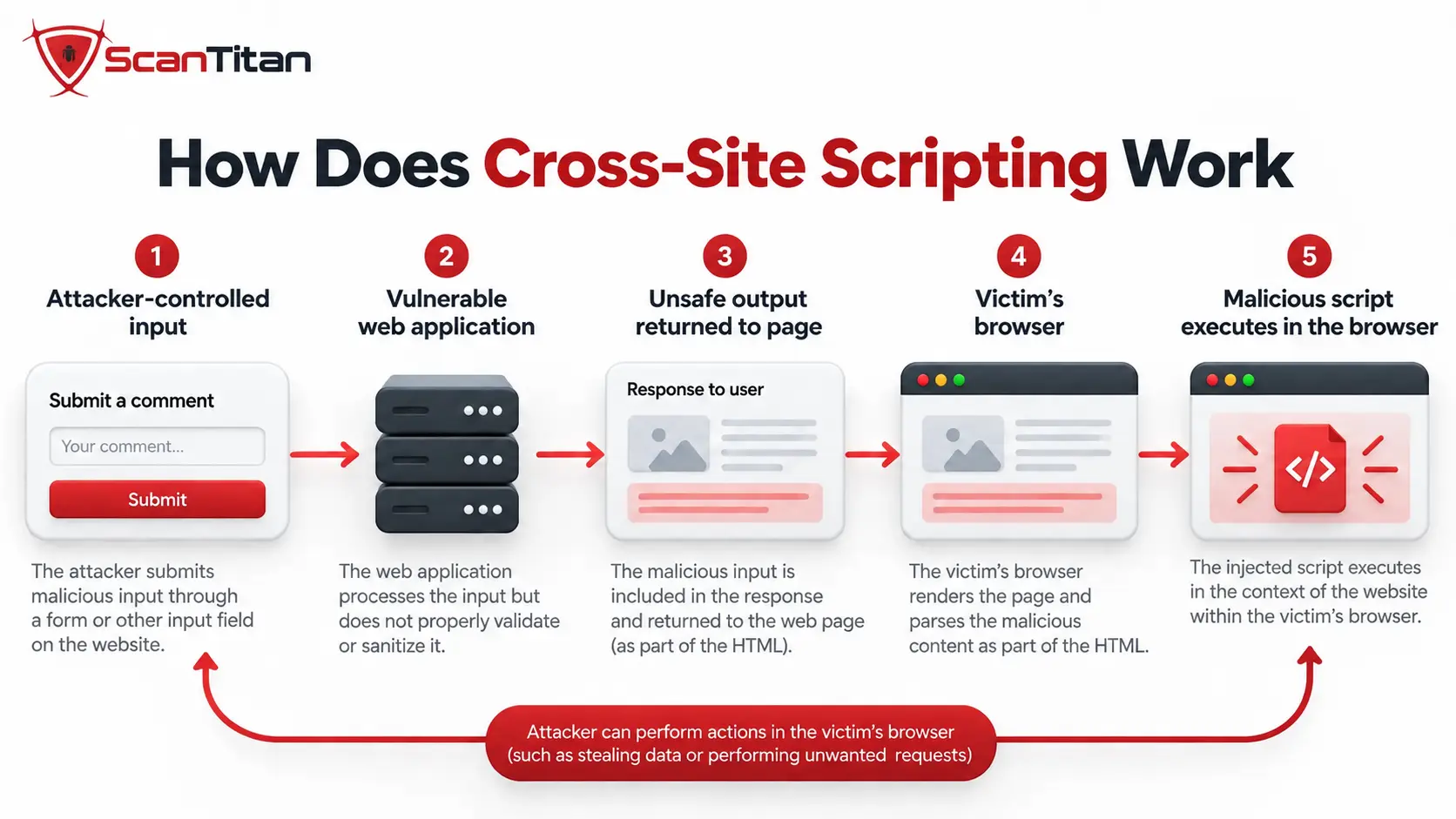
Cross-site scripting works when attacker-controlled data reaches a web page or browser API in a context where the browser interprets it as active content instead of ordinary data. In practical terms, an attacker supplies input, the application handles or renders that input unsafely, and the victim’s browser executes the resulting content within the context of the vulnerable website.
At a high level, this can be understood as two stages:
- Injection: Attacker-controlled data enters the application through a source such as a URL parameter, form field, stored comment, API response, browser storage, or another untrusted input.
- Execution: That data eventually reaches an HTML or JavaScript context that can interpret it as active content. When a victim loads or interacts with the affected page, the browser processes the injected content within the vulnerable site’s origin.
A more precise way to understand XSS is as a source-to-sink data-flow problem:
| Stage | What Happens | Typical Examples |
|---|---|---|
| Source | Attacker-influenced data enters the application or client-side code. | Query parameters, form fields, URL fragments, headers, API responses, stored profile data, browser storage |
| Data flow | The value moves through server-side templates, application logic, or client-side JavaScript. | Template rendering, string concatenation, DOM manipulation, frontend state |
| Sink or output context | The application places the value into a location or API where the browser may interpret it as markup or executable code. | HTML content, attributes, JavaScript contexts, innerHTML, document.write(), eval() |
| Execution | The browser interprets the attacker-controlled value as active content rather than inert text. | Injected JavaScript or other active browser content executes in the context of the vulnerable site |
For server-side XSS, attacker-controlled data is embedded unsafely into an HTTP response generated by the server. The browser receives that response and interprets the injected content when the page loads.
In a pure DOM-based XSS path, the original server response may be harmless. Client-side JavaScript later reads attacker-controlled data from a source, such as a URL or browser-controlled value, and passes it into an unsafe sink such as innerHTML. DOM-based XSS can also involve data that was previously reflected or stored by the server, so server-side and client-side classifications can overlap.
This distinction matters because the vulnerability must be fixed at the point where untrusted data becomes unsafe. Depending on the context, that may require context-aware output encoding, HTML sanitization, safer DOM APIs, or removing dangerous source-to-sink flows.
What Is an XSS Payload?
An XSS payload is attacker-controlled input crafted to demonstrate or trigger executable behavior through an XSS vulnerability. JavaScript is common, but a payload can also use HTML elements, event-handler attributes, URLs, or other browser-interpreted content depending on where the input is placed.
During authorized security testing, a harmless proof-of-concept payload may simply demonstrate that supplied data can be interpreted as active content. A malicious payload may instead attempt actions available within the victim’s browser session.
Whether an XSS payload works depends heavily on its execution context. A value placed in HTML text, an HTML attribute, a URL, an inline JavaScript block, or a DOM sink is parsed differently, so the same payload may execute in one context and remain harmless in another.
What Causes XSS Vulnerabilities?
The root cause is not simply “bad input.” Applications routinely need to accept characters such as angle brackets, quotes, URLs, and rich text. The security failure occurs when untrusted data reaches an output or execution context without the protection appropriate to that context.
- Missing or incorrect output encoding: data is inserted into HTML, an attribute, JavaScript, CSS, or a URL without encoding for that specific context.
- Unsafe DOM sinks: client-side code assigns attacker-controlled strings to APIs that interpret those strings as HTML or JavaScript.
- Unsafe framework escape hatches: a framework may auto-escape normal template output but allow developers to deliberately bypass that protection for raw HTML.
- Weak sanitization: applications that intentionally allow user-supplied HTML may use incomplete filtering or attempt to remove dangerous markup with fragile pattern matching.
- Incorrect trust assumptions: values from a database, API, message queue, browser storage, or internal service are treated as safe merely because they did not come directly from the current HTTP request.
Validation is not the same as XSS preventionInput validation can reject values that violate business rules, but it does not replace context-aware output encoding or sanitization. A value can be valid application data and still become dangerous when inserted into the wrong browser context.
Types of Cross-Site Scripting
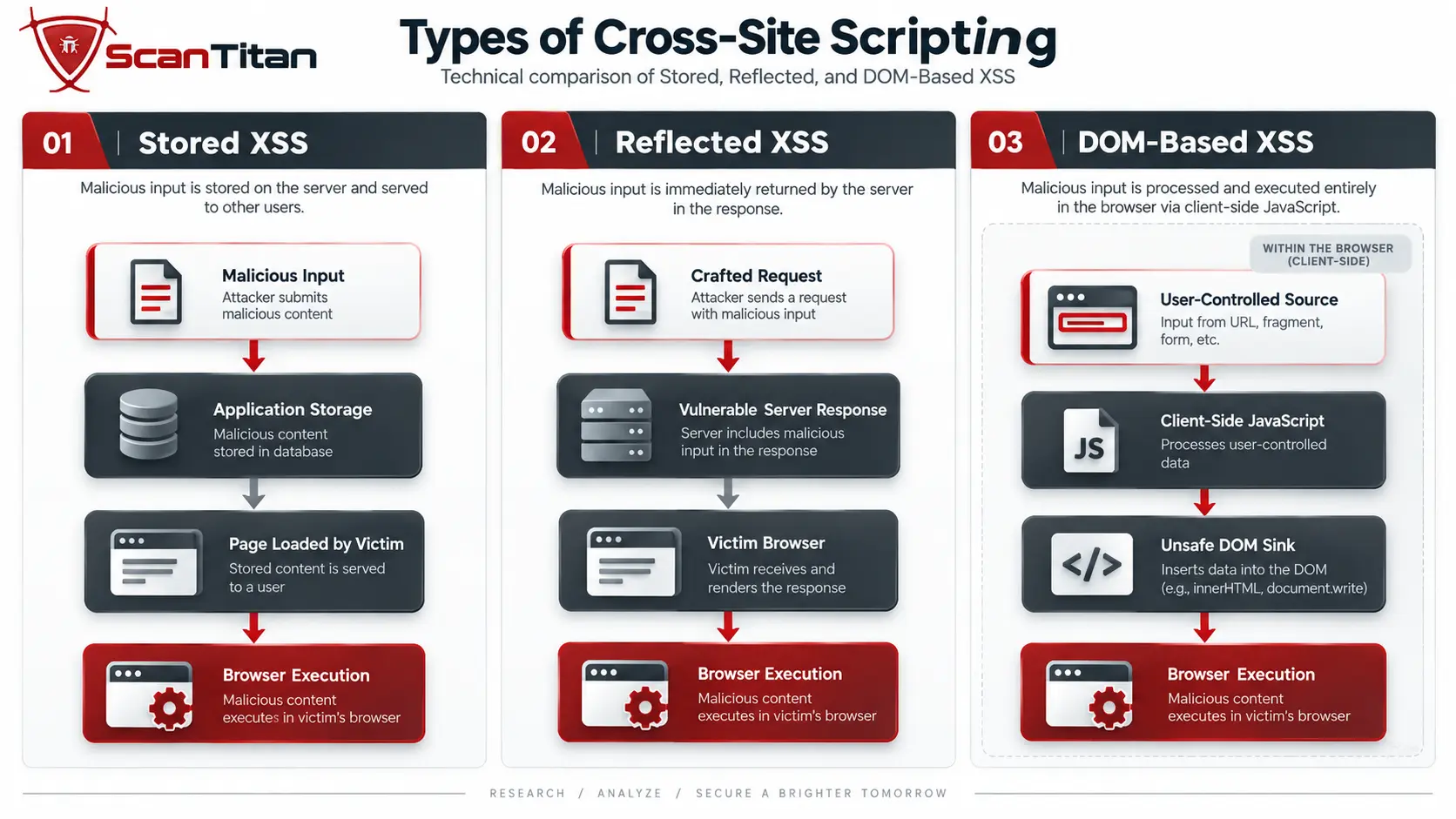
The three names most readers encounter are stored XSS, reflected XSS, and DOM-based XSS. They are useful, but they do not describe one perfectly clean three-way taxonomy. Stored and reflected describe how attacker-controlled data is delivered or persisted, while DOM-based describes where the unsafe injection happens. OWASP therefore also distinguishes server-side XSS from client-side XSS.
Stored XSS (Persistent XSS)
Stored XSS, also called persistent XSS, occurs when attacker-controlled content is saved by the application and later rendered to one or more users without being made safe for the destination context. The stored value might live in a database, support ticket, profile field, comment, product review, log entry, or another data store. The victim does not necessarily need to follow an attacker-created link; loading the affected page can be enough to trigger the unsafe content.
Blind XSS is usually a stored-XSS scenario in which the injected content executes in a different interface that the person submitting it cannot directly observe—for example, when feedback, a support ticket, or a logged value is later opened in an administrator dashboard. These paths are harder for unauthenticated scanners to confirm because injection and execution can occur in different application states or user roles.
Reflected XSS (Non-Persistent XSS)
Reflected XSS, also called non-persistent XSS, occurs when attacker-controlled data from the current HTTP request is inserted into the immediate response without safe context handling. Search terms, error messages, redirect parameters, tracking values, and other request data that an application echoes into a page are common reflected-XSS data flows.
The typical flow is crafted request → vulnerable response → browser interpretation. Because the payload is not saved by the application, exploitation often requires the victim to follow a crafted link or otherwise send the attacker-influenced request. Simple reflection alone is not enough to prove XSS; the tester still has to confirm that the reflected value reaches an executable browser context.
DOM-Based XSS
DOM-based XSS occurs when client-side JavaScript moves attacker-controllable data into a browser sink that interprets the value as HTML or executable code. A typical source might be location.search, location.hash, postMessage, or an API response. A dangerous sink might be innerHTML, document.write(), or a JavaScript-evaluating API. In some DOM-based cases, the malicious value never needs to be included in a server-generated HTML response.
| Variant | Where Attacker Data Comes From | Where the Unsafe Interpretation Happens | Typical Detection Challenge |
|---|---|---|---|
| Stored XSS (persistent) | Persisted application data | Server response or later client-side rendering | Scanner must revisit the location where the stored value is rendered |
| Reflected XSS (non-persistent) | Current request | Usually server-generated response | Context must be confirmed; simple reflection alone is not proof of executable XSS |
| DOM-based XSS | Browser-side source | Client-side JavaScript / DOM sink | May require JavaScript execution, data-flow analysis, or browser instrumentation |
This overlap is more than terminology. A value can be stored by the server and later become dangerous only when frontend JavaScript puts it into an unsafe DOM sink. In that case, “stored” describes persistence while “DOM-based” describes the execution path.
A Simple XSS Example
Consider a search page that prints the submitted search term directly into an HTML response:
<p>You searched for: USER_INPUT</p>If the application treats the value as trusted markup, a harmless test string such as <b>xss-test</b> may be rendered as bold text instead of displayed literally. That proves the application is interpreting supplied markup, but it does not by itself establish every possible XSS impact. A security tester working in an authorized environment would next determine the exact output context and whether executable content can reach it.
The same source-to-sink mistake can happen entirely in JavaScript. For example, this code places URL-derived input into an HTML-interpreting sink:
// Unsafe when userInput can be attacker-controlled
results.innerHTML = userInput;

// Safer when the application only needs to display text
results.textContent = userInput;
The vulnerability is not the existence of userInput by itself. The dangerous relationship is attacker-controlled data reaching a sink such as innerHTML that asks the browser to parse the value as markup. When only text is required, a text-only sink such as textContent preserves the value as data instead.
The secure behavior for server-rendered output is likewise to encode the value for its exact destination so the browser displays the characters as text. If the product intentionally allows a subset of HTML, the application needs a maintained HTML sanitizer with an explicit policy rather than ad hoc string replacement.
What Can an Attacker Do With XSS?
The impact depends on the victim’s privileges, the application’s security controls, and what data is reachable from the injected execution context. XSS does not automatically mean total server compromise, but code running inside an authenticated browser session can still have substantial power.
- Read or alter visible page content and data available to the current page.
- Make same-origin HTTP requests using the victim’s authenticated session.
- Perform application actions available to the victim, including actions protected only by normal session authentication.
- Read browser storage that is accessible to JavaScript.
- Capture data entered into the compromised page or replace trusted interface elements with deceptive content.
- Redirect the victim or load additional content permitted by the application and browser security policy.
Session-cookie theft is often used as the textbook example, but it needs an important qualification: JavaScript cannot directly read a cookie protected with the HttpOnly attribute. That protection reduces one XSS consequence; it does not eliminate the vulnerability. Injected code may still issue authenticated requests from the victim’s browser or interact with sensitive page content.
How to Detect XSS Vulnerabilities
Reliable XSS detection combines runtime testing, browser-side analysis, and code-aware techniques. No single method sees every execution path, especially in authenticated applications, JavaScript-heavy frontends, and workflows where submitted data is rendered later or to a different user.
A useful starting point is to submit a unique, inert marker into application inputs and trace where that value appears. Finding the marker in an HTTP response or the DOM does not by itself confirm XSS. The important next step is determining the context in which the value is rendered and whether the browser can interpret attacker-controlled data as active content.
| Method | What It Is Good At | Important Limitation |
|---|---|---|
| Manual testing | Identifying output contexts, tracing multi-step flows, examining stored values, and understanding application-specific behavior | Slow and dependent on tester skill; testing should only be performed on systems where authorization has been granted |
| DAST | Testing a running application for reflected and many reachable stored XSS paths through HTTP inputs | Coverage depends on crawling, authentication, application state, JavaScript execution, and whether the scanner reaches both the input and rendering point |
| Browser-aware DAST | Executing JavaScript and observing client-side routes, DOM changes, browser-controlled sources, and unsafe sinks in modern applications | Complex source-to-sink flows and unusual application states may still require manual investigation |
| SAST | Tracing attacker-controlled sources through application code toward unsafe rendering or JavaScript execution sinks | Static analysis may report flows that sanitization, framework behavior, or runtime conditions make non-exploitable |
| Code review | Identifying unsafe DOM APIs, framework escape hatches, inappropriate encoding, sanitization mistakes, and application-specific data flows | Finding suspicious code does not automatically prove that the path is reachable or exploitable at runtime |
| SCA / dependency analysis | Identifying known XSS vulnerabilities in third-party libraries, frameworks, and JavaScript packages | Does not determine whether first-party application code contains its own XSS source-to-sink vulnerability |
Detecting Reflected XSS
For reflected XSS, testing focuses on values from the current HTTP request that are returned in the immediate response. Search parameters, error messages, redirect parameters, form values, URL paths, and other request-controlled data are common places to examine, A practical process begins with a unique marker and checks every location where the value appears. The tester then determines whether it is rendered as HTML text, an attribute, a URL, JavaScript, or another browser-interpreted context. Reflection alone is not proof of XSS; the finding becomes meaningful when attacker-controlled data can cross the relevant context boundary and reach executable behavior.
Detecting Stored XSS
Stored XSS requires tracing data across time and application states. The input may be submitted through a comment, profile field, support ticket, message, uploaded metadata, or another feature and rendered later on a different page.
Detection therefore involves mapping both the entry point where attacker-controlled data is stored and the exit point where another user eventually receives it. These locations may be separated by multiple requests, roles, or interfaces, which is why stored XSS can be missed by scanners that only examine immediate request-response behavior.
Blind XSS is an especially difficult stored-XSS case because execution can occur in a page the tester cannot directly access, such as an administrative dashboard or internal support interface. Authorized security testing may use controlled out-of-band callback mechanisms to determine whether submitted content was later executed.
Detecting DOM-Based XSS
DOM-based XSS is detected by tracing attacker-controlled values through client-side JavaScript. Relevant sources can include URL components, browser storage, messages, or other browser-accessible data, while dangerous sinks include APIs that interpret strings as HTML or executable JavaScript, Browser developer tools, browser-aware scanners, and static JavaScript analysis can help trace these source-to-sink relationships. Importantly, a vulnerable value does not always appear visibly in the rendered DOM; JavaScript execution sinks can process data without creating searchable HTML, so source-code or runtime data-flow analysis may be necessary.
Confirming an XSS Finding
A reflected value, suspicious sink, or static-analysis warning should not automatically be reported as confirmed XSS. A strong finding establishes the complete data flow:
attacker-controlled source → application processing → unsafe rendering or execution sink → browser interpretation
This evidence-first approach helps distinguish exploitable XSS from harmless reflection, correctly encoded output, unreachable code, or false-positive scanner findings.
ScanTitan’s guide to
checking a website for vulnerabilities manually
explains the broader evidence-first approach to manual security testing.
Authentication also affects detection coverage. A public scan cannot assess forms, dashboards, administrative interfaces, or stored rendering paths it cannot reach. When potentially vulnerable functionality exists behind a login, an
authenticated vulnerability scan
can expose additional application states, inputs, and rendering paths.
How to Prevent Cross-Site Scripting
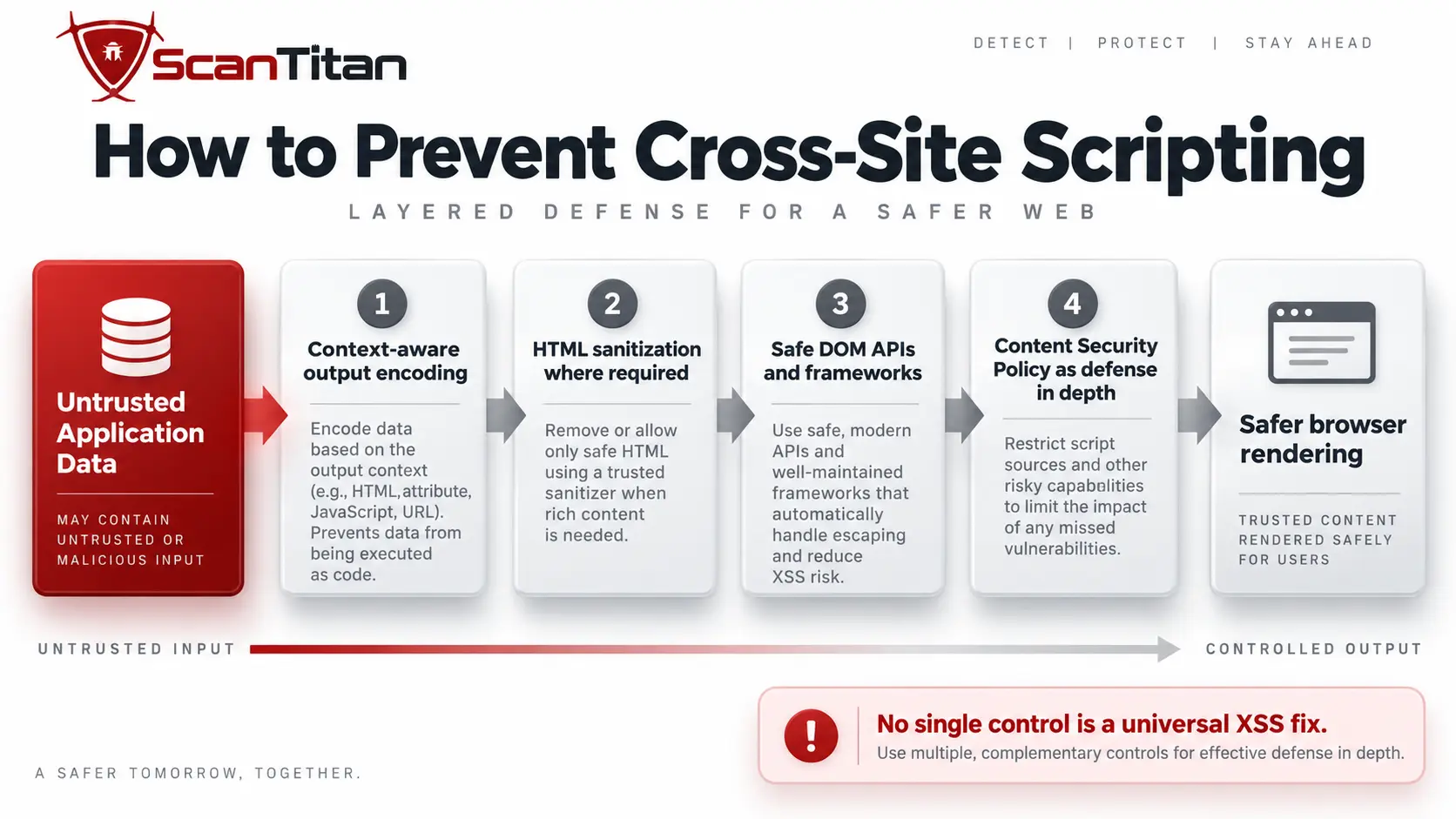
There is no universal string filter that solves XSS. Prevention works by keeping untrusted data separate from executable browser contexts and applying the right control at the point where data is rendered or interpreted.
Use Context-Aware Output Encoding
Encode untrusted values for the exact destination where they will appear. HTML text, HTML attributes, URLs, CSS, and JavaScript contexts have different parsing rules, so encoding that is correct for one context may be unsafe in another. Prefer framework templating features that escape output automatically and avoid bypassing those defaults without a clear security review.
| Output Context | Example Destination | Main Risk | Safer Handling |
|---|---|---|---|
| HTML text | <div>USER_DATA</div> |
Data is parsed as markup | Use HTML text encoding or framework auto-escaping |
| HTML attribute | <div title="USER_DATA"> |
Input breaks out of the intended attribute value | Use quoted attributes plus attribute-context encoding or safe framework binding |
| URL | <a href="USER_DATA"> |
Unsafe schemes or malformed destinations become active navigation | Validate allowed schemes/destinations and apply URL encoding where the URL component requires it |
| JavaScript | Data inserted into an inline script or JavaScript string | Input crosses into executable JavaScript syntax | Avoid inserting untrusted strings directly into executable JavaScript; use safe serialization and data-oriented APIs |
| CSS | Dynamic style values | Unexpected parser behavior or unsafe browser interpretation | Avoid untrusted dynamic CSS where possible and constrain values to an explicit safe set |
| DOM sink | element.innerHTML = value |
The browser reparses a string as HTML | Use text-only DOM APIs when markup is unnecessary; sanitize explicitly when trusted markup is required |
Sanitize HTML When the Application Must Allow Markup
Some products genuinely need rich user-authored HTML. In that case, simple output encoding would remove the desired formatting. Use a maintained HTML sanitizer that parses markup and enforces an explicit allowlist or policy. Avoid trying to remove dangerous HTML with regular expressions or home-grown string filters.
How to Prevent XSS in JavaScript: Use Safe DOM APIs
When client-side code only needs to display text, use APIs such as textContent or createTextNode() instead of HTML-interpreting sinks. Review uses of innerHTML, outerHTML, insertAdjacentHTML(), document.write(), eval(), and similar execution-capable APIs. The important question is not whether a source looks suspicious; it is whether attacker-influenced data can reach a sink that interprets it.
Modern frontend frameworks reduce many routine XSS risks by escaping interpolated text by default, but developers can deliberately bypass those protections. Raw-HTML features such as React’s dangerouslySetInnerHTML and Vue’s v-html are not vulnerabilities by themselves; they become dangerous when attacker-controlled HTML reaches them without appropriate sanitization. Framework auto-escaping is therefore a strong default, not permission to treat every rendering API as safe.
Use Trusted Types for Client-Side XSS Hardening
Trusted Types can reduce DOM-based XSS risk by requiring dangerous browser sinks to receive typed values created through approved policies instead of arbitrary strings. Modern browser support improved significantly in 2026, although teams still need to account for older browsers and must provide a real sanitizer or other safe transformation inside the Trusted Types policy. Trusted Types enforce a safer data-handling boundary; they are not themselves an HTML sanitizer.
Deploy a Strict Content Security Policy as Defense in Depth
A carefully designed Content Security Policy can reduce the impact of an XSS flaw by restricting which scripts the browser may execute. Nonce- or hash-based strict policies are stronger than broad host allowlists. CSP should be treated as a backup control, not as a substitute for fixing unsafe rendering, sanitization, or DOM data flows.
Web application firewalls (WAFs) can block some known XSS patterns and provide another defensive layer, especially against common payload signatures. They do not repair the application’s unsafe source-to-sink data flow and can be bypassed by context-specific variations, so a WAF should complement—not replace—context-aware encoding, sanitization, safe rendering, CSP, and application-level fixes.
Teams that maintain JavaScript-heavy applications should also review the difference between dependency risk and first-party code risk. ScanTitan’s guide to scanning JavaScript for vulnerabilities separates SCA findings from source-to-sink issues that require SAST, runtime testing, or code review.
XSS vs CSRF: What Is the Difference?
Cross-site scripting (XSS) and cross-site request forgery (CSRF) can both abuse a user’s relationship with a trusted web application, but they exploit different security boundaries.
XSS causes attacker-controlled content to execute within the vulnerable application’s browser origin.
The injected script may be able to read page data, make requests, modify the interface, and perform actions available to the victim.
CSRF does not require attacker-controlled code to execute inside the target application.
Instead, it tricks or causes a victim’s browser to send an unintended request to an application that accepts the browser’s automatically supplied credentials, such as session cookies.
| Question | XSS | CSRF |
|---|---|---|
| Core problem | Attacker-controlled content reaches an executable browser context | The application accepts an unintended request carrying the victim’s credentials |
| Where does the attack execute? | Inside the vulnerable site’s browser origin when exploitation succeeds | Attacker-controlled script execution in the target origin is not required |
| Does it normally require an authenticated victim? | No. Authentication may increase the impact, but XSS can affect unauthenticated users | Usually requires the browser to hold credentials or other ambient authority that the target accepts |
| Can the attacker cause requests? | Yes. Executing JavaScript can generally send same-origin requests with the victim’s privileges | Yes. Causing an unintended authenticated request is the core mechanism |
| Can the attacker read responses? | Typically yes when script executes within the target origin | Traditional CSRF normally cannot read cross-origin responses because of browser same-origin restrictions |
| Typical impact | Reading accessible page data, modifying content, performing actions as the victim, or abusing authenticated functionality | Performing specific state-changing actions that the victim is authorized to perform |
| Primary defenses | Context-aware output encoding, HTML sanitization where required, safe DOM APIs, and CSP or Trusted Types as additional controls | Anti-CSRF tokens, appropriate SameSite cookie settings, and Origin or request validation where applicable |
One useful way to think about the difference is that traditional CSRF is largely a one-way request attack: the attacker causes the victim’s browser to send a request but normally cannot inspect the protected response. XSS can become two-way because JavaScript executing within the trusted origin can both send requests and read data available to that origin.
Can XSS Bypass CSRF Protection?
An exploitable XSS vulnerability can often undermine anti-CSRF defenses. If attacker-controlled JavaScript executes within the application’s origin, it may be able to request a page containing a valid CSRF token, read that token, and then submit a protected request using the victim’s session.
This does not mean that CSRF tokens are useless. They remain an important defense against cross-site request forgery. In some specific reflected-XSS workflows, requiring a valid CSRF token on the vulnerable request can also make external exploitation harder. However, CSRF tokens do not remediate the underlying XSS vulnerability, and stored XSS is not prevented simply by placing a CSRF token on the affected page.
The distinction is therefore important: XSS defenses prevent attacker-controlled content from becoming executable browser code, while CSRF defenses verify that sensitive requests were intentionally initiated from an authorized application context.
Can Vulnerability Scanners Detect XSS?
Yes, vulnerability scanners can detect many XSS vulnerabilities, but the answer depends heavily on the application and the XSS path. DAST is well suited to probing URL parameters, form fields, headers, cookies, and other runtime inputs for reflected XSS. More advanced scanners can also revisit stored values and execute JavaScript in a real or headless browser to expose client-side behavior.
Reflected and stored XSS are among the most reliably detected classes, because a website security scanner can inject a payload, reload the page and confirm whether it executed.
Coverage becomes harder when the vulnerable path requires authentication, multiple user roles, a specific workflow, delayed rendering, an administrator-only review screen, or complex JavaScript data flow. DOM-based XSS may require browser instrumentation or source/sink analysis that a simple HTTP scanner cannot perform. A scanner finding should therefore be treated as evidence within a broader testing process, not as proof that every XSS path has been exhausted.
A website vulnerability scanner is valuable for repeatable DAST coverage, especially when it can crawl JavaScript-heavy applications and preserve authentication. Manual review remains important for context and confirmation. That division of labor is the same reason vulnerability scanning and penetration testing are complementary rather than interchangeable.
Scanner coverage ruleThe scanner can only test application states it can reach. Public-only crawling cannot assess a stored XSS path that renders only inside an authenticated admin queue, and a non-JavaScript crawler may miss client-side routes or DOM sinks entirely.
How to Remediate an XSS Finding
Fixing XSS starts by tracing the unsafe value rather than deleting one test payload. Identify the source, determine where the value becomes executable, and apply a control appropriate to that context. Then retest the original path and nearby paths that use the same component, template, sanitizer, or DOM sink.
- Identify the attacker-controlled source and every transformation applied to the value.
- Locate the exact HTML, attribute, URL, JavaScript, or DOM context where the value becomes unsafe.
- Replace unsafe rendering with framework auto-escaping, context-aware encoding, a safe sink, or a maintained sanitizer as appropriate.
- Review similar code paths for the same pattern instead of treating the reported parameter as an isolated bug.
- Add a regression test and rerun runtime scanning after the fix.
- Use CSP, Trusted Types, and hardened session cookies as additional controls rather than substitutes for remediation.
If XSS is one finding among many, remediation order should also consider exposure, user privileges, exploitability, and business context instead of relying on a severity label alone. ScanTitan’s guide to vulnerability remediation prioritization explains that broader decision process.
Because application code and dependencies change continuously, a successful fix should also be followed by recurring checks. Continuous vulnerability scanning helps detect regressions and newly exposed routes between deeper manual assessments.
Cross-Site Scripting FAQ
What does XSS stand for?
XSS stands for cross-site scripting. The abbreviation uses X instead of C to avoid confusion with CSS, which normally means Cascading Style Sheets.
What are the three main types of XSS?
The common three-part model is stored XSS, reflected XSS, and DOM-based XSS. Stored XSS is also called persistent XSS, while reflected XSS is also called non-persistent XSS. DOM-based describes a client-side injection path, so the categories can overlap. Blind XSS is generally a stored-XSS scenario rather than a separate fourth main category.
Is XSS a client-side or server-side vulnerability?
The injected code executes in the browser, but the vulnerable data flow can originate in server-side rendering or client-side JavaScript. OWASP distinguishes server XSS from client XSS for this reason.
Can HttpOnly cookies prevent XSS?
No. HttpOnly prevents JavaScript from directly reading the protected cookie value, which can reduce session-cookie theft, but injected code may still read page data and perform authenticated actions from the victim’s browser.
Is Content Security Policy enough to stop XSS?
No. A strict CSP is a valuable defense-in-depth control, but the underlying unsafe rendering or DOM data flow should still be fixed with the correct encoding, sanitization, or safe API.
Can an automated scanner find DOM-based XSS?
Some browser-aware DAST tools can detect DOM-based XSS, especially when they execute JavaScript and monitor DOM behavior. Coverage varies, and complex source-to-sink flows may still require SAST, code review, or manual browser testing.
Is XSS still in the OWASP Top 10?
Yes. In the OWASP Top 10:2025, cross-site scripting is included within A05:2025 Injection rather than appearing as a separate top-level category. MITRE classifies the underlying weakness as CWE-79.
What is the difference between XSS and SQL injection?
XSS causes attacker-controlled content to execute in a user’s browser, while SQL injection changes how a database interprets a query. Both are injection-related weaknesses, but they target different interpreters and require different remediation techniques.