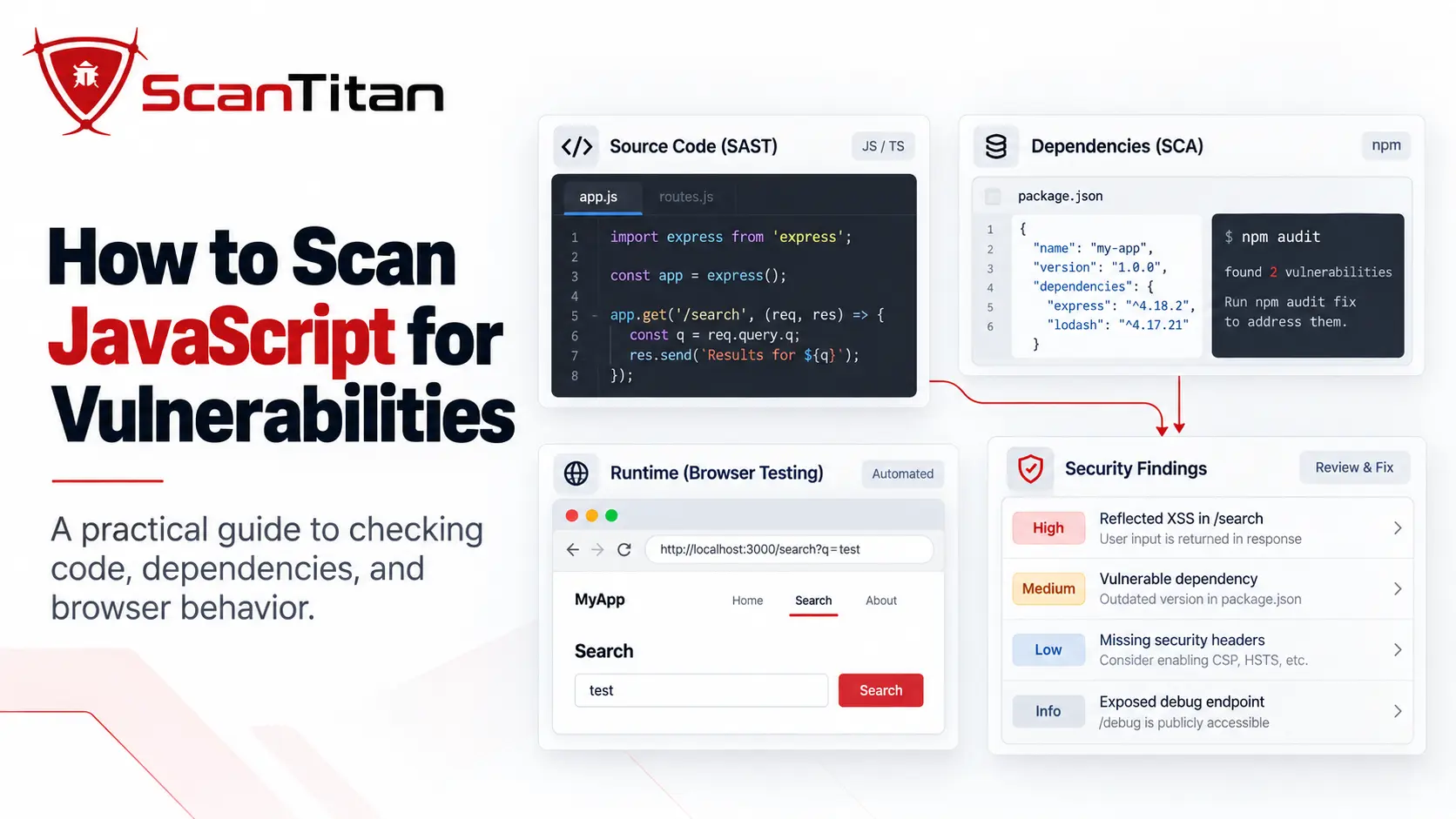
If you want to know how to scan JavaScript for vulnerabilities, do not rely on a single security check. A modern JavaScript application can contain weaknesses in the code your team writes, known vulnerabilities in npm dependencies, and security issues that appear only after the application runs in a browser. A useful JavaScript security assessment therefore combines static code analysis, dependency scanning, and runtime testing, then validates the findings before fixes are applied and rescans all three layers afterward.
QUICK ANSWERScan your JavaScript or TypeScript source code with SAST, inspect direct and transitive dependencies with SCA, and test the deployed application with browser-driven DAST. Each layer answers a different security question, and none of them provides complete JavaScript coverage by itself.
What Exactly Should You Scan in a JavaScript Application?
“Scan the JavaScript” can mean three very different things.
The first surface is your own source code: the JavaScript or TypeScript written by your developers. This is where insecure data flows, dangerous DOM operations, code-injection patterns, hardcoded sensitive data, and other code-level issues can appear. Static Application Security Testing, or SAST, analyzes that code without requiring the application to be running.
The second surface is the software supply chain. A project may depend on dozens or hundreds of packages through package.json, lockfiles, and transitive dependencies you never installed directly. Software Composition Analysis, or SCA, determines whether those components correspond to known vulnerability advisories.
The third surface is the running application. JavaScript can build the DOM, create client-side routes, trigger fetch or XHR requests, call GraphQL APIs, process browser state, and load additional scripts only after user interaction. Dynamic Application Security Testing, or DAST, examines that deployed behavior.
| Security layer | What it examines | Typical findings | Main blind spot |
|---|---|---|---|
| SAST | JavaScript and TypeScript source code | Unsafe data flows, dangerous DOM sinks, injection patterns, hardcoded sensitive data | Runtime states the analysis cannot reproduce |
| SCA | Direct and transitive dependencies | Known CVEs, advisories, vulnerable package versions | Security flaws in your own application logic |
| DAST | The deployed application | DOM XSS, runtime routes, API behavior, authentication-state issues | Source paths that never execute during testing |
| Manual validation | The actual finding and application context | Applicability, reachability, exploitability, false positives | Difficult to scale as the only testing method |
THE CORE IDEAA complete JavaScript security assessment checks your code + your dependencies + the running application. Running only one of those scans leaves part of the attack surface untested.
How to Scan JavaScript for Vulnerabilities
Step 1: Identify What Kind of JavaScript Application You Are Scanning
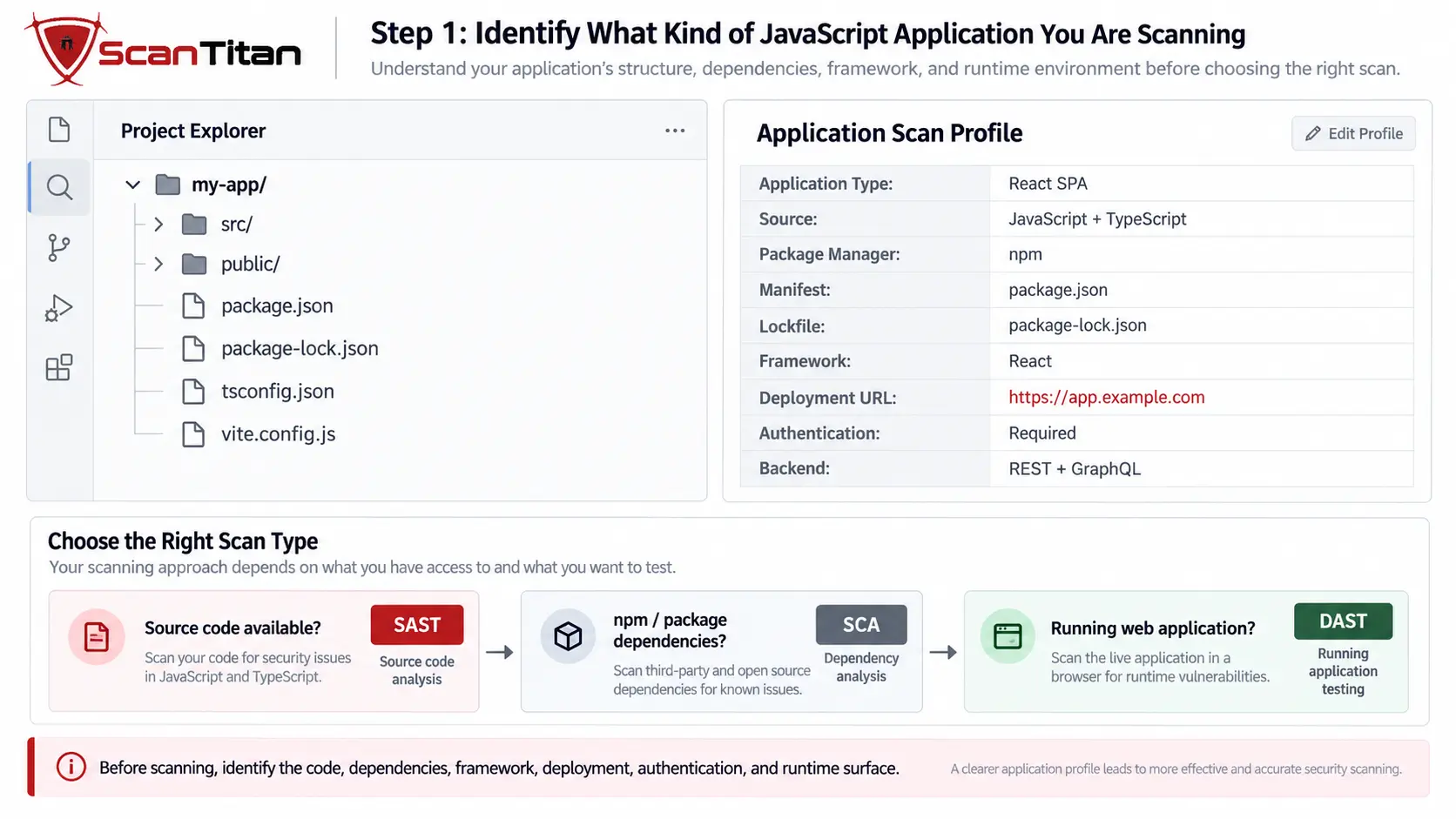
Before running a scanner, establish what actually exists. A Node.js service, React single-page application, browser script, Next.js application, npm package, and static website loading third-party JavaScript do not have identical attack surfaces.
For a source-controlled application, identify:
- the repository and relevant source directories
- whether the project uses JavaScript, TypeScript, or both
- the package manager: npm, Yarn, pnpm, or another tool
- the dependency manifest and lockfile
- the framework or runtime, such as Node.js, React, Angular, Vue, or Next.js
- the build process
- the production or staging URL
- whether authentication is required
- whether the frontend communicates with REST, GraphQL, WebSocket, or other APIs
A simple scan profile might look like:
Application: React SPA
Source: JavaScript + TypeScript
Package manager: npm
Manifest: package.json
Lockfile: package-lock.json
Deployment: https://app.example.com
Authentication: Required for dashboard
Backend calls: REST + GraphQL
This prevents a common mistake: scanning only the production URL when the question is really about source-code security, or running only npm audit when the goal is to assess the deployed application.
Source code available?
→ SAST

npm / Yarn / pnpm dependencies?
→ SCA

Running web application?
→ Browser-driven DAST
Step 2: Scan npm Dependencies for Known Vulnerabilities
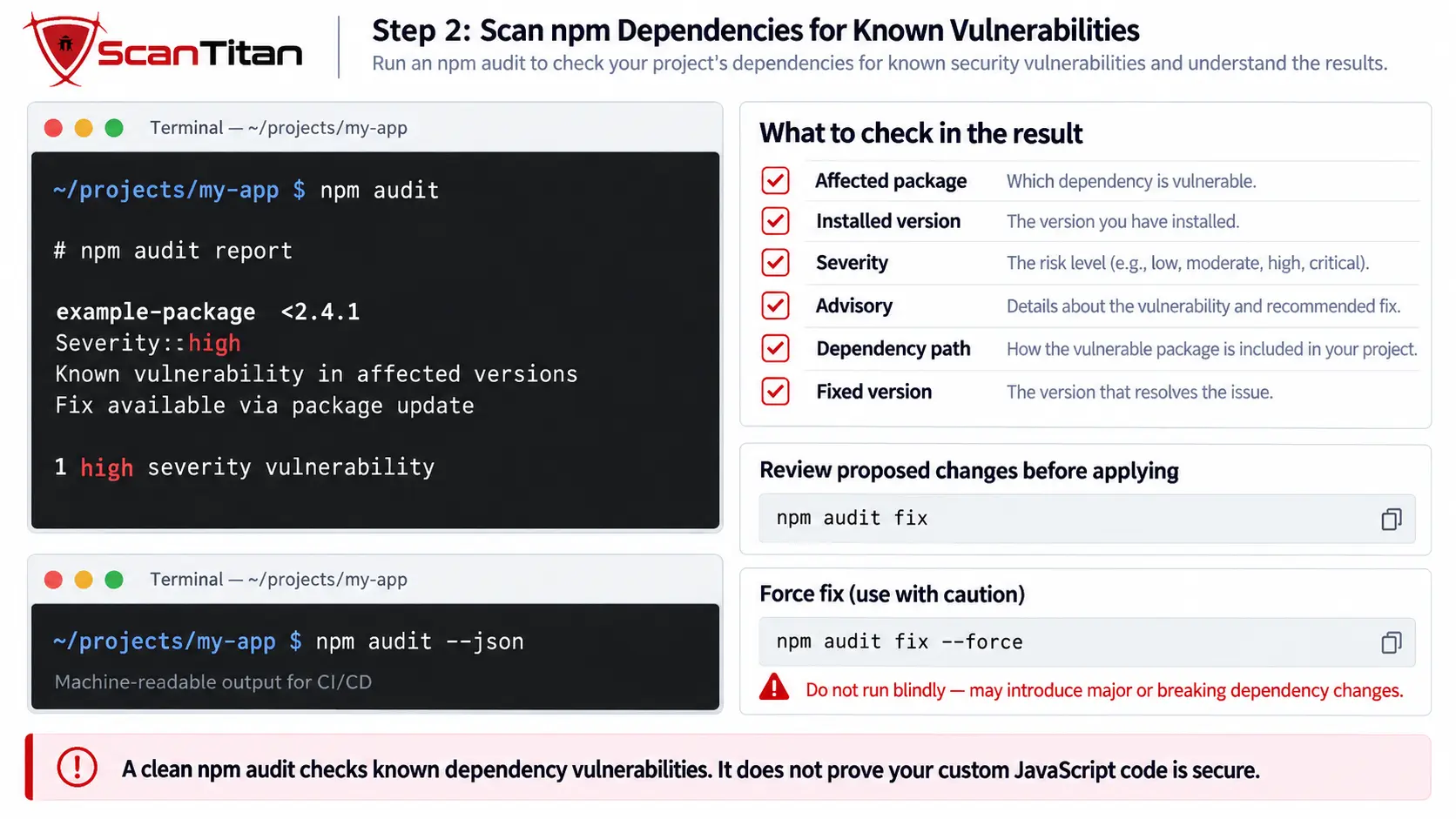
For an npm project, start in the project directory and run:
npm auditAccording to the official npm audit documentation, the command analyzes the configured dependency tree against vulnerability information from the registry and returns known issues together with remediation information where available.
A report can identify information such as:
- affected package
- severity
- security advisory
- dependency path
- affected version range
- whether a fix is available
For machine-readable output, use:
npm audit --jsonThis can be useful for CI/CD pipelines, report processing, build checks, or comparing results over time.
If npm proposes a compatible remediation, you may also see:
npm audit fixBut treat this as a change operation, not simply another scan. npm documents that npm audit fix performs an installation operation, and some vulnerabilities still require manual review or intervention.
DO NOT APPLY –FORCE BLINDLYnpm audit fix --force can permit dependency changes outside the normally accepted version range. Review the proposed upgrade and test application compatibility before treating it as remediation.
Most importantly, a clean npm audit result does not mean the JavaScript application is secure. It reports known dependency vulnerabilities that npm can identify; it does not comprehensively inspect the security of your custom code or reproduce browser behavior.
Step 3: Check Direct and Transitive Dependencies
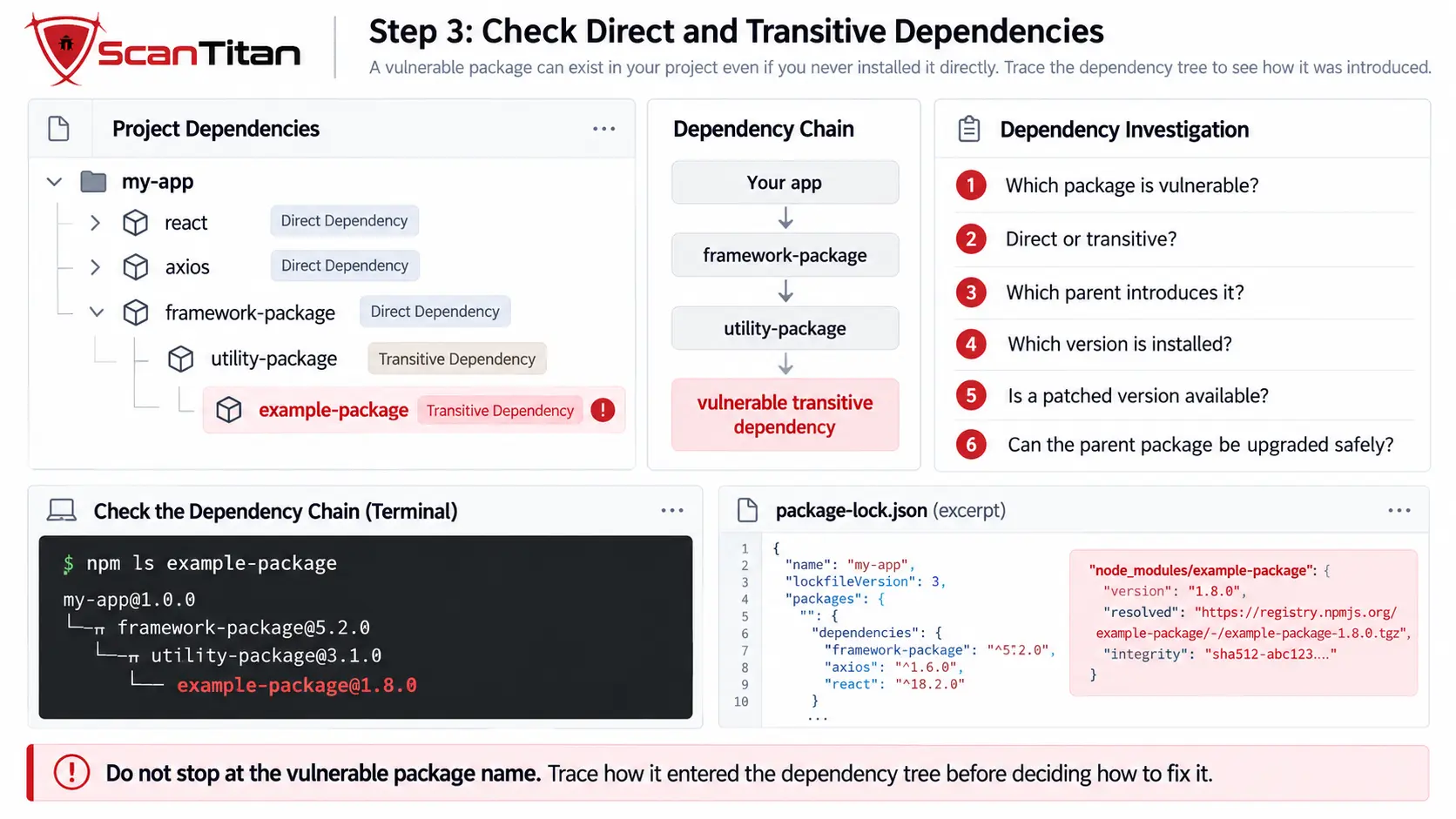
Modern JavaScript dependency trees are not flat.
Your application may depend on a vulnerable package even when your developers never installed it directly:
your-app
└── framework-package
    └── utility-package
        └── vulnerable-package
This is a transitive dependency. Another package introduced it into your dependency graph, Transitive dependencies can also create a software supply chain risk if an upstream package, maintainer account, or publishing process is compromised. See our guide to JavaScript npm supply chain attacks to understand how malicious packages, dependency confusion, typosquatting, and install-time scripts can reach downstream applications, GitHub’s Dependabot vulnerability-detection documentation explains that vulnerability detection can cover both direct and transitive dependencies when GitHub can determine the package version from the project’s manifest or lockfile, The lockfile matters because it records resolved versions rather than only the package ranges your team declared. npm’s package-lock.json documentation explains how the lockfile describes the generated dependency tree and resolved package information.
For every vulnerable dependency, determine:
Which package is vulnerable?
↓
Is it direct or transitive?
↓
Which parent package introduces it?
↓
Which installed version is affected?
↓
Is a patched version available?
↓
Can the parent dependency be upgraded safely?
This is much more actionable than simply reporting that the project contains a certain number of package vulnerabilities.
Another useful option is Retire.js, which is designed to identify versions of JavaScript libraries and Node.js modules with known vulnerabilities.
Step 4: Scan Your Own JavaScript and TypeScript Source Code
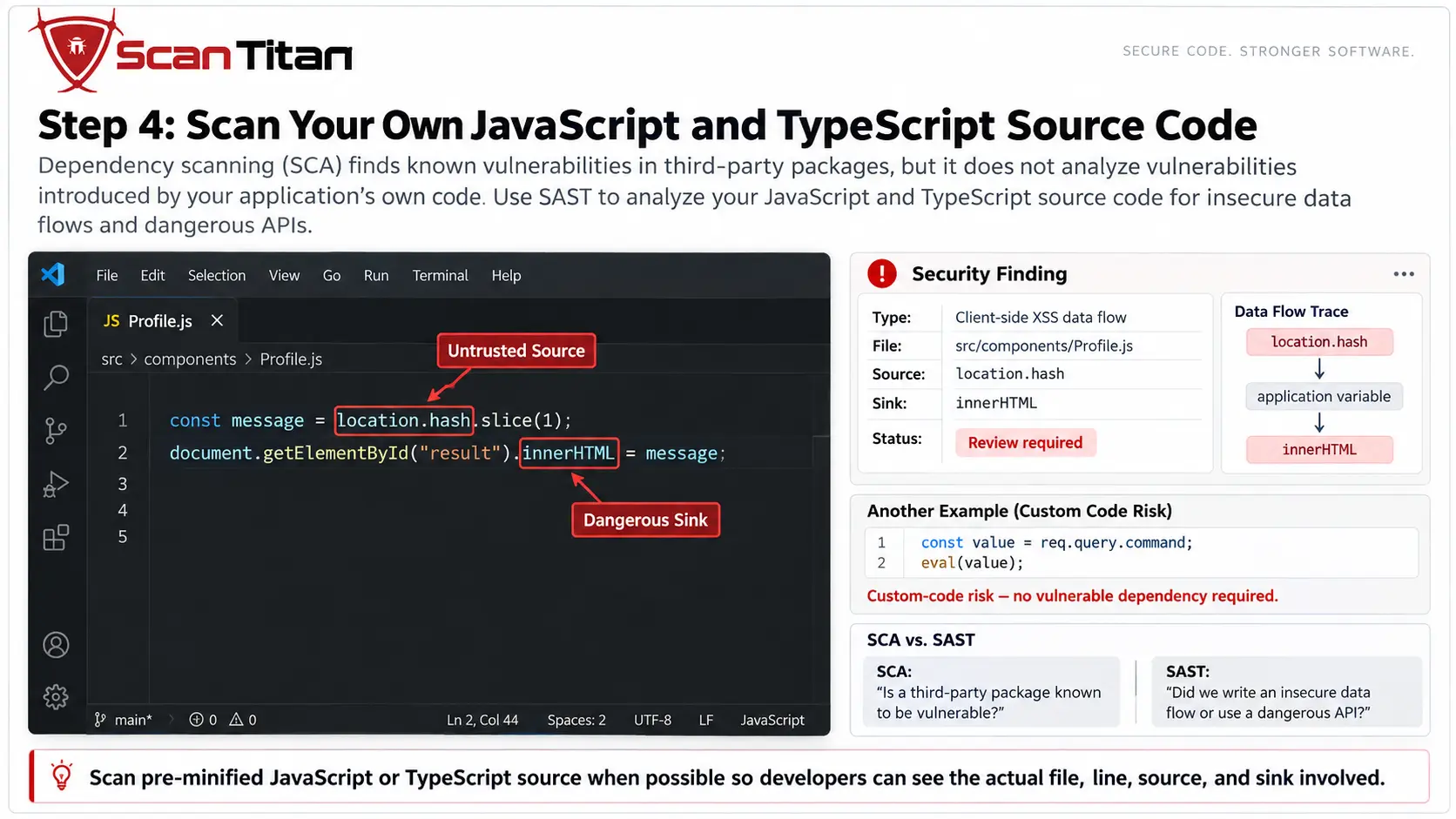
Dependency scanning asks:
Is software we imported known to be vulnerable?
Static analysis asks a different question:
Did we write insecure code?
This requires SAST.
GitHub’s current CodeQL JavaScript and TypeScript query documentation includes checks for security issues such as client-side cross-site scripting, code injection, client-side request forgery, unsafe code construction, origin-validation problems, sensitive-data exposure, path-related vulnerabilities, and other CWE-mapped weaknesses.
That means insecure application code can exist even when every third-party dependency is patched.
Consider this deliberately simple example:
const value = req.query.command;
eval(value);
There does not need to be a vulnerable npm package involved. The security problem is in the application’s own data flow and use of an execution-capable function.
The same distinction applies to browser code:
const message = location.hash.slice(1);
document.getElementById("result").innerHTML = message;
A dependency scanner cannot meaningfully evaluate the relationship between the untrusted source and the DOM sink in that code.
SAST AND SCA ANSWER DIFFERENT QUESTIONSSCA looks for known security problems in third-party components. SAST analyzes the security behavior of the code your developers wrote. A mature JavaScript assessment normally needs both.
Step 5: Review Dangerous JavaScript Sources and Sinks
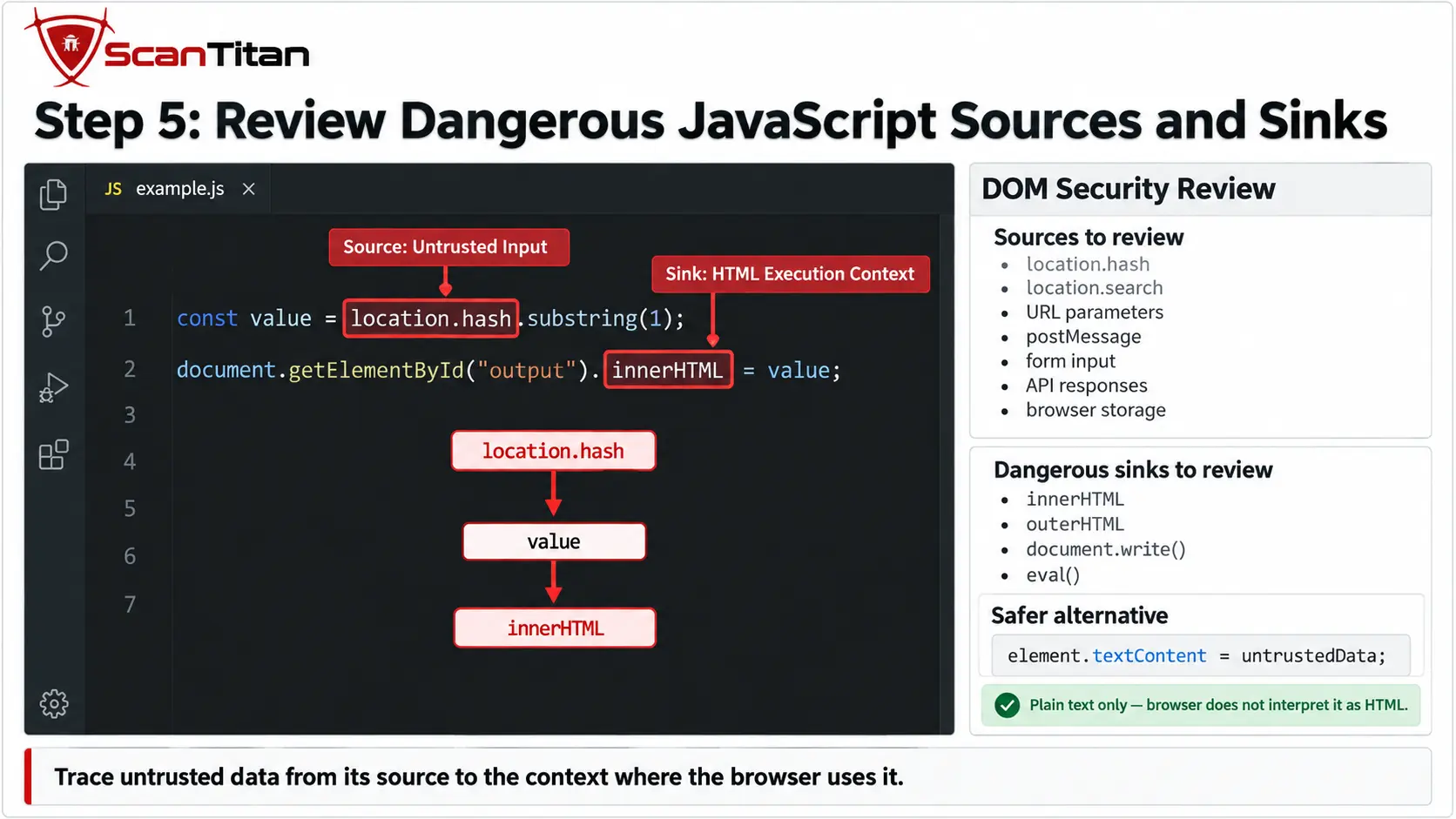
One JavaScript-specific concept worth understanding is the relationship between untrusted sources and dangerous sinks.
A source is somewhere untrusted or attacker-influenced data enters the application. Depending on the application, examples can include:
location.hashlocation.search- URL parameters
postMessagedata- form input
- API responses
- browser storage
A sink is an API or operation that can interpret the data as HTML, script, or another execution-capable context.
For example:
const value = location.hash.substring(1);
document.getElementById("output").innerHTML = value;
Here the relationship is:
Source → location.hash

Sink → innerHTML
If untrusted content can flow into an unsafe HTML sink without the required protections, DOM-based cross-site scripting may become possible.
The OWASP DOM-based XSS Prevention Cheat Sheet discusses dangerous DOM APIs such as innerHTML, outerHTML, document.write(), and other execution-capable sinks. OWASP recommends safer DOM construction methods and using properties such as textContent when the intended result is plain text rather than HTML.
For example:
element.textContent = untrustedData;The lesson is not simply “never use innerHTML.” The important task is to understand where data originates, which context receives it, and whether untrusted data can reach an execution-capable sink unsafely.
Step 6: Test the Deployed Application After JavaScript Executes
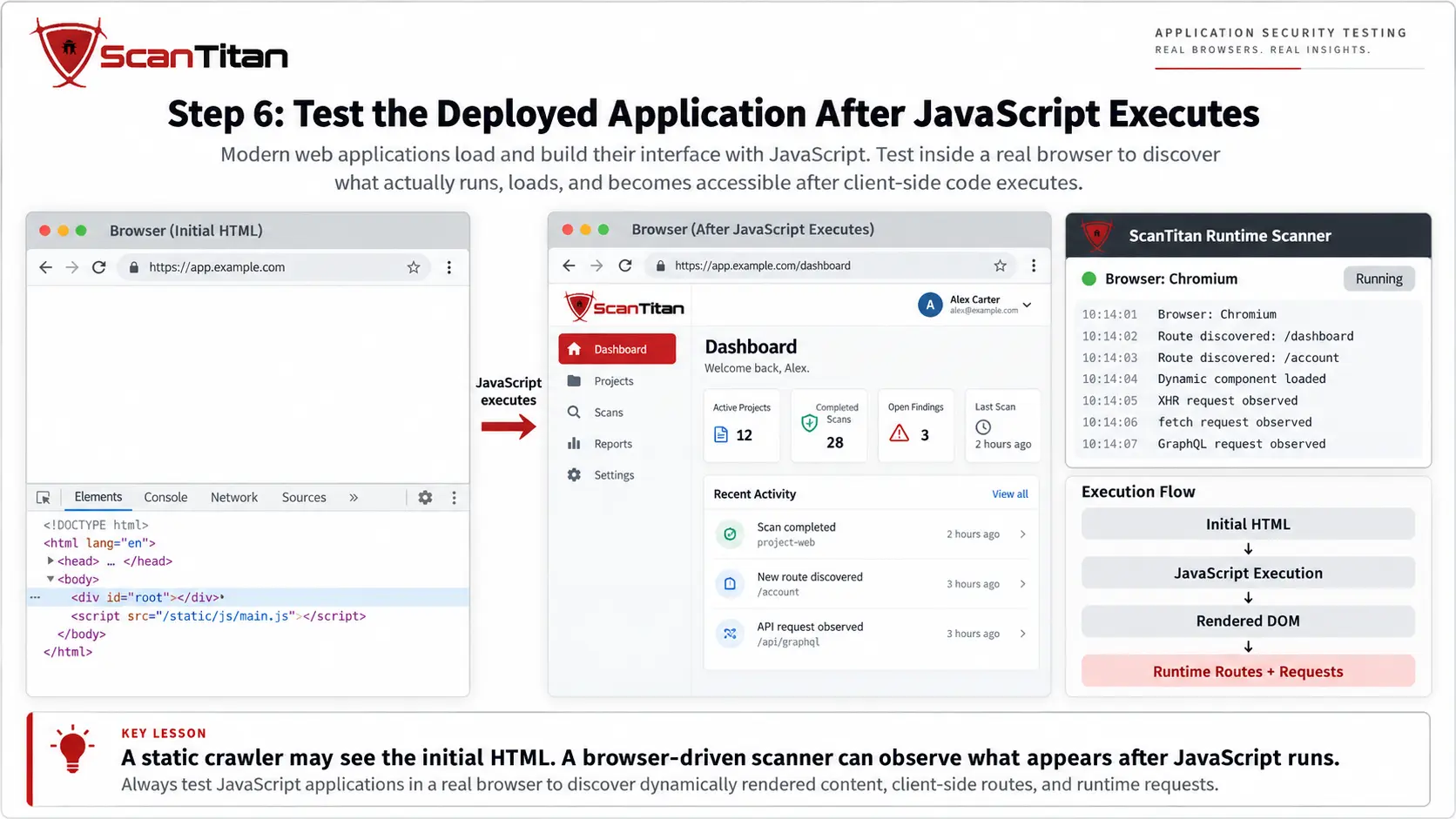
Static analysis still cannot answer every security question.
A modern JavaScript application may initially return little more than:
<div id="root"></div>and create most of the meaningful application only after the browser executes its JavaScript.
At runtime, the application may:
- create client-side routes
- render user-controlled values into the DOM
- trigger XHR or
fetchrequests - send GraphQL requests
- load lazy components and additional bundles
- change behavior after authentication
- store and process browser-side state
- load third-party scripts dynamically
This is why deployed JavaScript applications need runtime testing.
PortSwigger’s JavaScript scanning documentation describes using a browser-based crawler to render JavaScript-generated content and build the resulting DOM so dynamic application states can be reached during scanning.
Runtime testing also matters for threats that exist only after code reaches the browser. For example, a Magecart attack can use malicious or compromised JavaScript to read payment fields and exfiltrate checkout data while the legitimate transaction continues normally, ScanTitan’s JavaScript Vulnerability Scanner is designed for this runtime layer. It renders client-side applications in a browser environment, follows JavaScript-driven routes, and observes requests generated by frontend behavior rather than relying only on the original HTML response.
WHY THE BROWSER MATTERSA source-code scanner can inspect JavaScript without executing it. A browser-driven scanner answers a different question: what security-relevant behavior actually appears after the deployed application runs?
Step 7: Inspect the APIs and Client-Side States JavaScript Reveals
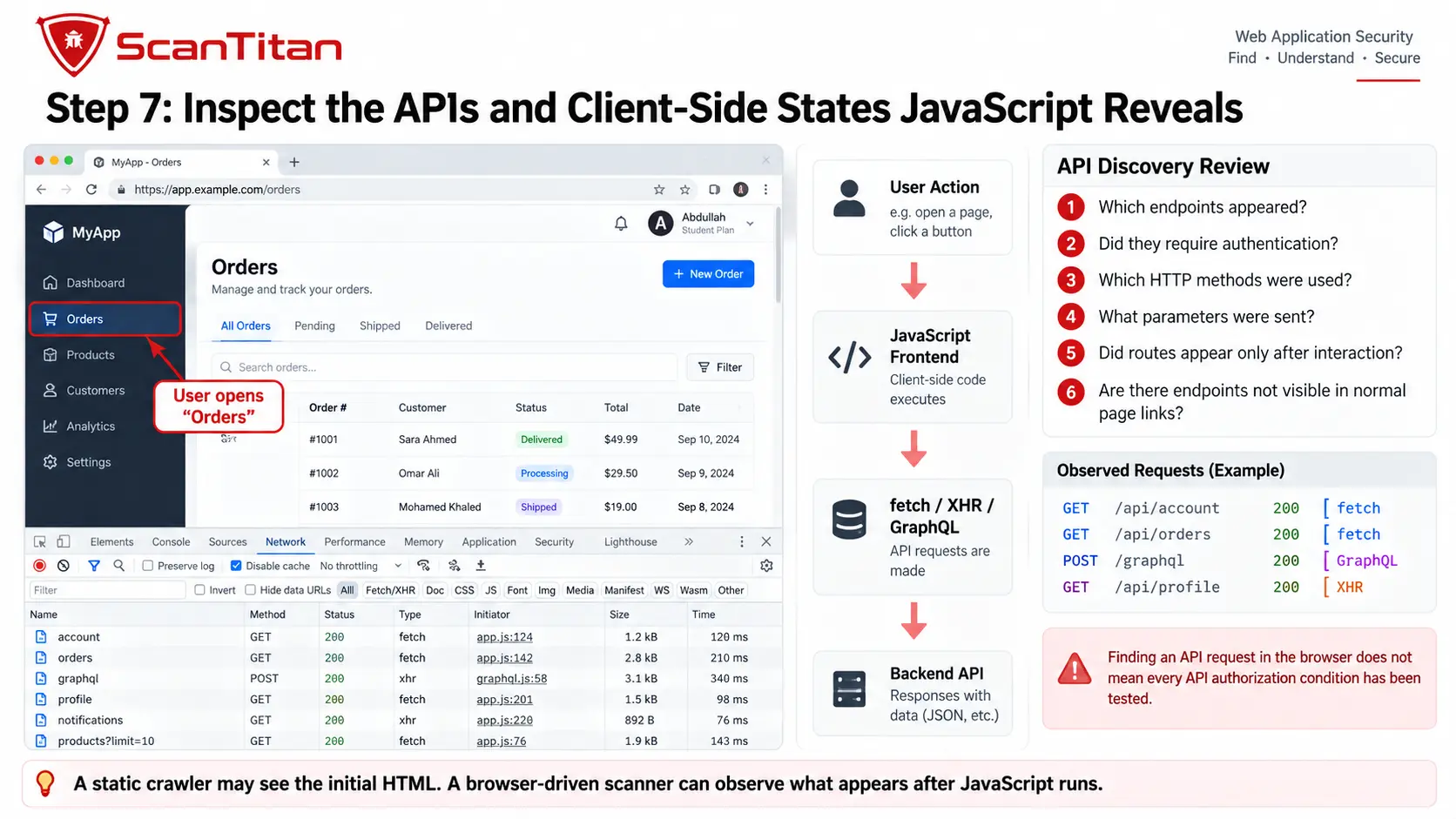
Scanning the visible DOM is not enough for many modern applications.
JavaScript frontends frequently operate as clients for backend APIs. Important functionality may appear only after the browser generates requests such as:
fetch("/api/account");or:
axios.get("/api/orders");or a GraphQL request generated when a user opens a dashboard or performs an application action.
During runtime scanning, pay attention to:
- XHR requests
fetchcalls- GraphQL requests
- client-side routes
- authenticated states
- dynamically loaded components
- forms and state changes
- API endpoints revealed after user interaction
The architecture often looks like:
JavaScript frontend
        ↓
Browser runtime
        ↓
XHR / fetch / GraphQL
        ↓
Backend API
A browser-driven JavaScript scan can reveal those endpoints, but API security is still its own testing layer. Frontend testing does not automatically exercise every authorization condition or every backend endpoint. For a dedicated procedure, see our guide on how to scan an API for vulnerabilities.
Step 8: Check Browser Security Controls
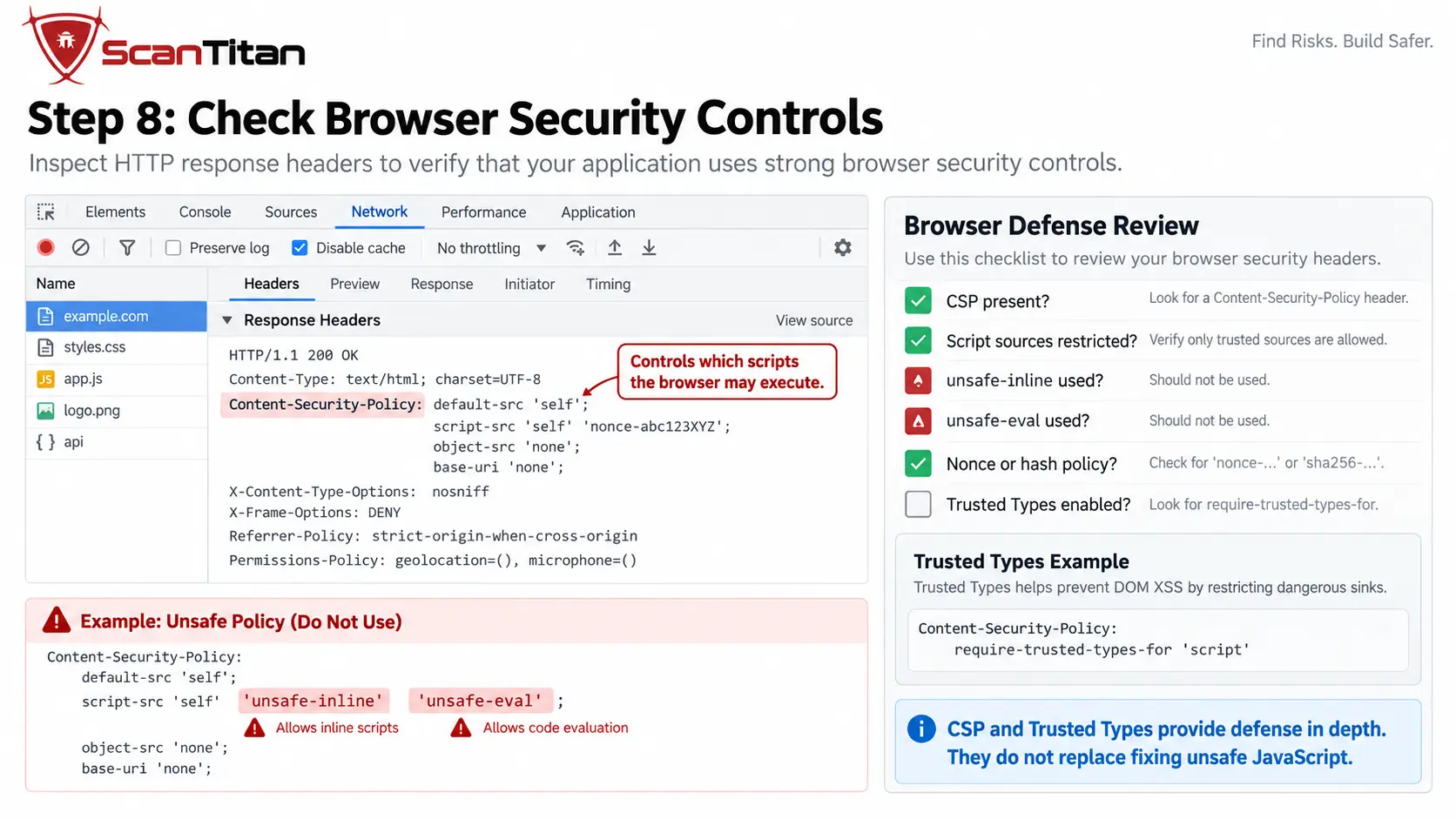
The browser provides additional security controls that can reduce the impact of certain JavaScript weaknesses.
One of the most important is Content Security Policy (CSP).
A CSP can restrict where scripts are allowed to load from and, when configured strictly, can reduce reliance on unsafe inline JavaScript and dangerous execution behavior.
MDN’s practical CSP implementation guidance recommends strict nonce- or hash-based policies as a significant defense against script injection.
But CSP must be treated as defense in depth, not as a reason to leave insecure JavaScript unfixed.
If the application’s own code contains:
Untrusted source
      ↓
Dangerous sink
that unsafe data flow should still be corrected even when CSP happens to block one exploitation path.
Another relevant browser control is Trusted Types. MDN’s Trusted Types CSP documentation explains how the browser can restrict values assigned to dangerous DOM XSS sinks such as innerHTML.
For this workflow, CSP and Trusted Types are supporting controls. They do not replace secure code, dependency management, or runtime testing. Browser security also depends on cross-origin trust.
When a frontend calls APIs on another origin, review the server’s CORS configuration to make sure attacker-controlled origins cannot read responses intended only for trusted applications.
Step 9: Validate Every Important Finding Before Fixing It
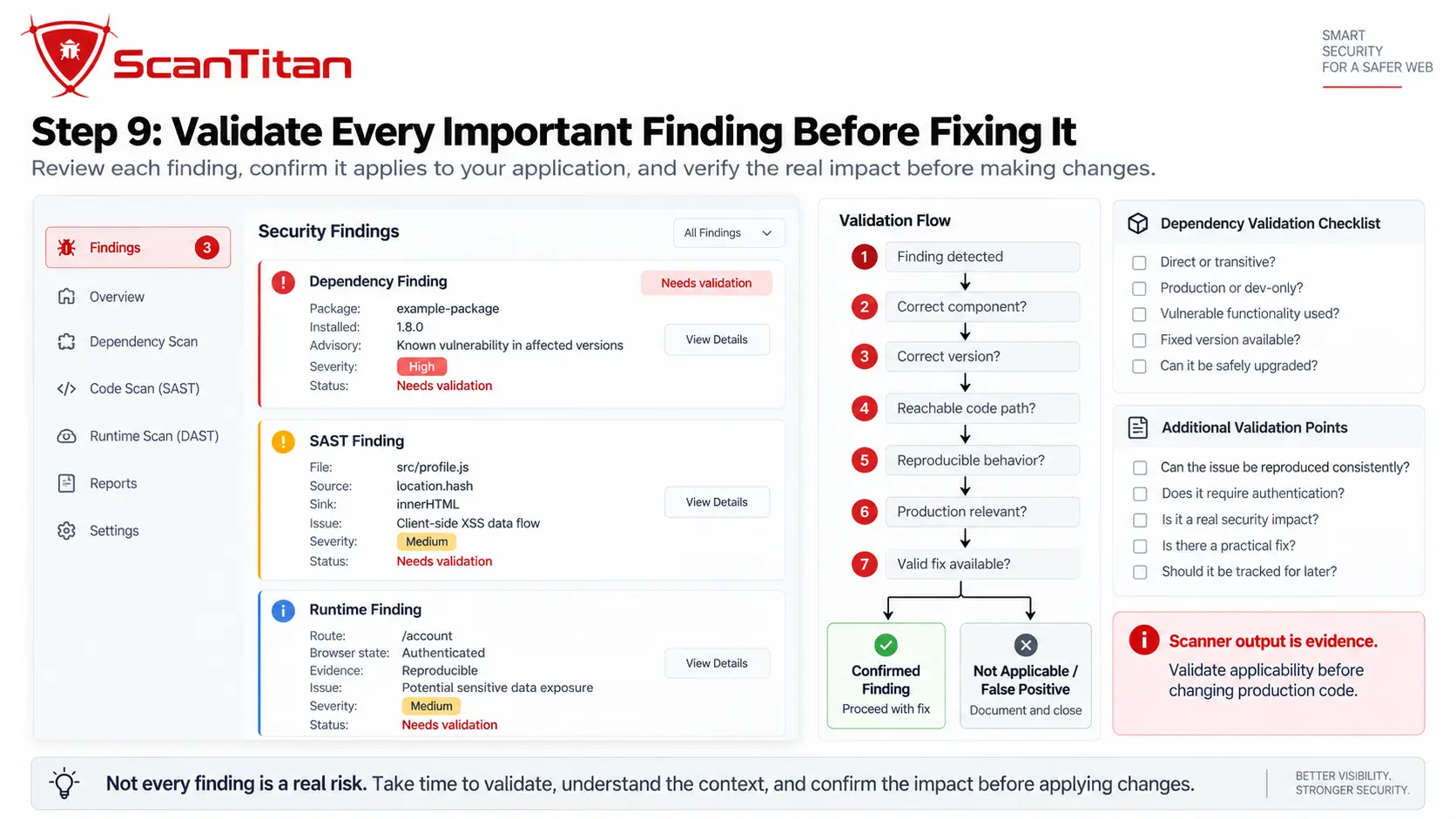
Scanner output is evidence, not a final verdict.
For a vulnerable dependency, verify:
- the exact installed version
- whether the dependency is direct or transitive
- whether the advisory applies to that version
- whether the package is used in production or only during development
- whether the affected functionality is actually reachable
- whether a patched version is available
For a SAST finding, verify the source-to-sink path and whether an attacker or untrusted system can influence the input.
For a runtime finding, verify the browser state, request, response, DOM behavior, authentication context, and sequence of actions that produced the result.
A practical validation sequence is:
Finding detected
↓
Correct component or code path?
↓
Relevant version or configuration?
↓
Reachable in this application?
↓
Evidence reproducible?
↓
Applicable fix available?
GitHub’s Dependabot documentation also describes limitations in dependency vulnerability detection, including the need for supported package ecosystems and enough manifest or lockfile information to determine affected versions.
AN ADVISORY DOES NOT AUTOMATICALLY PROVE EXPLOITABILITYA dependency can match a legitimate security advisory without proving that your application exposes the vulnerable code path. The reverse is also true: a clean dependency report cannot prove that your custom JavaScript contains no security flaws.
Step 10: Apply the Fix That Matches the Finding
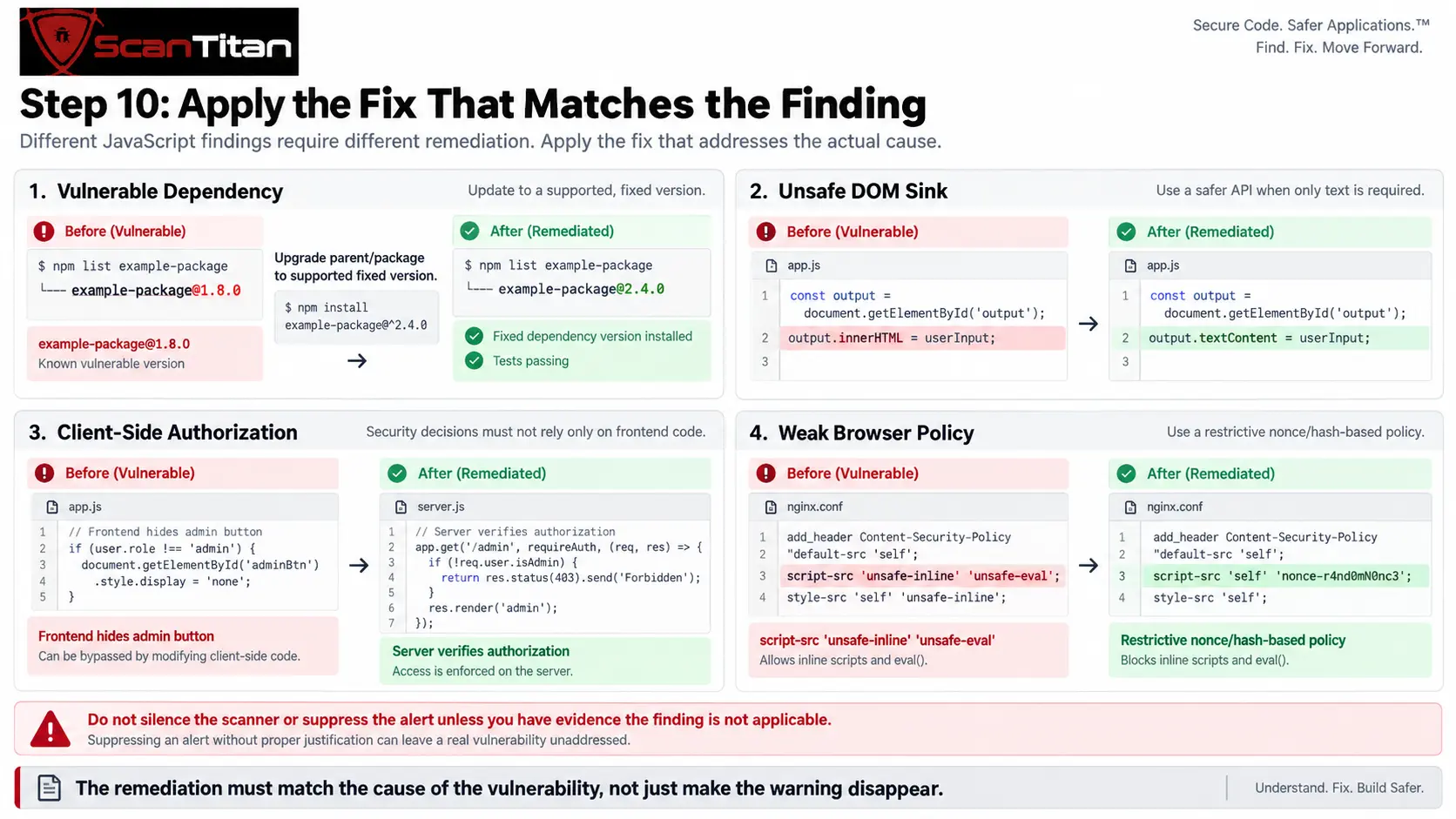
Different scan layers require different remediation.
| Finding | Typical remediation |
|---|---|
| Vulnerable direct npm dependency | Upgrade to a fixed, supported release and test compatibility. |
| Vulnerable transitive dependency | Upgrade the parent package or dependency chain that introduces it. |
| Dangerous DOM sink | Use a safer DOM API or apply appropriate contextual sanitization or encoding. |
| Unsafe dynamic code execution | Remove or redesign execution paths that evaluate attacker-influenced data. |
| DOM-based XSS | Break the unsafe source-to-sink flow and verify the affected runtime state. |
| Weak CSP | Move toward stricter script-source controls while fixing the underlying application issue. |
| Exposed secret or sensitive build artifact | Remove the artifact and rotate exposed credentials where required. |
| Client-side authorization assumption | Enforce authorization on the server rather than relying on frontend logic. |
| Vulnerable loaded JavaScript library | Upgrade or remove the affected library. |
| Authenticated runtime vulnerability | Fix the affected application logic and repeat the same authenticated test. |
Do not assume the most convenient automated fix is automatically the safest. A major package upgrade can introduce breaking API or behavior changes and should be tested like any other application modification.
Likewise, suppressing a SAST rule or dismissing a dependency alert is not remediation unless you have evidence that the finding does not apply.
Step 11: Rescan the Code, Dependencies and Running Application
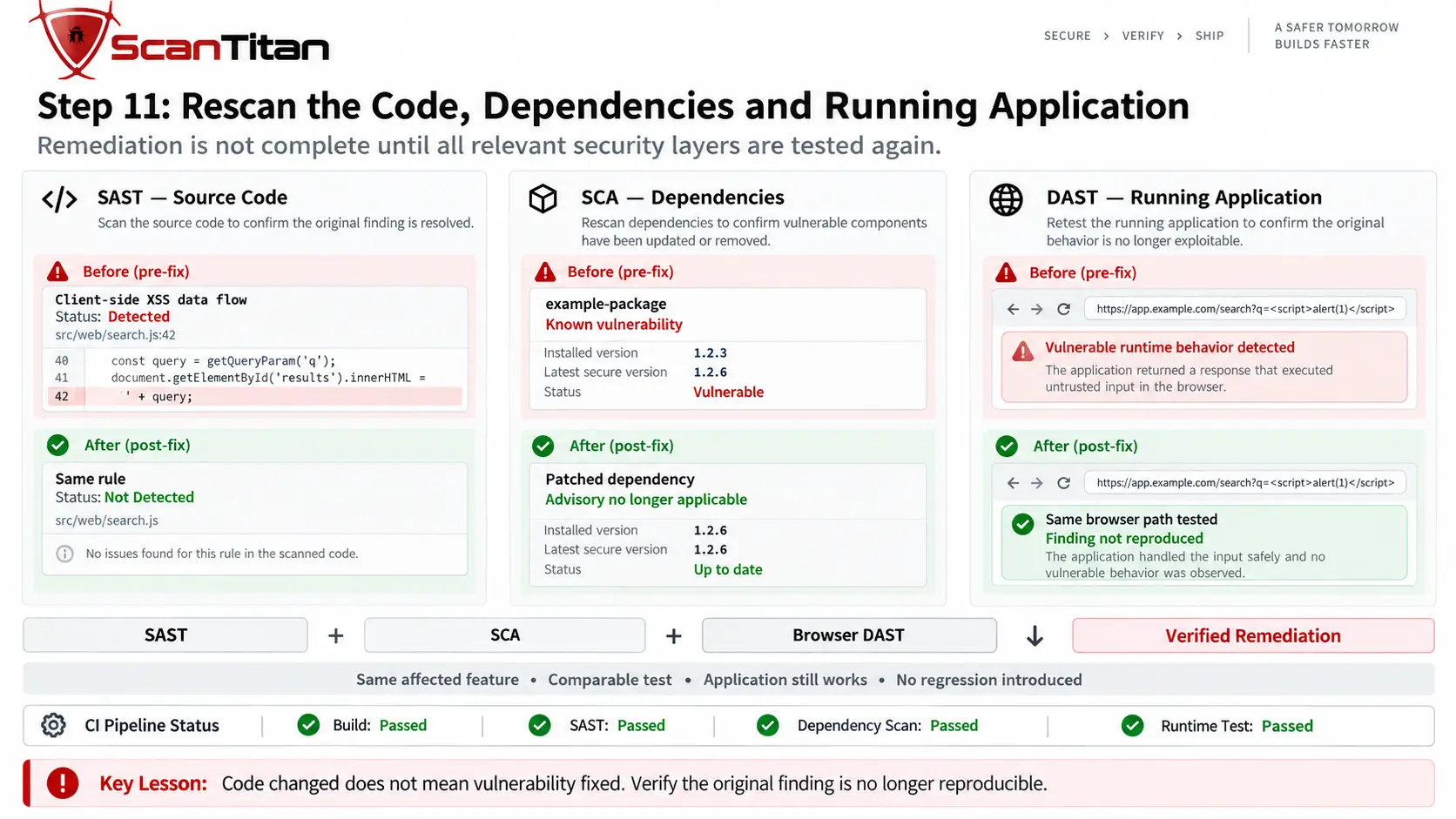
The final step is where many JavaScript scanning workflows stop too early.
A security fix should be verified at the layer where the original issue appeared, but significant changes can affect other layers too.
SAST
+
SCA
+
Browser / runtime DAST
Suppose an outdated dependency is upgraded. The dependency scanner may confirm that the known vulnerability is gone, but the upgraded package can also change:
- DOM behavior
- API calls
- bundled JavaScript
- route handling
- authentication state
- browser compatibility
So:
Package updated does not automatically mean application verified.
Similarly, fixing an unsafe DOM sink should be followed by source-code re-analysis and runtime verification that the vulnerable state no longer behaves insecurely.
A stronger acceptance criterion is:
Original finding no longer detected
+
Application still behaves correctly
+
No relevant regression introduced
Can npm audit Find All JavaScript Vulnerabilities?
No.
npm audit is valuable for identifying known vulnerabilities in the dependency tree recognized by the configured npm registry, but it does not comprehensively analyze your own JavaScript or TypeScript logic and does not execute the application in a browser.
That means it should not be expected to comprehensively find:
- custom DOM-based XSS
- unsafe application-specific data flows
- client-side authorization mistakes
- runtime-only application states
- JavaScript-generated API behavior
- arbitrary business-logic flaws
- unknown vulnerabilities that have no advisory yet
The distinction can be summarized as:
npm audit
≠
JavaScript source-code scan
≠
deployed application scan
They answer related but different security questions.
JavaScript Source Code vs Dependencies vs Runtime: Which Scan Do You Need?
| Your situation | Best starting point | What should follow |
|---|---|---|
| npm or Node.js project | SCA | SAST plus runtime testing where applicable |
| Custom JavaScript or TypeScript repository | SAST | SCA plus runtime scanning |
| React, Angular, or Vue SPA | Browser-driven DAST | SAST plus dependency scanning |
| Website loading older third-party JavaScript | Runtime library detection or SCA | DAST |
| Node.js backend | SAST + SCA | Server-side dynamic testing |
| SPA with client-side routes | Browser-driven DAST | SAST + dependency scanning |
| CI/CD pipeline | Automated SAST + SCA | Scheduled or deployment-time DAST |
The mature question is usually not “Which single scanner should I use?” but:
Which JavaScript security layer have I not tested yet?
What Should a Complete JavaScript Security Scan Cover?
A useful assessment should be able to answer all of these questions:
- Does the project contain insecure JavaScript or TypeScript code?
- Do direct or transitive dependencies correspond to known vulnerabilities?
- Are vulnerable JavaScript libraries actually loaded in the deployed application?
- Can JavaScript create application states that a static crawler would miss?
- Do important routes appear only after client-side execution?
- What XHR,
fetch, GraphQL, or other API requests does the browser trigger? - Can untrusted values reach dangerous DOM or JavaScript sinks?
- Are browser controls such as CSP providing appropriate defense in depth?
- Are debug artifacts, source maps, or sensitive data unintentionally exposed?
- Do important findings remain reproducible after remediation?
Dependency scanning only sees what is declared in your lockfile. To catch the scripts that were injected or loaded at runtime you have to scan the website as it is actually served to a browser.
COMPLETE DOES NOT MEAN ONE TOOLA strong JavaScript assessment combines evidence from the repository, dependency graph, browser runtime, backend interactions, and manual validation rather than asking one scanner to answer every security question.
Common Mistakes When Scanning JavaScript
| Mistake | Why it creates incomplete results |
|---|---|
| Using only npm audit | Dependency scanning does not comprehensively analyze your custom code or runtime behavior. |
| Using only SAST | Static analysis does not reproduce every browser state or deployed application condition. |
| Using only DAST | Dynamic testing sees what executes during the scan, not every dormant source-code path. |
| Scanning only minified production bundles for source remediation | Minification can make source locations and developer remediation much harder to interpret. |
| Ignoring transitive dependencies | The vulnerable package may be introduced several levels below a direct dependency. |
| Applying automated upgrades blindly | Security fixes can introduce breaking dependency or application changes. |
| Ignoring frontend-generated APIs | Important backend functionality may appear only after client-side execution. |
| Treating CSP as the fix | Browser defenses reduce exploitation opportunities but do not remove insecure application logic. |
| Not rescanning after remediation | A code or package change is not the same as verified vulnerability closure. |
The most important mistake is treating one scanning technique as proof of complete JavaScript security. The security layers overlap, but each has its own visibility and blind spots.
Frequently Asked Questions
How do I scan JavaScript code for vulnerabilities?
Use a JavaScript-capable static analysis tool such as CodeQL to inspect your source code, then separately scan third-party dependencies and test the deployed application. Source-code analysis alone does not cover all known package vulnerabilities or issues that appear only after browser execution.
How do I check npm packages for vulnerabilities?
Run npm audit with the project’s dependency manifest and lockfile available. Review the affected package, dependency path, advisory, installed version, and proposed remediation rather than applying major automated changes blindly. npm also supports npm audit --json for machine-readable output.
What is the difference between SAST, SCA, and DAST for JavaScript?
SAST analyzes the JavaScript or TypeScript code your developers wrote. SCA identifies known security issues in third-party dependencies. DAST tests the deployed application while it is running. JavaScript applications often need all three because each layer sees a different part of the attack surface.
Can JavaScript vulnerabilities exist even when npm audit reports zero issues?
Yes. A clean dependency audit does not evaluate every security flaw in your custom application code or browser behavior. DOM-based XSS, unsafe data flows, authorization mistakes, and other application-specific weaknesses can still exist.
Can a browser scanner find issues that static analysis misses?
Yes. Some states appear only after JavaScript executes, routes resolve, components render, users interact with the application, or the frontend sends runtime API requests. Browser-driven testing can examine those deployed behaviors, while static analysis can inspect code paths that might never execute during a dynamic scan.
Should I use npm audit fix –force?
Not automatically. The --force option can allow dependency changes outside normal protections and may introduce breaking changes. Review the vulnerable dependency, proposed version change, release notes, and application compatibility before using it.
Does a JavaScript vulnerability scanner replace source-code analysis?
No. A browser-driven vulnerability scanner tests the behavior of the deployed application, while source-code analysis examines the JavaScript or TypeScript itself. They provide different evidence and should be treated as complementary layers.
Should I scan JavaScript again after fixing a vulnerability?
Yes. Rerun the scan that originally identified the issue and, for meaningful application changes, repeat source-code analysis, dependency scanning, and runtime testing. A package update or code change can affect more than one security layer.