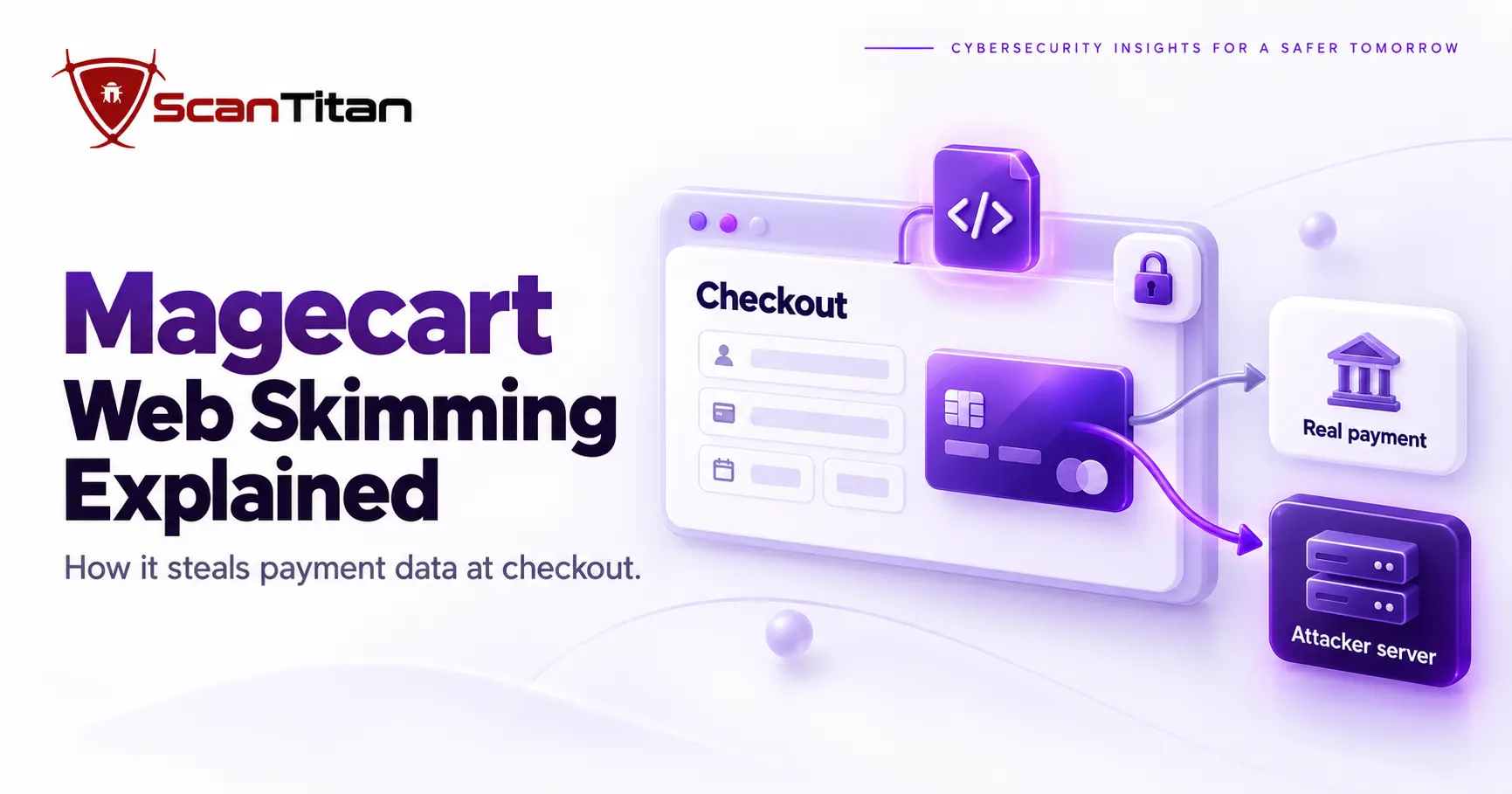
Magecart is the name for criminal groups that steal payment card data from online checkout pages, usually by planting JavaScript that copies card details while the real purchase goes through. The code may sit on your own site, in a third-party script or in a tag manager, so a store can leak cards without a single visible error. This guide explains how Magecart attacks work, how skimmers get in, how to detect and remove one, and what PCI DSS 4.0.1 asks of you.
QUICK ANSWERMagecart is an umbrella term associated with ecommerce web-skimming attacks. Attackers compromise a store or something the store trusts, insert payment-skimming code, wait for shoppers to enter sensitive information, and exfiltrate a copy of that data. Because the real checkout can continue working normally, the merchant and customer may see no obvious sign that theft occurred.
What Is a Magecart Attack?
A Magecart attack is a form of digital payment-card skimming in which malicious code captures information from an ecommerce website or payment flow.
The term originally became associated with multiple criminal groups targeting online stores, particularly Magento-based ecommerce sites. It is now commonly used much more broadly for web-skimming activity involving compromised checkout pages, malicious JavaScript, third-party scripts, and other payment-data theft techniques.
Magecart should therefore not be understood as one single hacking group or one fixed malware family.
Where the Name Comes From
The name Magecart came from attacks on Magento stores, and researchers later found that many separate groups were using similar skimmers. That is why Magecart names a family of activity and not one gang. Wikipedia’s entry on web skimming describes Magecart as software used by a range of hacking groups, and it records early waves such as a 2016 report of as many as 6,000 compromised online shops. The same waves included targeted attacks on named brands and commodity attacks on Magento extensions. Treat the label as shorthand for the technique, not as a clue about who is behind an infection.
The Basic Attack Flow
The basic objective is:
Compromise something the store trusts
        ↓
Place or modify skimming code
        ↓
Wait for customer checkout
        ↓
Capture payment / personal information
        ↓
Send a copy to attacker infrastructure
        ↓
Allow legitimate checkout to continue
This last step is one reason Magecart attacks can remain hidden. The attacker usually does not need to stop the transaction or display an error. The theft can happen alongside the legitimate purchase.
Because many Magecart attacks rely on malicious or compromised client-side code, monitoring the JavaScript that actually executes in the browser is an important part of detecting unexpected checkout behavior. A JavaScript vulnerability scanner can help identify security issues in deployed JavaScript and expose risky client-side behavior that may not be visible from server-side code alone.
Magecart vs Web Skimming vs Formjacking
Several terms are used for closely related attack techniques. They overlap, but they are not always perfectly interchangeable.
| Term | What it usually means |
|---|---|
| Magecart | An umbrella term associated with criminal groups and techniques used to steal payment data from ecommerce websites. |
| Web skimming | Stealing information entered into a website, especially payment and checkout forms. |
| E-skimming | A common payment-security term for electronic or ecommerce skimming. |
| Digital skimming | A broad synonym for stealing payment data through compromised web applications or scripts. |
| Formjacking | Injecting or modifying code so information entered into a web form is intercepted and copied. |
| JavaScript skimmer | Malicious client-side JavaScript specifically designed to capture and exfiltrate form or payment data. |
The most familiar Magecart implementation is a client-side JavaScript skimmer, but that is not the only possible architecture. Ecommerce security researchers have also documented server-side skimmers and persistent backend malware, and some campaigns combine both: server-side code that writes the browser skimmer into the page, or a browser skimmer that survives cleanup because a backdoor keeps restoring it. Payment skimmers are one of the website-specific malware types in our guide to the 15 types of malware.
MAGECART DOES NOT MEAN “MAGENTO ONLY”The name has historical links to Magento-targeting campaigns, but modern web skimming can affect many ecommerce stacks. The relevant question is whether an attacker can influence the payment page, its scripts, or the systems that generate them.
How Does a Magecart Attack Work?
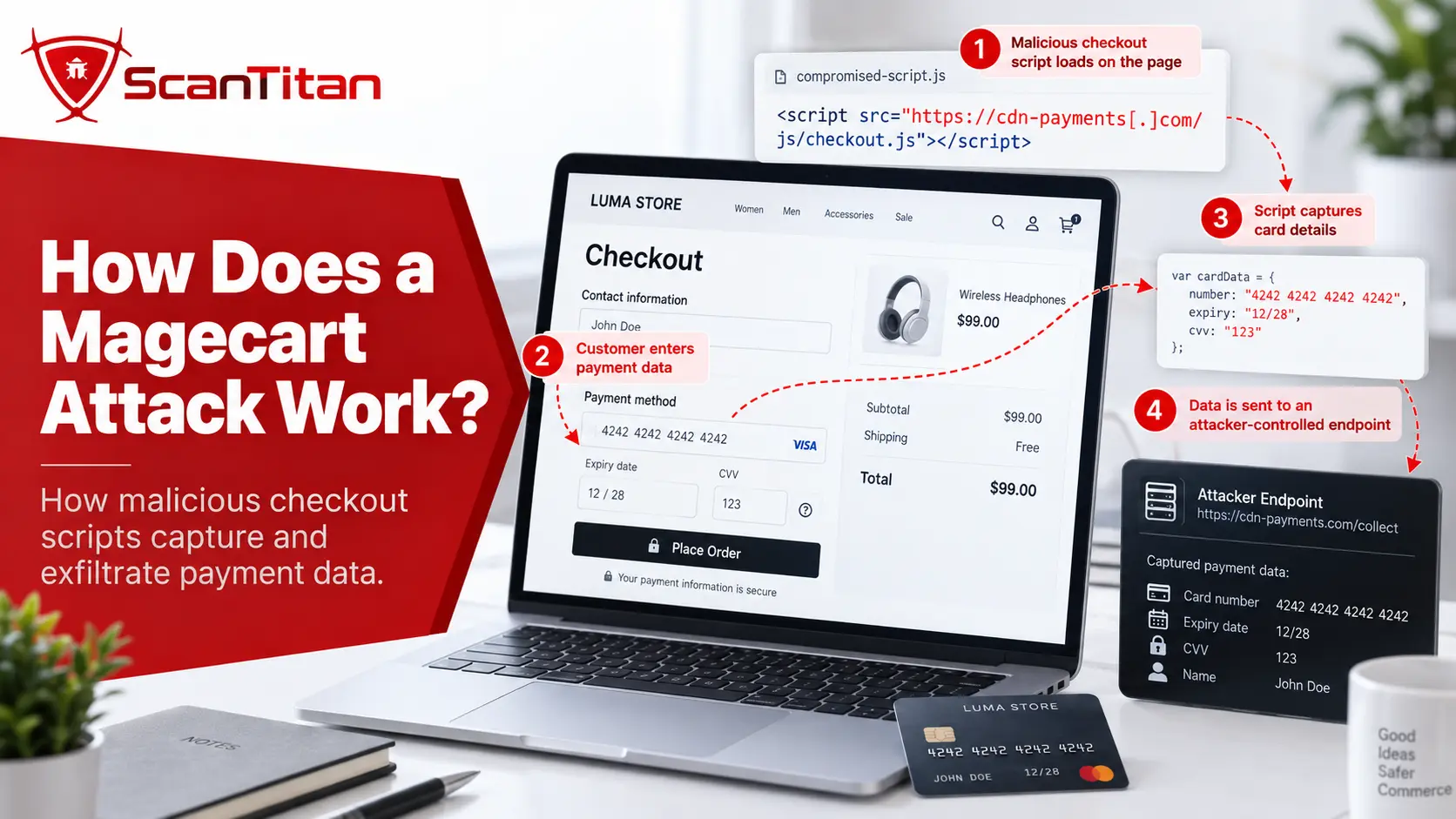
A practical Magecart attack can be understood as six stages.
- Gain access. The attacker compromises the ecommerce platform, administrator account, vulnerable extension, deployment process, third-party supplier, tag manager, or another trusted component.
- Plant or modify code. Malicious logic is inserted into JavaScript, HTML, a database record, template, server-side file, or externally hosted resource.
- Wait for the payment state. The skimmer may run only on checkout pages or after particular form fields appear.
- Capture sensitive data. The code reads information entered by the shopper.
- Exfiltrate the stolen copy. The captured information is sent to an attacker-controlled or compromised endpoint.
- Remain hidden. The real payment process continues, while obfuscation, selective execution, lookalike domains, or persistent malware help conceal the compromise.
A simplified browser-side flow looks like:
Customer opens checkout
        ↓
Legitimate page loads
        ↓
Malicious JavaScript executes
        ↓
Customer enters card data
        ↓
Skimmer reads payment fields
        ↓
        ├──→ Legitimate payment processor
        │
        └──→ Attacker-controlled endpoint
The store can still receive the real payment. From the customer’s perspective, checkout may appear completely successful.
How Magecart gets in. The skimmer itself is only part of the attack. An attacker first needs a way to make malicious code execute somewhere in the payment flow.
Entry Point 1: First-Party Website Compromise
The attacker compromises infrastructure controlled directly by the merchant.
Potential entry points include:
- vulnerable ecommerce software
- vulnerable plugins or extensions
- stolen administrator credentials
- compromised hosting credentials
- deployment or source-control access
- database compromise
- server-side backdoors
The attacker can then alter a checkout template, JavaScript bundle, database value, or server-generated page so the customer’s browser receives the skimmer as part of the legitimate website. In the British Airways case, the attacker first used the stolen login of an employee at a supplier to reach the airline’s systems, and only then changed what the website served.
Entry Point 2: Third-Party JavaScript Supply-Chain Compromise
An ecommerce page often executes code the merchant did not write.
Examples include:
- analytics scripts
- live-chat widgets
- marketing tags
- customer-support tools
- advertising scripts
- payment helpers
- CDN-hosted libraries
- tag-management systems
OWASP’s Third Party JavaScript Management Cheat Sheet highlights the core problem: a third-party script executing directly inside a page may access the DOM and other sensitive information available to first-party code.
If that supplier or hosted resource is compromised, the merchant can serve malicious JavaScript even though its own server files were never directly modified.
This is one specific form of the broader risk explained in our guide to JavaScript npm supply chain attacks, although Magecart is not limited to npm packages or software dependencies.
Entry Point 3: Tag Manager or Client-Side Configuration Compromise
Tag managers make it possible to change which scripts execute on a site without modifying the main application source code.
That flexibility is useful for marketing and analytics, but it also creates a high-value control point. If an attacker gains access to a privileged tag-management account or compromises a vendor loaded through it, malicious JavaScript may reach checkout without a traditional application-code deployment.
Security teams should therefore treat changes to payment-page tags as security-relevant code changes. Record who approved each new or changed tag, which domain it loads from, and whether it runs on payment pages, so an unexpected tag stands out immediately.
Entry Point 4: Server-Side Skimmers and Backdoors
Not every payment skimmer lives exclusively in the browser.
An attacker who compromises the web server may place PHP or other server-side malware that:
- captures submitted form data
- injects malicious browser JavaScript
- creates persistent backdoors
- restores the skimmer after defenders remove one visible file
Some setups are hybrid: a server-side script writes the browser skimmer into the page, so the visible JavaScript is only the symptom. This distinction matters during incident response. Removing the visible JavaScript is not enough if the server-side mechanism that generated it remains active, because the skimmer returns the next time the page is built.
What Is the Impact of a Magecart Attack?
The impact of a Magecart attack falls on two groups: shoppers whose data is copied, and the merchant who pays for the breach. The two parts below cover what is taken and what it costs.
What Data Can a Magecart Attack Steal?
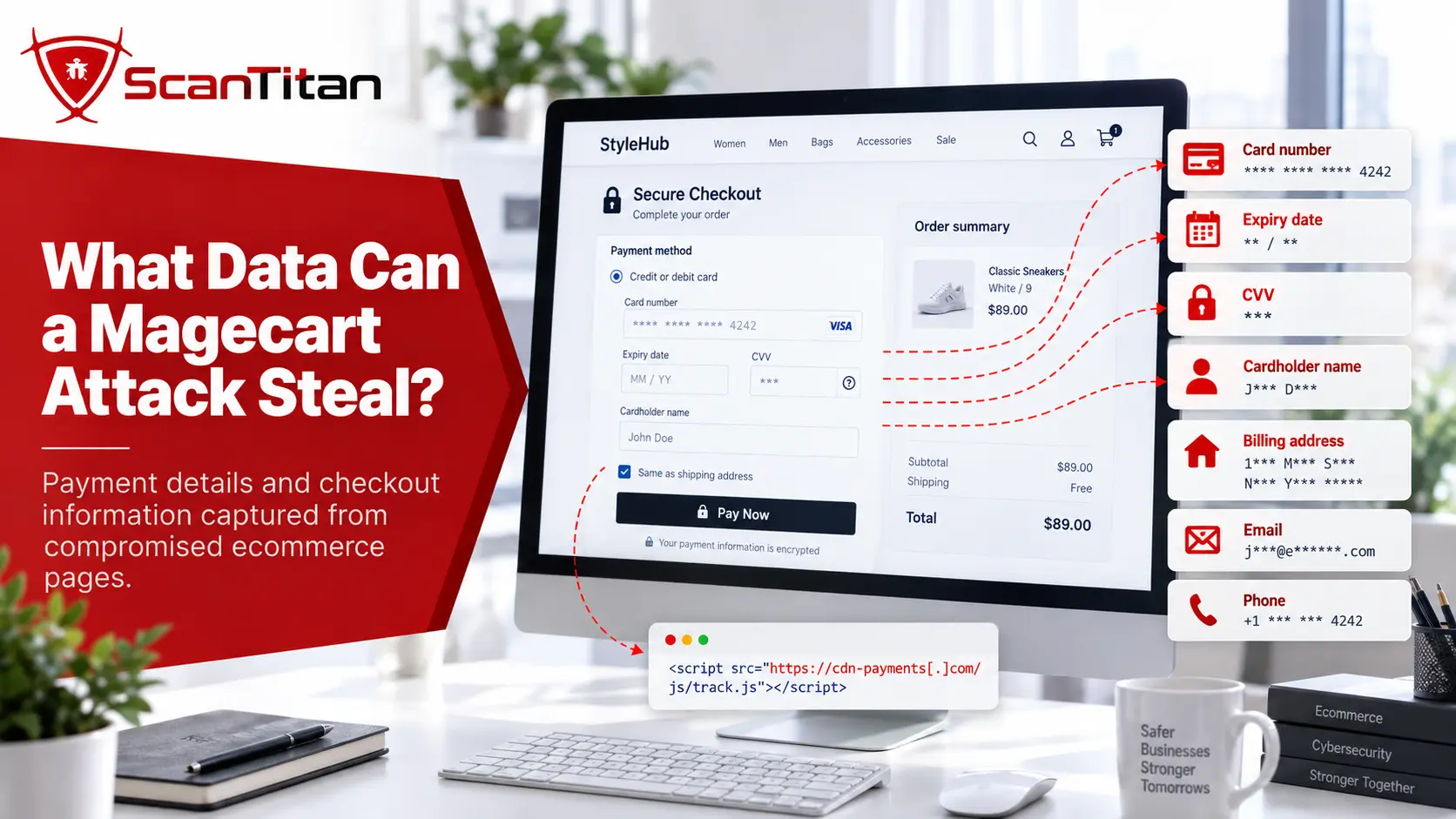
Magecart is commonly described as credit-card theft, but a skimmer can potentially collect any information available to the compromised code.
Depending on the checkout design, that may include:
- primary account number (PAN) or card number
- cardholder name
- expiration date
- CVV or CVC
- billing address
- shipping address
- email address
- telephone number
- account information
- other personally identifiable information entered into forms
The important technical point is that a browser-side skimmer can capture data before or while the legitimate application sends it to the real payment processor.
Encryption between the customer and the merchant does not prevent malicious code already executing inside the trusted page from reading data available to that page.
What a Magecart Infection Costs a Merchant
A Magecart infection costs a merchant in several ways at once: regulator penalties, incident and forensic work, consequences from the processor and card brands, and lost customer trust. The documented penalties show the scale. The UK ICO fined British Airways 20 million pounds after a skimming attack, and fined Ticketmaster UK 1.25 million pounds over a chatbot script on its payment pages. Processor and card-brand consequences depend on your contracts, so ask your acquiring bank what applies to you before an incident, not after one. The cheapest cost in the whole picture is the monitoring you run before anything happens.
How to Detect a Magecart Attack
Effective detection requires visibility into both the code that should exist and the behavior that actually occurs when a customer reaches checkout.
Skimmers are injected into the page delivered to the browser, so file-integrity checks on the server will miss them. Run a website malware scan from the outside and compare the scripts actually served against your allowlist.
A useful investigation sequence is:
Know expected scripts
        ↓
Detect unexpected changes
        ↓
Load the real checkout state
        ↓
Observe DOM access and script behavior
        ↓
Inspect outbound browser requests
        ↓
Inspect server-side files and databases
        ↓
Investigate unexpected findings- Inventory every script on payment pages. Record each script URL, its owner, its business purpose, whether it is first-party or third-party, whether it runs on checkout, and who can approve changes. You cannot spot an unauthorized script without a list of the authorized ones.
- Monitor payment pages for unexpected changes. Review any change to checkout HTML, script references, inline JavaScript, security headers or tag-manager configuration. File-integrity monitoring covers first-party files, but also check what the browser actually receives after templates, third parties and dynamic configuration are combined.
- Inspect browser network activity. A checkout page should talk to a known set of services, so look for new or lookalike domains, unexpected POST requests, encoded payloads and calls triggered when payment fields change. For the wider process, see our guide on how to scan JavaScript for vulnerabilities.
- Review the server. If a malicious script is confirmed, check modified files, database-injected JavaScript, administrator accounts, scheduled tasks, plugins and extensions, deployment credentials, web shells and backdoors. Finding the skimmer is not the same as finding the root compromise.
Why Are Magecart Attacks Hard to Detect?
Magecart is effective because stealing the data does not require breaking the visible checkout experience. A clean result is not reassurance either, because a clean scan does not rule out a skimmer that loads only for some visitors.
The customer may see:
Product added
✓

Checkout opened
✓

Payment accepted
✓

Order confirmation
✓
At the same time, an unauthorized data flow may be occurring in the background.
Attackers have used several techniques to make skimmers difficult to identify:
- minified or obfuscated JavaScript
- small code changes inside legitimate files
- lookalike domains
- compromised legitimate domains
- code disguised as analytics or tag-manager logic
- selective execution only on checkout
- execution only for particular visitors or regions
- encoded or encrypted exfiltration
- self-removal or cleanup behavior
- persistent server-side backdoors that restore removed code
Lookalike Domains and Fake Script Hosts
A lookalike domain is a hostname chosen to resemble a legitimate service, so a request to it passes a quick glance at the page source or the network log. Skimmers use these names both for the script host and for the place the stolen data is sent. Volexity’s analysis of the Newegg compromise found card data going to neweggstats.com, a name built to resemble the retailer’s own infrastructure. In the British Airways case, a Bird & Bird summary of the ICO penalty notice records that traffic was redirected to BAways.com. To catch these, compare every host in the browser Network tab with your approved script inventory, and treat any name that merely resembles a vendor as unapproved until the vendor confirms it.
What Each Detection Control Can and Cannot See
A detection control is any tool or process that can spot a skimmer, and each one sees a different stage of the attack. File checks see the server, a WAF sees inbound requests, CSP sees which origins a page may use, and browser-side monitoring sees what scripts actually do for a shopper. None of them sees everything, which is why a payment page needs several controls that overlap. Use the table to find the gap in your own setup: for each row, ask what that control would miss if the attacker used a trusted third-party script.
| Security control | Useful for | Does not guarantee |
|---|---|---|
| WAF | Blocking some web-based initial compromise attempts | Visibility into every script action occurring inside the shopper’s browser |
| SAST | Finding insecure source-code patterns | Detection of a third-party script that becomes malicious after deployment |
| SCA | Known vulnerabilities in dependencies | Detection of every malicious script or compromised external service |
| Browser-driven DAST | Observing deployed routes, requests, DOM states, and runtime behavior | Execution of every hidden or selectively triggered skimmer condition |
| Content Security Policy | Restricting script and network destinations | Safety of every origin explicitly trusted by the policy |
| Subresource Integrity | Detecting unexpected changes to fixed external resources | Protection for every dynamic, inline, or frequently changing script |
| File integrity monitoring | Detecting unauthorized server-file changes | Detection of malware delivered entirely through an external third party |
| Client-side monitoring | Observing script changes, DOM access, and browser-side data flows | Removal of server-side persistence or the original compromise path |
| Malware scanning | Finding malicious files, injected code, and known server-side indicators | That every selectively triggered browser behavior has been reproduced |
Can a WAF Detect a Magecart Attack?
A web application firewall can be useful against some parts of a Magecart attack, but it should not be treated as complete protection against browser-side skimming.
The important distinction is where the malicious activity occurs. A WAF sits in front of your server, so it sees the requests that reach you, not what the shopper’s browser does after the page loads. That is the gap a skimmer lives in.
| Attack stage | Can a WAF help? | Why? |
|---|---|---|
| Attacker exploits a vulnerable web endpoint | Potentially | A WAF may block or detect malicious inbound requests depending on the vulnerability and rule coverage. |
| Attacker uses stolen administrator credentials | Limited | The traffic may appear to be a legitimate authenticated session. |
| Trusted third-party JavaScript becomes malicious | Often limited visibility | The browser may legitimately fetch an already trusted resource. |
| JavaScript reads checkout fields in the browser | Usually limited | The important behavior happens in the customer browser after the page is delivered. |
| Skimmer sends data to an unexpected domain | Depends on architecture | The request originates from the customer’s browser and may bypass infrastructure normally inspected by the merchant. |
THE RIGHT QUESTION IS NOT “DOES A WAF STOP MAGECART?”Ask which stage of the attack the control can actually observe. Server-side request filtering, file integrity, browser-side monitoring, script governance, CSP, and incident response cover different parts of the Magecart attack path.
How to Prevent Magecart and Web-Skimming Attacks
No single header, scanner, or security product solves every Magecart scenario. Prevention works best when the merchant reduces the number of ways attackers can alter the payment page and quickly detects unauthorized changes when they occur.
- Patch the ecommerce platform, CMS, plugins, extensions and server software on maintained versions, because internet-facing vulnerabilities give attackers the foothold to plant a skimmer or a persistent backdoor.
- Protect administrator, hosting, source-control, CI/CD, tag-manager, CDN, DNS and payment-integration accounts with strong authentication, multi-factor login where supported, and least privilege. An attacker with legitimate admin access may not need an exploit at all.
- Reduce third-party JavaScript on checkout. Ask whether each script needs to run there, who controls it, whether it can read payment fields, how a change is approved and what happens if its host is compromised.
- Monitor what customers actually receive, not only the source repository: scripts, page contents, security headers, external destinations and checkout network activity.
Use Content Security Policy Carefully
A Content Security Policy (CSP) is a response header that tells the browser which sources it may load scripts from and where the page may send data. It limits what a skimmer can load and where it can send what it steals. Four directives matter on a checkout page: script-src for script origins, connect-src for fetch and XHR destinations, img-src because skimmers also leak data through image requests, and form-action for where forms may post. Start in report-only mode and read the reports before you enforce.
Content-Security-Policy-Report-Only:
  default-src 'self';
  script-src 'self' https://js.payment-provider.example;
  connect-src 'self' https://api.payment-provider.example;
  img-src 'self' https://assets.payment-provider.example;
  form-action 'self' https://pay.payment-provider.example;
  report-to csp-endpoint
MDN’s Content Security Policy guide covers the Report-Only header and the report-to directive. CSP has one hard limit: it trusts every origin you list, so a compromised vendor still gets through. Keep the list short, avoid wildcards, and treat each allowed origin as a vendor you must watch. CSP works best with a short list of trusted origins, a script inventory, SRI, runtime monitoring, change detection and strong access controls.
Use Subresource Integrity Where It Fits
Subresource Integrity (SRI) allows a browser to verify that an externally loaded resource still matches an expected cryptographic hash.
MDN’s Subresource Integrity documentation specifically describes SRI as protection against a supply-chain scenario where a third-party host is compromised and a JavaScript resource is changed.
A simplified example looks like:
<script
  src="https://cdn.example.com/app.js"
  integrity="sha384-EXPECTED_HASH"
  crossorigin="anonymous">
</script>
If the fetched resource no longer matches the expected hash, a supporting browser refuses to execute it. SRI needs the integrity attribute and a crossorigin attribute so the browser can read the file under CORS rules. It cannot protect inline scripts, scripts that change on purpose, or tag-manager loaders, because the hash would break or never exist. Use SRI for stable libraries and change monitoring for everything dynamic. PCI DSS Requirement 6.4.3 asks for integrity protection on payment-page scripts, so SRI is the simplest way to meet it for fixed files.
Reduce Exposure of Payment Data to the Main Page
Where appropriate, payment architectures can reduce how much card data is accessible to the merchant’s ordinary page scripts.
Hosted payment fields, appropriately isolated iframes, tokenization, and carefully designed payment-provider integrations can reduce exposure, depending on implementation.
Isolation is valuable because a third-party script directly included in the top-level page can otherwise receive powerful access to the same browser context. MDN’s web privacy guidance notes that directly included third-party scripts effectively execute with first-party access to page data, while properly isolated cross-origin iframe content operates under a separate origin boundary. If you can only do one thing from this list, do this one, because a skimmer cannot read card fields that never enter your page.
Does HTTPS Prevent Magecart?
No.
HTTPS protects data while it travels between endpoints. It does not make malicious JavaScript already running inside the legitimate page safe.
Consider:
Customer enters card number
        ↓
Malicious script reads it in browser
        ↓
        ├── HTTPS → legitimate merchant
        │
        └── HTTPS → attacker server
Both network connections can be encrypted.
The Newegg attackers, for example, obtained an SSL/TLS certificate for their exfiltration infrastructure. HTTPS protected the stolen data in transit just as effectively as it protects legitimate traffic.
HTTPS is essential, but it is not a client-side malware detector. It can even give attackers cover, because stolen data sent over an encrypted connection looks like normal traffic in many network tools. Check the destination host and who owns it, not the padlock.
Magecart Security Checklist for Ecommerce Teams
A payment-page security program should be able to answer these questions:
- Do we know every script that executes on checkout?
- Is every payment-page script authorized and justified?
- Can we detect when one of those scripts changes?
- Can third-party JavaScript access payment fields unnecessarily?
- Do we monitor unexpected outbound browser requests?
- Do we restrict script and connection origins with CSP?
- Can stable third-party resources use SRI?
- Are administrator, tag-manager, hosting, and deployment accounts strongly protected?
- Are ecommerce plugins and extensions supported and patched?
- Can we distinguish client-side skimming from server-side persistence?
- Do we monitor the payment page as the customer browser actually receives it?
- Do we have an incident-response process for exposed payment data?
Magecart prevention is ultimately a trust-management problem. The less code allowed to influence a payment page, and the better an organization understands every remaining script and change, the smaller the opportunity for a skimmer to hide in normal checkout behavior.
What Does PCI DSS 4.0.1 Require for Payment-Page Security?
Magecart and e-skimming are important enough that the PCI Security Standards Council has issued specific guidance around protecting ecommerce payment pages.
The PCI SSC’s Payment Page Security and Preventing E-Skimming guidance addresses PCI DSS Requirements 6.4.3 and 11.6.1.
PCI DSS Requirement 6.4.3
For applicable payment-page scripts, the control focuses on ensuring scripts are:
- authorized
- integrity protected
- inventoried
- documented with a business or technical justification
In practice that means a written inventory of every script on the payment page, a named owner for each one, and a way to show that the script a visitor received is the script you approved, plus a review whenever the vendor or the script changes. That maps directly to one of Magecart’s biggest weaknesses in ecommerce environments: organizations often do not have a reliable answer to:
“Which JavaScript is supposed to be running on this payment page?”
PCI DSS Requirement 11.6.1
This requirement focuses on detecting unauthorized modification of payment-page content and relevant HTTP headers as they are received by the consumer browser.
Conceptually:
Expected payment page
        ↓
Scripts + content + security headers
        ↓
Monitor for unauthorized change
        ↓
Generate alert
        ↓
Investigate
The requirements became effective on March 31, 2025. PCI SSC later adjusted how certain SAQ A merchants demonstrate compliance, but explicitly stated that those questionnaire changes did not remove or diminish the underlying PCI DSS requirements.
WHY THIS MATTERS FOR MAGECARTPCI’s payment-page requirements move ecommerce security beyond simply patching the server. Organizations also need visibility into which scripts execute in the shopper’s browser and whether the payment page has changed unexpectedly.
Real Magecart Attack Examples
Magecart incidents have used different initial-access paths and different skimmer implementations. The most useful historical cases are the ones that show how the attack model changes.
| Incident | Attack lesson | What happened |
|---|---|---|
| Ticketmaster — 2018 | Third-party JavaScript risk | Attackers compromised JavaScript hosted by chatbot provider Inbenta. Ticketmaster had included the chatbot on payment pages, allowing malicious code to scrape customer financial data. |
| British Airways — 2018 | Targeted payment-page modification | Malicious code copied payment-card information to attacker infrastructure without interrupting the normal booking and payment process. |
| Newegg — 2018 | Small customized checkout skimmer | A targeted JavaScript snippet ran during billing and sent captured checkout data to the lookalike domain neweggstats.com over HTTPS. |
| Long-running 2026 campaign | Magecart remains active | Silent Push identified a web-skimming infrastructure active since at least early 2022 and targeting scripts associated with six major payment networks. |
Ticketmaster: The Third-Party Script Problem
The Ticketmaster case is one of the clearest examples of why third-party JavaScript belongs inside a payment-page threat model.
The UK Information Commissioner’s Office documented that Ticketmaster included an Inbenta chatbot on payment pages. Attackers compromised the JavaScript hosted on Inbenta’s infrastructure, and the malicious code collected information entered by customers, including names, payment-card numbers, expiry dates, and CVV values.
The merchant’s core checkout application did not need to contain the original malicious file. Trust in the third-party script was enough to expose payment data. The ICO later fined Ticketmaster UK 1.25 million pounds, as this Hunton Andrews Kurth summary explains.
British Airways: The Customer Never Needed to See an Error
The British Airways incident demonstrates the silent nature of web skimming particularly well.
The ICO’s investigation found that malicious code copied customer payment-card information to attacker-controlled infrastructure while the normal British Airways booking and payment process continued. The skimming activity remained active for approximately 15 days.
The ICO later imposed a £20 million penalty on British Airways following its investigation. According to the Bird & Bird summary, the attacker redirected payment traffic to BAways.com, data relating to 429,612 people was affected, and name, address, card number and CVV were taken for about 244,000 of them.
Magecart in 2026: Why the Threat Still Matters
Magecart is not simply a historical threat from the 2018 wave of Ticketmaster, British Airways, and Newegg compromises.
In January 2026, Silent Push published research into an ongoing Magecart web-skimming network that its analysts traced back to at least January 2022.
The campaign included scripts associated with at least six major payment network brands:
- American Express
- Diners Club
- Discover
- JCB
- Mastercard
- UnionPay
The lesson is not that those payment networks themselves were necessarily compromised. The research shows that modern skimmers continue to target payment workflows and ecommerce customers at scale while maintaining infrastructure over long periods.
For merchants, Magecart is a current problem, not a historical case study.
Web skimming is only one part of the modern retail threat landscape. Our Retail Data Breach Statistics research shows how today’s retail breaches also involve vulnerability exploitation, third-party systems, credentials, corporate data and ransomware.
How to Remove a Magecart Skimmer From Your Website
Removing a Magecart skimmer means finding every copy of the code, closing the way it got in, proving the checkout is clean, and telling the right parties about the exposed cards. Deleting the visible JavaScript is not enough. For the general order of response, see the full website hacked response order.
Find Every Copy of the Skimmer
A skimmer copy is any place the malicious code can load from, and there is rarely only one. Contain the payment flow first, then save evidence: files, logs, timestamps, database rows and the page as a visitor receives it. Then search each place a script can enter a store: theme and template files, custom header and footer script fields in the admin, CMS content blocks, plugin and extension code, database settings and post content, tag-manager containers, and scripts loaded from third-party hosts. Note which fields the code reads and the domain it sends data to, then search every file and database table for that domain.
Remove It and Close the Way In
Removing the skimmer is not removing the attacker. Replace modified files from a clean source, delete injected database content, remove unknown administrator accounts, and search for web shells, scheduled jobs and backdoors that put the code back. Then find the entry point: a vulnerable plugin or extension, a stolen password, a compromised supplier or a hijacked tag manager. Rotate every credential that touched the store, including hosting, admin, deployment, API and payment keys, and patch whatever let the attacker in. Restore from a known-good state when you cannot prove the server is clean.
Verify the Checkout Is Clean
Verification means testing the payment page the way a customer receives it, not trusting the file list. Load checkout in a fresh browser session, open the Network tab and confirm every request goes to a host on your approved inventory. Compare the delivered scripts with that inventory, run an outside scan of the site, and check again after a day, because many skimmers run only for some visitors or return through a backdoor you missed. Keep payment-page monitoring on afterwards, since reinfection is common when the entry point stays open. Write down the date and result of each check so you can prove the fix held.
Notify the Right Parties
Notification starts once you know which cards and which dates are affected. Work out the period the skimmer was active, which fields it read and how many customers used checkout in that window. Then tell your acquiring bank or payment processor, because they or the card brands may require an investigation by a PCI Forensic Investigator (PFI), an assessor qualified by the PCI Security Standards Council to determine whether cardholder data was compromised and how. Involve legal and privacy teams for breach-notification duties, and tell affected customers when the law or your processor requires it.
REMOVING THE SKIMMER IS NOT THE SAME AS REMOVING THE ATTACKERIf the website was compromised through stolen credentials, a vulnerable extension, server malware, or a persistent backdoor, deleting one malicious JavaScript block may only remove the visible symptom.
If a website is already compromised and needs investigation and cleanup rather than general vulnerability testing, ScanTitan’s website malware removal service is designed for malware identification, cleanup, and post-compromise remediation.
Frequently Asked Questions About Magecart Attacks
What does Magecart stand for?
Magecart is a nickname, not an acronym. It became attached to criminal groups that skimmed card data from Magento stores, and it now describes web skimming on any ecommerce platform.
What are the types of Magecart attacks?
There are three: client-side attacks, where malicious JavaScript runs in the shopper’s browser, server-side attacks, where malware on the web server captures data, and hybrid attacks, where server-side code writes the browser skimmer into the page. Client-side is the most common form people describe, but server-side persistence is what makes cleanup fail.
What is a Magecart attack?
A Magecart attack is an ecommerce data-theft attack in which criminals compromise a website or something it trusts and use malicious code to capture payment or personal information. The best-known Magecart technique uses JavaScript running in the customer’s browser to steal checkout data while the legitimate transaction continues.
Is Magecart the same as formjacking?
They overlap but are not exactly identical terms. Formjacking describes intercepting data entered into web forms. Magecart is an umbrella term associated with ecommerce web-skimming groups and techniques, many of which use formjacking-style JavaScript to steal payment data.
Is Magecart malware?
Magecart is not one single malware family. The term covers multiple groups and web-skimming techniques. A Magecart incident can involve malicious JavaScript, server-side malware, compromised third-party scripts, web shells, injected database content, or combinations of these techniques.
Does Magecart only affect Magento websites?
No. Although the Magecart name has historical associations with attacks against Magento stores, web-skimming techniques can affect many ecommerce platforms and custom applications. The key risk is whether an attacker can alter the payment page, its scripts, or a trusted third-party resource.
Does HTTPS prevent Magecart?
No. HTTPS protects information while it travels between endpoints, but malicious JavaScript already running inside a legitimate checkout page can read data before sending a stolen copy elsewhere. An attacker-controlled exfiltration endpoint can also use HTTPS.
Can a WAF detect Magecart?
A WAF may help block some initial compromise attempts, but it does not provide complete visibility into code that executes inside a customer’s browser. If an already trusted third-party script becomes malicious, browser-side monitoring, script integrity controls, CSP, and payment-page change detection become particularly important.
Can Content Security Policy stop Magecart?
CSP can restrict which scripts may execute and where the browser can send requests, making some skimming techniques harder. It is not a complete guarantee because a compromised origin already trusted by the policy may still be allowed. CSP should be combined with script inventory, integrity controls, monitoring, and strong access security.
How can I tell if my checkout page contains a skimmer?
Compare the scripts and payment-page content against a known authorized inventory, investigate unexpected changes, inspect browser network traffic for unusual outbound requests, monitor payment-page behavior, review CSP reports, and inspect the server, database, plugins, and administrative activity for the mechanism that introduced the code.
What PCI DSS requirements address ecommerce skimming?
PCI DSS v4.0.1 Requirements 6.4.3 and 11.6.1 directly address payment-page script management and unauthorized payment-page changes. Requirement 6.4.3 focuses on authorizing, inventorying, justifying, and protecting the integrity of payment-page scripts, while Requirement 11.6.1 addresses detecting unauthorized modifications to payment-page content and relevant HTTP headers.
How do I remove a Magecart skimmer from my website?
Contain the affected payment flow, preserve forensic evidence, identify the skimmer and its exfiltration destination, determine how the attacker gained access, search for backdoors and persistence, rotate exposed credentials, assess payment-data exposure, meet applicable notification requirements, restore from a known-good state, and monitor for reinfection.