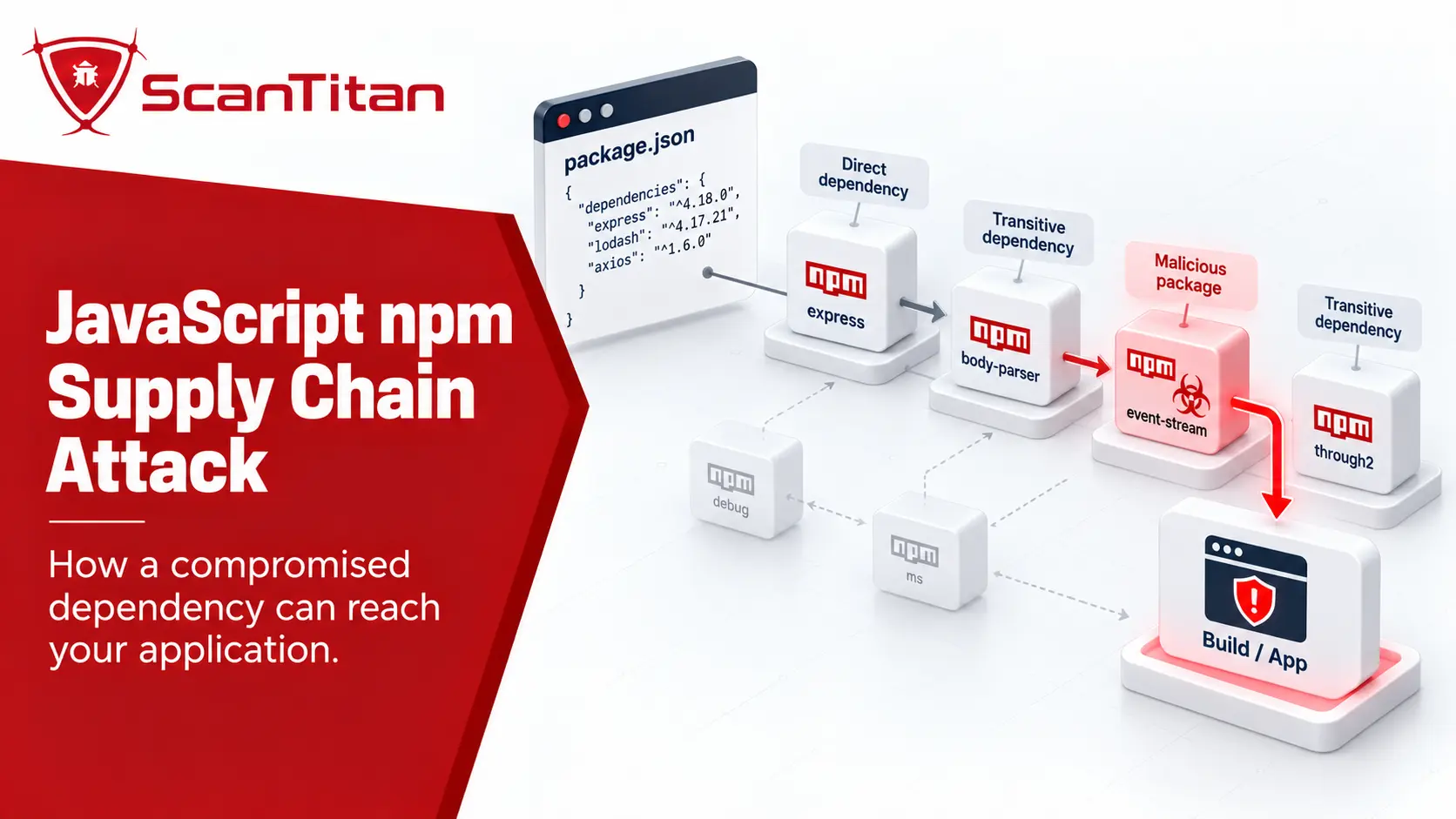
A JavaScript npm supply chain attack targets the software and infrastructure between an npm package maintainer and the application that eventually installs that package. Instead of exploiting a flaw in your own JavaScript first, an attacker may compromise a trusted package, publish a lookalike dependency, abuse package resolution, steal publishing credentials, or execute malicious code during installation. The result can reach developer laptops, CI/CD runners, cloud credentials, production builds, and downstream applications before a traditional vulnerability alert even exists.
QUICK ANSWERAn npm supply chain attack compromises part of the dependency or publishing path instead of attacking only your application code. Common entry points include maintainer-account compromise, malicious npm packages, typosquatting, dependency confusion, compromised CI/CD workflows, transitive dependencies, and install-time lifecycle scripts.
What Is a JavaScript npm Supply Chain Attack?
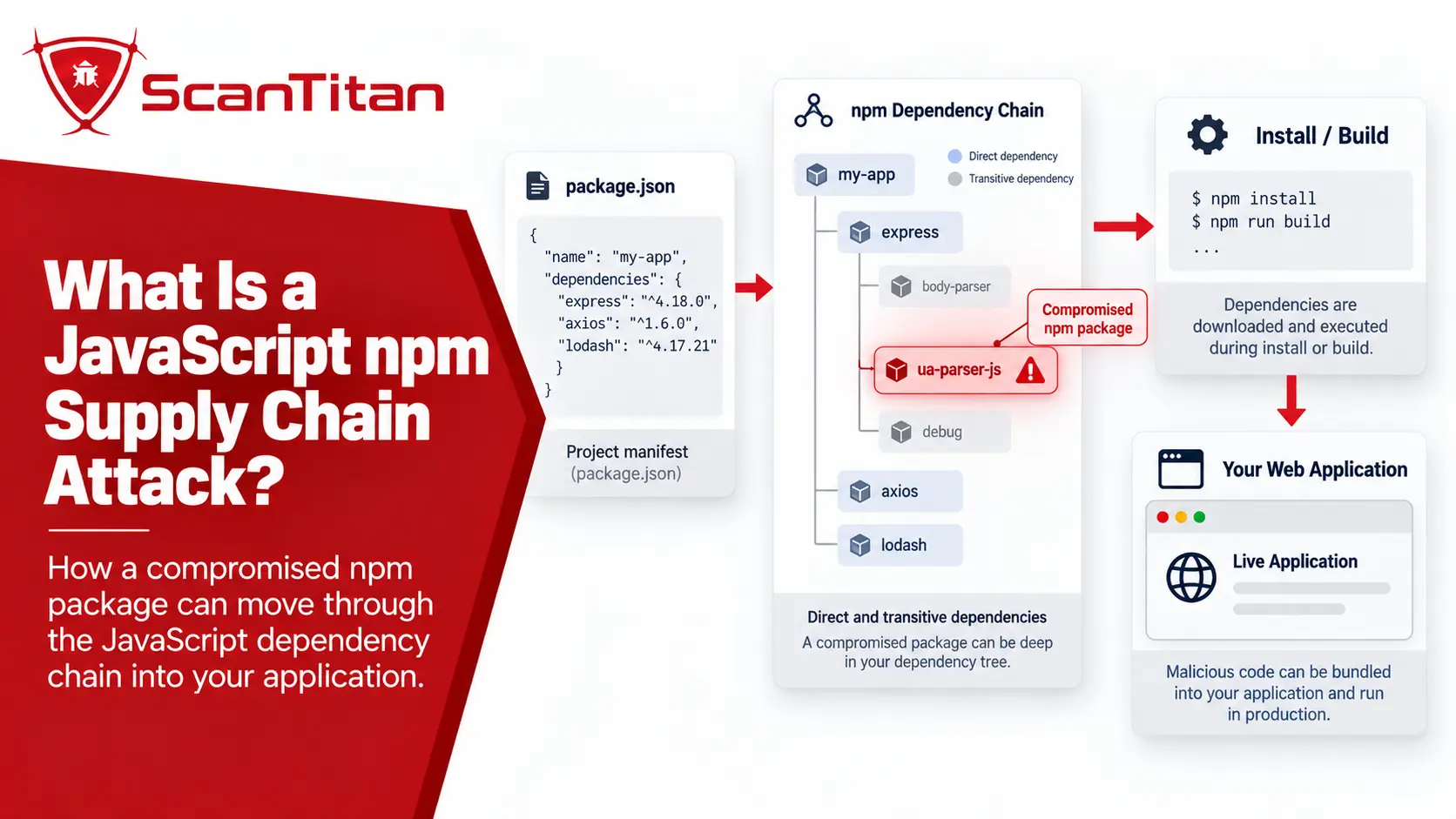
A JavaScript npm supply chain attack occurs when an attacker compromises or abuses something your application trusts before that software reaches your own codebase or production environment.
The affected component may be:
- an npm maintainer account
- a legitimate package release
- a package publishing token
- a GitHub Actions or other CI/CD workflow
- a direct npm dependency
- a transitive dependency
- a lookalike or typosquatted package
- an internal package namespace
- an install-time lifecycle script
The attack path can look like this:
Maintainer / Repository / CI
            ↓
       Package Publish
            ↓
        npm Registry
            ↓
    Dependency Resolution
            ↓
        npm install
            ↓
    Install-Time Execution
            ↓
 Developer / CI Environment
            ↓
        Application
The defining characteristic is trust inheritance. Your developers may believe they are installing a legitimate dependency, but something upstream in the software supply chain has changed.
Vulnerable Package vs Malicious Package vs Compromised Package
These terms are related, but they describe different security problems.
| Package state | What happened? | Typical detection signal |
|---|---|---|
| Vulnerable package | The legitimate software contains a security flaw. | CVE, security advisory, npm audit, Dependabot alert, SCA finding |
| Malicious package | The package was created or published with intentionally harmful behavior. | Malware analysis, package-reputation signal, security research, registry removal |
| Compromised package | A legitimate package or publishing path was taken over and a malicious release was published. | Unexpected release, maintainer compromise, incident advisory, malicious package behavior |
| Typosquatted package | A malicious package impersonates a legitimate package with a similar name. | Name mismatch, suspicious publisher, unexpected repository, security research |
This upstream trust problem is especially relevant to ecommerce environments. Verizon’s retail dataset shows unusually high third-party involvement; see our Retail Data Breach Statistics for the broader retail supply-chain context.
THIS DISTINCTION MATTERSA package can be malicious even before a normal CVE or vulnerability advisory exists. That is why dependency vulnerability scanning and software supply chain security overlap, but they are not the same discipline.
How Can an npm Supply Chain Attack Reach Your Application?
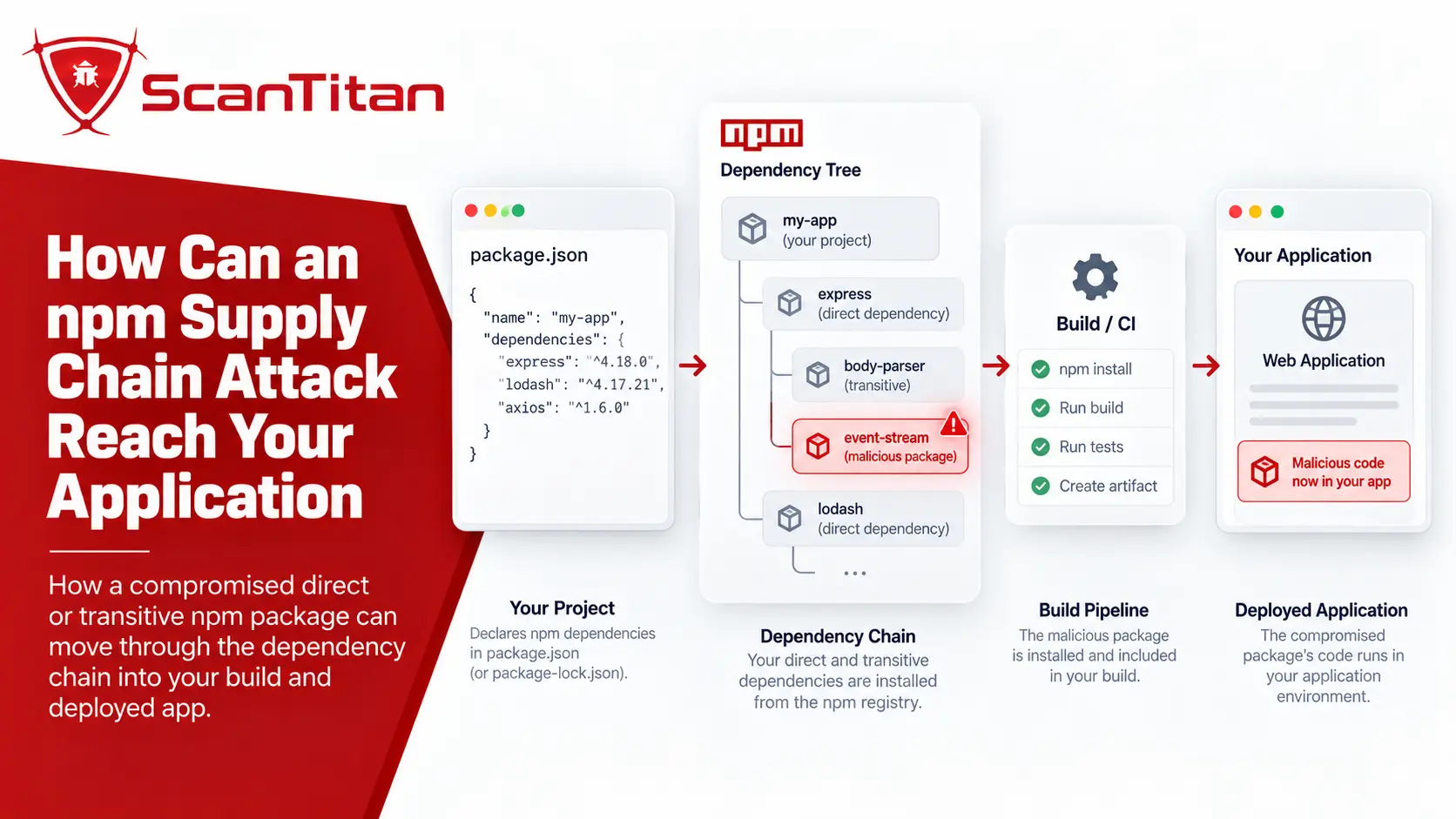
There is no single npm supply chain attack technique. Attackers can target different parts of the path between package development and package installation.
1. Maintainer Account Compromise
A trusted package becomes dangerous when an attacker gains enough access to publish a new release under the legitimate package name.
The developer installing the package may see:
trusted-package@new-versionrather than an obviously suspicious package.
This is especially important because package reputation is inherited from the legitimate project’s history. A long-established package name does not guarantee that every future release was published through an uncompromised account or workflow.
2. Compromised Build or Release Pipeline
An attacker does not always need direct access to npm itself. Compromising the repository or CI/CD workflow that builds and publishes a package may provide another route into the release process.
Modern package publishing often involves:
Source repository
      ↓
CI/CD workflow
      ↓
Build artifact
      ↓
Publishing credential
      ↓
npm registry
If a privileged workflow can be manipulated, the attacker may be able to alter a release, steal credentials, or publish an unauthorized version.
GitHub’s 2026 review of npm and GitHub Actions supply chain attacks describes how recent campaigns chained together compromised project access, CI/CD credentials, publishing permissions, and malicious package distribution.
3. Typosquatting
Typosquatting relies on a developer installing the wrong package.
A malicious package may use a name that resembles a popular legitimate dependency through:
- a missing character
- a swapped character
- a different separator
- a misleading scope
- a name that sounds like an official extension or helper package
In May 2026, Microsoft documented a campaign using typosquatted npm packages targeting cloud and CI/CD credentials. The packages impersonated familiar development and infrastructure-related software and used install-time behavior to access sensitive environments.
The defensive lesson is simple:
Verify the exact package identity before installation rather than trusting a familiar-looking name.
4. Dependency Confusion
Dependency confusion targets the way package managers resolve dependencies when the same or similar package identity exists in both internal and public package sources.
A simplified risk scenario looks like:
Application expects:
@company/internal-package

        ↓

Package manager checks configured sources

        ↓

Unexpected public package is selected

        ↓

Attacker-controlled code enters dependency tree
Microsoft documented an active May 2026 campaign where malicious npm packages abused dependency confusion by impersonating internal corporate namespaces and using installation-time code to profile developer environments.
Organizations using private npm packages should therefore treat registry configuration and internal namespace control as part of dependency security, not merely package management.
5. Malicious Direct Dependencies
A developer may intentionally add a package that appears useful but was malicious from the beginning.
This risk is different from compromising an established project. The package itself may have been created specifically to:
- collect environment variables
- steal credentials
- run unexpected installation code
- download secondary components
- inspect developer or CI environments
This is why package selection should be treated as a security decision rather than only a productivity decision.
6. Malicious Transitive Dependencies
The package your team selected may itself depend on other packages.
Your application
      ↓
Package A
      ↓
Package B
      ↓
Package C
You intentionally selected Package A, but Packages B and C can still become part of the installed software.
If a transitive dependency becomes malicious or compromised, the downstream application may inherit that risk without a developer ever explicitly adding the affected package.
For the practical workflow for identifying direct and transitive dependencies, SAST, SCA, and runtime findings, see our guide on how to scan JavaScript for vulnerabilities.
7. Install-Time Lifecycle Script Abuse
One of the most important npm-specific risks is that packages can define lifecycle scripts that execute during installation.
Relevant script stages include:
preinstallinstallpostinstall
That means harmful behavior may begin during package installation rather than waiting for your application to import or execute the dependency.
The current npm CLI documentation exposes controls such as ignore-scripts, allowScripts, and stricter install-script policies that teams can use where appropriate.
DO NOT DISABLE INSTALL SCRIPTS BLINDLYSome legitimate dependencies require installation scripts to build native components or complete setup. The safer goal is to understand which dependencies need scripts and restrict unnecessary execution rather than assuming every project can disable all lifecycle scripts without consequences.
Real JavaScript npm Supply Chain Attack Examples
Recent npm incidents show that JavaScript supply chain attacks do not all begin the same way.
| Incident | Entry point | Security lesson |
|---|---|---|
| Axios compromise — March 2026 | Legitimate package publishing path compromised; malicious dependency inserted into releases | A trusted package name does not guarantee every release is trustworthy |
| Typosquatting campaign — May 2026 | Lookalike npm packages impersonated familiar software | Package identity should be verified before installation |
| Dependency confusion campaign — May 2026 | Public packages impersonated internal corporate namespaces | Private-package resolution and registry configuration matter |
| Broader 2026 npm/CI attacks | Credential theft, CI/CD compromise and malicious package propagation | Package security extends beyond the package file itself |
The March 31, 2026 Axios incident is particularly useful because it demonstrates how a legitimate dependency can become the delivery path. Google Threat Intelligence reported that malicious Axios releases introduced another malicious npm dependency, which then used a postinstall hook for automatic execution. You can read the Google Threat Intelligence analysis of the Axios npm compromise for the full incident timeline.
The important lesson is not that Axios is uniquely risky. It is that a dependency users already trust can temporarily become part of an attack chain when publishing infrastructure or maintainer access is compromised. For the counts behind these campaigns, including Sonatype’s quarterly malicious-package totals and the 2026 Shai-Hulud waves, see our software supply chain attack statistics.
What Happens When You Install an npm Dependency?
Understanding the installation process makes npm supply chain risk easier to reason about.
At a high level, installation involves several stages:
Read package.json
      ↓
Resolve dependency versions
      ↓
Use package-lock.json where applicable
      ↓
Fetch packages
      ↓
Verify available integrity metadata
      ↓
Build node_modules dependency tree
      ↓
Run permitted lifecycle scripts
      ↓
Application / build can use packages
Attackers do not need to compromise every stage. They only need one trusted point in the chain to behave differently from what the developer expects.
This is why dependency security should consider:
- which package was selected
- which version was resolved
- where the artifact came from
- who published it
- whether provenance is available
- which scripts are allowed to execute
- what credentials exist in the installation environment
Why package-lock.json Helps — and What It Does Not Prove
A committed package-lock.json is an important dependency-security control because it records the resolved dependency tree instead of allowing every installation to choose new compatible versions independently.
In CI/CD environments, npm ci can install from the existing lockfile and fails when the dependency declarations and lockfile do not match instead of silently rewriting the lockfile. The official npm ci documentation describes these installs as effectively frozen because the command does not modify package.json or the lockfiles.
That improves reproducibility:
package.json
+
package-lock.json
        ↓
Known dependency tree
        ↓
Repeatable installation
But there is an important limitation.
A LOCKFILE ESTABLISHES VERSION CONSISTENCY, NOT PACKAGE TRUSTIf the lockfile already contains a malicious or compromised release, a deterministic installation can faithfully reproduce that same unsafe dependency. Lockfiles reduce unexpected version drift; they do not prove that every locked package is trustworthy.
Why npm audit Is Necessary but Not Enough
npm audit is useful for known dependency vulnerabilities, but it should not be treated as a complete npm supply chain defense.
The official npm audit documentation explains how the command analyzes the dependency tree against vulnerability data and provides information about known security issues.
That makes it valuable for questions such as:
- Does this dependency version have a known advisory?
- Which package introduces the vulnerable dependency?
- Is a fixed version available?
But supply chain attacks introduce different questions:
- Was this package intentionally malicious?
- Was a trusted maintainer account compromised?
- Was the release pipeline hijacked?
- Did the package begin executing malicious behavior before an advisory existed?
- Did installation expose CI or cloud credentials?
A newly malicious release can exist before normal vulnerability databases have enough information to flag it.
npm auditis a vulnerability control. It is not proof that every installed npm package is non-malicious.
How to Reduce JavaScript npm Supply Chain Risk Before Installation
The best time to investigate a dependency is before it becomes trusted application infrastructure.
Verify the Exact Package Identity
Before adding an unfamiliar dependency, confirm that the package name, scope, repository, maintainer, and documentation correspond to the project you intended to install.
Do not rely on:
"The package name looks familiar."Typosquatting works precisely because visual familiarity can substitute for verification.
Question Whether You Need the Dependency
Every dependency adds code, maintainers, update events, release infrastructure, and transitive components to the application’s trust boundary.
This does not mean avoiding open-source packages. It means asking whether a new dependency provides enough value to justify another upstream trust relationship.
Review package.json and Lockfile Changes
Dependency changes should receive the same attention as application-code changes.
A pull request that adds one line to package.json may change dozens of entries in package-lock.json because a new package introduces its own dependency tree.
GitHub’s Dependency Review is designed for this purpose. It shows packages added, removed, or updated in a pull request, including indirect dependency changes and known vulnerability information.
Useful review questions include:
- Why is this dependency being added?
- Is this the expected package?
- Did the lockfile change more than expected?
- Which transitive dependencies were introduced?
- Does the package run install scripts?
- Is the package actively maintained?
Avoid Blindly Pulling Every New Release
Automatic dependency updates are useful for patching and maintenance, but immediately consuming every newly published version can reduce the time available for malicious-release signals to emerge.
GitHub announced in July 2026 that Dependabot version updates now use a default package cooldown before opening ordinary version-update pull requests, while security updates continue without that delay. GitHub described this as a way to give ecosystem detection signals time to surface before fresh releases reach downstream projects. The change is documented in GitHub’s 2026 supply chain security update.
The correct policy depends on your environment. Critical security fixes may need immediate adoption, while ordinary feature releases may tolerate additional review time.
Control npm Install Scripts
Install-time scripts deserve special attention because they can execute before your application begins normal runtime behavior.
For environments where dependency scripts are unnecessary, npm supports:
npm ci --ignore-scriptsBut this can break packages that legitimately require installation-time setup.
Current npm also supports more granular controls for approved install scripts. The npm CLI configuration documentation describes allowScripts and strict-allow-scripts policies that can restrict which dependency lifecycle scripts are permitted to execute.
A stronger model is:
Dependency contains install script
        ↓
Has the team reviewed why it is needed?
        ↓
Yes → explicitly allow where appropriate

No / Unknown → investigate before execution
This changes the assumption from:
Every dependency may run installation code because it was installed.
to:
Installation-time execution is a capability that should be understood and controlled.
Secure npm Installation in CI/CD
CI/CD environments are particularly attractive during supply chain attacks because build runners may contain or access:
- GitHub or source-control credentials
- npm publishing tokens
- cloud credentials
- deployment secrets
- artifact repositories
- signing or release infrastructure
A malicious dependency running on a developer laptop is serious. The same dependency running inside a highly privileged release pipeline can have a much larger blast radius.
Useful controls include:
- use
npm ciwith a reviewed lockfile for reproducible CI installs - limit secrets available to dependency-installation jobs
- use least-privilege CI identities
- avoid exposing publishing credentials to jobs that do not need them
- review third-party GitHub Actions and workflow changes
- separate build, test, and publish privileges where practical
- restrict install scripts when the project can support that policy
The 2026 Microsoft typosquatting investigation showed why this matters: malicious npm packages specifically targeted AWS credentials, HashiCorp Vault tokens, CI/CD secrets, and npm publishing credentials. ([Microsoft Security](https://www.microsoft.com/en-us/security/blog/2026/05/28/typosquatted-npm-packages-used-steal-cloud-ci-cd-secrets/))
Verify npm Package Signatures and Provenance
npm provenance adds another layer of supply chain evidence by connecting a published package to information about how and where it was built.
Where provenance is available, npm can expose information such as:
- source repository
- source commit
- build workflow
- transparency-log information
The npm CLI can also verify registry signatures and provenance attestations for installed packages:
npm audit signaturesThe official npm package provenance documentation explains that this command verifies registry signatures and available provenance attestations and reports missing or invalid verification information.
PROVENANCE IS NOT A SECURITY GUARANTEEValid provenance helps answer where and how a package was built. It does not prove that the source code contains no vulnerability or malicious logic. Treat provenance as evidence of origin and build history, not as a substitute for security review.
If Your Team Publishes npm Packages, Protect the Publishing Path
Teams that publish packages have an additional responsibility: preventing their own package from becoming the next supply chain entry point.
One of the strongest current controls is npm Trusted Publishing.
The official npm Trusted Publishing documentation explains that supported CI/CD systems can use OpenID Connect, or OIDC, to publish without storing a long-lived npm publishing token in the workflow.
The security model changes from:
Long-lived npm publish token
        ↓
Stored in CI/CD
        ↓
Token stolen
        ↓
Persistent publishing capability
toward:
Authorized CI workflow
        ↓
Short-lived OIDC identity
        ↓
npm verifies workflow identity
        ↓
Package publish
This does not eliminate every supply chain attack, but it removes an important class of reusable publishing credentials from supported workflows.
For package maintainers, also consider:
- strong account authentication and 2FA
- least-privilege repository access
- reviewed release workflows
- trusted publishing where supported
- provenance generation
- staged or additional approval for high-impact releases where appropriate
- monitoring unexpected maintainer and publishing changes
Can JavaScript Vulnerability Scanning Detect Supply Chain Risk?
Partially.
Software composition analysis can identify known vulnerable dependencies, and runtime scanning may detect vulnerable libraries or security problems in the deployed application. Those are useful controls, but they do not automatically answer whether an npm package was intentionally malicious during installation or whether a publisher’s CI workflow was compromised.
Lockfile analysis misses anything injected after build. scan the website as it is served and you see the scripts that actually reach your users.
ScanTitan’s JavaScript Vulnerability Scanner is relevant to the deployed-application side of this problem because it can assess browser-executed JavaScript behavior and identify security evidence in running applications.
It should not be treated as a replacement for:
- dependency review
- package identity verification
- CI/CD hardening
- malicious-package detection
- publishing-security controls
- incident response after install-time compromise
Supply chain security requires controls before, during, and after dependency installation.
What to Do If You Installed a Compromised npm Package
Removing the package is not necessarily enough.
If malicious code executed during installation, it may already have accessed environment variables, credentials, source-control tokens, cloud identities, or CI/CD secrets.
A practical response should consider the following sequence.
1. Confirm the Affected Package and Version
Determine exactly which package version was installed and where it was installed:
- developer laptops
- CI runners
- build servers
- containers
- production build environments
2. Stop Further Installation and Deployment
Prevent affected dependency versions from continuing through automated builds and releases while the incident is investigated.
3. Determine Whether Install-Time Code Executed
Review the package’s installation behavior and available security advisories. Pay particular attention to lifecycle scripts and unexpected child processes, downloads, or network activity.
4. Investigate Exposed Credentials
If the package executed in an environment containing sensitive credentials, assume those credentials may require investigation and rotation according to your incident-response process.
Potentially affected secrets can include:
- npm tokens
- GitHub tokens
- cloud access credentials
- deployment credentials
- CI/CD secrets
- Vault or secret-management tokens
5. Review Downstream Builds and Artifacts
If the compromised dependency participated in a production build, determine whether generated application artifacts, containers, packages, or deployment images were affected.
6. Rebuild From a Known-Good Dependency State
After the malicious or compromised version has been removed, rebuild from a reviewed lockfile and dependency state rather than assuming that uninstalling one package restores trust in already-generated artifacts.
7. Rescan and Monitor
Repeat dependency scanning and relevant application-security testing, then monitor affected systems for signs that the compromise had effects beyond the package installation itself.
UNINSTALLING DOES NOT REVERSE EXECUTED MALWAREIf a compromised dependency already ran installation code, removing it from package.json only prevents future use. It does not automatically invalidate stolen credentials, restore modified files, or make previously built artifacts trustworthy again.
JavaScript npm Supply Chain Security Checklist
A mature dependency-security process should be able to answer these questions:
- Do we know which direct and transitive dependencies our applications use?
- Are dependency manifests and lockfiles committed and reviewed?
- Do pull requests clearly show dependency changes?
- Do we verify package names and publisher information before adding unfamiliar dependencies?
- Do we understand which packages execute install scripts?
- Are dependency installation jobs isolated from unnecessary secrets?
- Do CI jobs use least-privilege credentials?
- Do we run vulnerability scanning such as
npm auditor equivalent SCA? - Do we verify signatures or provenance where available?
- Do package publishers avoid unnecessary long-lived publishing tokens?
- Do we have a response process for compromised or malicious dependencies?
- Do we reassess the deployed application after dependency changes?
The objective is not to eliminate npm dependencies. It is to make the trust relationships behind those dependencies visible and controllable.
Frequently Asked Questions About JavaScript npm Supply Chain Attacks
What is a JavaScript npm supply chain attack?
A JavaScript npm supply chain attack targets the dependency, development, build, publishing, or package-distribution path used by a JavaScript application. Attackers may compromise legitimate maintainers, publish malicious packages, use typosquatting or dependency confusion, abuse lifecycle scripts, or steal CI/CD and npm publishing credentials.
How does an npm supply chain attack work?
The attack compromises a trusted point before the dependency reaches the application. This might be a package maintainer account, CI/CD workflow, publishing token, package name, dependency-resolution process, transitive dependency, or install-time script. The malicious or compromised package is then installed by developers or automated systems.
Can npm audit detect malicious packages?
npm audit is primarily designed to identify known dependency vulnerabilities using advisory data. It is an important security control, but a newly malicious or compromised package may exist before normal vulnerability data or advisories are available. Supply chain security therefore requires additional controls such as dependency review, package verification, install-script controls, provenance, and CI/CD hardening.
Does package-lock.json prevent npm supply chain attacks?
No. A package-lock.json file improves reproducibility by recording the resolved dependency tree and reducing unexpected version changes. However, if the lockfile already references a malicious or compromised package version, the lockfile can reproduce that same unsafe version consistently.
What is dependency confusion in npm?
Dependency confusion occurs when package-resolution behavior causes an attacker-controlled public package to be selected instead of an intended internal package. Organizations using private packages should control package namespaces, registry configuration, and dependency resolution so internal dependencies cannot be unexpectedly replaced by public packages.
Why are npm install scripts a supply chain risk?
npm dependencies can define lifecycle scripts such as preinstall, install, and postinstall. These scripts may execute during package installation, which means a malicious dependency can potentially run code before the application normally imports or executes that package. Teams should review and restrict install-time execution where their environment allows it.
What does npm audit signatures do?
npm audit signatures verifies available registry signatures and package provenance attestations for installed dependencies. This can help detect missing or invalid integrity and provenance information, but valid provenance does not prove that the package contains no vulnerability or malicious logic.
What should I do if I installed a compromised npm package?
Identify the affected package and version, stop further installations and deployments, determine whether installation code executed, investigate credentials available to the affected environment, rotate exposed secrets where appropriate, review downstream artifacts, rebuild from a known-good dependency state, and repeat security testing before returning affected systems to normal operation.
How can npm package publishers reduce supply chain risk?
Package publishers should protect maintainer accounts and release workflows, use strong authentication, reduce privileged long-lived credentials, use npm Trusted Publishing with OIDC where supported, generate provenance, review release changes, and restrict who or what can publish new package versions.