What Is a Cloud Security Scan?
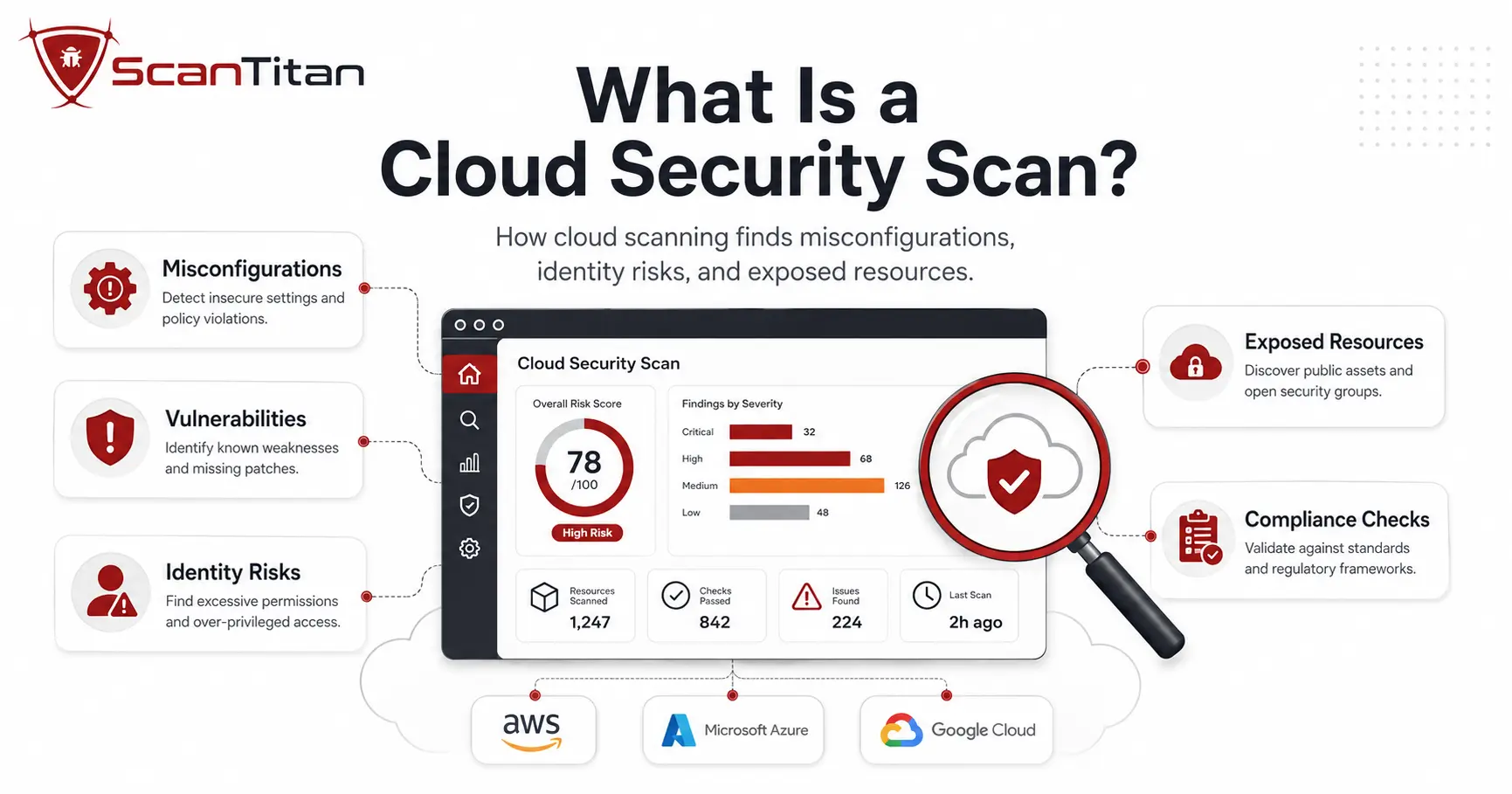
A cloud security scan inspects several layers and reports what it finds. First, it looks for vulnerabilities, known software flaws with a CVE (Common Vulnerabilities and Exposures) identifier, in your virtual machines, container images, and application dependencies. Second, it checks configurations, the settings on your storage buckets, databases, and identity policies, against secure baselines. Third, it maps technical findings and configuration checks to relevant controls in frameworks and standards such as PCI DSS, CIS Benchmarks, SOC 2, HIPAA, and ISO 27001. A scan can support compliance evidence and technical control validation, but it does not establish compliance by itself. To do any of this, the scanner first builds an inventory of supported resources it can discover across the connected accounts, subscriptions, projects, and regions, then tests each one and returns a prioritized vulnerability assessment.
How Is a Cloud Security Scan Different from a Traditional Vulnerability Scan?
Here is where teams get tripped up. Traditional vulnerability scanners can assess cloud-hosted systems too, so it is wrong to call them on-premises only. The gap is context: network-only scanning does not usually expose the full cloud control-plane picture. Cloud-native scanning adds provider API visibility into identities, storage policies, managed services, configuration state, account relationships, and short-lived resources that a conventional network scan may not see directly. That difference matters because cloud environments change fast. A developer can create a public storage bucket with one command, and an autoscaling group can launch new servers on its own. API- and event-driven discovery can detect short-lived resources that periodic network scans may miss, depending on the platform’s coverage, permissions, integrations, and discovery cadence. Same goal, wider lens for a more fluid environment.
A cloud scan reads control-plane configuration. A website security scanner tests the running application. Most teams need both, because a misconfigured bucket and an injectable form are different failures.
What Does a Cloud Security Scan Check For?
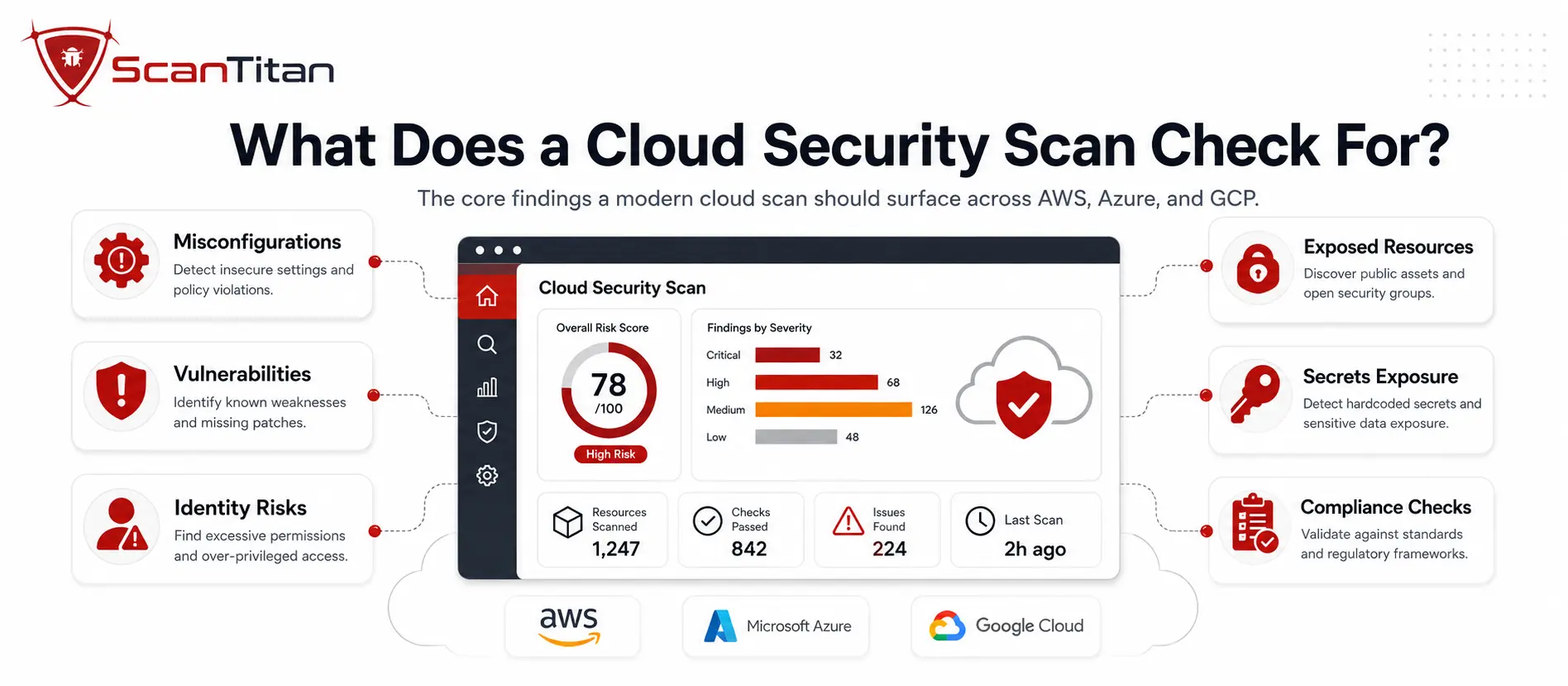
A capable cloud security scan can cover six categories, though the exact depth depends on the scanner, the integrations you enable, and the permissions you grant. Weak coverage in any one can leave a blind spot.
- Software vulnerabilities appear as known CVEs in operating-system packages, container layers, libraries, and dependencies. The scanner compares detected components against vulnerability intelligence such as CVE records, vendor advisories, the National Vulnerability Database where available, and CISA’s Known Exploited Vulnerabilities catalog, the list of flaws attackers are using now.
- Misconfigurations show up as insecure settings: a public Amazon S3 bucket, a security group open to the internet on port 22, or logging switched off. This is Cloud Security Posture Management (CSPM). Misconfiguration remains a major source of cloud exposure, and our guide to common cloud misconfigurations covers the full list.
- Identity and access risks appear as over-privileged identity and access management (IAM) roles, unused access keys, or missing multi-factor authentication. Cloud Infrastructure Entitlement Management (CIEM) is the discipline that catches an account quietly able to read your production database.
- Exposed secrets include hardcoded API keys, tokens, and passwords. Secrets scanning may inspect supported repositories, images, templates, or configuration sources when the relevant integrations and permissions are enabled.
- Compliance gaps map technical configuration findings to applicable controls and benchmarks such as PCI DSS, SOC 2, ISO 27001, or the CIS Benchmarks. They support an audit or compliance program but do not by themselves prove that the organization is compliant.
- Container and Kubernetes issues cover vulnerable base images, exposed dashboards, and risky workload permissions, though deep image-level or cluster inspection usually depends on registry, cluster, or workload integrations rather than a basic API connection alone.
How Do CSPM, CWPP, CIEM, DSPM, and CNAPP Fit Together?
Shop for cloud scanning and you will drown in acronyms, so here is the map. CSPM (Cloud Security Posture Management) scans configurations for misconfigurations and compliance drift. CWPP (Cloud Workload Protection Platform) secures the workloads themselves: virtual machines, containers, and serverless functions. CIEM (Cloud Infrastructure Entitlement Management) governs identities and permissions. DSPM (Data Security Posture Management) finds and protects sensitive data, and SSPM (SaaS Security Posture Management) checks SaaS apps like Microsoft 365. A CNAPP (Cloud-Native Application Protection Platform) bundles these into one platform, so a single tool can correlate a misconfiguration, a vulnerability, and an over-privileged role into one attack path instead of three disconnected alerts. For a lean team, the takeaway is simple: you do not need five tools, you need one scan that covers these angles and one prioritized queue.
How Does a Cloud Security Scan Work?
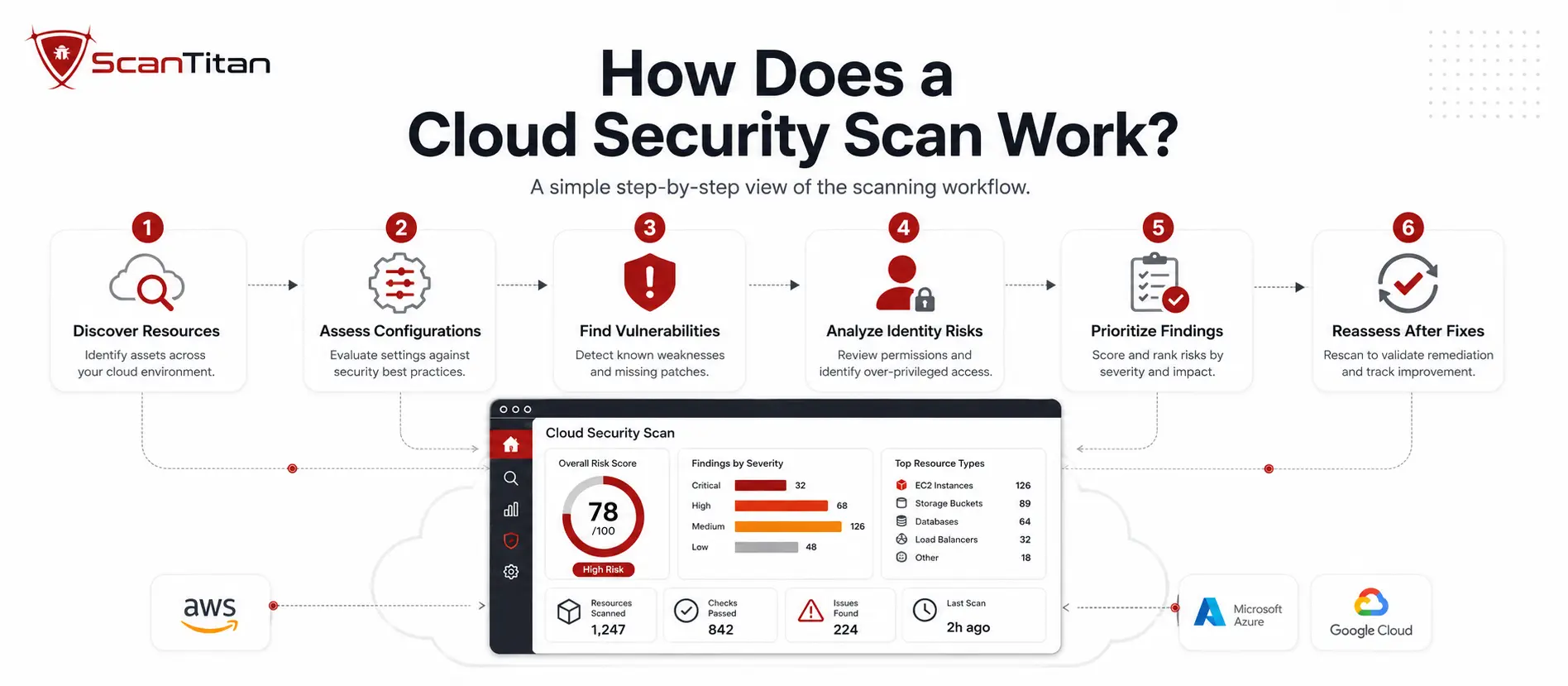
Under the hood, a cloud security scan runs a loop, then repeats it.
- Discover supported resources across the connected scope. The scanner connects to the cloud environments and integrations you authorize and builds an inventory of supported resources across the connected accounts, subscriptions, projects, regions, registries, clusters, or repositories.
- Detect the flaws. Depending on the scan types and integrations enabled, it checks assets against vulnerability intelligence, configuration baselines, and compliance rules, flagging vulnerabilities, misconfigurations, identity risks, and exposed secrets.
- Add exploitability and reachability context. Advanced platforms may combine network exposure, package data, runtime telemetry, exploit intelligence, attack-path relationships, and asset context to reduce false positives and highlight findings that are more likely to be exploitable. A vulnerable library such as Log4Shell (CVE-2021-44228, CVSS 10.0) matters far more when the affected code is actually reachable.
- Prioritize by real risk. Good platforms rank findings by exposure, privileges, sensitive-data access, and exploit intelligence, not by the raw CVSS (Common Vulnerability Scoring System) severity alone, so an internet-facing server with admin rights to sensitive data rises above an isolated dev box.
- Remediate with guidance. Supported findings should include remediation guidance that explains what to patch, restrict, reconfigure, or investigate.
- Repeat on the right cadence. Discovery and posture assessment can run continuously or on a frequent automated cadence, while deeper vulnerability tests can follow risk-based, scheduled, and event-driven triggers.
What Are the Main Types of Cloud Security Scans?
Beyond what a scan checks, how it collects the data matters, and each method carries tradeoffs. Most mature programs blend them. For a deeper breakdown, see our guide on agentless vs agent-based scanning.
- Agentless scanning uses cloud-provider APIs and, in some implementations, snapshots, provider inventory data, or registry access to assess workloads without deploying a dedicated agent on every system. It deploys quickly and broadly, though coverage and depth vary by provider, resource type, permissions, and scanner, and it may miss live, in-memory activity.
- Agent-based scanning installs or uses a workload-side sensor to collect deeper host and runtime information. It can provide richer package and process context, but it adds deployment and lifecycle overhead, and agents are not applicable to many fully managed services because customers do not control the underlying host.
- Hybrid scanning combines agentless breadth with agent- or workload-level depth where additional runtime or host context is useful.
How Does Cloud Security Scanning Fit Into CI/CD?
The cheapest vulnerability to fix is the one that never ships. That is the logic behind shift-left scanning: moving checks earlier, into the build pipeline, so problems get caught before they reach production. When repository, registry, or CI/CD integrations are enabled, cloud security tooling can inspect container images and Infrastructure as Code (IaC) templates, the Terraform or CloudFormation files that define your cloud, so a public bucket or an open port gets flagged in the pull request rather than in a breach report. A single policy that blocks a critical CVE in the pipeline can flag the same issue if it reaches production, so fewer risks fall through the gap between build and runtime. For teams shipping daily, this is not optional polish. Manual review struggles to keep pace with automated deployment, and catching a misconfiguration in code is minutes of work against days of incident response.
How Do AWS, Azure, and Google Cloud Handle Security Scanning?
Each major provider offers native security tooling, but the coverage model is no longer strictly single-cloud. Microsoft Defender for Cloud, for example, provides posture coverage for Azure plus expanded multicloud assessment for AWS and GCP. The practical question for multi-cloud teams is therefore not simply whether cross-cloud support exists, but how consistently assets, severity, identity context, workflows, and remediation are normalized across providers.
- AWS offers Amazon Inspector for EC2, ECR container images, Lambda, package vulnerabilities, and network reachability findings; AWS Config for configuration rules; GuardDuty for threat detection; and Security Hub for aggregation and posture management.
- Azure centralizes scanning in Microsoft Defender for Cloud, which provides cloud security posture management, workload protection, a secure score, regulatory mappings, and multicloud posture coverage that includes AWS and GCP resources.
- Google Cloud uses Security Command Center for asset inventory, posture and misconfiguration findings, vulnerability findings for supported services, and threat detection.
Multi-cloud teams should compare how well each platform normalizes findings, identities, asset relationships, risk scoring, ticketing, and remediation across the clouds they actually use.
What Should You Look for in a Cloud Security Scanner?
Not every scanner earns its place. When you evaluate one, weigh these against your actual environment, not a feature checklist.
- Confirm the scanner supports the providers, accounts, regions, managed services, clusters, registries, and resource types that are actually in scope, so you are not left with silent gaps.
- Prioritize by exposure, reachability, and exploit intelligence, not raw severity alone. Context is what turns ten thousand findings into the handful that matter.
- Reduce false positives with exposure, reachability, runtime or workload context where available, and asset relationships. Noise is what burns out a small team.
- Scan configurations, identities, and secrets, not vulnerabilities alone, because misconfiguration and identity are where many cloud incidents start.
- Integrate with your workflow. Findings should land in the tools your team already uses, and scanning should slot into your deployment pipeline where the integration exists.
- Attach evidence and remediation. High-value findings should include supporting context to verify the issue, plus actionable guidance an engineer without a security background can follow.
Why Does Cloud Security Scanning Matter?
The case for scanning is not abstract. Several forces make it a baseline control, not a nice-to-have.
- Expanding attack surface grows every time someone launches a resource. Each new VM, bucket, or function is another potential entry point, and in the cloud those appear quickly.
- Misconfiguration remains a major source of cloud exposure, particularly when public access, permissive network rules, disabled logging, weak identity controls, or unsafe defaults are involved.
- Compliance requirements can make scanning necessary. PCI DSS includes explicit internal and external vulnerability-scanning requirements for applicable environments, including scans at least once every three months and additional scanning after significant changes. Frameworks such as HIPAA, SOC 2, and ISO 27001 require organizations to manage security risk and vulnerabilities, but the exact method and frequency depend on scope, risk, and the controls selected.
- The shared responsibility model puts configuration, identity, and workload security largely on the customer side, which the next sections unpack.
- Shadow IT hides risk in plain sight. Untracked accounts and forgotten test environments are often what attackers enumerate first, and discovery-based scanning is how you surface them.
- Breach cost tends to climb the longer an exposure goes unnoticed. Catching an exposed workload in a scan is generally far cheaper than catching it in an incident.
What Are the Main Challenges of Cloud Security Scanning?
No scan is friction-free, and knowing the failure modes up front saves pain. The most common is false positives: a scanner that flags packages regardless of whether they are reachable can bury the real risks and wear out a small team. The second is coverage. Scanning across dozens of accounts and subscriptions is easy to misconfigure, and an unscanned account is often the one an attacker finds. The third is prioritization. Without exposure context, a flat list of critical findings gives you little basis to decide what to fix first. The fourth is developer friction: security that blocks a release without a clear fix tends to get worked around. A risk-based approach consistent with frameworks such as the NIST Cybersecurity Framework is to maintain ongoing visibility, validate vulnerabilities regularly, prioritize them in context, and route remediation to the right owners. Here, continuous monitoring means a frequency sufficient to support timely risk decisions, not that every active test runs without interruption.
How Does the Cloud Shared Responsibility Model Affect Scanning?
Every cloud breach conversation eventually lands here, so get it straight. Under the shared responsibility model, the cloud provider secures the underlying infrastructure, while customer responsibilities vary by service model. Customers commonly remain responsible for identities, data, access policies, application code, and many configuration choices. With infrastructure services, they may also manage the guest operating system, installed software, and security patches. With more managed services, the provider takes on more of the underlying stack, but customers still need to secure how the service is configured and who can access it. AWS describes this as security “of” the cloud versus security “in” the cloud, while noting that customer responsibilities vary by the services used. A cloud security scan helps assess the parts of that shared model that remain visible and controllable from the customer side, which is where a large share of real-world exposure sits.
How Often Should You Run a Cloud Security Scan?
There is no single number, but there is a clear principle. For asset discovery and cloud posture, run assessment as continuously or frequently as practical. For deeper vulnerability testing, use a risk-based, scheduled, and event-driven cadence in addition to any compliance minimums. Useful triggers for a deeper scan include a new cloud account or subscription, a new internet-facing resource, a major deployment, a significant configuration change, a newly disclosed critical or actively exploited vulnerability, a new container image, and a material IAM change. On the compliance floor, PCI DSS requires applicable internal and external vulnerability scans at least once every three months, plus scans after significant changes. More frequent assessment is often appropriate when cloud resources change faster than that minimum. If you are moving from periodic checks toward ongoing coverage, our guide on continuous vulnerability scanning walks through the setup.
How Do You Run a Cloud Security Scan?
Getting started is more approachable than the enterprise tooling suggests. The core sequence looks like this.
- Connect the cloud environments and the least-privilege integrations required for the scan types you enable. Posture assessment may use read-only control-plane access, while workload, registry, Kubernetes, repository, or snapshot-based scanning may require additional narrowly scoped permissions or integrations.
- Run an initial baseline scan to discover supported resources across the connected scope and surface current vulnerabilities, misconfigurations, and exposed secrets.
- Triage the findings by real exposure. Fix the internet-facing, high-privilege, sensitive-data issues first, and tune out the noise that does not apply to your setup.
- Remediate using the guidance attached to each finding, then rescan or re-evaluate the finding to verify that the relevant condition is no longer detected.
- Automate the loop. Separate continuous posture monitoring, scheduled vulnerability scanning, event-driven reassessment, and CI/CD checks so each runs on the cadence that fits it.
If you would rather not stitch that together across separate consoles, ScanTitan’s Cloud Vulnerability Scanner is designed to assess supported AWS, Azure, and Google Cloud resources from a unified workflow, helping teams prioritize detected vulnerabilities, misconfigurations, identity risks, and exposed resources with supporting context and remediation guidance where available.
Frequently Asked Questions
What is the difference between a cloud security scan and a cloud security audit?
A scan is the automated tool action: it discovers supported resources and detects vulnerabilities, misconfigurations, identity risks, and compliance-relevant issues. An audit is the broader, often manual process of reviewing your environment against a framework and documenting evidence. The scan feeds the audit. Our cloud security audit checklist covers the wider process.
Is a cloud security scan the same as CSPM?
No. CSPM focuses primarily on cloud configuration, posture, and policy compliance. The broader term cloud security scanning may also include workload vulnerabilities, IAM and entitlement analysis, secrets, containers, Kubernetes, Infrastructure as Code, and external exposure, depending on the platform and integrations enabled.
Can one scanner cover AWS, Azure, and Google Cloud?
Yes. Many dedicated security platforms support AWS, Azure, and Google Cloud in one workflow, and some provider-native platforms also offer multicloud capabilities. The important question is how consistently the tool covers the services you use and normalizes inventory, severity, identity context, remediation, and workflow across providers.
How is cloud scanning different from a website vulnerability scan?
A website vulnerability scan tests a running web application from the outside for issues such as injection flaws, cross-site scripting, authentication weaknesses, and other web risks. A cloud security scan inspects the infrastructure behind it: accounts, configurations, identities, workloads, and storage across your cloud estate. Most organizations need both.
How often should I scan my cloud environment?
Use ongoing or frequent discovery and posture assessment, then run deeper vulnerability testing on a risk-based, scheduled, and event-driven cadence. Reassess after significant deployments or configuration changes and when important new vulnerabilities affect technologies you use. For PCI DSS environments, meet the applicable scanning minimums in addition to any more frequent operational checks.
Reviewed by Obaida Al-Sulaiman, Information Security Manager, ScanTitan. CISSP, GXPN, GCIH, GWAPT, CISA, CEH, ISO 27001 Lead Auditor. Obaida leads offensive and defensive security assessments across ScanTitan’s vulnerability scanning, malware, and attack surface work.