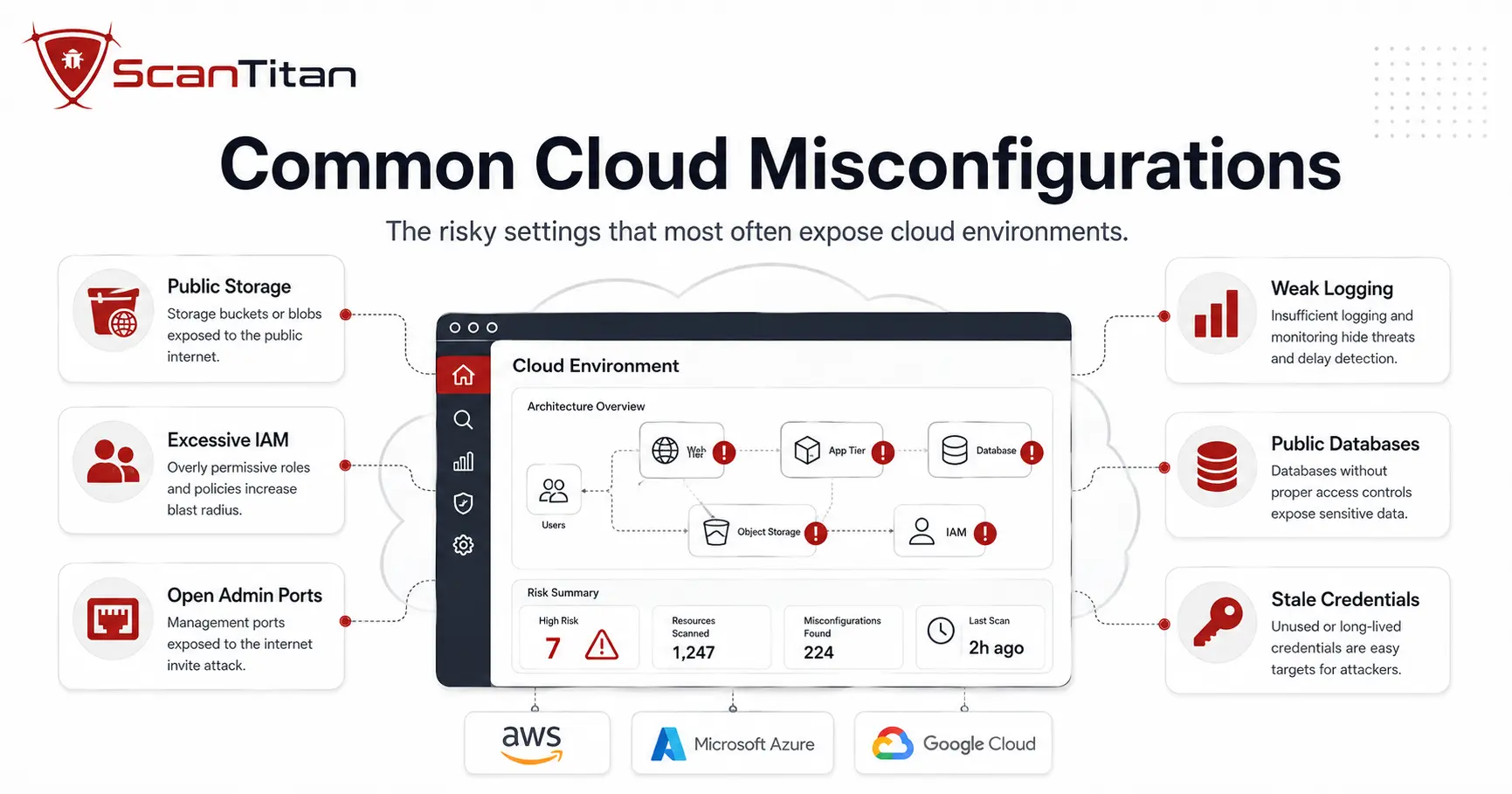
What Is a Cloud Misconfiguration?
A cloud misconfiguration is a security-relevant setting or policy that leaves a resource more exposed than intended. Under the shared responsibility model, responsibility for a specific setting depends on the service being used, but customers commonly remain responsible for identities, access policies, data exposure, network rules, and many resource configurations. What makes misconfigurations matter is reach and timing. Some create immediate exposure the moment they go live, such as a public data store or an unrestricted management port. Others become dangerous only when combined with a compromised identity, a vulnerable workload, or a reachable path to sensitive data. Internet-exposed resources can be discovered quickly through automated reconnaissance, which shortens the time teams have to notice and correct a risky setting. That is why a cloud security scan exists: to surface these settings before they turn into an incident.
What Are the Most Common Cloud Misconfigurations?
The table below is a quick reference. Each row names a misconfiguration, its main risk, and the first fix to reach for. The sections that follow explain each one in depth.
| Misconfiguration | Main risk | First fix |
|---|---|---|
| Over-permissive IAM | Privilege escalation, lateral movement | Apply least privilege, scope roles tightly |
| Missing MFA / weak identity | Account takeover from stolen passwords | Enforce MFA, use a central identity provider |
| Exposed long-lived access keys | Reusable credentials for attackers | Prefer short-lived, federated credentials |
| Public object storage | Direct data exposure | Keep Block Public Access on, stay private by default |
| Public snapshots and backups | Full data-set exposure | Keep snapshots private and encrypted |
| Weak encryption or key policy | Data readable if other controls fail | Align key ownership and policy, enforce TLS |
| Open management ports | Brute-force on SSH and RDP | Restrict source ranges, use a bastion or VPN |
| Unrestricted outbound access | Data exfiltration and command-and-control | Apply egress filtering and private endpoints |
| Flat network segmentation | Free lateral movement after a breach | Segment tiers, drop implicit network trust |
| Public databases and caches | Direct database exposure | Remove public endpoints, restrict access |
| Unsecured API gateway config | Unauthenticated access to services | Enforce gateway authentication and authorization |
| Dangling DNS | Subdomain takeover | Remove DNS records when targets are deleted |
| Disabled logging / missing alerts | Blind spots and slow detection | Enable audit logs, route alerts to owners |
| Hardcoded secrets | Leaked keys grant application access | Use a secrets manager, rotate keys |
| Privileged or root containers | Larger blast radius on compromise | Run non-root, drop unneeded capabilities |
| Neglected cloud assets | Forgotten exposure attackers find first | Inventory, tag ownership, expire and clean up |
Which Identity and Access Misconfigurations Are Most Dangerous?
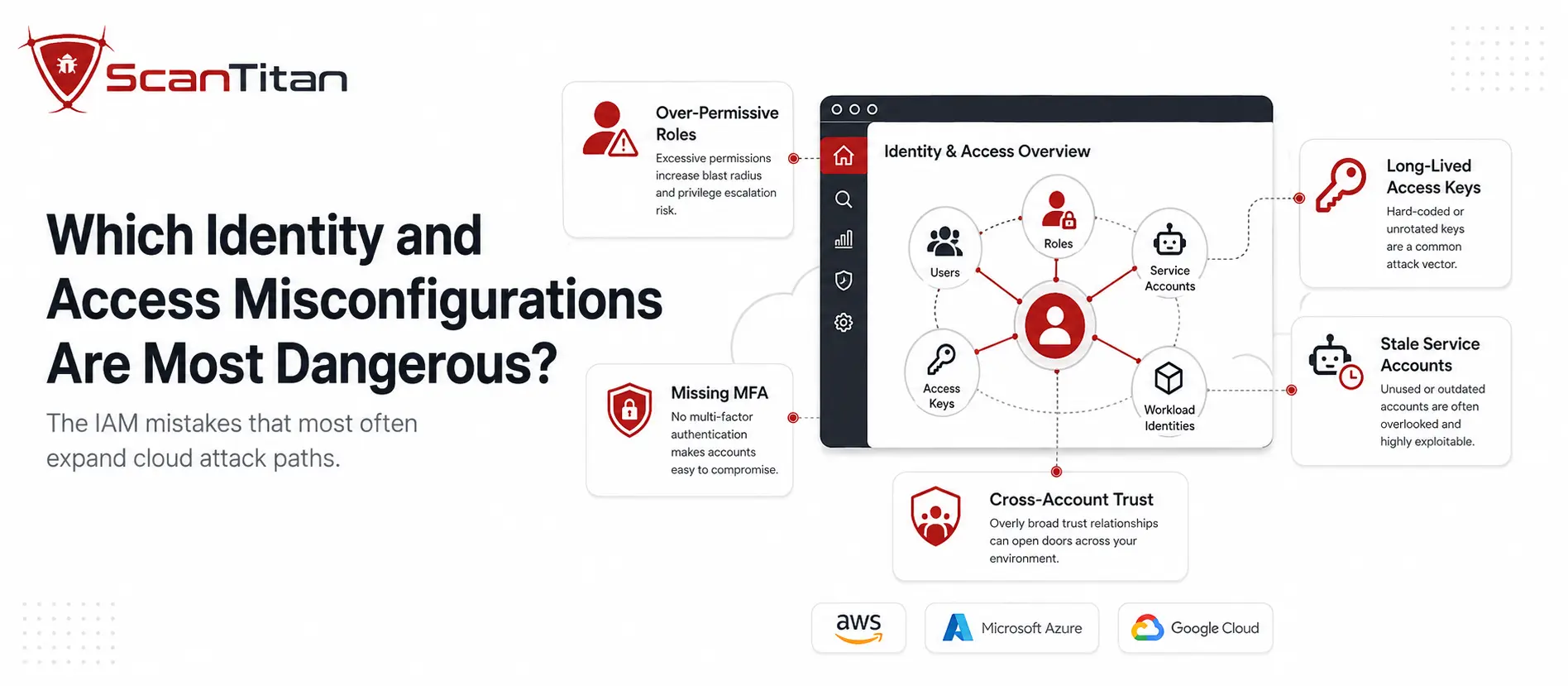
Identity is the practical perimeter in the cloud, and it is where many incidents escalate. These four misconfigurations hand out more access than any workload or person should hold.
Over-Permissive IAM Roles and Policies
This is the misconfiguration that turns a small breach into a large one. An identity and access management (IAM) role or policy that grants broad permissions, wildcard actions like allowing every action on every resource, lets an attacker who compromises one workload escalate privileges and move laterally. Cross-account trust adds reach: a role that anyone can assume through sts:AssumeRole can bridge accounts an attacker should never touch. A web app that only reads one storage bucket should never hold administrator rights, yet over-permissive roles are among the most common audit findings. The fix is least privilege: grant only the actions a workload uses, replace long-lived keys with short-lived roles, and generate tighter policies from real usage with AWS IAM Access Analyzer.
Missing Multi-Factor Authentication and Weak Identity Controls
A password alone is a single point of failure. Credential theft through phishing and infostealer malware feeds a market in stolen cloud logins, so an account protected only by a password is one leaked credential from takeover, and privileged or root accounts are exactly the ones attackers target first. Multi-factor authentication (MFA) adds a second check a stolen password cannot satisfy. Weak identity architecture compounds the gap: personal accounts instead of a corporate identity provider, inconsistent MFA, long session lifetimes, orphaned identities, and inactive users who still hold access. The fix is to enforce MFA across human accounts and require it on privileged identities, centralize authentication through a single identity provider, shorten session durations, and remove stale accounts on a schedule.
For current evidence on how phishing, stolen credentials, AI-assisted social engineering, and account takeover are evolving, see our phishing and credential-theft statistics research.
Exposed and Long-Lived Cloud Credentials
Static cloud credentials are a favorite target because they rarely expire and often sit in plain sight. AWS access keys, Azure service-principal secrets, and Google Cloud service-account keys turn up in code repositories, continuous-integration variables, log files, container images, and developer laptops, where anyone who reads them inherits that access. A long-lived key that never rotates gives an attacker durable, reusable entry. The fix is to move away from static secrets where the platform supports it: prefer workload identities, federated access, and short-lived credentials over permanent keys, use managed identities for service-to-service access, remove unused credentials, rotate the keys you must keep, and scan repositories, images, and pipelines so a committed credential is caught before it ships.
Over-Privileged Serverless Functions
Serverless functions like AWS Lambda, Azure Functions, and Google Cloud Functions run with an execution role, and that role is often far broader than the function needs. A function that resizes images does not need permission to read every database or delete log groups, yet reviews regularly find serverless roles carrying near-administrator access, sometimes through a policy as broad as AWSLambdaFullAccess. The risk compounds when the function has its own flaw: if an attacker influences its execution through unvalidated input, they operate with whatever the role allows, which can mean reaching sensitive storage or altering records. The fix is least privilege applied per function: scope each execution role to the specific actions and resources it uses, and review these roles as closely as human access.
Which Storage and Data Misconfigurations Are Most Common?
Storage holds the data attackers actually want, so a mistake here exposes the crown jewels directly. These four cover the ways data ends up reachable.
Public Object Storage
Modern Amazon S3 buckets are not public by default: Block Public Access is enabled and ACLs are disabled for new buckets through Bucket owner enforced object ownership. Exposure still happens when teams deliberately override those protections, keep legacy ACL-enabled buckets, or attach broad bucket, access-point, or cross-account policies. On an ACL-enabled bucket, the Authenticated Users group means any AWS account in the world, not only identities in your organization, which is a classic trap. The fix is to keep S3 Block Public Access on at the account and bucket level, leave ACLs disabled through S3 Object Ownership unless a specific need exists, review bucket and access-control policies, and apply the same private-by-default stance to Azure Blob Storage and Google Cloud Storage.
Public Snapshots and Insecure Backups
Backups and snapshots are copies of your most sensitive data, and they are easy to forget when you lock down the originals. Making an EBS volume snapshot or an RDS database snapshot public, sometimes to share it quickly, can expose an entire database to anyone who finds it. Automated backups left unencrypted or with loose permissions carry the same risk as the live data they copy, with less attention on them. Attackers specifically hunt for public snapshots because they are a shortcut to a full data set. The fix is to keep snapshots and backups private by default, share them only with named accounts when genuinely required, encrypt them at rest, and restrict who can create, restore, or modify them.
Weak Encryption and Key-Management Configuration
Encryption is a safety net for when other controls fail, but availability and defaults differ by service. Amazon S3, for example, automatically encrypts new object uploads with server-side encryption, so the meaningful questions are whether the encryption mode, key ownership, and key policy match your risk model, not simply whether encryption is switched on. The common misconfigurations here are data in transit without TLS, customer-managed keys that policy requires but nobody uses, KMS or key-vault permissions that are too broad or allow cross-account access, and backups protected with weaker key controls than production. The fix is to align encryption mode and key ownership to policy, enforce TLS for data in transit, scope key policies tightly, and hold backups to the same standard as live data. Encryption is not a substitute for access control; a public but encrypted object is still public.
Public Databases, Caches, and Data Services
Object storage gets the headlines, but databases and caches are exposed the same way and hurt just as much. A managed database endpoint, or a Redis, Memcached, or Elasticsearch-style service, reachable from the public internet without a business need is an open door to whatever it holds, and management consoles left internet-facing are a similar risk. The exposure usually comes from a security group or firewall rule that is broader than intended, not from the data service itself. The fix is to keep data services on private networks by default, require access through a bastion, VPN, or private endpoint, restrict database security groups to known application sources, and scan regularly for any database, cache, or console that answers on a public address.
Which Network and Exposure Misconfigurations Create the Most Risk?
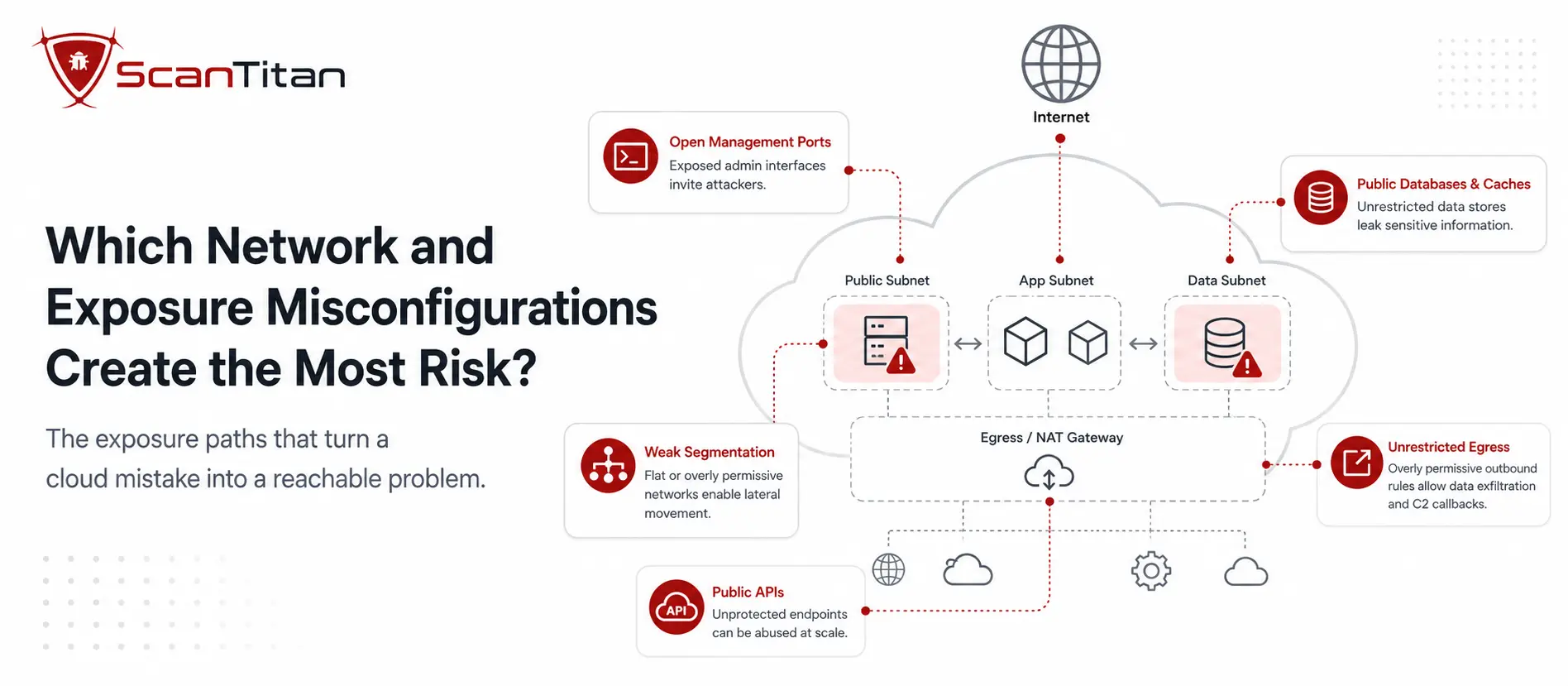
The network layer decides what the outside world can reach and how far an intruder can move once inside. These five are where one broad rule undoes the rest.
Open Security Groups and Management Ports
A security group is a cloud firewall, and one rule opened too wide undoes it. Allowing inbound traffic from 0.0.0.0/0, meaning the entire internet, on management ports like 22 for SSH or 3389 for RDP puts your servers’ front doors on the public web, where automated bots brute-force them around the clock. Exposing management interfaces or legacy protocols like FTP and Telnet the same way widens the opening. The fix is to restrict inbound rules to known source addresses such as your office or VPN, close ports that do not need public access, place administrative access behind a bastion host or VPN, and audit security groups and Azure Network Security Groups regularly so a temporary allow-all rule never becomes permanent. Our guide on open ports in cyber security goes deeper on the exposure side.
Unrestricted Outbound Access
Inbound rules get the attention, but outbound access matters just as much after something is compromised. A workload with unrestricted egress can reach an attacker’s command-and-control server and exfiltrate data with nothing standing in the way, which is exactly how a contained incident becomes a breach. Outbound is easy to leave wide open because everything simply works when it is. The fix is to limit egress to what a workload actually needs: apply egress filtering and firewall rules, route traffic through NAT with allowlists, use service or private endpoints to keep provider traffic off the public internet, add DNS controls, and monitor outbound connections for anomalies. The point is not to block all outbound traffic blindly, which breaks legitimate services, but to scope it deliberately.
Flat Networks and Weak Segmentation
A flat cloud network, where everything can talk to everything, means one compromised workload can reach all the others. Treating anything inside the VPC or VNet as automatically trusted is the mistake, because an attacker who lands on a low-value host then has a clear path to sensitive systems. Segmentation contains that blast radius. The fix is to divide the network into segments with distinct trust levels: separate production from development, isolate sensitive data tiers and management planes, and keep high-value workloads apart. Enforce the boundaries with security groups, Network Security Groups, and firewall policies, add identity-aware controls where available, and review the rules between segments so only intended traffic flows. Segmentation turns a single compromise into a contained problem rather than a total one.
Public APIs Without Required Gateway and Access Controls
APIs are how cloud services talk to each other, and the configuration around them is a frequent exposure point. The misconfigurations here are about how the API is deployed and governed: endpoints unintentionally made public, missing authentication at the API gateway, overly broad gateway or resource policies, missing authorization enforcement, absent rate limiting, weak TLS policy, permissive cross-origin settings, and management APIs exposed to the internet. The fix is to treat the gateway as the control point: enforce authentication and authorization there, keep resource policies tight, apply rate limits and a strong TLS policy, and avoid exposing admin endpoints publicly. Application flaws such as broken object-level authorization, injection, or broken business logic are separate API-security issues that require application testing in addition to configuration review.
Dangling DNS and Subdomain Takeover
This one hides in plain sight. When a team deletes a cloud or SaaS resource, an old app, a storage endpoint, a load balancer, but leaves the DNS record that pointed to it, the record is left dangling. It becomes a takeover risk specifically when the record still points to a removed resource and the provider allows another tenant to claim the referenced hostname or resource identifier. An attacker who claims it can serve malware or phishing pages under your trusted domain, which is both a technical and a reputational problem. Not every stale record is exploitable, but you cannot tell which are without checking. The fix is DNS hygiene: remove records the moment their target is decommissioned, audit DNS zones for entries that resolve to resources you no longer own, and monitor for subdomains that point to unclaimed resources.
Which Visibility and Workload Misconfigurations Are Often Missed?
You cannot secure what you cannot see, and you cannot trust a workload you have not hardened. These four quietly undermine everything above.
Disabled Logging, Missing Alerts, and Weak Detection Routing
Logging is only the first step, and each later step is a place teams fall short. Audit logs may never be enabled, or enabled but never centralized, so no one can correlate activity across accounts. Even with logs, the alerts that should fire on a critical configuration change may not exist. And even with alerts, findings may drown in noise or never reach an owner with a service-level agreement to act. Attackers know this and often try to disable logging early to hide. The fix is to treat detection as a chain: enable audit logging such as AWS CloudTrail across accounts, regions, and key services, forward logs to a centralized store with sensible retention, alert on high-risk configuration changes, route those alerts into your SIEM or ticketing with a named owner, and monitor specifically for attempts to turn logging off.
Hardcoded Secrets and Exposed Credentials
Secrets are the keys to the kingdom, and they end up in the worst places. API keys, passwords, tokens, and encryption keys hardcoded into source code, container images, or Infrastructure as Code templates get committed to repositories and baked into artifacts, where an attacker who reads the code inherits the access. A single leaked key can grant the same reach as the application it belonged to. The fix is to keep secrets out of code entirely: store them in a dedicated secrets manager such as AWS Secrets Manager, Azure Key Vault, or HashiCorp Vault, inject them at runtime, rotate them on a schedule, and scan repositories and images so a committed secret is caught before it ships.
Insecure Workload and Container Configuration
Two different risks hide here, and separating them helps. The first is a vulnerability-management issue: a virtual machine or container image running outdated software carries known flaws that attackers exploit with ready-made tools, and many compliance frameworks require systems to stay current. The second is a configuration and hardening issue: containers that run as root, mount the host filesystem, hold excessive Linux capabilities, or use unsafe security contexts. Running a container as root increases the impact of a compromise and can make a container escape more damaging, but root inside a container is not automatically root on the underlying host. The fix is to patch and rebuild images on a schedule, scan across development, registries, and runtime, run containers as a non-privileged user with only the capabilities they need, and start from minimal, trusted base images.
Forgotten and Orphaned Cloud Resources
The resource nobody remembers is the one nobody patches. Temporary test environments, abandoned projects, unused public IP addresses, stale snapshots and images, old load balancers, resources owned by teams that have moved on, and dormant IAM roles and keys all accumulate quietly, and each is exposure with no one watching it. Attackers enumerate exactly these forgotten assets because they are unmonitored and often unpatched. The fix is lifecycle discipline: maintain an inventory of what you actually run, tag every resource with an owner, set expiration dates on temporary resources, automate cleanup of what is unused, manage account and subscription lifecycle, and rely on continuous discovery so a resource cannot hide from your security program simply by being forgotten.
What Causes Cloud Misconfigurations?
Misconfigurations rarely come down to a single cause, and blaming human error alone misses the point. Cloud platforms expose thousands of individual settings across dozens of services, and one wrong toggle is easy to miss. Teams ship quickly, and a temporary allow-all rule opened during troubleshooting often never gets closed. Governance is frequently weak, with no standard baseline and no regular audit, so small mistakes accumulate unseen. Ownership is fragmented, templates are inconsistent, and configuration drift pulls live settings away from the approved baseline over time. Multi-cloud sprawl multiplies the surface, so a control set correctly on AWS gets forgotten on Azure. The common thread is human decisions meeting system complexity at speed, which is why manual review alone cannot keep pace and automated checks and guardrails matter.
How Can Attackers Chain Multiple Cloud Misconfigurations?
The highest-risk cloud incidents usually come from combinations, not one bad setting. Individually manageable weaknesses line up into a path:
- Reach an internet-facing application or exposed endpoint.
- Compromise a workload and pick up the cloud credentials or identity it holds.
- Escalate using an identity whose permissions are broader than intended.
- Move laterally because network segmentation or egress controls are weak.
- Access sensitive storage or databases the identity can now reach.
- Persist and exfiltrate while insufficient logging and alerting delay detection.
A public endpoint may be survivable on its own, and an over-permissive role may be harmless while nothing is compromised. Together they form an attack path, which is why prioritizing findings by how they combine, rather than one at a time, matters more than raw counts.
Read More: Agentless vs Agent Based Scanning: What Is the Difference?
What Happens When Cloud Misconfigurations Go Unfixed?
The consequences are concrete, and history illustrates them.
- Data exposure happens first and fastest: a single public store or over-broad policy can put customer records, credentials, and internal data within reach of anyone who finds it.
- The 2019 Capital One breach combined a configuration weakness at the application-layer firewall with permissions broader than intended. AWS later stated that a server-side request forgery (SSRF) technique was believed to have been used after access was gained, letting the attacker obtain credentials and reach data in S3. In 2020, the OCC imposed an $80 million civil money penalty for risk-management and control deficiencies tied to the cloud migration, and Capital One later agreed to a separate $190 million class-action settlement.
- The 2021 Microsoft Power Apps case showed the same lesson without a software exploit: UpGuard reported that portal configurations exposed roughly 38 million records across 47 organizations, driven by platform access settings and API exposure.
- Compliance and contractual fallout follows: GDPR violations can lead to regulatory enforcement and fines, while PCI DSS noncompliance can trigger remediation requirements, additional assessments, or contractual penalties through payment-industry relationships.
The cost of catching a mistake in a scan is a fraction of the cost of catching it in an incident.
How Do You Find and Fix Cloud Misconfigurations?
Finding misconfigurations by hand does not scale past a handful of resources. Run this as a repeatable lifecycle instead:
- Discover the resources across your connected accounts, subscriptions, projects, and regions, because you cannot secure what you have not inventoried.
- Baseline against the CIS Benchmarks, provider standards, and your own policy so secure has a concrete definition.
- Detect misconfigurations continuously or frequently enough for how fast your environment changes, using cloud posture assessment and continuous vulnerability scanning.
- Prioritize by public exposure, identity privilege, sensitive-data access, exploit path, and business context, not raw severity alone.
- Fix the configuration with least-privilege changes and a safe rollout.
- Verify by reassessing to confirm the risky condition is no longer detected.
- Prevent recurrence with Infrastructure as Code, policy-as-code checks, and organization-level guardrails.
- Assign ownership so every finding reaches the team responsible for the resource.
Pair configuration review with an external website scan. It is the fastest way to confirm whether a misconfiguration is actually reachable from the internet.
Pair this with periodic human review using a cloud security audit checklist, because automated scanning does not catch everything. ScanTitan’s Cloud Vulnerability Scanner is designed to assess supported AWS, Azure, and Google Cloud resources from a unified workflow, helping teams identify cloud misconfigurations, exposed resources, identity risks, and other supported findings with contextual evidence and remediation guidance where available.
How Do You Prevent Cloud Configuration Drift?
Configuration drift is the gap between the approved baseline and the configuration that actually exists after manual changes, deployments, troubleshooting, exceptions, or service evolution. Left unmanaged, it quietly reopens the very settings you closed. Prevent it with a layered hierarchy, strongest first:
- Start from secure defaults so new resources begin in a safe state.
- Define infrastructure with Infrastructure as Code, for example Terraform or CloudFormation, so configuration is version-controlled and repeatable.
- Enforce policy-as-code and continuous-integration checks that block risky changes before they merge.
- Set organization-level guardrails, such as service control policies, that individual accounts cannot override.
- Assess posture continuously so drift is detected soon after it appears.
- Route findings to owners with clear responsibility and a timeline to act.
- Expire exceptions automatically so a temporary allowance never becomes permanent.
- Audit periodically with human review to catch what automation misses.
Which Native AWS, Azure, and GCP Controls Help Prevent Misconfigurations?
Each provider ships native controls that prevent or surface the misconfigurations above. They are a strong foundation, and a multi-cloud scanner adds a consistent view across all three.
| Provider | Prevent public exposure | Enforce posture and guardrails |
|---|---|---|
| AWS | S3 Block Public Access, S3 Object Ownership with ACLs disabled | IAM Access Analyzer, Security Hub, AWS Config, Organizations service control policies |
| Azure | Disallow anonymous storage access, restrict network exposure | Microsoft Defender for Cloud recommendations, Azure Policy standards |
| Google Cloud | Uniform bucket-level access, allUsers and allAuthenticatedUsers findings | Security Command Center, Organization Policy Service |
For the authoritative details, see AWS on Security Hub controls and service control policies, Azure on Defender for Cloud recommendations, and Google Cloud on Security Command Center findings. Native tooling covers each provider well on its own; the gap for multi-cloud teams is a consistent inventory, severity model, and remediation workflow across them.
Frequently Asked Questions
What is the most common cloud misconfiguration?
Public exposure and excessive permissions are consistently high-impact categories, but there is no universal single most common misconfiguration across every cloud environment. Common findings include public storage, overly broad IAM, unrestricted network access, missing logging, exposed credentials, and neglected resources.
What causes cloud misconfigurations?
Most come from a combination of human error and system complexity rather than one cause. Rapid deployments, weak governance, configuration drift, overly broad permissions, inconsistent templates, unclear ownership, and different control models across AWS, Azure, and GCP all contribute.
Whose responsibility are cloud misconfigurations, the provider’s or mine?
It depends on the cloud service and the setting. Under the shared responsibility model, providers secure the underlying platform while customers commonly remain responsible for identities, access policies, data exposure, network rules, and how services are configured. The customer and provider boundary shifts as you move from infrastructure services to more managed services.
How do I detect cloud misconfigurations?
Use cloud posture assessment or CSPM, provider-native security controls, configuration baselines like the CIS Benchmarks, Infrastructure as Code and policy-as-code checks, and periodic human review. The right combination depends on the services and accounts in scope.
What is the difference between a cloud misconfiguration and a vulnerability?
A vulnerability is usually a weakness in software or code, while a misconfiguration is a risky state created by how a cloud service, identity, network rule, or policy is set up. They can combine: a vulnerable workload with excessive IAM and public exposure creates more risk than any one issue alone.
How do I stop my S3 bucket from being public?
New S3 buckets already block public access and disable ACLs by default. Keep Block Public Access enabled at the account and bucket level, leave ACLs disabled unless you have a specific need, review bucket, access-point, and account or organization policies, and use IAM Access Analyzer or Security Hub to flag anything that overrides the defaults. Note that encryption and public access are separate controls; encrypting an object does not make public access safe.
Reviewed by Obaida Al-Sulaiman, Information Security Manager, ScanTitan. CISSP, GXPN, GCIH, GWAPT, CISA, CEH, ISO 27001 Lead Auditor. Obaida leads offensive and defensive security assessments across ScanTitan’s vulnerability scanning, malware, and attack surface work.