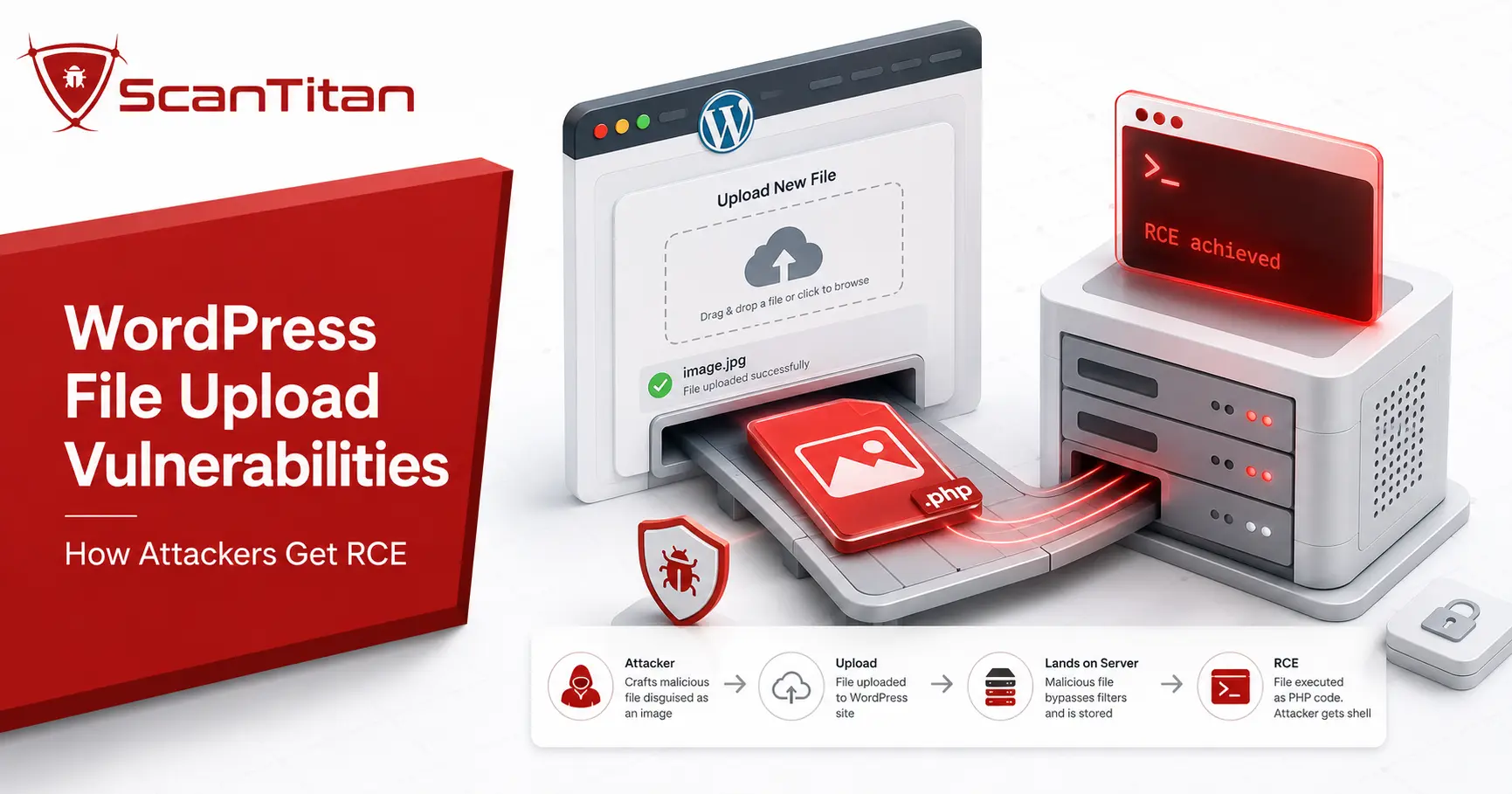
A WordPress file upload vulnerability is one of the most dangerous flaws a site can have, because it can lead straight to remote code execution when an attacker can place an executable file in a web-accessible location where the server will run it. These flaws live almost entirely in plugins and themes that accept uploads without checking them, not in the WordPress core. This guide covers what it is, how the attack works, the real CVEs behind mass compromises, and how to detect and prevent it. For the verified data behind those compromises, see our WordPress website hack statistics.
Short answer: A WordPress file upload vulnerability lets an attacker upload a malicious file, usually a PHP webshell. If that file lands in a web-accessible location where the server will execute it, the flaw can become remote code execution. It almost always lives in a plugin or theme that fails to check uploads, not in the core. Keep plugins updated, block script execution in upload directories, validate uploads against an allow list in code, and scan on a schedule so a critical flaw reaches you before an attacker does.
What is a WordPress file upload vulnerability?
A file upload vulnerability, also called arbitrary or unrestricted file upload, is a flaw where a site accepts a file without properly checking its type, extension, or contents, classified by MITRE as CWE-434 and tracked by OWASP as one of the most dangerous web weaknesses. In WordPress, the risk appears when a plugin or theme exposes an upload feature, a contact form, a media importer, a backup tool, or a file manager, and trusts whatever a user sends. An attacker may upload an executable script instead of the expected image or document; if it lands in a web-accessible location where the server will execute it, the attacker can then request it and gain code execution with the web server’s permissions. The WordPress core validates uploads carefully, so these flaws almost always sit in third-party code.
How does a WordPress file upload attack work?
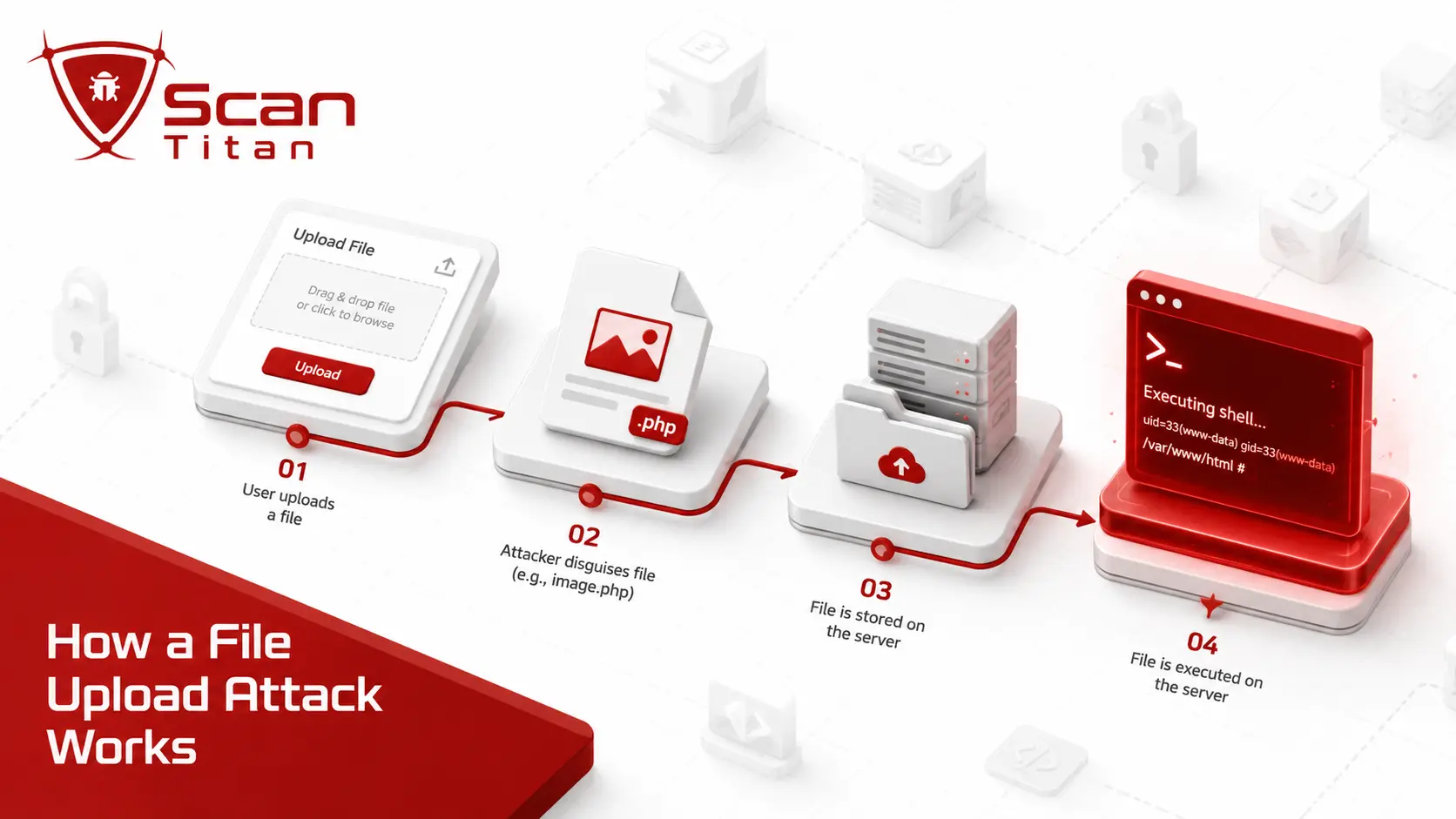
An attacker does not need clever exploitation once an upload accepts the wrong file. The steps are short and repeatable.
- Find an unvalidated upload. Locate a form, importer, or file manager that accepts uploads through
$_FILESor a REST route without checking them properly. - Disguise a PHP payload. Upload a webshell as
shell.php, or slip it past a weak blocklist with a name likeshell.php.jpgor a doctored MIME type. - Request the uploaded file. If the file lands in a web-accessible directory where the server treats it as executable, requesting its URL can make the server run the PHP inside it.
- Gain code execution. Once the webshell executes, the attacker can run commands with the permissions of the web-server process and may be able to take over the site or expand further depending on the hosting environment and privilege boundaries.
Two details make these attacks worse. A developer who calls wp_handle_upload() with test_type set to false disables the built-in type check entirely, and an attacker who can upload a crafted .htaccess file can reconfigure the server to execute files it otherwise would not. The root cause never changes: the site trusted a file it should have inspected.
The different types of file upload attacks
A file upload flaw is not always a plain PHP webshell, and the variations matter for defence.
- Upload a PHP webshell. Drop an executable script that runs commands, the direct route to remote code execution.
- Slip past with a double extension. A name such as
shell.php.jpg, or a trailing-dot variation, can bypass a naive filename check, but it becomes an RCE path only if later processing or server configuration treats the dangerous portion as executable. - Abuse a
.htaccessupload. Upload a crafted.htaccessfile to reconfigure the server to execute files it otherwise would not, documented in Patchstack’s arbitrary file upload guide. - Hide code in an image or SVG. Craft a polyglot that is a valid image and valid PHP at once, or an SVG carrying script, to bypass image-only checks.
- Exploit archive extraction. Feed a plugin that unzips uploads a zip-slip payload that writes files outside the intended folder.
Each variation defeats one naive check, which is why strong upload security combines an extension allow list, server-side type and content checks, controlled filenames, safe storage, and a non-executable upload directory. No single MIME or extension check is enough. Unlike the WordPress SQL injection that reaches your database, these attacks can reach the server directly when an uploaded file becomes executable.
Where WordPress file upload flaws come from
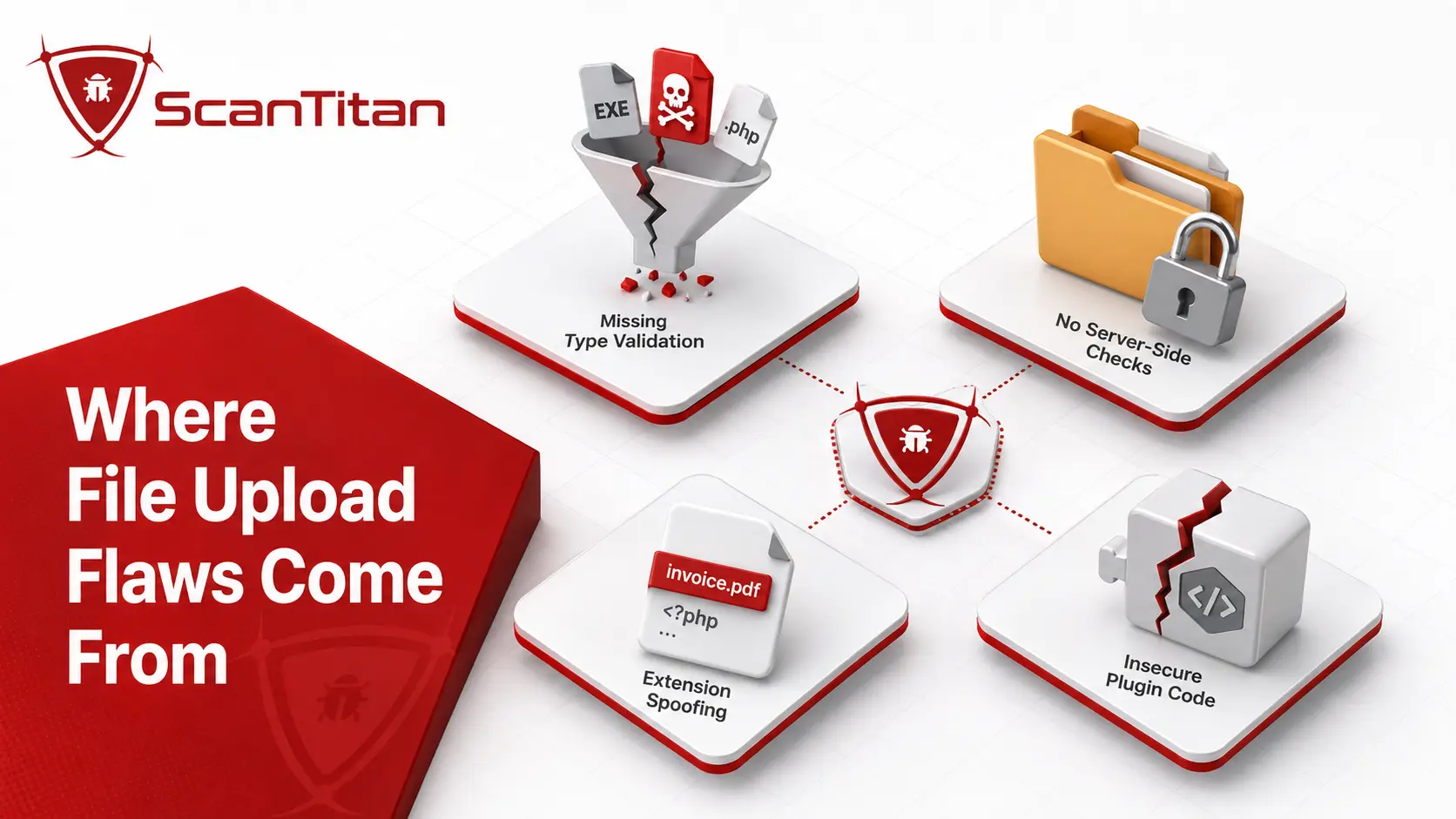
These vulnerabilities cluster in a few predictable places, and knowing them tells you which plugins to watch. The common thread is a validation shortcut in third-party code, which is a recurring theme across WordPress plugin vulnerabilities.
- Use a blocklist instead of an allow list. Blocking known-bad extensions always misses cases; only allowing a short list of safe types holds up.
- Trust the extension or MIME type. Checking the filename or the browser-supplied MIME type is easy to fake, so the real file contents go unverified.
- Miss a bypass in the check. The 2026 Forminator flaw was an exact-key blocklist that attackers bypassed with pipe-alternative MIME keys, a subtle logic gap.
- Ship upload-heavy features. Form builders, backup and staging plugins, media importers, and file managers handle uploads constantly, so they carry most of the risk.
Fix the validation logic and you close the door; leave it to a blocklist and an attacker eventually walks through.
How dangerous are WordPress file upload vulnerabilities?
Context matters, because these flaws are not the most frequent but they are among the most severe. By Patchstack’s data, arbitrary file upload made up roughly 2 to 3% of WordPress vulnerabilities, far behind cross-site scripting in the ranking of most common WordPress vulnerabilities yet the impact sits at the opposite end of the scale. A file upload flaw that reaches remote code execution routinely earns a CVSS (Common Vulnerability Scoring System) base score of 9.8 out of 10, because it gives an unauthenticated attacker full control with no user interaction. WP Time Capsule’s 2024 flaw scored exactly that. The reason is simple: most WordPress attacks steal data or hijack a session, but a webshell lets an attacker do anything the server can, from planting persistent backdoors to pivoting across every site on the same host. Low frequency plus maximum impact is exactly the combination a scanner should surface first.
Notable WordPress file upload vulnerabilities
Specific cases show why one upload flaw outweighs its share of the statistics. Each of these reached remote code execution, and most needed no login.
| CVE | Plugin | Scale | Why it mattered |
|---|---|---|---|
| CVE-2026-15748 | Forminator Forms | 600K+ installs | Unauthenticated arbitrary file upload via a blocklist bypass; affected through 1.56.1 and fixed in 1.56.2; executable upload could lead to RCE |
| CVE-2020-25213 | WP File Manager | 700K+ installs | Unauthenticated upload to RCE, mass-exploited within days of disclosure |
| CVE-2024-8856 | WP Time Capsule (Backup) | 20K+ installs | Unauthenticated RCE at CVSS 9.8 through a flawed validate() function |
| CVE-2024-31210 | WordPress core | pre-6.4.3 | High-privilege plugin-upload bypass in a specific locked-down configuration; affected Administrator/Super Admin users and was fixed in 6.4.3 with backports to older branches |
| CVE-2023-5360 | Royal Elementor Addons | 200K+ installs | Arbitrary file upload actively exploited in the wild |
The pattern is consistent: an upload feature in trusted third-party code, weak validation, and an unauthenticated path to running code. The Forminator case in 2026 shows the class is very much alive, not a historical problem.
A closer look: the 2026 Forminator flaw
The 2026 Forminator vulnerability shows how current this class still is. Forminator is a popular form builder installed on more than 600,000 sites, and its file upload handler carried a blocklist of dangerous extensions that performed exact-key matching. Researchers at Wordfence found that an attacker could bypass it with pipe-alternative MIME type keys, combined with a public submission handler that trusted attacker-controlled upload settings injected through a forged form field. The result was unauthenticated arbitrary file upload: any visitor could upload a PHP file through a form. Successful RCE still depends on that uploaded file landing in a location where the web server will execute it, which is why blocking script execution in upload directories remains an important containment layer. A PHP security scanner can flag the vulnerable plugin version before an attacker uploads anything. What makes the case instructive is that Forminator did ship a defence, an .htaccess file meant to block PHP execution, yet the broader flaw still showed why one layer is never enough and why a blocklist loses to a determined attacker.
What can an attacker do with a file upload flaw?
A successful upload is rarely the goal; it is the doorway. Once an uploaded webshell is successfully executed, the attacker can run code with the permissions of the web-server process and may be able to achieve full site or server compromise depending on the hosting environment and privilege boundaries.
- Run arbitrary commands. Execute code as the web server user, reading, writing, or deleting any file the server can reach.
- Plant a persistent backdoor. Drop additional shells and hidden admin accounts so access survives a plugin update, Once that persistent access exists, the attacker’s payload does not have to remain a webshell. A compromised WordPress site can also be modified to serve redirects, hidden links, or SEO spam; pharmaceutical search spam is one example, explained in our WordPress pharma hack guide.
- Steal the database and files. Exfiltrate your
wp_userstable, customer records, and secret keys, which turns into a GDPR and PCI DSS incident. - Pivot and spread. Move to other sites on the same hosting account and use the server to attack others or serve malware. If this has already happened, start with malware removal, not another scan.
Because an executed webshell can provide powerful server-side access, a file upload flaw can be one of the fastest paths to a full compromise when hosting permissions and privilege boundaries allow it.
How do you check if your WordPress site is vulnerable?
You can turn the question into a confident answer with a short routine.
Start with an automated site scan to enumerate every upload endpoint the application exposes, then test each one against the file-type checks described above.
Run this on a schedule, because a new upload flaw in a popular plugin can appear and be mass-exploited within hours.
How to prevent WordPress file upload vulnerabilities
Prevention has an owner half and a developer half. Owners control configuration and patching; developers control how uploads are validated. Both have to hold.
If you run or manage the site
Patch first: keep every plugin and theme, especially form, backup, and file-manager plugins, on their latest version, since the advisory that fixes an upload flaw also tells attackers where to aim. Remove upload plugins you do not need, because each one is an entry point, and vet any replacement with our guide on how to check if a WordPress plugin is safe. Block script execution in upload directories at the web-server or hosting layer. On Nginx, deny PHP execution under wp-content/uploads; on Apache, prefer a server or virtual-host rule where you control it. A .htaccess rule can be a shared-hosting fallback, but it should not be your only protection because some upload flaws can also affect files inside that directory. Put a web application firewall in front of the site to filter malicious uploads, and set the DISALLOW_FILE_MODS constant if your site never installs plugins through the dashboard. Give the web server account least privilege, and scan on a schedule so a critical flaw reaches you fast.
If you write plugins or themes
Validate uploads against an allow list, never a blocklist. Accept only a short set of known-safe extensions, and confirm the real file type with wp_check_filetype_and_ext() rather than trusting the filename or the client-supplied MIME type. Never call wp_handle_upload() with test_type set to false, because that disables the checks that protect you. Rename uploaded files to a value you control, strip double extensions, and store uploads outside the web root or in a directory where scripts cannot execute. Add a capability check and a nonce so only authorised users can upload, and verify the file contents, not just the header. Then test your own upload endpoints before an attacker does.
What to audit in an upload handler
How to prioritise a file upload finding
A scan can return several findings, and file upload flaws usually belong at the top of the list. Rank each one by four signals.
- Check whether it needs authentication. An unauthenticated upload that any visitor can trigger, like the Forminator or WP File Manager flaws, is a patch-tonight emergency.
- Confirm it reaches code execution. An upload that runs a PHP file outranks one limited to a harmless document type.
- Read the CVSS score. The Common Vulnerability Scoring System rates severity from 0 to 10, and file upload flaws often sit at 9.8, near the maximum.
- Check the CISA KEV catalog. A place in the Known Exploited Vulnerabilities catalog, or a high EPSS score from FIRST, means active or likely exploitation.
An unauthenticated file upload that enables executable code is a critical, patch-immediately finding and normally belongs at the very top of the remediation queue.
What to do if a webshell was uploaded
If a scan or an unexpected file suggests a webshell, treat the site as fully compromised and work in order. The full order is in what to do when your website is hacked, including containment, evidence and notification.
1
Take the site offline.
Move it into maintenance to stop the attacker and protect visitors while you work.
2
Find the entry point.
Use logs and a scan to identify the vulnerable plugin and the uploaded file that let the attacker in.
3
Remove the malware.
Delete the webshell and any additional backdoors (see how to find a backdoor in a website), then follow our guide on how to fix a hacked WordPress site.
4
Patch or replace the plugin.
Update to the fixed version, or delete an abandoned plugin and install a maintained replacement.
5
Rotate every credential.
Reset admin passwords, database credentials, and secret keys, since a webshell can read all of them.
6
Re-scan and monitor.
Confirm the site is clean, block PHP execution in uploads, and watch closely for reinfection.
Read More: How to Check a WordPress Version in Database (Accurately).
File upload flaws, PCI DSS, and GDPR
A file upload vulnerability is a compliance problem as much as a technical one, because it can expose exactly the data regulators protect. A store that takes card payments falls under PCI DSS, which requires patched software and regular vulnerability scanning, so an unpatched upload flaw that leads to server access can jeopardize PCI DSS compliance and require remediation, depending on scope and assessment findings. A site holding personal data answers to Article 32 of the GDPR and its duty to apply appropriate technical measures. If exploitation causes a personal-data breach, GDPR breach-notification obligations depend on the risk to individuals; where notification to the supervisory authority is required, Article 33 sets a 72-hour reporting window after becoming aware of the breach. For a small business, the framing is stark: a file upload flaw is not a minor bug, it can be one of the shortest paths from a public form to a serious data breach, which is why scanning on a schedule matters.
Common myths about file upload security
Several assumptions make file upload flaws worse by giving owners and developers false confidence.
- Assuming an extension check is enough. Checking the extension alone is trivially bypassed with double extensions or a faked MIME type, so verify the real contents.
- Believing images are always safe. A file can be a valid image and valid PHP at once, so an image-only filter still lets executable code through.
- Trusting that renaming fixes it. Renaming helps, but without blocking execution in the upload folder an attacker can still reach a runnable path.
- Thinking only admins can upload. Many of the worst flaws, including Forminator and WP File Manager, needed no login, so public forms are in scope.
Each myth trusts one signal an attacker controls, which is why layered validation and blocking execution in the uploads folder beat any single check.
Frequently asked questions
What is a WordPress file upload vulnerability?
It is a flaw where a plugin, theme, or the core lets a user upload a file without properly checking its type, extension, or contents. An attacker can abuse it to upload a malicious script, usually a PHP file. If the file lands in a web-accessible location where the server will execute it, the flaw can lead to remote code execution. Classified as CWE-434, unrestricted file upload is among the most severe web flaws because the impact can include full site compromise.
How do attackers exploit file upload vulnerabilities in WordPress?
They find an upload feature that fails to validate files, then upload a PHP webshell, sometimes disguised with a double extension or slipped past a weak blocklist. If the file reaches a web-accessible location where the server treats it as executable, requesting it can give the attacker command-level access. Many of these flaws need no login at all, which is why an unauthenticated executable upload in a popular plugin is treated as critical.
Can a file upload vulnerability give an attacker full control of my site?
Yes, it can. Once an uploaded webshell is successfully executed, the attacker can run code with the permissions of the web-server process and may be able to read or change reachable files, plant backdoors, steal data, and pivot further depending on the hosting environment and privilege boundaries. That is why unauthenticated upload flaws that enable executable code are treated as critical.
How do I prevent file upload vulnerabilities in WordPress?
As an owner, keep plugins and themes updated, remove risky or abandoned upload plugins, add a web application firewall, and block script execution in upload directories at the web-server or hosting layer. As a developer, validate every upload against an allow list of extensions, verify the real file type and contents, never disable WordPress’s file checks, rename files, and store them outside the web root or in a non-executable location. The core rule is to trust no uploaded file.
How do I know if my WordPress site has a vulnerable upload plugin?
Match every plugin and theme against a vulnerability database such as WPScan or Patchstack, or run a scanner that maps your versions to known CVEs. Look for unexpected PHP files in your uploads folder, since those are often webshells. A vulnerability scanner tells you which upload flaws apply to your exact stack with evidence, rather than leaving you to guess.
Are file upload vulnerabilities common in WordPress?
They are a smaller share of WordPress vulnerabilities than cross-site scripting, at roughly 2 to 3% by Patchstack’s data, but they are among the most damaging because they lead to remote code execution. Recent examples include critical unauthenticated flaws in Forminator, WP File Manager, and WP Time Capsule, each affecting hundreds of thousands or millions of sites. Low frequency does not mean low risk here.
Where do attackers upload files on a WordPress site?
Often into wp-content/uploads or another plugin-controlled upload path. If a vulnerable upload feature places a PHP file in a web-accessible directory where the server will execute it, requesting the file can turn the upload into RCE. Blocking script execution in upload locations, and storing uploads where scripts cannot run, removes the usual execution payoff even if a flawed plugin accepts the file.
Can blocking PHP execution in the uploads folder stop these attacks?
Blocking script execution removes the usual RCE payoff from a PHP webshell, but the uploaded file can still create other risks, so execution blocking must be paired with patching, upload validation, safe storage, and incident review. Prefer a web-server or hosting-level rule; a .htaccess rule can be a shared-hosting fallback where appropriate.
Worried a form or file-manager plugin is exposing your server? Run a scan to map your WordPress plugins and themes to known file upload CVEs, with evidence and a fix for each finding.