Important distinctionA pharma hack is usually the result of a WordPress compromise, not the original vulnerability itself. A vulnerable plugin, stolen administrator credential, file upload flaw, SQL injection, compromised hosting account, or another entry point may give the attacker access. The pharma spam is what the attacker deploys after that access is obtained.
What Is a WordPress Pharma Hack?
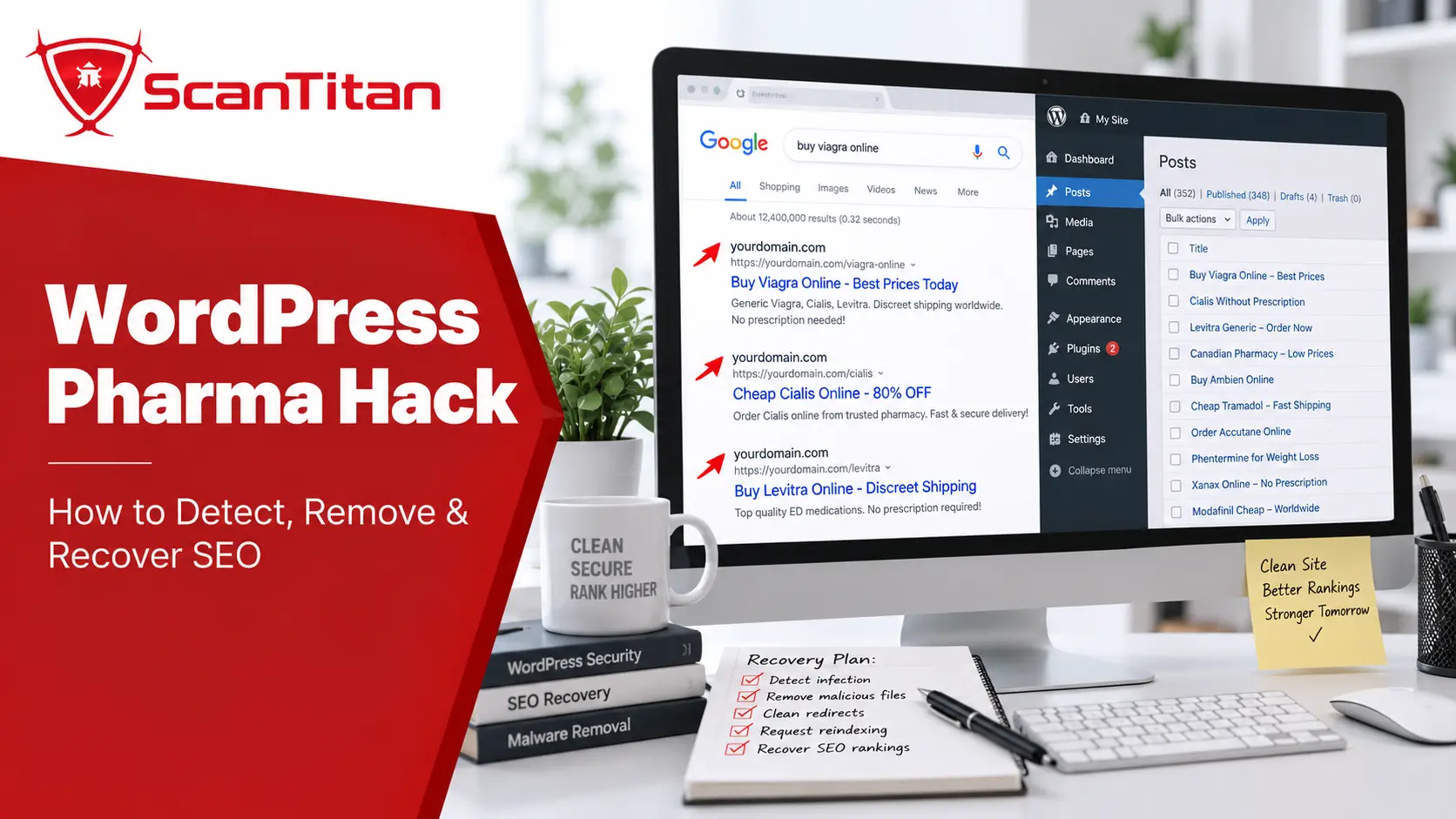
A WordPress pharma hack is a form of unauthorized SEO spam in which a compromised website is used to host or promote pharmaceutical-related content. Attackers may inject links into legitimate pages, create new spam URLs, alter search-result titles and descriptions, redirect visitors, or generate content that is shown selectively to search engines.
The word “pharma” describes the spam theme rather than the initial security flaw. Similar post-compromise campaigns can promote gambling, counterfeit products, adult content, Japanese-language shopping pages, or other topics. The common element is that an attacker is abusing the authority and indexing of a legitimate website for content the owner never created.
Google classifies unauthorized material added after a compromise as hacked content. Its examples include code injection, page injection, hidden content, redirects, and cloaking. Google’s Search Console Security Issues guidance specifically notes that hacked content injection may contain pharmaceutical terms or unrelated spam.
This makes the pharma hack part of a broader WordPress compromise rather than a standalone vulnerability class. If the infection is only one symptom of a larger breach, ScanTitan’s guide to fixing a hacked WordPress site covers the wider incident-response process.
How Does a WordPress Pharma Hack Work?
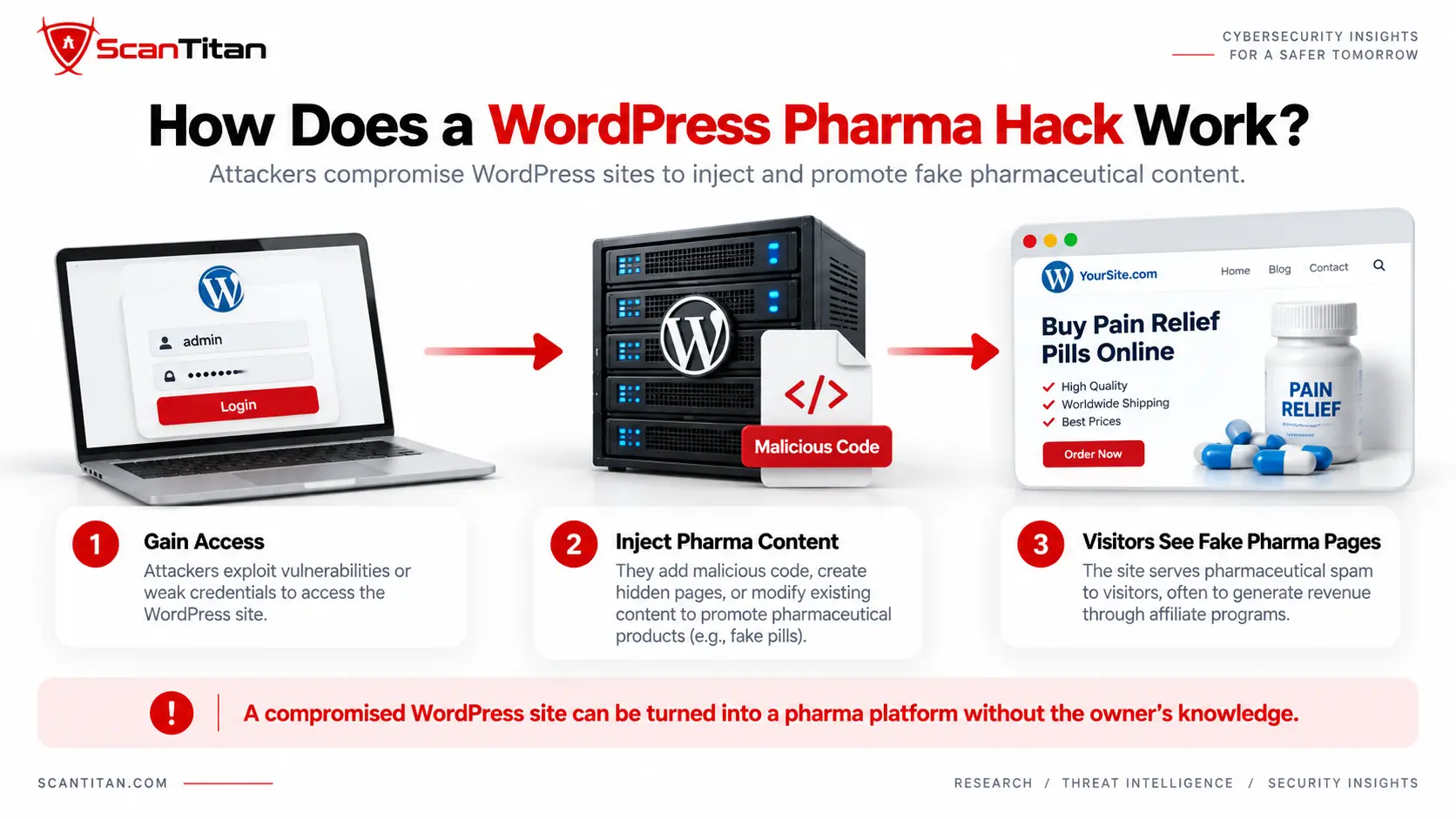
The most useful way to understand a pharma hack is as a sequence rather than as a single malicious file. The visible Google spam is often near the end of the compromise, not the beginning.
- Initial compromise: the attacker gains access through a vulnerable component, stolen credential, insecure upload path, database flaw, compromised hosting account, or another weakness.
- Persistence: additional code, accounts, scheduled tasks, database entries, or backdoors are added so access survives the removal of one infected file.
- SEO payload: pharmaceutical text, links, doorway pages, metadata, redirects, or other spam content is injected.
- Conditional delivery: the site may serve different content depending on the visitor, crawler, user agent, referrer, device, or request path.
- Search indexing: search engines discover the unauthorized URLs or modified content.
- Traffic abuse: the compromised site’s existing authority and search visibility are used to promote an external destination or spam campaign.
This lifecycle explains why deleting a page containing “Viagra” does not necessarily fix the site. The process that generated that page may still be active elsewhere.
Cloaking makes the infection particularly confusing. Google defines cloaking as serving different content to search engines and users, and notes that hacked sites commonly use it to make compromises harder for owners to notice. A site owner may therefore see the legitimate homepage while a crawler receives pharmaceutical content or a different redirect path.
Signs Your WordPress Site Has a Pharma Hack
No single symptom proves a pharma infection, but several patterns together should trigger an incident investigation.
- Google shows pharmaceutical keywords. Search results suddenly contain terms such as Viagra, Cialis, pharmacy, pills, medications, or unrelated product names.
- Unknown URLs appear in Google. Search Console or a
site:search reveals pages you never created. - Search-result titles or snippets change. Legitimate pages display spam titles or descriptions even though the visible page looks correct.
- You cannot reproduce what Google sees. Opening the affected URL normally shows legitimate content because the infection uses conditional delivery or cloaking.
- Visitors are redirected unexpectedly. Some requests lead to pharmaceutical, shopping, spam, or other unrelated destinations.
- Unfamiliar files or administrator accounts appear. These may indicate persistence beyond the SEO payload itself.
- Search Console reports hacked content. The Security Issues report may identify content injection, URL injection, code injection, malware, or another compromise indicator.
Check the search index, not only the homepageA pharma infection may create hundreds or thousands of URLs that are not linked from your normal navigation. A clean-looking homepage does not establish that the rest of the site is clean.
Where Does Pharma Spam Hide in WordPress?
There is no single file or database table that every pharma infection uses. Modern compromises often spread persistence across several layers so removing one component does not remove the entire infection.
WordPress Database
Unauthorized content can be stored in WordPress database records such as wp_options, wp_posts, wp_postmeta, user-related tables, or tables created by plugins. Attackers may store spam HTML, encoded payloads, malicious configuration values, redirect destinations, or code that another component later loads.
This is one reason a file-only cleanup can fail. Sucuri’s 2024 SiteCheck malware report describes a broader shift toward storing malicious payloads in WordPress database options to avoid traditional file-integrity monitoring.
Plugins, Themes, Uploads and Other Files
The infection may also modify theme files, plugin files, WordPress root files, configuration files, or files inside wp-content/uploads. Some compromises add new PHP files with ordinary-looking names; others modify legitimate application files to load the spam conditionally.
Unexpected changes to WordPress core can be checked with the official WP-CLI checksum command. Running wp core verify-checksums compares installed core files with WordPress.org’s published checksums, while --include-root can also warn about unexpected files in the root directory.
A successful checksum check does not prove the site is cleanCore checksums cover WordPress core. Pharma spam can still persist in themes, plugins, uploads, the database, scheduled tasks, configuration files, or other locations outside the verified core files.
Backdoors and Persistence
A complete investigation should also review wp-content/mu-plugins, administrator accounts, scheduled WordPress events, server cron jobs where accessible, .htaccess, wp-config.php, abandoned WordPress copies, and other applications under the same hosting account.
These locations matter because the file displaying the pharmaceutical spam may not be the component that recreates it. A surviving backdoor can restore deleted spam within minutes or days.
How to Detect a WordPress Pharma Hack
The most reliable investigation uses three different evidence planes: what search engines have indexed, what the website serves at runtime, and what actually exists on the server or in the WordPress database.
1. Search-Index Evidence
Start by determining what Google has already discovered.
- Search Google for
site:yourdomain.comand review unfamiliar pages and titles. - Repeat the search with pharmaceutical or spam terms associated with what you observed.
- Review indexed and discovered URLs in Google Search Console.
- Open the Search Console Security Issues report and inspect every sample URL Google provides.
- Compare spam URLs with your CMS, sitemap, and legitimate content inventory.
Google notes that the sample URLs shown in the Security Issues report are not necessarily a complete list. Finding five infected URLs does not mean only five URLs are affected.
2. Runtime Evidence
Next, determine what the site actually serves. Check affected URLs from more than one perspective because cloaking may make the response depend on the request.
A remote malware scan can help identify injected scripts, visible spam, suspicious external resources, unauthorized redirects, and other content delivered to visitors. It is especially useful when the infection appears in the rendered response rather than in an obvious WordPress file.
However, a remote scanner observes the site from the outside. It cannot automatically inspect every server-side PHP file, database row, scheduled task, account, or backdoor that never appears in the tested response.
3. Origin Evidence
Finally, investigate where the compromise actually persists.
- Verify WordPress core integrity against known checksums.
- Review plugins and themes for unexpected or recently changed files.
- Inspect
wp-content/uploadsfor executable files that should not be there. - Review
mu-plugins,wp-config.php,.htaccess, and relevant server configuration. - Inspect database content and options for injected pharmaceutical text, links, scripts, unusual encoded data, and unauthorized changes.
- Review administrator accounts and remove users that cannot be explained.
- Inspect scheduled WordPress events and available server cron jobs for unfamiliar persistence.
| Detection Method | Useful For | Can Miss |
|---|---|---|
| Google / Search Console review | Indexed pharma URLs, spam titles, injected pages and hacked-content warnings | Server persistence that search engines have not discovered |
| Remote malware scan | Rendered spam, malicious JavaScript, external resources and redirect behavior | Server-side files or database payloads that are not served to the scanner |
| File and integrity scanning | Modified PHP, unknown files, backdoors and changed core | Database-only spam or content stored through legitimate application functions |
| Database inspection | Injected posts, options, metadata and stored spam | Filesystem backdoors or malicious server configuration |
| Manual incident review | Connecting persistence, entry point, logs and cross-layer evidence | Slower and dependent on access and investigator skill |
No single method proves the entire WordPress installation is clean. The goal is to reconcile search evidence, runtime behavior, and origin evidence until the visible symptoms and the persistence mechanism are both explained.
How to Remove a WordPress Pharma Hack
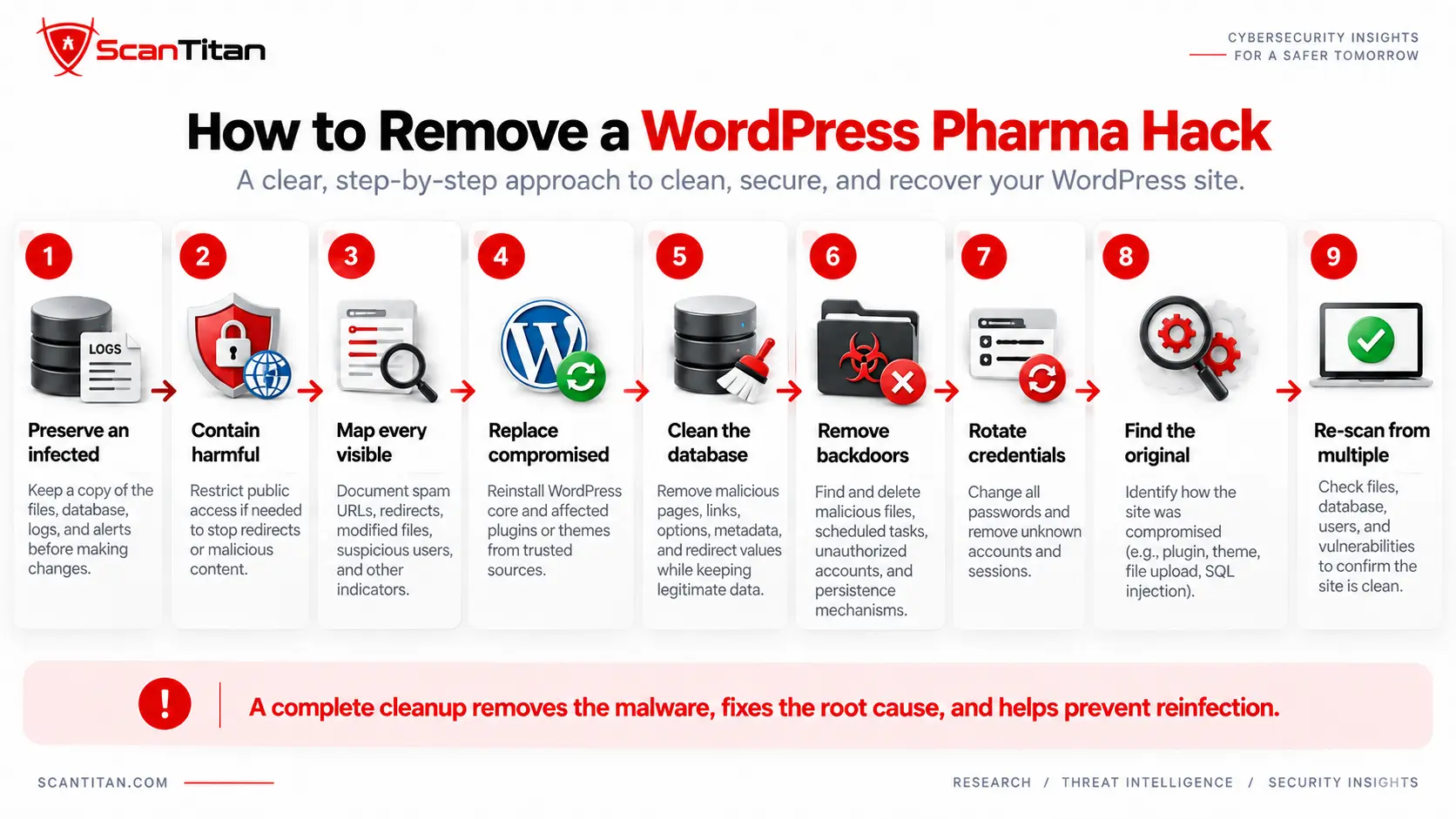
Removal should be treated as incident recovery rather than as a search-and-delete exercise. Preserve evidence first, then remove the payload, eliminate persistence, and close the original route into the site.
- Preserve an infected backup and relevant logs. Before modifying the site, capture the filesystem, database, available access logs, security alerts, and timestamps. Keep this copy separate from known-clean backups.
- Contain harmful behavior if necessary. If visitors are being redirected or exposed to malicious content, restrict public access using a hosting, firewall, CDN, or other trusted control while cleanup is underway.
- Map every visible symptom. Record Google spam URLs, redirects, modified pages, malicious files, suspicious database rows, unknown users, and other indicators before deleting them.
- Replace compromised software with known-clean copies. Reinstall WordPress core and affected plugins or themes from trusted sources rather than trying to repair badly modified application files line by line.
- Clean the database. Remove unauthorized pharmaceutical pages, links, options, metadata, redirect values, scripts, and other malicious records without deleting legitimate application data.
- Remove backdoors and persistence. Review uploads,
mu-plugins, scheduled events, server cron, configuration files, unauthorized administrators, and other persistence locations. - Rotate credentials and sessions. Change WordPress administrator credentials, hosting credentials, SSH/SFTP credentials, database credentials where appropriate, and WordPress authentication salts. Remove unknown accounts.
- Find the original entry point. Determine whether the compromise came from a vulnerable plugin, theme, file upload flaw, SQL injection, stolen credential, abandoned installation, hosting issue, or another route.
- Patch or remove the vulnerable component. Cleaning the malware while leaving the original exploit path available almost guarantees another compromise.
- Re-scan from multiple layers. Recheck search behavior, remote responses, files, database content, users, persistence locations, and known vulnerabilities before declaring the site clean.
If the initial compromise appears to involve third-party software, review ScanTitan’s guide to WordPress plugin vulnerabilities. File-upload flaws are another high-impact route because a vulnerable plugin can allow an attacker to place executable code on the server; see WordPress file upload vulnerabilities for that specific attack path.
Database access can also matter. An exploitable WordPress SQL injection vulnerability may allow unauthorized reading or modification of WordPress data, although the presence of pharma spam in the database does not by itself prove SQL injection was the original entry point.
Why Does the WordPress Pharma Hack Keep Coming Back?
Reinfection usually means the cleanup removed a symptom but not the mechanism that recreates it.
| What Was Cleaned | What May Still Remain | Result |
|---|---|---|
| Spam pages | Backdoor or malicious scheduled task | The pages are generated again |
| Database spam | Malicious PHP or compromised plugin | The database is reinjected |
| Malicious file | Database payload or loader | The file is recreated |
| Visible malware | Unpatched vulnerable plugin or theme | The attacker exploits the same flaw again |
| Administrator account | Stolen hosting or application credentials | Unauthorized access returns |
| Main WordPress installation | Abandoned staging site or second compromised application | The cleaned site is compromised again from the same account |
This is why ScanTitan’s broader WordPress recovery guide separates malware removal from entry-point analysis. A site is not fully recovered simply because the pharmaceutical keywords disappeared.
How to Recover SEO After a WordPress Pharma Hack
Security cleanup and search recovery are separate stages. Start SEO recovery only after the infection and persistence mechanisms have been removed; otherwise Google can recrawl the same hacked content while you are trying to clean the index.
- Confirm the site is actually clean. Recheck files, database records, redirects, users, scheduled tasks, and the original vulnerability before asking Google to reassess the site.
- Review the Search Console Security Issues report. Google’s report provides sample affected URLs and the type of security problem detected. Treat those URLs as examples rather than as a complete inventory.
- Find unauthorized indexed URLs. Use Search Console and targeted
site:searches to locate pharmaceutical pages, injected URLs, and altered search results that should not exist. - Restore legitimate pages. If an existing page was modified, restore its correct content, metadata, internal links, and canonical behavior.
- Remove unauthorized URLs correctly. Spam URLs that should not exist should stop serving hacked content and return an appropriate not-found or gone response where applicable. Remove them from sitemaps and internal links.
- Submit clean sitemaps and important URLs. Make it easy for search engines to rediscover the legitimate site structure after cleanup.
- Request a security review when applicable. Google instructs site owners to fix all instances of the reported problem before requesting review through the Security Issues report.
- Monitor the index after cleanup. Continue checking Search Console and search results for returning pharmaceutical pages, new unexpected URLs, or another security warning.
Google’s Security Issues documentation explicitly identifies pharmaceutical terms as one example of hacked content injection and recommends searching for additional affected pages rather than cleaning only the samples shown in the report.
SEO recovery does not have a universal deadlineRemoving the malware does not instantly remove every spam URL or restore previous rankings. Search engines need to recrawl affected URLs and process the cleaned site. The recovery period varies with crawl frequency, infection scale, site history, and the type of search or security action involved.
How to Prevent WordPress Pharma Hack Reinfection
Prevention should focus on the compromise path, not on blocking pharmaceutical words. Attackers can change the SEO payload at any time; the important control is preventing unauthorized access and detecting vulnerable components before they are exploited.
- Keep WordPress components current. Patch core, plugins, and themes promptly and remove abandoned software you no longer need.
- Audit plugin exposure. Third-party code is the largest source of disclosed WordPress ecosystem vulnerabilities, so know exactly which components are installed and which versions are running.
- Use strong authentication. Require strong unique passwords and multi-factor authentication for administrator and hosting accounts.
- Remove nulled or untrusted extensions. Plugins and themes should come from trusted repositories or vendors.
- Limit unnecessary administrator access. Remove dormant privileged users and apply least privilege to active accounts.
- Maintain clean backups. Keep backups separate from the live WordPress environment and verify that restoration actually works.
- Monitor file and database changes. Unexpected changes should be investigated before they become a large search-spam campaign.
- Use vulnerability and malware scanning together. One identifies weaknesses that may allow compromise; the other looks for evidence that compromise has already happened.
The current Patchstack State of WordPress Security in 2026 reports 11,334 newly disclosed WordPress ecosystem vulnerabilities during 2025, with 91% found in plugins and 9% in themes. Only six were reported in WordPress core, and Patchstack classified those core issues as low priority.
Those figures describe the disclosed vulnerability surface; they do not mean that 91% of pharma infections specifically originate from plugins. They do show why third-party components deserve close attention when investigating the initial compromise.
For the broader vulnerability landscape, see ScanTitan’s guide to the most common WordPress vulnerabilities.
Can a Malware Scanner Detect a WordPress Pharma Hack?
Yes, scanners can detect important parts of a pharma infection, but the answer depends on what the scanner is designed to inspect.
| Scanner or Method | Primary Question | Example Findings |
|---|---|---|
| Remote malware scanner | What does the website serve externally? | Spam content, malicious scripts, redirects and suspicious external resources |
| Server/file scanner | What malicious or changed files exist? | Backdoors, modified PHP and unexpected files |
| Database inspection | What unauthorized data persists in WordPress? | Injected posts, options, links, metadata and stored payloads |
| Vulnerability scanner | What known security weaknesses could allow compromise? | Vulnerable plugin, theme or WordPress versions and exposed attack surface |
These methods answer different questions. Finding a vulnerable plugin does not prove that a pharma infection exists, and finding pharmaceutical spam does not automatically reveal the vulnerability that installed it.
Sucuri’s 2024 SiteCheck dataset illustrates the scale of externally visible SEO abuse: its researchers reported SEO spam on 422,741 websites across 70.8 million remote scans. That is Sucuri’s own scanning dataset rather than a measurement of every website on the internet, but it shows why runtime and search-facing detection remain useful alongside server-side investigation.
If your site is already infected and the cleanup is beyond your team’s available access or experience, a dedicated website malware removal service can handle the malware, persistence, and cleanup process. Vulnerability scanning should then be used alongside remediation to identify weaknesses that could allow the site to be compromised again.
WordPress Pharma Hack FAQ
What is a WordPress pharma hack?
A WordPress pharma hack is a post-compromise SEO spam infection that adds unauthorized pharmaceutical content, links, pages, metadata, or redirects to a WordPress website. It is also commonly called a Viagra hack or pharma SEO spam.
Why does my WordPress site show Viagra or pharmacy pages in Google?
The site may have been compromised and used to create pharmaceutical SEO spam. Attackers can inject pages or alter existing content so Google indexes pharmaceutical titles and URLs even when the normal website still appears legitimate to its owner.
Why does the pharma hack appear only in Google?
Some infections use cloaking or conditional delivery, showing one version of a page to search-engine crawlers and another to normal visitors. The spam may also exist on hidden URLs that are indexed by Google but are not linked from the site’s normal navigation.
Where does pharma spam hide in WordPress?
It can persist in WordPress database records, plugins, themes, uploads, mu-plugins, configuration files, scheduled tasks, unauthorized users, or other server files. There is no single location used by every pharma infection.
How do I remove pharma spam from WordPress?
Preserve an infected backup and logs, map the affected URLs and components, replace compromised software with trusted copies, clean malicious database records, remove backdoors and rogue accounts, rotate credentials, patch the original entry point, and re-scan the site before starting search-index recovery.
Why does the WordPress pharma hack keep returning?
Repeated infection usually means a backdoor, malicious scheduled task, compromised credential, vulnerable component, database payload, or another persistence mechanism survived the previous cleanup. Removing only the visible spam does not remove the mechanism that generates it.
Can a security plugin detect a pharma hack?
A security plugin may detect malicious files, changed code, known malware signatures, or suspicious activity, but coverage varies. Database-only spam, conditional cloaking, server-level persistence, or an unknown entry point may require additional remote, server-side, database, and manual investigation.
Will removing the pharma hack restore my Google rankings?
Removing the infection is the first requirement, but search recovery is not immediate. Clean affected pages, remove unauthorized URLs, fix Search Console security issues, submit accurate sitemaps, request a review when applicable, and allow search engines time to recrawl and process the cleaned site.
Is a WordPress pharma hack the same as a Japanese keyword hack?
No. Both are forms of post-compromise SEO spam, but they promote different content. Pharma hacks typically inject pharmaceutical terms and destinations, while Japanese keyword hacks commonly generate Japanese-language doorway pages or shopping spam. Their persistence and cleanup techniques can overlap.
Need Help Removing a WordPress Pharma Hack?
If your WordPress site is already showing pharmaceutical spam, unexpected Google results, malicious redirects, or signs of reinfection, removing only the visible pages may not be enough. The underlying compromise can remain in WordPress files, plugins, themes, database records, administrator accounts, scheduled tasks, or other persistence locations.
ScanTitan can help investigate and clean a compromised website through its website malware removal service. The goal is not only to remove the visible pharma spam, but also to identify malicious persistence, clean affected components, and reduce the chance that the same infection immediately returns.
If your website is already infected
Start with malware removal. A cleanup should address the malicious content and persistence mechanisms before you focus on Google reindexing or SEO recovery.
If the site is clean but you want to find weaknesses
Use a website vulnerability scanner to identify exposed security weaknesses that could provide an attacker with another route into the application. Vulnerability scanning and malware removal solve different problems: one looks for weaknesses, while the other investigates an existing compromise.
If you are not sure whether you are dealing with an active infection or only a vulnerable WordPress installation, start by confirming the symptoms. Unexpected pharma pages in Google, malicious redirects, injected content, unfamiliar administrator accounts, or malware warnings point toward compromise and should be investigated as an incident rather than treated only as a vulnerability scan.