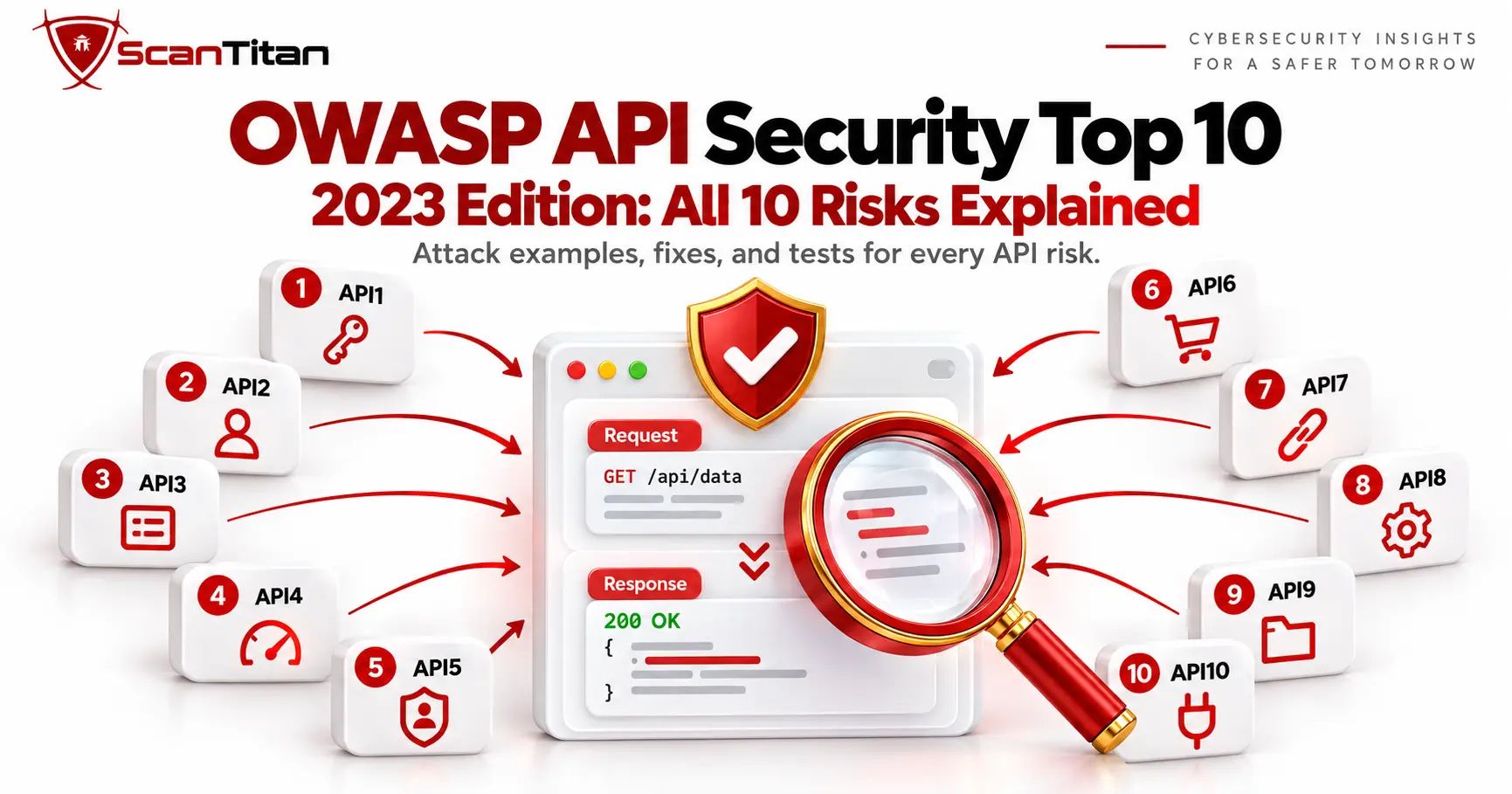
The OWASP API Top 10 is a ranked list of the ten most critical API security risks, and the 2023 edition is still the current version. It covers broken authorization, broken authentication, resource abuse, server-side request forgery, misconfiguration, and unsafe use of third-party APIs. This guide explains all ten risks with an attack example, a fix, and a test for each, shows what changed since 2019, and separates what an automated scanner can find from what needs manual testing.
What is the OWASP API Top 10?
The OWASP API Security Top 10 is an awareness document from the OWASP API Security Project that ranks the most critical risks in application programming interfaces (APIs). OWASP, the Open Worldwide Application Security Project, published the first edition in 2019 and released the second edition in June 2023. The project page still presents 2023 as the current edition, and we checked it in October 2026. Developers, architects, and security teams use the list to decide what to design for and what to test. API risks differ from classic web risks because an API exposes object identifiers, functions, and properties directly to the client, so authorization flaws dominate the ranking. OWASP notes that three of the top five items concern authorization.
Is the OWASP API Top 10 based on vulnerability statistics?
The OWASP API Security Top 10 is an awareness and prioritization document, not a statistical league table of the ten most frequently observed API vulnerabilities. For the 2023 edition, OWASP ran a public Call for Data from September 1 to November 30, 2022, but the data it received was not enough for a relevant statistical analysis of the most common API security issues. The project therefore reviewed public API security incidents from bug bounty platforms and public reports, consulted specialists, and applied the OWASP Risk Rating Methodology. This means that API1 ranking first should be read as OWASP’s prioritization of Broken Object Level Authorization as a critical risk, not as evidence that a fixed share of all API vulnerabilities are BOLA.
Why API security risks lead to real breaches
In January 2023, T-Mobile told the US Securities and Exchange Commission that someone had obtained customer data through a single API without authorization. The company said the activity began around November 25, 2022, was identified on January 5, 2023, and reached about 37 million customer accounts, although the data was limited to fields such as name, billing address, email, phone number, and date of birth. T-Mobile did not publish which OWASP category the flaw belonged to, so we do not label it here. The case shows the pattern behind the list: one endpoint, about six weeks of unnoticed access, and a large volume of data at the end.
OWASP API Top 10 2023 at a glance
The table below lists all ten risks in the official 2023 order, with the quickest practical test for each one. Use the ID column when you map findings to reports and tickets, because the same IDs appear in OWASP documentation and in most security tooling. Authorization risks sit near the top because a modern API exposes thousands of endpoints and many parameters, and each one needs its own access check. The sections below explain every risk in detail, including an attack example and a prevention checklist, so you can move from the summary to a concrete fix without switching documents or searching for the original OWASP page each time.
| ID | Risk | In one line | Quickest test |
|---|---|---|---|
| API1:2023 | Broken Object Level Authorization (BOLA) | A user reaches another user’s object by changing an ID | Request user B’s private object with user A’s token and check the policy |
| API2:2023 | Broken Authentication | Login, token, or key handling lets attackers act as someone else | Test login limits, token expiry, and password reset |
| API3:2023 | Broken Object Property Level Authorization | A user reads or writes properties they should not | Compare response fields by role and add extra fields to updates |
| API4:2023 | Unrestricted Resource Consumption | No limits on requests, size, or cost | Send bursts, oversized inputs, and huge page sizes in staging |
| API5:2023 | Broken Function Level Authorization (BFLA) | Regular users call administrative functions | Call admin endpoints and switch HTTP methods with a normal token |
| API6:2023 | Unrestricted Access to Sensitive Business Flows | Automation abuses a legitimate flow | Script the flow and check per-account and per-device limits |
| API7:2023 | Server Side Request Forgery (SSRF) | The API fetches a URL an attacker controls | Submit internal and metadata URLs to every URL parameter |
| API8:2023 | Security Misconfiguration | Weak defaults, verbose errors, open CORS | Check headers, CORS, error pages, and enabled methods |
| API9:2023 | Improper Inventory Management | Old or undocumented API versions stay reachable | Compare the OpenAPI file with what is actually exposed |
| API10:2023 | Unsafe Consumption of APIs | The API trusts data from third-party APIs | Feed hostile responses from a mocked upstream service |
What changed from the 2019 list
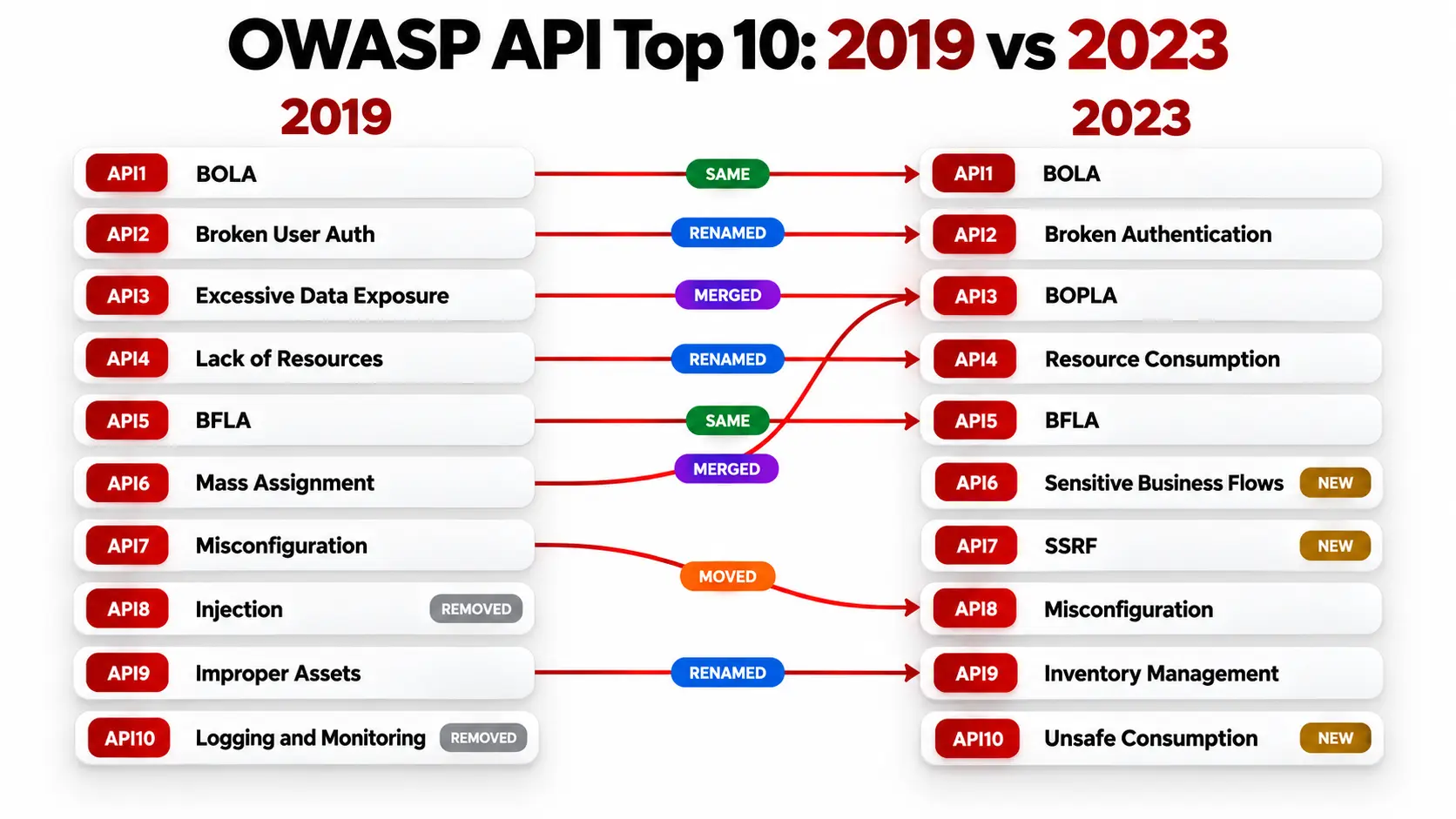
The 2023 edition keeps the 2019 structure but reshapes it: three risks are new, two were merged into one, three were renamed, and two 2019 entries no longer appear as separate items. OWASP says the update reflects how APIs changed since 2019, with authorization remaining the biggest challenge and server-side request forgery becoming more prevalent in API-based applications. If you still work from a 2019 checklist, the mapping below shows which controls carry over and which need new tests. Use it to update old audit templates, scanner profiles, and training material before your next review, so that nothing in your process still points at a retired category.
How the 2019 risks map to 2023
| 2023 risk | 2019 risk it came from | Change |
|---|---|---|
| API1 BOLA | API1 BOLA | Same |
| API2 Broken Authentication | API2 Broken User Authentication | Renamed |
| API3 BOPLA | API3 Excessive Data Exposure and API6 Mass Assignment | Merged |
| API4 Unrestricted Resource Consumption | API4 Lack of Resources and Rate Limiting | Renamed |
| API5 BFLA | API5 BFLA | Same |
| API6 Unrestricted Access to Sensitive Business Flows | None | New |
| API7 SSRF | None | New |
| API8 Security Misconfiguration | API7 Security Misconfiguration | Moved down one place |
| API9 Improper Inventory Management | API9 Improper Assets Management | Renamed |
| API10 Unsafe Consumption of APIs | None | New |
The most common mapping mistake is to treat Security Misconfiguration as unchanged. It was API7 in 2019 and is API8 in 2023, so a report that still says API7 is using the old numbering. Mass assignment and excessive data exposure no longer have separate IDs, but both behaviors remain important. OWASP combined them under API3:2023 Broken Object Property Level Authorization because they share the same underlying problem: missing or incorrect authorization at the object-property level.
Excessive data exposure is primarily a read-side problem, where the API returns properties that the caller should not be allowed to see. Mass assignment is primarily a write-side problem, where the API accepts and changes properties that the caller should not be allowed to control. Keep the existing test cases for both behaviors, but classify new findings under API3:2023, and re-tag any finding written against a 2019 ID before it goes into an audit report or a ticket.
Where did API injection go?
Injection was API8 in 2019, and Insufficient Logging and Monitoring was API10. Neither appears as its own item in the 2023 list, but neither stopped being a risk. OWASP’s text for API10:2023 Unsafe Consumption of APIs lists many types of injection among its impacts and gives an example where a SQL injection payload arrives through data from a third-party service, so injection through consumed data now sits there. Injection through direct client input still works against API parameters, and the OWASP Top 10:2025 for web applications still lists Injection as A05:2025. Keep testing for it as a standard input-handling check on every endpoint, and use API fuzzing to push unexpected values into every field. Logging and monitoring still matter too, because without them you cannot detect the abuse described in the other nine risks.
The 10 OWASP API security risks explained
Each card below follows the same pattern: what the risk is, an attack example, how to fix it, and how to test it, plus how it changed since 2019 and how well automated scanners cover it. The examples are illustrative requests we wrote to show the mechanics, not reports of real incidents, and they use made-up endpoints and IDs. Run the tests only against systems you own or have written permission to test, and prefer a staging environment for anything that sends bursts or oversized input. The order follows the official list, so you can use the headings as a checklist and tick off each risk as your team confirms the fix and the test result.
API1:2023 Broken Object Level Authorization (BOLA)
What it is
An endpoint accepts an object identifier from the client and returns or changes that object without checking whether the caller may access it. OWASP ranks it first because object IDs appear in paths, query strings, headers, and request bodies. For a deeper look at this pattern, see What Is IDOR.
Attack example
A customer calls GET /api/orders/1043 with their own token, changes the number to 1044, and receives another customer’s order. The token is valid, but the object is not theirs.
Fix it
- Check authorization against the logged-in user’s permissions in every function that touches an object, and do not rely on the gateway alone.
- Use unpredictable IDs such as UUIDs as an extra layer, never as the only control.
- Return 403 or 404 when ownership fails, and log the attempt.
Test it
- Create two ordinary test accounts, A and B, with objects that are intentionally private to each account.
- Request B’s objects with A’s authenticated token on every endpoint that accepts an object identifier.
- Test read, update, delete, download, and share actions separately, because permission for one action does not imply permission for another.
- Confirm a finding only when A can act on an object that the authorization policy says belongs to B. A
200 OKalone is not proof if the resource is public or shared.
API2:2023 Broken Authentication
What it is
The mechanisms that identify a caller are weak or missing: login, password reset, tokens, and API keys. Typical flaws include no limit on login attempts, credential stuffing, tokens that never expire, and JSON Web Tokens (JWT) accepted without checking the signature or expiry.
Attack example
An attacker replays a stolen token that never expires, or sends thousands of leaked passwords to POST /api/login and meets no lockout.
Fix it
- Use established authentication standards instead of custom token or credential flows. OAuth 2.0 provides authorization, so add an identity layer such as OpenID Connect where users must be authenticated.
- Validate every token on every request: authenticity, signature, expected issuer and audience where applicable, and expiry.
- Protect login, recovery, and password-reset endpoints with stricter brute-force and credential-stuffing controls than ordinary endpoints.
- Require re-authentication for sensitive changes such as email, password, or MFA device.
- Avoid treating an API key as proof of a user’s identity, because keys identify API clients, not people.
Test it
- Send repeated bad logins and check for lockout or throttling.
- Replay an expired token and a token with a changed algorithm field.
- Change an email or password and confirm that the API asks for re-authentication.
API3:2023 Broken Object Property Level Authorization
What it is
A user can see or change properties of an object that they should not control. It merges two 2019 risks: excessive data exposure, where responses return more fields than the client needs, and mass assignment, where the API binds request fields straight onto an internal object.
Attack example
A profile update accepts {"name":"Sam","isAdmin":true} and the server saves both fields, so an ordinary user becomes an administrator.
Fix it
- Return an explicit allowlist of properties per role instead of whole objects.
- Accept only named fields in write requests, and reject unknown ones.
- Validate request and response bodies against a schema.
Test it
- Compare response fields for different roles.
- Add unexpected properties such as
role,isAdmin, orbalanceto update requests. - Check whether the values stick on the next read.
API4:2023 Unrestricted Resource Consumption
What it is
The API does not limit what one client can ask for. Resources include bandwidth, CPU, memory, storage, and paid third-party services such as SMS or email providers, so abuse hurts both availability and your bill.
Attack example
GET /api/users?limit=1000000 returns the whole user table in one call, or a flood of requests slows the service for everyone.
Fix it
- Set rate limits, quotas, maximum page sizes, batch limits, and payload and upload size limits based on each endpoint’s business needs.
- Add execution timeouts, and spending limits or billing alerts for operations that use paid third-party services.
- Return an error that matches the limit exceeded:
429 Too Many Requestsfor request frequency,413 Content Too Largefor oversized bodies, and a validation error for excessive pagination or batch size.
Test it
- Send bursts above your documented limit in staging.
- Request a very large
limitvalue and upload a file above the allowed size. - Watch latency and error rates during the run.
API5:2023 Broken Function Level Authorization (BFLA)
What it is
A regular user can call functions meant for another role, such as administrators. The question is not which object, but which action. Attackers find privileged endpoints in documentation, in client code, or by guessing paths.
Attack example
A normal user changes GET /api/users/12 to DELETE /api/users/12, or calls /api/admin/users directly, and the server answers.
Fix it
- Apply deny-by-default, where every function declares which roles may call it.
- Enforce the policy centrally, not inside each handler.
- Review administrative endpoints separately from user endpoints.
Test it
- Call every admin function with a low-privilege token.
- Switch the HTTP method on every endpoint and compare the answers.
- Tie the test list to your OpenAPI file so new endpoints are included.
API6:2023 Unrestricted Access to Sensitive Business Flows
What it is
The API works as designed, but automation turns a normal flow into abuse: buying limited stock in bulk, creating fake accounts, posting spam reviews, or draining a referral program. No individual request needs to be malformed. The weakness appears when a legitimate flow can be automated or used excessively in a way that harms the business, so traditional payload-driven scanning may miss it unless the testing system understands the sequence, rate, identities, and business rules behind the flow.
Attack example
A script creates 5,000 accounts through POST /api/signup and claims the sign-up bonus on each one.
Fix it
- List your sensitive flows first, then limit each one per account, device, and address.
- Add friction where it matters, such as step-up verification at account creation and checkout.
- Monitor for abnormal volumes and alert on them.
Test it
- Script the flow at speed with several accounts.
- Check whether limits and alerts trigger.
- Review the flow design with the business owner, because this is as much a design review as a technical test.
API7:2023 Server Side Request Forgery (SSRF)
What it is
The API fetches a remote resource using a URL that the client controls and does not validate it. Webhook setup, import by URL, avatar upload from a link, and link previews are common places. Our guide to server-side request forgery covers the attack in depth.
Attack example
{"imageUrl":"http://169.254.169.254/latest/meta-data/"} makes the server call an internal address and can expose cloud instance metadata on some platforms.
Fix it
- Allow only listed destinations, and block private and link-local ranges.
- Disable redirects and run URL fetching in a separate network zone.
- Avoid returning the raw upstream response to the caller.
Test it
- Submit internal and metadata addresses to every parameter that accepts a link.
- Use a URL on a server you control to confirm outbound requests.
- Watch for connections and timing differences.
API8:2023 Security Misconfiguration
What it is
Insecure defaults and settings across the API stack: missing patches, unnecessary HTTP methods, permissive Cross-Origin Resource Sharing (CORS), detailed error messages, missing TLS, and missing security headers. Our article on CORS misconfiguration explains the CORS part in detail.
Attack example
A malformed request returns a full stack trace with framework versions and file paths, and an overly permissive CORS rule lets untrusted origins read responses.
Fix it
- Build a repeatable hardening baseline for every environment.
- Automate configuration checks in your deployment pipeline.
- Disable unused features and return generic errors to clients.
Test it
- Scan for open HTTP methods and missing security headers.
- Send malformed input and read how the errors look.
- Compare CORS responses for untrusted origins.
API9:2023 Improper Inventory Management
What it is
You do not know which API versions, hosts, and environments are live, or what data they expose. Beta and debug endpoints reach production, and shadow APIs appear that nobody documented. Our guide to REST API security covers the wider hygiene.
Attack example
/v1/ stays online after /v3/ ships and lacks the authorization check added to the newer version, so an attacker simply calls the old path.
Fix it
- Keep an inventory of hosts, versions, environments, and the data each API handles.
- Generate it from OpenAPI files and gateway logs.
- Retire old versions on a schedule, and keep production data out of test environments.
Test it
- Compare documented endpoints with what discovery finds.
- Assign an owner to every difference.
- Check that old versions enforce the same rules as new ones.
API10:2023 Unsafe Consumption of APIs
What it is
Your API trusts what another API sends back. Developers apply strict checks to user input but accept data from partner or third-party services with little validation, so an attacker who compromises that service can inject data, redirect requests, or crash yours.
Attack example
Your API follows an HTTP redirect from a partner service straight to an internal address, or stores a partner’s response in a database without checking it.
Fix it
- Treat every upstream response as untrusted input and validate it against a schema.
- Set timeouts and size limits, use TLS, and do not follow redirects blindly.
- Allow only the hosts you call.
Test it
- Mock an upstream service that returns oversized, malformed, or malicious payloads.
- Return redirects to internal addresses from the mock.
- Review the code that handles upstream data, because this usually needs mocked dependencies or code review.
OWASP API Top 10 vs the OWASP Top 10 for web applications
The OWASP API Security Top 10 and the OWASP Top 10:2025 overlap, but they are not interchangeable. The general list covers web application security broadly, while the API list focuses on risks that grow when APIs expose objects, properties, functions, business flows, and integrations directly to clients.
Broken access control and security misconfiguration are major themes in both lists. Server-Side Request Forgery (SSRF) remains a standalone API7:2023 category, while the OWASP Top 10:2025 includes SSRF under A01:2025 Broken Access Control rather than listing it separately.
Injection remains A05:2025 in the general list but is no longer a standalone item in the API Top 10:2023. A web or mobile application backed by APIs should therefore be assessed against both lists. Our guide to types of website security vulnerabilities covers the web side.
How to test your API against the OWASP API Top 10
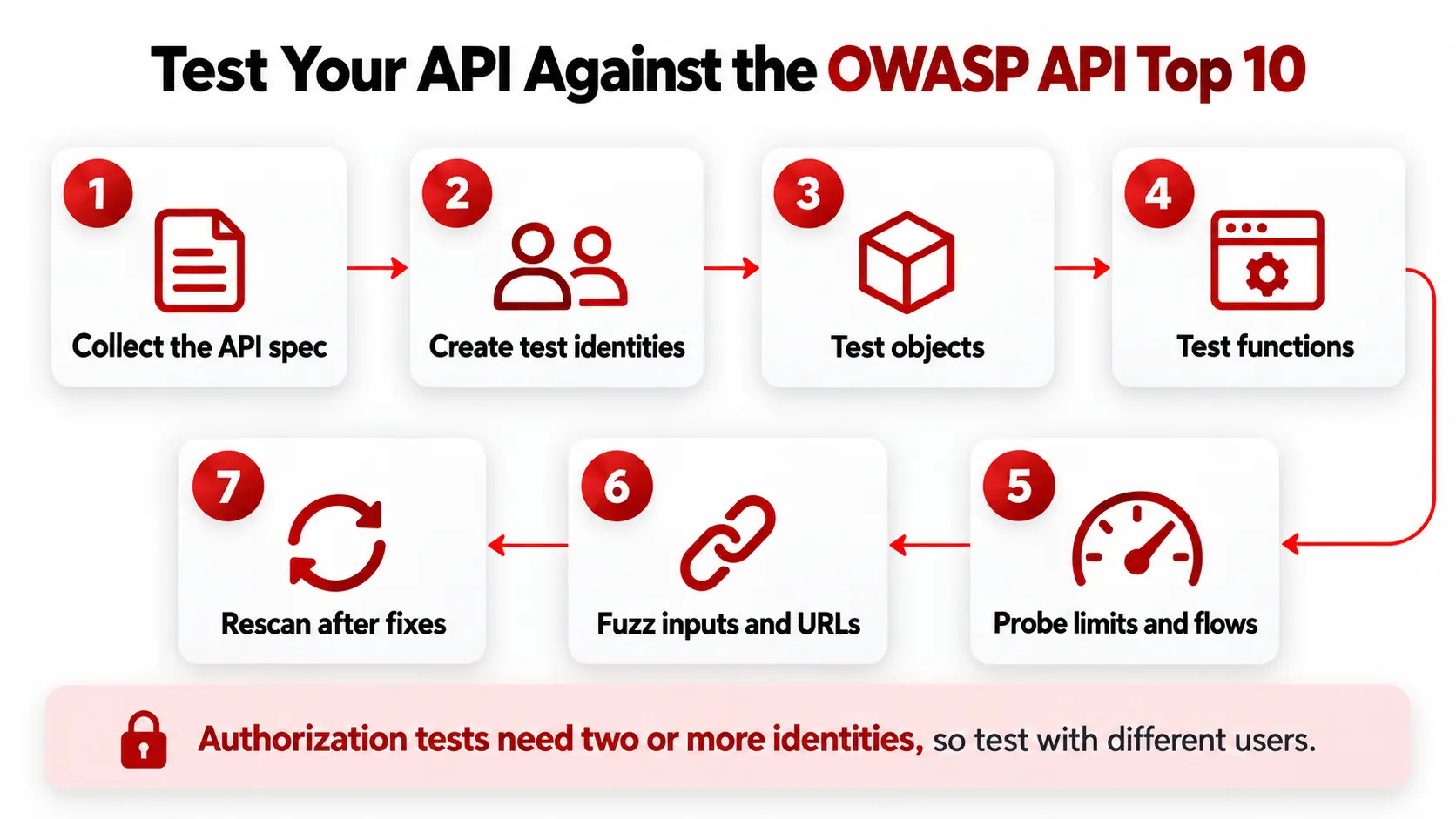
Testing works best as a repeatable routine rather than a one-off audit. Start from your OpenAPI document so that every endpoint is covered, and run tests with more than one identity, because most of the high-ranked risks only appear when you compare what different users can do. Combine an automated scan for repeatable checks with manual tests for logic-heavy risks, and rerun both after every significant API change. Follow these steps in order, and keep the evidence from each run so you can show that a fix worked.
- Collect the API description: the OpenAPI or Swagger file, any Postman collection, and gateway logs, then list every host and version in scope.
- Create at least three test identities: two ordinary users and one administrator, each with valid credentials.
- Run object tests: request each object ID with another user’s token to find BOLA, and compare properties in responses to find BOPLA.
- Call every endpoint and HTTP method with the low-privilege token to find BFLA.
- Probe limits and flows: send bursts, large page sizes, and scripted flows to check resource and business-flow controls.
- Submit URLs and hostile payloads to every parameter, including internal addresses for SSRF, and fuzz inputs to find injection and input-handling flaws.
- Rescan after each fix and keep the before and after results.
For a hands-on walkthrough, see how to scan an API for vulnerabilities and our overview of API security testing.
What an automated scanner finds and what needs manual testing
Automated scanners cover repeatable, signature-driven checks well and need extra context for logic that depends on who owns what. A scanner such as the ScanTitan API vulnerability scanner reads an OpenAPI, Swagger, or Postman spec to map the endpoints and runs authenticated tests against the OWASP API Security Top 10, with proof for each finding, according to its product page. Technical checks such as misconfiguration, SSRF, input handling, and inventory suit automation. Authorization and business-flow risks depend on identities, context, and judgment, so back the scan with multi-user and manual validation. The table shows a realistic split. It is our assessment, not a vendor claim, and coverage varies by tool, so confirm what yours supports. If you are choosing a tool, our comparison of the top vulnerability scanning tools lists ten scanners.
| Risk | Automated scanner | Manual or multi-user test |
|---|---|---|
| API1 BOLA | Partial, needs two authenticated identities | Yes, test ownership rules per object type |
| API2 Broken Authentication | Good for rate limits, token checks, and headers | Review reset and recovery flows |
| API3 BOPLA | Partial, can flag extra fields in responses | Yes, review fields by role |
| API4 Resource Consumption | Partial, can test limits and large inputs | Load-test limits in staging |
| API5 BFLA | Partial, needs a low-privilege identity | Yes, review admin functions |
| API6 Business Flows | Limited, needs business-flow context | Yes, needs business context |
| API7 SSRF | Good with out-of-band callback checks | Review every URL-fetching feature |
| API8 Misconfiguration | Good | Review the hardening baseline |
| API9 Inventory | Partial, discovery and spec comparison | Maintain the inventory process |
| API10 Unsafe Consumption | Limited, needs mocked upstream services | Code review and mocked upstream tests |
Frequently asked questions
What is the latest version of the OWASP API Top 10?
The latest version is the OWASP API Security Top 10 2023, released in June 2023 as the second edition after the original 2019 list. The OWASP project page still presents 2023 as the current edition, and we checked it in October 2026. Some vendor articles talk about a 2026 version, but OWASP has not published one that we could find. Check the official project page before you cite the edition in an audit report, because the list is revised every few years and a newer edition would change the IDs used in your documentation.
What is the number one risk in the OWASP API Top 10?
The number one risk is API1:2023 Broken Object Level Authorization, usually shortened to BOLA. It has held first place since the 2019 edition. OWASP ranks it first because object identifiers appear in almost every API request, and each one needs its own access check. A single missing check on a single endpoint can expose every record behind it, which is why one flaw in this category can turn into a large breach. Developers often assume that a valid login is enough, so they check who the caller is but not whether the caller owns the object being requested.
What is the difference between BOLA and BFLA?
BOLA is about objects and BFLA is about functions. In BOLA, a user changes an identifier such as an order number and reaches data that belongs to someone else. In BFLA, a user calls an action they should not be able to perform at all, such as deleting an account with an administrator endpoint. Both are authorization failures, but they need different tests. BOLA tests compare two ordinary users, while BFLA tests call every function and HTTP method with a low-privilege token. Many teams find BOLA first because it appears in everyday data endpoints.
Is mass assignment still in the OWASP API Top 10?
Mass assignment is no longer a separate item, but the risk is still there. In the 2023 edition, mass assignment (API6:2019) was merged with excessive data exposure (API3:2019) into API3:2023 Broken Object Property Level Authorization. The attack is unchanged: a client sends extra fields such as isAdmin and the server saves them. You should keep the old test cases and tag the findings under API3. Searching for the old name still helps, because many guides and scanner reports use it, and tagging both names in your tracker makes old findings easy to find.
Is API injection in the OWASP API Top 10 2023?
Injection is not a standalone item in the 2023 list. It was API8 in 2019 and was removed as its own category, and OWASP’s API10 text now lists injection among the impacts of trusting third-party data. The risk still applies to APIs, because SQL, NoSQL, and command injection can reach a backend through any parameter, and the OWASP Top 10 for web applications still covers it. Keep injection in your API test plan as a general input-handling check, and run it against every endpoint, header, and body field, including the ones that do not look database related, since injection often shows up in headers and nested JSON fields.
Can a vulnerability scanner cover the whole OWASP API Top 10?
An API vulnerability scanner can test against all ten OWASP API Security Top 10 categories, but automation cannot validate every possible instance of every category with equal confidence. Repeatable technical checks such as security misconfiguration, SSRF, input handling, authentication controls, rate limits, and exposed API inventory lend themselves well to automation. Authorization categories such as BOLA, BOPLA, and BFLA can also be tested effectively when the scanner has multiple authenticated identities and role context. Business-flow abuse and unsafe consumption of third-party APIs often need additional application knowledge, mocked dependencies, code review, or manual validation. The practical goal is full Top 10 testing coverage, using the right mix of automated, multi-user, and manual techniques.
How often should you test your API against the OWASP API Top 10?
Test after every significant API change, such as a new endpoint, a new version, an authentication change, or a new third-party integration, and on a regular schedule in between. Automated checks can run with each release, while manual authorization and business-flow tests fit a quarterly or per-feature review. There is no single required interval in the OWASP list itself, so set the frequency from your risk, how often the API changes, and any standard you are bound to. Rerun the relevant test after each fix to confirm it worked, and record the date so audits can see the history.
Run a free scan on your API
The fastest way to see where your API stands is to scan it. Create a free ScanTitan account, run a scan against your website, network, and APIs, and review prioritized findings with the request and response behind each one. Use the results as the starting point for the manual tests in this guide, especially the authorization checks. Create a free ScanTitan account and, if you need continuous scanning, authenticated scans, or compliance exports, review ScanTitan pricing.
Sources. OWASP API Security Top 10 2023 (official edition); OWASP, “OWASP API Security Top 10 2023 has been released” (July 3, 2023); T-Mobile US, Inc. SEC filings describing the API incident identified on January 5, 2023.