

Port 5985 is the default TCP port for Windows Remote Management (WinRM) over HTTP, the service that lets administrators run PowerShell commands on a remote Windows server. It is normal on a trusted internal network and dangerous on the internet, because anyone who reaches it with valid credentials can run commands on the machine. WinRM encrypts its traffic after login, even over HTTP, so the real risks are exposure and stolen passwords. This guide explains what the port does, how to check it, and how to close it.
What Is Port 5985?
Port 5985 is the default TCP port for WinRM over HTTP. WinRM is Microsoft’s implementation of the WS-Management protocol, and PowerShell Remoting uses it to run commands on other computers. Microsoft enables PowerShell Remoting by default on Windows Server 2012 R2 and later, so every such server already has a listener on this port, while client versions of Windows keep it off until someone turns it on. The HTTPS version of the same service uses port 5986. On a small IT team the practical meaning is simple: most Windows servers you manage probably answer on 5985 inside your network, and you should know exactly which machines are allowed to reach it.
| Port | Service | How traffic is protected | Typical use |
|---|---|---|---|
| 5985 | WinRM over HTTP | Message-level encryption after authentication | Domain servers and automation inside a trusted network |
| 5986 | WinRM over HTTPS | TLS, and the certificate lets the client verify the server | Workgroup servers, management across networks, stricter environments |
Three kinds of tools commonly use the port, and knowing which ones you run tells you what breaks if you close it.
- PowerShell Remoting: PowerShell Remoting is the built-in way to run commands on another Windows machine with Invoke-Command or Enter-PSSession, and it uses WinRM underneath.
- Server Manager: Server Manager is the Windows Server console that manages other servers remotely, and it relies on WinRM to reach them.
- Automation tools: Configuration tools such as Ansible manage Windows hosts over WinRM, so a firewall change can stop a deployment job without any error on the server itself.
Is Port 5985 Safe?
Port 5985 is safe only where you control who can reach it. The three parts below cover the encryption myth, the defaults Windows ships with, and where the real risk sits.
HTTP Does Not Mean Unencrypted
Many pages call port 5985 unencrypted because it carries HTTP, and Microsoft’s own documentation says otherwise. Regardless of the transport, WinRM encrypts all PowerShell Remoting communication after the initial authentication. Over HTTP it uses the message-level encryption that authentication negotiates: Kerberos uses AES-256 on modern systems, NTLM uses a 128-bit RC4 cipher, and Basic authentication provides no encryption at all. So the thing to avoid is Basic authentication, and not the port number. HTTPS on 5986 still adds one real benefit: the certificate lets the client confirm which server it reached, which NTLM cannot do by itself. Read the details in Microsoft’s WinRM security guide.
Who Can Connect by Default
By default, PowerShell Remoting only accepts connections from members of the local Administrators group, and the session runs with that user’s own permissions. The Windows Firewall rule is looser than most people expect: on private networks it accepts all connections, and on public networks it accepts them only from the same subnet. Running Enable-PSRemoting also creates a listener that accepts requests on any IP address on the machine, so a server with several network cards listens on all of them. When a client connects by IP address or to a workgroup server, Kerberos is not possible and NTLM is used, which Microsoft says stays disabled until you configure SSL on the server or the TrustedHosts setting on the client.
Where the Risk Really Is
The risk sits in who can reach the port and which passwords they hold, since a WinRM login gives an administrator a command line on the server. Attackers do not need an exploit in the port for that. They need one valid administrator password, which they get from a phishing page, a reused credential or a password guessing run, and they need a network path to port 5985. Block the path and most of the risk disappears. Leave the port open to the internet and every guessed password becomes remote code execution. That is why an exposed WinRM port is a critical finding on any external scan, even when the traffic is encrypted.
How Attackers Use Port 5985
Attackers use WinRM because it is a signed, built-in Windows feature that looks like normal administration. MITRE ATT&CK tracks the technique as T1021.006, Remote Services: Windows Remote Management, a lateral movement method that needs valid accounts, and it lists real users of it, including APT29 during the SolarWinds compromise, the Chimera group and Storm-0501. Tools such as Evil-WinRM, Cobalt Strike and Brute Ratel automate it. Three patterns show up most often.
- Password spraying: Password spraying is trying one or a few common passwords against many accounts, and it pays off against WinRM because a successful administrator login returns a command shell instead of a web page.
- Credential reuse: Credential reuse is logging in with a password that leaked from another site or system, and it works whenever an administrator used the same password in two places.
- Lateral movement: Lateral movement is using one compromised machine to reach the next, and an attacker who holds an administrator account on a workstation can use WinRM to reach every server that trusts it. Our guide to port 445 vulnerabilities shows the same pattern on SMB.
Which Port 5985 Situation Are You In?
The right response depends on where the port answers, so match your finding to one row before you change anything. An internet-facing result is an incident to fix today, while an internal result is a configuration to tighten this week. If you are unsure, assume the port is reachable from more places than you think, because cloud security groups and port forwarding rules often outlive the project that created them. Write the answer down for each server that you own, because one machine can sit in two rows, such as an internal server that a contractor can also reach through a VPN.
| Situation | Risk | Action |
|---|---|---|
| Open to the internet | Critical: anyone can try passwords against an administrator shell | Block it at the firewall today, then review logins for the period it was open |
| Open on internal servers, reachable from any internal machine | Medium: one compromised workstation can reach every server | Limit the firewall rule to admin workstations or a jump host |
| Open on a machine you never manage remotely | Unneeded exposure | Disable WinRM and close the listener |
| Open on an isolated lab machine | Low, if the lab network is truly separate | Keep it, and never route it to the internet |
How to Check If Port 5985 Is Open
Check twice, from outside the network and from the server itself, because the two views often disagree. The outside view shows what an attacker sees, and the inside view shows what is actually listening.
Check From Outside
Test the port from a network position that matches your attacker, which means a machine outside your office network, not a laptop on the same switch. On any system with Nmap installed, run nmap -p 5985,5986 your-public-address against the public address and read the state of both ports. On Windows, Test-NetConnection -ComputerName your-public-address -Port 5985 tells you whether the connection succeeds. A state of open or a successful test means the port answers from that position. For repeat checks across every public address you own, a network vulnerability scanner reports open ports on a schedule, and attack surface management explains how to keep the list of internet-facing assets current. Our open ports security risk assessment shows how to rank the findings.
Check on the Server
On the Windows server, open PowerShell as an administrator and use these checks to see whether WinRM is listening and who it accepts.
- Run
Get-NetTCPConnection -LocalPort 5985 -State Listento confirm a process is listening on the port. - Run
winrm enumerate winrm/config/listenerto list the listeners. An address of * means WinRM accepts connections on every network interface. - Run
Get-Service WinRMto see the WinRM service state and whether it starts automatically. - Run
winrm get winrm/config/serviceand confirm that AllowUnencrypted is false and Basic authentication is off. - Run
Get-NetFirewallRule -DisplayGroup "Windows Remote Management"to list the Windows Firewall rules and the remote addresses they allow.
How to Close or Restrict Port 5985
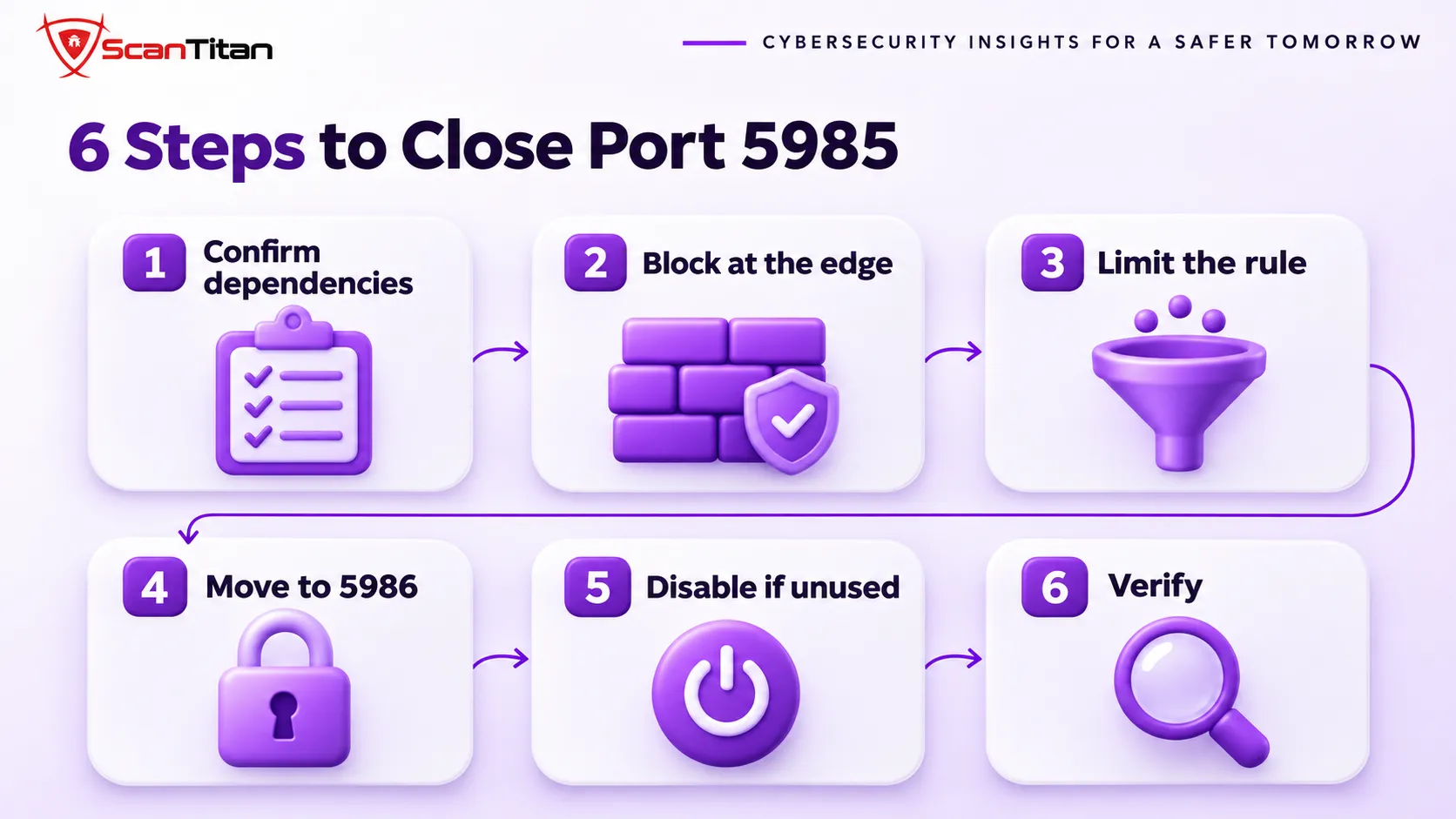
Do these steps in order, because closing a port that a backup job or deployment tool depends on creates a different outage. Restrict first where you need the service, and disable it only where you do not.
- Confirm what depends on WinRM by listing the tools that manage the server, such as Server Manager, Ansible and monitoring agents, and by checking recent connection sources in the logs.
- Block inbound ports 5985 and 5986 at the network edge, unless a named outside system needs them.
- Limit the Windows Firewall rule to your admin addresses by running
Set-NetFirewallRule -DisplayName "Windows Remote Management (HTTP-In)" -RemoteAddress your-admin-addressand setting the allowed remote address to your admin workstation or jump host. - Move management across untrusted networks to port 5986, with a certificate from an authority your clients trust, and keep Basic authentication and unencrypted traffic off.
- Disable WinRM on machines that do not need it. Running Disable-PSRemoting alone is not enough, and Microsoft says you may also need to stop and disable the WinRM service, delete the listener, disable the firewall exceptions and reset the LocalAccountTokenFilterPolicy value to 0.
- Verify from outside that the port no longer answers, and repeat the check on a schedule so a later change cannot reopen it unnoticed.
The disable step uses Stop-Service WinRM, Set-Service WinRM -StartupType Disabled and winrm delete winrm/config/Listener?Address=*+Transport=HTTP on a Windows server. Keep a second way into the machine, such as the console or RDP from a trusted address, before you disable WinRM on a server you manage remotely. Microsoft’s Enable-PSRemoting page documents each part, and its Disable-PSRemoting page documents what gets undone.
How to Detect Abuse of Port 5985
A WinRM login by an administrator looks like normal work, so detection depends on spotting the wrong person, the wrong address or the wrong time. Microsoft points to Mandiant’s research on the event logs that PowerShell Remoting leaves behind, and these are the signals to start with.
- Review Security event 4624 with logon type 3 for administrator accounts that sign in from addresses you do not recognize, and event 4625 for bursts of failed logons that suggest password spraying.
- Watch for the wsmprovhost.exe process, which hosts each remote PowerShell session, and for unusual child processes started under it. Process creation event 4688 records them when command line auditing is on.
- Enable PowerShell script block logging, which records the commands run in a session as event 4104.
- Alert on new WinRM listeners, new firewall rules for ports 5985 and 5986, and new members of the Administrators group.
If any of these point to a login you cannot explain, treat the server as compromised and follow our guide on what to do when a website is hacked.
Port 5985 Not Listening or Not Working?
When a legitimate connection fails, one of four causes is usually responsible. Fix the cause on the machines that need remoting, and resist the urge to open the port everywhere to make the error go away.
- Stopped service: A stopped service is a WinRM service that is not running or not set to start automatically, and Enable-PSRemoting with the Force switch starts it, sets it to Automatic and creates the listener.
- Public network profile: A public network profile is a Windows setting that makes the firewall stricter, and on client versions of Windows Enable-PSRemoting refuses to run on a public network unless you add SkipNetworkProfileCheck.
- Blocked path: A blocked path is a host firewall, a cloud security group or a network device that drops the traffic, so test with Test-NetConnection from the client to see where it stops.
- Missing listener: A missing listener is the result of an earlier cleanup that deleted it, and the listener enumeration command shows whether one exists.
Microsoft notes that the configuration starts listeners, so it is prudent to run Enable-PSRemoting only where it is needed.
Port 5985 FAQ
What is port 5985 used for?
Port 5985 is the default port for Windows Remote Management over HTTP. PowerShell Remoting, Server Manager and automation tools such as Ansible use it to manage Windows machines remotely. It is enabled by default on Windows Server 2012 R2 and later, and off on client versions of Windows until someone enables it.
Is port 5985 encrypted?
Yes, after login. Microsoft says WinRM encrypts all PowerShell Remoting communication after the initial authentication, even over HTTP. Kerberos uses AES-256 on modern systems and NTLM uses RC4 with a 128-bit key, but Basic authentication provides no encryption, so keep it off.
What is the difference between port 5985 and 5986?
Port 5985 carries WinRM over HTTP and port 5986 carries it over HTTPS. Both encrypt the session after authentication, but 5986 uses TLS and a server certificate, which lets the client verify which server it reached. Use 5986 when you manage servers across networks you do not fully control.
Is it safe to leave port 5985 open?
Only inside a trusted network, and only for the machines that need it. Never leave it open to the internet, because one valid administrator password then gives an attacker a command shell. Limit the Windows Firewall rule to your admin workstations or a jump host.
How do I close port 5985?
Block it at the network edge, limit the firewall rule to named addresses, or disable WinRM on machines that do not need it. Disable-PSRemoting alone does not close it. Microsoft says you may also need to stop and disable the WinRM service, delete the listener and disable the firewall exceptions.
Is port 5985 a vulnerability?
No, it is a service port and not a flaw, and using it takes valid credentials. The danger is exposure: an attacker with a valid administrator login and a network path can run commands. Scan your public addresses to confirm the port is closed to the internet.
Related reading: what an open port is, the port 445 vulnerability and a free external scan.