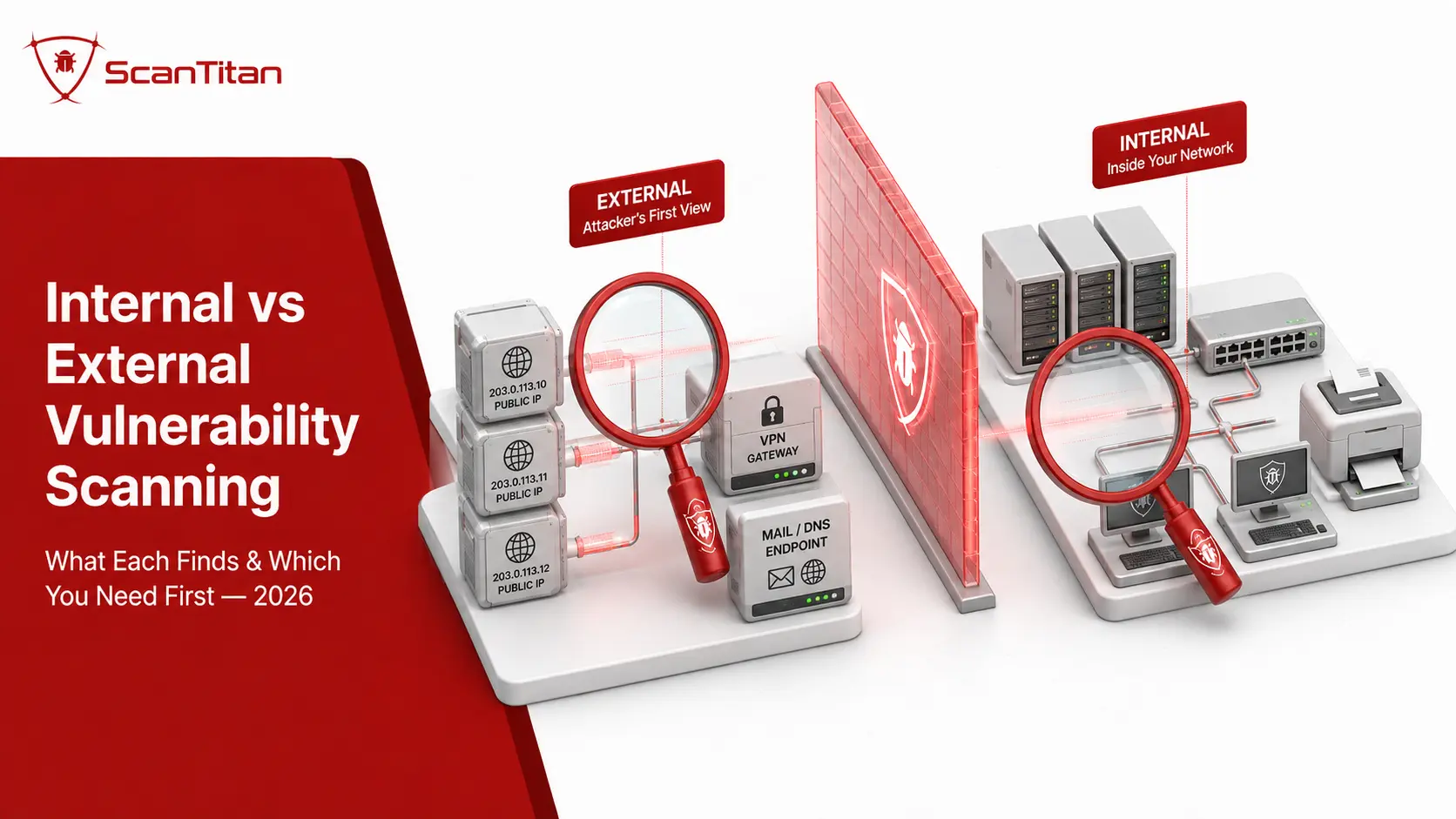
Internal vs external vulnerability scanning is primarily a difference in vantage point. An external scan tests internet-facing systems from outside your network, while an internal scan tests systems reachable from inside it. External scanning answers “what can an attacker reach before gaining access?” Internal scanning answers “what weaknesses become reachable after someone is inside?” Most organizations eventually need both, but the right scan to run next depends on which part of that attack path you have not yet assessed.
Quick answerUse an external vulnerability scan to assess public IPs, VPN gateways, firewalls, mail services, cloud endpoints, and other internet-facing systems. Use an internal vulnerability scan to assess private servers, endpoints, network devices, and services behind the perimeter. Use both when you need to understand both initial exposure and post-compromise risk.
Internal vs External Vulnerability Scanning: The Difference at a Glance
Internal and external vulnerability scans use many of the same underlying techniques, but they observe your environment from different locations. That changes which assets are reachable, which weaknesses are visible, and which security question the result can answer.
| Decision factor | External vulnerability scan | Internal vulnerability scan |
|---|---|---|
| Vantage point | Outside the network or security perimeter | Inside the network or connected to an internal segment |
| Primary question | What can someone on the internet reach? | What can someone reach after gaining internal access? |
| Typical assets | Public IPs, VPN gateways, firewalls, DNS, mail servers, public cloud services, internet-facing hosts | Servers, workstations, databases, routers, switches, printers, internal applications, private services |
| Typical findings | Exposed services, vulnerable perimeter software, unnecessary public ports, weak TLS, reachable management interfaces | Missing patches, vulnerable internal services, insecure configurations, weak credentials, excessive reachability |
| Main blind spot | Private systems that cannot be reached from the external scanner | The true view of what is reachable directly from the public internet |
| Credentials | Often unauthenticated, but authentication is a separate design choice | Often authenticated for deeper host-level visibility; unauthenticated internal scanning also has uses |
| Typical deployment | Remote/cloud scanner outside the target environment | Internal scanner, connector, appliance, scanner VM, or endpoint agent |
| PCI DSS | Requirement 11.3.2 where applicable; quarterly external ASV scans | Requirement 11.3.1; quarterly internal scanning, with authenticated scanning under 11.3.1.2 where systems support credentials |
| CIS Controls v8.1 | Safeguard 7.6: monthly or more often | Safeguard 7.5: quarterly or more often; authenticated and unauthenticated |
| Can it replace the other? | No | No |
Both are forms of network vulnerability scanning. The important distinction is where the scanner is positioned and therefore which systems it can reach.
Which Vulnerability Scan Do You Need?
There is no universal rule that every organization should always start with the same scan. Start with the perspective that answers the security question you currently cannot answer.
| If you need to know… | Start with | Why |
|---|---|---|
| What attackers can reach from the internet | External | The scanner needs to observe your public exposure from outside. |
| Whether a VPN, firewall, public server, or cloud service is exposed | External | These are perimeter and internet-facing assets. |
| Which private servers and workstations are missing patches | Internal | Those systems normally cannot be inspected from the public internet. |
| What an attacker could reach after compromising one endpoint | Internal | The relevant question is post-entry reachability and internal exposure. |
| Whether internal host configurations and patch levels are correct | Internal authenticated | Credentials allow the scanner to inspect local package, patch, registry, and configuration data where supported. |
| Your vulnerability posture across the whole network | Both | Neither perspective covers the other’s blind spots. |
| PCI DSS vulnerability-scanning coverage | Both, where applicable | PCI DSS separates internal scanning under 11.3.1 from external ASV scanning under 11.3.2. |
| Whether a recent firewall or public-service change created exposure | External | The change affects what the internet can reach. |
| Risk after a compromised account, malware infection, or foothold | Internal | The attacker is already operating from inside the environment. |
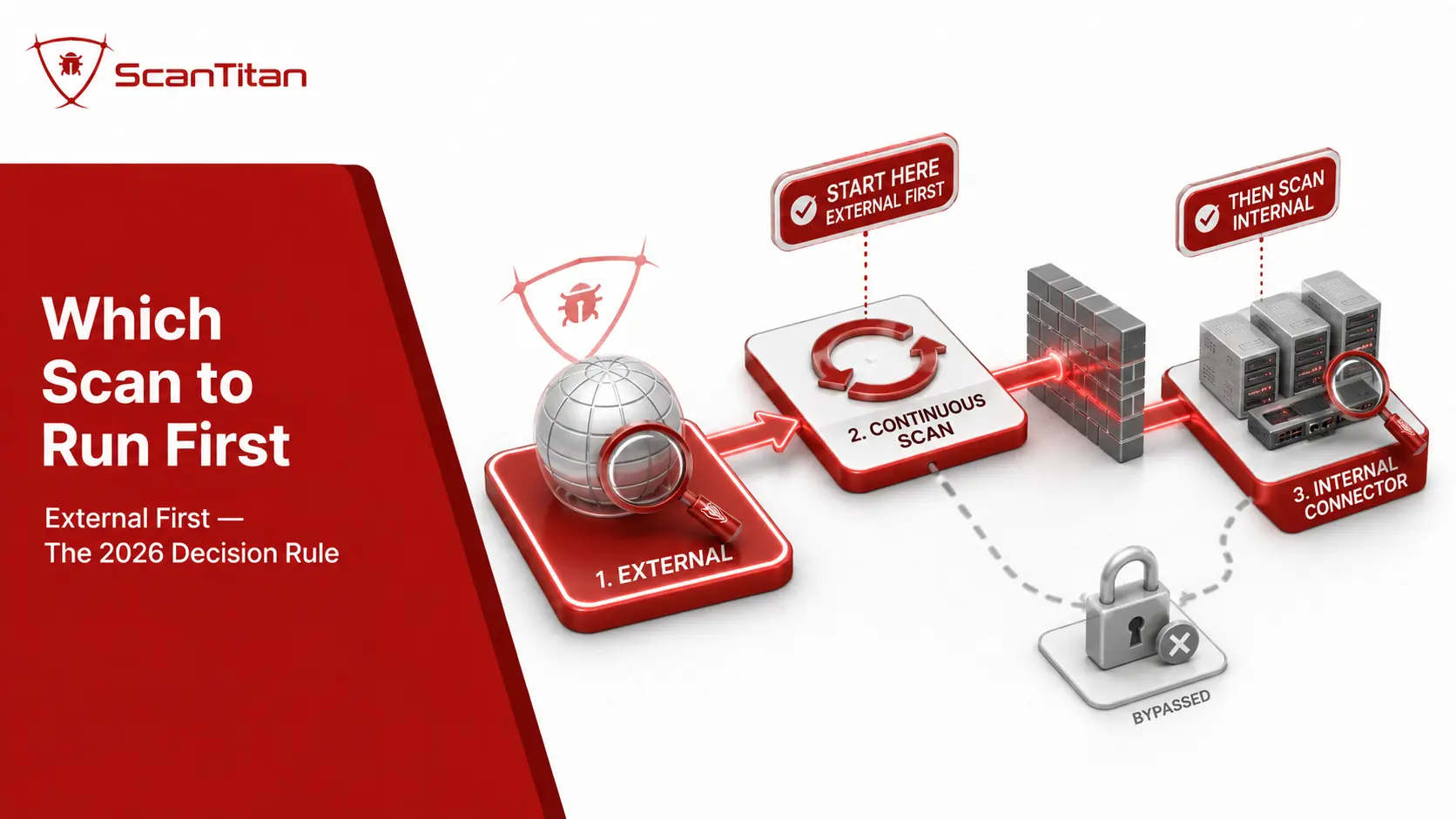
NIST SP 800-115 does describe one situation where external-first sequencing is useful: when assessors are deliberately conducting both external and internal testing “blind,” it recommends performing external scanning first so results and logs can be compared before the internal phase. That is a testing-sequence recommendation for that scenario, not a universal rule that every vulnerability-management program must always begin externally.
What Is an External Vulnerability Scan?
An external vulnerability scan runs from outside your network and assesses systems that are reachable through public-facing addresses or services. It is designed to show the security exposure visible before an attacker has established trusted internal access.
Typical external targets include:
- Public IPv4 and IPv6 addresses.
- Internet-facing servers.
- VPN and remote-access gateways.
- Firewalls and edge appliances.
- DNS and mail services.
- Public cloud workloads and gateways.
- Externally reachable management interfaces.
External scanning commonly identifies exposed ports and services, software with known vulnerabilities, outdated perimeter devices, insecure protocols, certificate and TLS weaknesses, and administrative interfaces that should not be internet-reachable.
The security value of this perspective is clear in current breach data. Verizon’s 2026 Data Breach Investigations Report found that 31% of breaches in its reporting dataset started with software vulnerability exploitation, making exploitation the leading initial-access vector in the report.
What an External Scan Does Not Automatically Do
An external vulnerability scan should not be confused with external attack-surface discovery. A scanner can thoroughly assess the public IP addresses, hostnames, or ranges placed in scope, but it does not automatically know every cloud asset, forgotten subdomain, or third-party system your organization owns unless discovery capabilities are also part of the process.
This distinction matters in cloud environments where public assets can appear and disappear between scheduled scans. Asset discovery and network port and exposure monitoring complement external vulnerability scanning by helping maintain the scope the scanner should test.
What Is an Internal Vulnerability Scan?
An internal vulnerability scan runs from a position with access to the private network or another trusted internal segment. Its job is to find weaknesses on systems that an internet-based scanner cannot normally reach.
Typical internal targets include:
- Windows and Linux servers.
- Employee workstations and endpoints.
- Databases and private application servers.
- Routers, switches, and firewalls.
- Printers and other network appliances.
- IoT and operational devices where active scanning is safe.
- Private cloud workloads and services.
Internal scanning commonly finds missing operating-system and application patches, vulnerable internal services, insecure configurations, outdated software, weak or default credentials, unnecessary open services, and systems that are reachable from network segments that should have been more restricted.
The relevant threat model is broader than the classic “malicious employee.” Internal vulnerabilities also matter after phishing, stolen credentials, malware, VPN compromise, exploitation of an internet-facing system, or any other event that gives an attacker an internal foothold.
Authenticated Internal Scanning Goes Deeper
Internal scans are often credentialed because authentication allows the scanner to inspect information that cannot reliably be inferred from network responses alone: installed packages, patch levels, operating-system configuration, registry values, local services, and other host-level security state.
That does not make “internal” a synonym for “authenticated.” Internal and unauthenticated scans can also be useful because they show what another device on the same network segment can discover without privileged access.
Internal vs External Scanning: The Key Differences
1. Vantage Point and Reachability
The defining difference is scanner location.
An external scanner starts outside the trusted network and can only test what routing, firewall rules, public addresses, and exposed services allow it to reach. An internal scanner begins from inside or through an internal connector and can reach private address space and internal services that are intentionally unavailable to the internet.
This is why the same server can produce very different results depending on the scan location. A service may be fully reachable internally while a firewall correctly blocks it externally.
2. Threat Model
External scanning primarily models pre-entry exposure: what a remote actor can probe before establishing internal access.
Internal scanning primarily models post-entry exposure: what becomes reachable after a compromised endpoint, stolen credential, malicious insider, VPN session, or other foothold gives an attacker network access.
Both scans are proactive. Calling external scanning “proactive” and internal scanning “reactive,” as some comparison articles do, creates a false distinction. An internal scan performed before an incident is just as proactive as an external one.
3. What Each Scan Finds
| Finding | External scan | Internal scan |
|---|---|---|
| Internet-facing open ports | Strong visibility | Does not reproduce the public-internet perspective |
| Vulnerable perimeter software | Strong visibility when reachable externally | May also detect it, but from a different network path |
| Weak or deprecated TLS | Strong for public services | Useful for private encrypted services |
| Missing patches on private servers | Usually invisible when the server is not externally reachable | Strong, especially with authenticated scanning |
| Internal network-device weaknesses | Only if the device is externally exposed | Strong when the scanner can reach the device |
| Local configuration weaknesses | Limited without authenticated access | Strong with authenticated host checks |
| Unexpected internal reachability | No | Useful for identifying services reachable from the scanner’s segment |
| True public exposure | Yes | No substitute for an outside-in test |
4. Deployment
External scanning is usually operationally simpler because the scanner can run remotely against authorized public targets.
Internal scanning requires visibility inside the environment. Depending on the platform and network, that may come from a scanner appliance, virtual machine, lightweight connector, endpoint agent, or a combination of these.
Network-based internal scanning is particularly important for devices that cannot run agents, such as routers, switches, firewalls, printers, storage appliances, cameras, and other embedded systems.
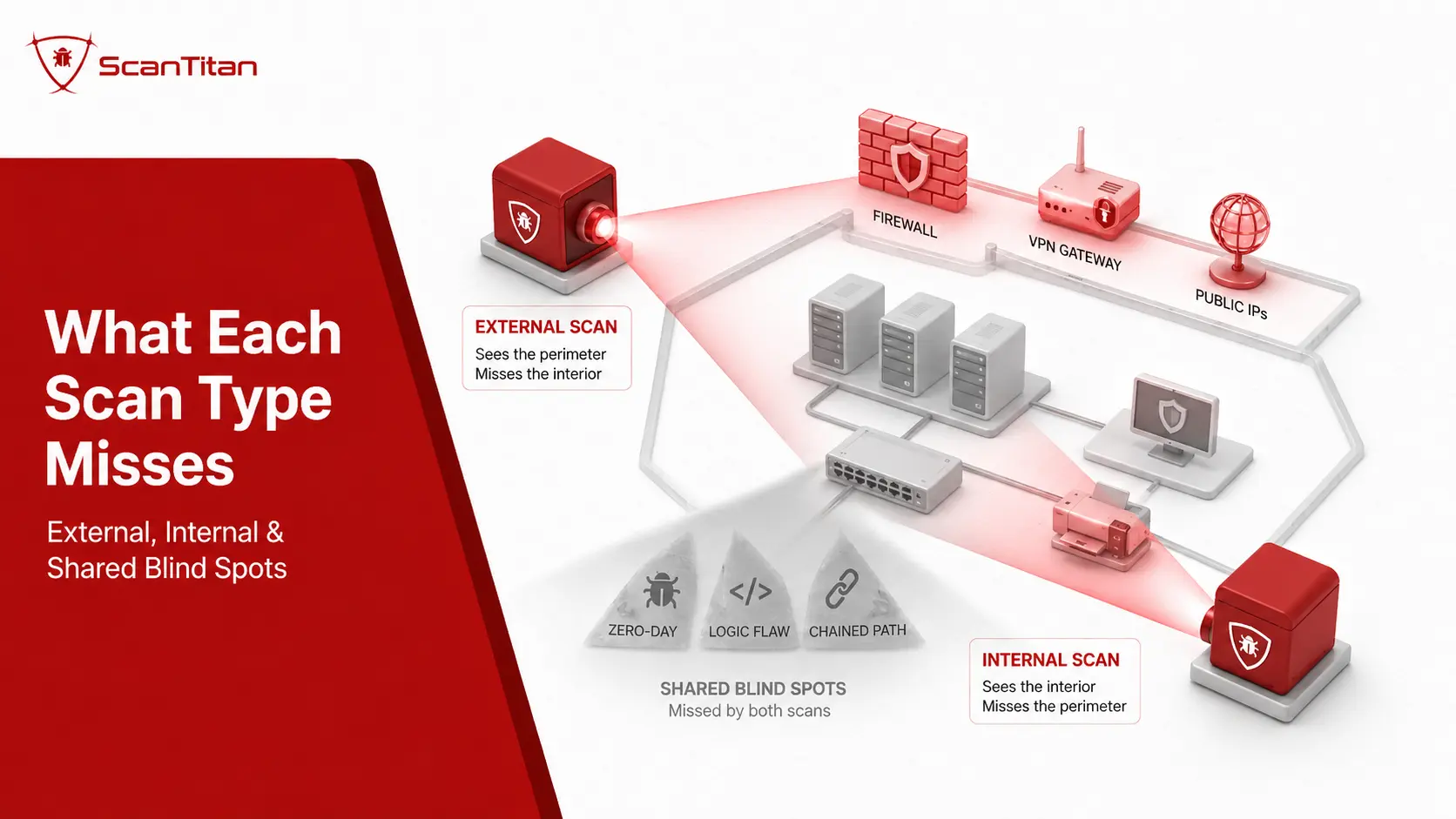
5. Blind Spots
External scanning misses private internal systems. A clean perimeter scan does not prove that your internal servers, workstations, network hardware, or private services are patched and securely configured.
Internal scanning cannot reproduce the public-internet view. A port that is always reachable internally may have become accidentally exposed through a firewall or cloud-security-group change, which is exactly the kind of mistake an outside-in scan can reveal.
The two result sets therefore answer different questions rather than competing to produce the larger number of findings.
Internal vs External Is Not the Same as Authenticated vs Unauthenticated
This is one of the most important distinctions in vulnerability scanning. Internal vs external describes vantage point. Authenticated vs unauthenticated describes access level.
| Question | Scanning axis | Options |
|---|---|---|
| Where does the scanner sit? | Vantage point | Internal / External |
| Can the scanner log into the target? | Access | Authenticated / Unauthenticated |
| Does it actively send probes? | Method | Active / Passive |
| How does it reach the device? | Delivery | Network-based / Agent-based |
A scan can therefore be internal and unauthenticated, internal and authenticated, or—in platforms and target types that support it—external with authenticated checks. The two decisions should not be collapsed into one.
For the deeper access-level comparison, see authenticated vs unauthenticated vulnerability scanning.
Internal vs External Vulnerability Assessment: Is That Different?
The phrases internal vs external vulnerability assessment and internal vs external vulnerability scanning are often used interchangeably in search, but technically an assessment can be broader than the automated scan itself.
A vulnerability scan gathers technical evidence automatically: hosts, ports, services, software versions, known vulnerabilities, configuration signals, and related findings. A vulnerability assessment can include that scan output plus validation, prioritization, business context, risk interpretation, and remediation recommendations.
| Comparison | Vulnerability scan | Vulnerability assessment |
|---|---|---|
| Primary activity | Automated detection | Detection plus analysis and interpretation |
| Typical output | Technical findings | Validated and contextualized risk picture |
| Internal/external distinction | Based on scanning vantage point | Can include evidence gathered from one or both vantage points |
NIST SP 800-115 places vulnerability scanning among several technical security-testing techniques and emphasizes understanding the benefits and limitations of each rather than treating one technique as a complete assessment program. See the NIST Technical Guide to Information Security Testing and Assessment.
Why Most Vulnerability Programs Need Both Perspectives
Because a real attack does not stop at the perimeter, most vulnerability programs need both external and internal scanning perspectives. An external scan can identify an exposed weakness such as a vulnerable internet-facing VPN gateway before an attacker uses it to gain access, while an internal scan can reveal what becomes reachable after that initial compromise, such as an unpatched server, an exposed management service, or another vulnerable internal system that could support lateral movement. The external result therefore helps identify the potential entry point, while the internal result helps show the potential post-entry exposure. Reading both perspectives together provides a more complete view of the attack path than treating them as separate reports. This distinction is particularly relevant because Verizon’s 2026 DBIR found vulnerability exploitation was the leading breach entry point in its dataset at 31%. That figure does not distinguish between internal and external vulnerabilities, but it reinforces the importance of identifying reachable vulnerable software before attackers can exploit it.
Internal vs External Vulnerability Scanning: Real-World Scenarios
| Scenario | Best approach | Reason |
|---|---|---|
| Company launching a new public service | External first, then internal coverage where relevant | The immediate question is what the internet can reach after the launch. |
| Office network with servers and employee endpoints | Both | External scanning tests perimeter exposure; internal scanning tests private systems and post-entry risk. |
| Suspected compromised endpoint | Internal | The immediate concern is what other systems are reachable from inside. Incident-response tooling is still required for the compromise itself. |
| PCI DSS environment | Both where the requirements apply | PCI DSS separates internal scans under 11.3.1 from external ASV scans under 11.3.2. |
| Remote-first company | External plus appropriate internal/endpoint coverage | Roaming endpoints may rarely connect to a traditional office segment, so agent or remote-access coverage may be needed. |
| Cloud environment changing daily | Both, supported by continuous discovery | Public exposure and private cloud-network weaknesses can change independently. |
How Often Should You Run Internal and External Vulnerability Scans?
There is no universal scanning frequency that fits every organization. Compliance requirements establish minimums for particular environments, while operational frequency should also reflect asset criticality, exposure, infrastructure changes, and the speed at which new vulnerabilities affect your software.
CIS Controls v8.1
The CIS Controls v8.1 provide unusually explicit guidance:
- Safeguard 7.5: scan internal enterprise assets quarterly or more frequently and conduct both authenticated and unauthenticated scans.
- Safeguard 7.6: scan externally exposed enterprise assets monthly or more frequently.
These are CIS Safeguard recommendations, not universal laws requiring every organization to use exactly those frequencies.
Event-Driven Scanning Matters Too
Calendar schedules should be supplemented by rescans after security-relevant changes. Examples include:
- Deploying a new internet-facing service.
- Changing firewall or cloud security-group rules.
- Introducing a new network segment.
- Major server or infrastructure changes.
- Remediating a vulnerability and needing to verify closure.
- A major new vulnerability affecting software you operate.
For the operational workflow behind scheduled and event-driven coverage, see our guide to continuous vulnerability scanning.
PCI DSS Internal vs External Vulnerability Scanning Requirements
PCI DSS is one of the clearest examples of why internal and external scanning should not be treated as interchangeable.
| PCI DSS requirement | Internal scanning | External scanning |
|---|---|---|
| Main requirement | 11.3.1 | 11.3.2 |
| Minimum scheduled frequency | At least once every three months | At least once every three months |
| Who can perform it? | Qualified personnel with appropriate organizational independence; an ASV is not required | The quarterly external requirement must be performed by a PCI SSC Approved Scanning Vendor |
| Authentication | 11.3.1.2 requires authenticated scanning for systems that can accept scan credentials; systems that cannot accept credentials are documented | Not equivalent to the authenticated-internal requirement |
| After significant changes | 11.3.1.3 requires internal scanning after significant changes | Separate PCI requirements apply to relevant external scanning and rescanning obligations |
The PCI Security Standards Council states that an Approved Scanning Vendor is qualified to perform the external scanning required by PCI DSS 11.3.2.
PCI’s internal-scanning requirements are different. Requirement 11.3.1 does not require an ASV, and 11.3.1.2 requires authenticated internal scanning for systems capable of accepting scan credentials.
PCI compliance noteA normal external vulnerability scan from a tool that is not operating as the required PCI SSC ASV scan does not automatically satisfy PCI DSS Requirement 11.3.2, even if the technical scanning is otherwise thorough.
Cloud and Remote Work Blur the Perimeter, but Not the Security Question
The traditional picture of “external = outside the office firewall” and “internal = inside the office LAN” is less clean in cloud and remote environments.
A cloud workload can use a private address while still becoming reachable through a load balancer, API gateway, firewall rule, VPN, or identity-based access path. A remote employee laptop may spend most of its time outside the corporate network. Containers and cloud instances can also appear and disappear faster than static IP inventories are updated.
The useful question remains:
Which vantage point can reach this asset?If an untrusted internet source can reach it, it belongs in the external-exposure picture. If it requires trusted network access, private routing, an internal connector, or endpoint visibility, it belongs in the internal picture. Some assets require both perspectives.
This is also why vulnerability scanning and asset discovery should work together rather than relying indefinitely on a manually maintained list of IP addresses.
What Neither Internal nor External Vulnerability Scanning Replaces
Using both scanning perspectives gives you much broader vulnerability visibility, but it still does not turn automated scanning into every other form of security testing.
Penetration Testing
A vulnerability scanner primarily identifies known weaknesses and security conditions. A penetration test uses human-led testing and controlled exploitation to determine what an attacker can actually achieve and whether multiple weaknesses can be chained together.
See our full comparison of vulnerability scanning vs penetration testing.
Application-Layer Security Testing
A network scanner may identify vulnerable software, exposed services, TLS weaknesses, and network-level configuration problems on a web server, but network scanning should not be assumed to provide complete testing for application logic, authorization flaws, SQL injection, XSS, API authorization problems, or other application-specific weaknesses.
Unknown Zero-Day Discovery
Standard CVE- and signature-driven vulnerability scanning is designed primarily around known weaknesses and detectable security conditions. It should not be relied upon to discover a previously unknown zero-day simply because the vulnerability has not yet been described or detection logic has not yet been developed.
Complete Asset Discovery
A scanner only provides meaningful coverage for assets it can reach and has been configured or enabled to discover. Shadow IT, forgotten cloud environments, unmanaged SaaS, and third-party infrastructure require additional inventory and attack-surface processes.
What Should You Do After Internal and External Scans?
Running the scans is the beginning of vulnerability management, not the outcome.
- Validate important findings. Remove obvious false positives and confirm the affected service, software, configuration, or host state.
- Combine both perspectives. A vulnerable internal system is more urgent when an exploitable external weakness creates a realistic path to it.
- Add exploit and exposure context. Use severity alongside real-world exploitation evidence, reachability, asset criticality, and business impact.
- Assign ownership. Every actionable vulnerability needs a team or person responsible for remediation.
- Fix or mitigate the weakness. Patch, upgrade, reconfigure, restrict access, remove the service, or apply an appropriate compensating control.
- Rescan. A vulnerability should not be considered closed until the relevant perspective confirms the fix.
For the decision layer after detection, see our guide on how to prioritize vulnerability remediation.
What Should a Scanner Supporting Both Perspectives Provide?
If you are evaluating a vulnerability-scanning platform, focus on coverage and operational usefulness rather than simply the number of checks advertised.
- Separate internal and external vantage points. The product should be able to reproduce both perspectives rather than relabel one scan.
- Authenticated and unauthenticated options. Location and credentials should remain independent choices.
- Coverage beyond endpoints. Routers, switches, firewalls, printers, and other devices without installable agents should not disappear from the inventory.
- Clear evidence. Findings should explain what was detected and why the scanner believes the target is vulnerable.
- Scheduling and event-driven rescans. Teams should be able to verify fixes and reassess after important changes.
- Risk context. Severity alone should not be the only prioritization signal.
- Usable reporting. The output should support remediation and, where relevant, audit evidence.
To see how popular scanners handle both vantage points, read our comparison of the top vulnerability scanning tools. ScanTitan’s network vulnerability scanner supports internal and external network scanning from one platform, including network devices that agent-only coverage can miss.
Internal vs External Vulnerability Scanning: Final Decision
Internal and external vulnerability scanning are complementary, not competing, controls.
| Your priority | Use |
|---|---|
| Understand public attack surface and perimeter exposure | External scanning |
| Find weaknesses on private servers, endpoints, and network devices | Internal scanning |
| Inspect host patch and configuration state deeply | Authenticated internal scanning |
| See what a compromised device can reach without privileged access | Unauthenticated internal scanning |
| Meet applicable PCI DSS internal and external scanning obligations | Both, following the separate PCI requirements |
| Build a complete vulnerability-management program | Both perspectives, plus discovery, prioritization, remediation, and verification |
The simplest decision rule is this: external scanning tells you what is exposed before an attacker gets in; internal scanning tells you what remains vulnerable after they do. If your security decision depends on both questions, you need both perspectives.
Frequently Asked Questions
What is the difference between internal and external vulnerability scanning?
External vulnerability scanning tests internet-facing systems from outside the network and shows what an untrusted remote actor can reach. Internal vulnerability scanning runs from inside or through an internal connection and tests private systems and services reachable after internal access. The difference is primarily scanner vantage point.
Do I need both internal and external vulnerability scans?
Most organizations with both public-facing infrastructure and private internal systems benefit from both perspectives because each scan has blind spots the other cannot remove. External scanning validates public exposure; internal scanning identifies weaknesses behind the perimeter.
Which should I run first: an internal or external vulnerability scan?
Run the scan that answers your most important unanswered security question. Start externally when the immediate concern is internet-facing exposure, and internally when the immediate concern is private systems, patch state, or post-compromise reachability. NIST SP 800-115 recommends external-first sequencing in a specific intentionally blind assessment scenario, but that is not a universal rule for every vulnerability program.
Is an external vulnerability scan always unauthenticated?
No. External versus internal describes where the scanner is positioned, while authenticated versus unauthenticated describes whether it can log into the target. Many perimeter scans are intentionally unauthenticated because they model outside exposure, but the two concepts are technically separate.
Is an internal vulnerability scan always authenticated?
No. Authenticated internal scanning usually provides deeper host-level information, but unauthenticated internal scans can show what another system on the same network can reach without privileged access. CIS Control 7.5 specifically calls for both authenticated and unauthenticated scanning of internal enterprise assets.
What is internal vs external vulnerability assessment?
The distinction is still based on perspective: external assessment considers externally reachable exposure while internal assessment examines weaknesses visible from inside the environment. A vulnerability assessment is usually broader than the automated scan itself because it may also validate findings, apply business context, prioritize risk, and recommend remediation.
What are internal vs external vulnerabilities?
They are not two formal vulnerability classes. The phrase usually refers to where a weakness is reachable. An external vulnerability is exposed through an internet-facing system or service, while an internal vulnerability is reachable only after access to the private environment or another trusted network path.
How often should internal and external vulnerability scans be run?
Frequency depends on risk and compliance obligations. CIS Controls v8.1 recommends internal scans quarterly or more often and externally exposed asset scans monthly or more often. PCI DSS requires applicable internal and external vulnerability scans at least once every three months, with additional requirements for rescanning and significant changes.
Does PCI DSS require internal and external vulnerability scanning?
PCI DSS Requirement 11.3 separates the two. Requirement 11.3.1 covers internal vulnerability scanning, while Requirement 11.3.2 covers external scanning and requires the applicable quarterly external scan to be performed by a PCI SSC Approved Scanning Vendor. Requirement 11.3.1.2 also requires authenticated internal scanning for systems that can accept scanning credentials.
Can internal and external vulnerability scanning replace a penetration test?
No. Vulnerability scanning provides automated coverage for known weaknesses and security conditions. Penetration testing is a separate activity that uses human-led testing and controlled exploitation to validate attack paths and impact. Organizations often use both because they answer different security questions.