


A cloaking hack in WordPress is malicious code that shows spam to Google and a normal site to you, so the dashboard and your own browser look clean while search results fill with pharmacy or casino pages. The code checks who is asking, by user agent, IP address, referrer or login state, and serves the spam only to crawlers or search visitors. This guide shows the six triggers, how to test each one, where the code hides and how to remove it.
What a Cloaking Hack in WordPress Is and Why You Cannot See It
Cloaking is the practice of presenting different content to users and search engines, and Google’s spam policies name it as a violation, with a travel page shown to crawlers while users see discount drugs as an example. In a hack, an attacker does this on your site without your knowledge. Cloaking is the delivery, and the spam or redirect is the payload, so removing the visible spam while leaving the cloaking logic brings it back within days. You cannot see it because the code excludes you: administrators and ordinary browsers receive the clean page, while the crawler or the search visitor receives the other one. A clean-looking homepage therefore proves nothing.
What Triggers a Cloaking Hack: Six Signals the Code Checks
A trigger is the request detail that the code tests before it decides which page to serve. Knowing the six signals tells you which test to run and which pattern to search for.
- User agent: The user agent is the text a browser or crawler sends to name itself, and the code matches it against names such as Googlebot or Bingbot. It is the crudest trigger and the easiest to test.
- IP address: The IP address is where the request comes from, and the code can match it against known search engine ranges. A spoofed user agent sent from your own address never triggers it.
- Referrer: The referrer is the page that sent the visitor, and the code checks whether it was a search engine, so spam appears only to people who click a Google result.
- Login state: Login state is whether the visitor carries a WordPress login cookie, and the code skips logged-in users so that administrators never see the spam.
- Device: The device is the type of phone or computer making the request, and the code can send only mobile visitors to a spam domain, a case Google lists among its examples of sneaky redirects.
- Country: The country is the visitor’s location, estimated from the IP address, and the code can serve the spam only to visitors outside the owner’s country.

Cloaking Hack WordPress: How to Test Each Trigger
Each trigger needs its own test, and no single test catches all six. Fetch the page as each kind of visitor, save the outputs and compare them, because any difference is both proof and a clue to the trigger.
| Trigger | Test | A difference shows | What it misses |
|---|---|---|---|
| User agent | Fetch with a Googlebot user agent | Spam text or a redirect in the response | Code that also checks the IP address |
| Referrer | Fetch with a Google referrer | A redirect or different HTML | Code that also checks the IP address |
| Device | Fetch with a phone user agent | A redirect to another domain | Code that needs a real mobile network |
| Login state | Fetch with no cookies | HTML that differs from your logged-in view | Triggers that ignore login state |
| IP address and country | URL Inspection live test in Search Console | Fetched HTML that differs from your browser | Nothing in this list, because it comes from Google |
curl -s -A "Mozilla/5.0 (compatible; Googlebot/2.1; +http://www.google.com/bot.html)" https://example.com/ -o googlebot.html
curl -s -e "https://www.google.com/" -A "Mozilla/5.0" https://example.com/ -o search-visitor.html
curl -s -A "Mozilla/5.0 (iPhone; CPU iPhone OS 17_0 like Mac OS X)" https://example.com/ -o mobile.html
curl -s https://example.com/ -o plain.html
diff plain.html googlebot.html
Video: Google Search Central shows how the URL Inspection tool works, the same tool you use for the live test. It runs under 5 minutes, and the menus may look slightly different today.
Why Spoofing a User Agent Is Not Enough
A spoofed user agent sent from your own computer tests only code that reads the user agent. Code that matches Google’s IP ranges ignores you, so the page looks clean and the test passes wrongly. The URL Inspection live test fetches the page from Google’s own network, so the HTML it shows is what Googlebot received. In your server logs, verify a visitor that claims to be Googlebot with a reverse DNS lookup on its IP address, which should return a name in googlebot.com, google.com or googleusercontent.com, followed by a forward lookup that returns the same address, as the Google documentation on verifying Googlebot describes.
Compare the Search Result With the Live Page
Search Google for your domain and read the titles and snippets. A title about pharmacy or casino games that appears on no page of yours is a strong sign that Google received a different page. Then open the URL Inspection tool, run the live test, choose View tested page and compare the HTML and the screenshot with your browser. Differences in text, links or a redirect confirm it. Our guide on a scanner that says clean while the site is still infected shows why a remote scan can miss the same pages.

Where Cloaking Code Hides in WordPress
Once a test shows which trigger fires, search for that signal. The places below cover almost every case, and the patterns after the list find the code that tests each signal.
- .htaccess: The .htaccess file holds server rules, and a cloaking rewrite sits there as conditions that match a crawler or referrer and route the request to another file. Read every copy in every folder, not only the root one.
- Theme files: Theme files such as
functions.phpandheader.phprun on every page, and cloaking code there swaps the output for matching requests. - Plugins and must-use plugins: A plugin or a must-use plugin runs before the theme and can hide from the normal plugin list, as our guide to WordPress mu-plugin malware explains.
- wp-config.php and prepend files: The
wp-config.phpfile and anauto_prepend_filesetting run before WordPress loads, so code there acts before any plugin can interfere. - Database: The database can hold injected PHP or script in options and widgets that the theme prints, which our guide on database malware in WordPress covers.
grep -rnE "googlebot|bingbot|HTTP_USER_AGENT" wp-content wp-config.php
grep -rn "HTTP_REFERER" wp-content wp-config.php
grep -rnE "is_user_logged_in|wp_is_mobile" wp-content/themes wp-content/plugins
find . -name ".htaccess" -exec grep -lE "HTTP_USER_AGENT|HTTP_REFERER" {} \;
What Cloaking Code Looks Like
Real samples are rarely this tidy, but the logic is always the same: test the request, then serve something else. The examples below are defanged, with a placeholder file name, so they show the shape without working as written.
A PHP User Agent Check
The simplest PHP cloaking code tests the user agent and the login state, serves another file and stops. The condition names a crawler, the second condition spares logged-in administrators, and the include pulls the spam from a file the attacker placed in the uploads folder. Attackers usually hide this logic with encoding, so the crawler name does not appear as plain text, and our guide on obfuscated PHP malware shows how to decode such strings safely. When you find a block like this, read what it includes and search the site for that file.
if (stripos($_SERVER['HTTP_USER_AGENT'], 'googlebot') !== false && !is_user_logged_in()) {
    include WP_CONTENT_DIR . '/uploads/cache-x.php';
    exit;
}
An .htaccess Rewrite That Serves a Spam File
Cloaking needs no PHP at all when the server rules do the work. Two conditions match a crawler name or a search engine referrer, and the rewrite sends the request to a file chosen by the attacker. No theme or plugin file changes, so file comparisons against clean copies find nothing, and the rule is invisible in the dashboard. That is why you must read every .htaccess file on the server. A rule that names crawlers or search referrers is a reason to keep reading, because caching plugins and security tools write rules of their own.
RewriteEngine On
RewriteCond %{HTTP_USER_AGENT} (googlebot|bingbot) [NC,OR]
RewriteCond %{HTTP_REFERER} (google|bing)\. [NC]
RewriteRule ^(.*)$ /wp-content/uploads/cache-x.php [L]
How to Remove a Cloaking Hack From WordPress
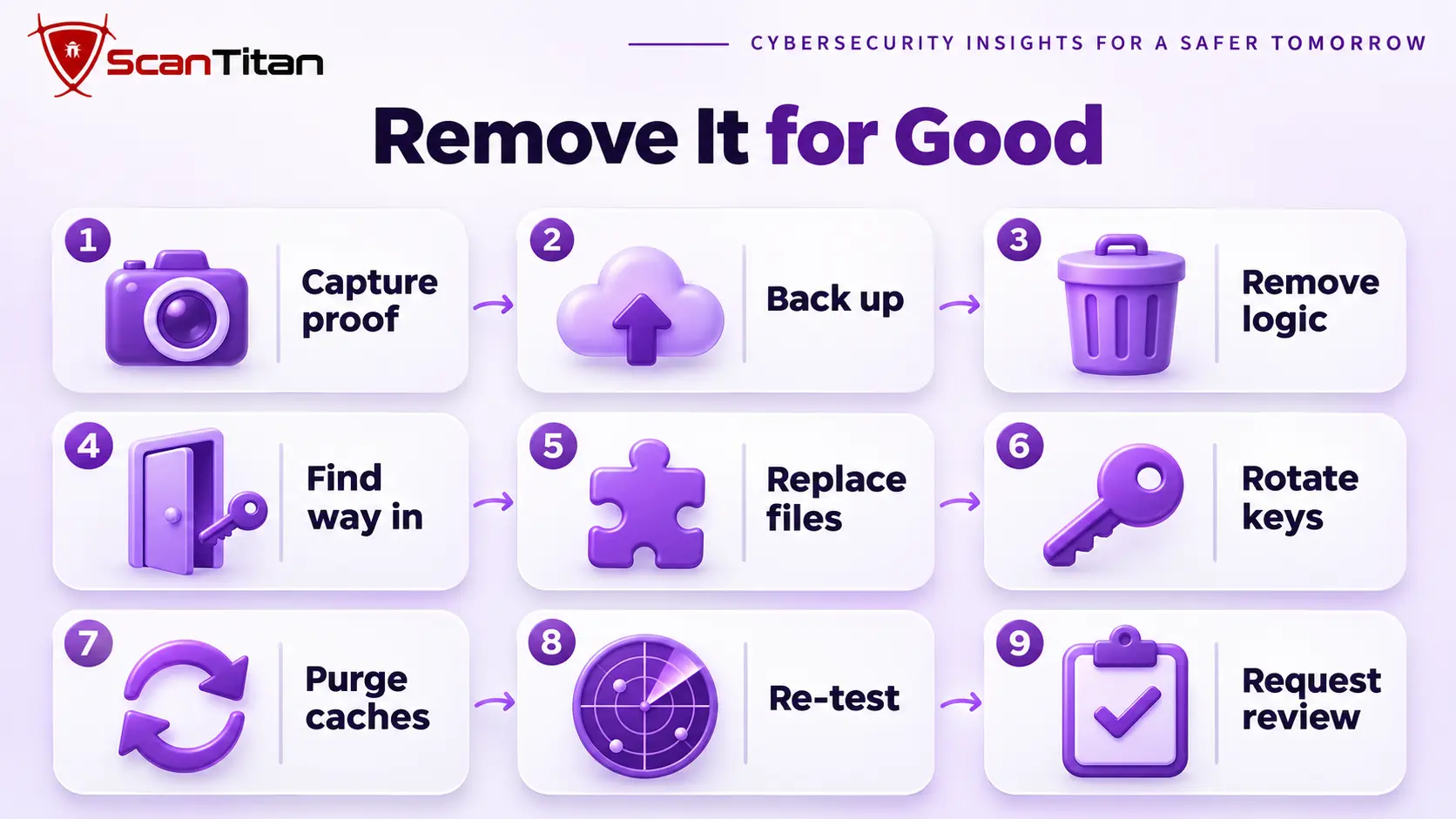
Removing the visible spam is not enough, because the cloaking logic restores it. Follow the steps in this order, and save your proof before you change anything.
- Capture the live test HTML and the curl outputs before cleaning, so you can show the difference and later prove the fix.
- Back up the files and the database, so you keep evidence and can roll back a mistake.
- Remove the cloaking logic and the files or rows it served from, using the trigger your tests found.
- Find the way back in, because cloaking often sits on top of a backdoor, using our guide to find a backdoor in a website.
- Replace core, plugins and themes from clean copies, and clean the database.
- Rotate every credential and delete administrators you did not create.
- Purge the plugin cache, the server cache and the CDN, or visitors and crawlers keep receiving the old pages.
- Test all six triggers again and compare the results with your capture.
- Request a review if Search Console shows a security issue or a manual action, and clear the spam URLs from the index as our guide on the SEO spam hack describes.
For the full cleanup around these steps, follow our malware removal guide.
What Google Does About Cloaking
Google’s spam policies define cloaking as presenting different content to users and search engines with the intent to manipulate rankings and mislead users, and its manual actions documentation lists a Cloaking and/or sneaky redirects action for sites that show Google different pages than users. A hacked site can carry that action even though the owner never meant to cloak, because the action describes what the site serves. If Search Console shows one, fix the cause first, then submit a reconsideration request that explains what happened and what you did. Google asks you not to resubmit while a request is pending, and a review can take several days or weeks. If a flag stays after you clean up, read why a site stays blocklisted after cleanup.
When a Cloaking Hack Needs a Professional Cleanup
Get help when the spam returns after you remove it, when you cannot find which trigger fires, when a manual action is already in Search Console, or when several sites share the hosting account. These cases usually involve a hidden way back in, and every failed attempt gives the attacker more time to build spam in Google’s index. A professional cleanup proves the cloaking with fetches from several vantage points, finds the logic and the backdoor behind it, and re-tests the result. The list of signs of website malware shows what else to check, and ScanTitan’s website malware removal service covers the cleanup.
Cloaking Hack WordPress FAQ
What is cloaking in WordPress hacks?
It is malicious code that serves different content depending on who asks. Crawlers or search visitors get spam or a redirect, while you and ordinary visitors get the normal site. The code checks signals such as the user agent, IP address, referrer, login state, device or country.
How can I see what Googlebot sees?
Open the URL Inspection tool in Search Console, run the live test and choose View tested page. The HTML and screenshot show what Google received. It is more reliable than a browser check or a spoofed user agent, because it comes from Google’s own network.
Why does my site look fine while Google shows spam?
Because the code is built to exclude you. It serves the clean page to administrators and ordinary browsers and the spam page to crawlers or visitors from search results. Test as a crawler, as a search visitor and with no login cookie to see the other version.
Can a scanner find a cloaking hack?
Sometimes. A scanner that reads files can find the cloaking code, and one that fetches pages can catch some triggers. Code that matches Google’s IP ranges or acts only for some visitors can pass both, so combine a scan with live tests and a code search.
Is cloaking against Google’s rules?
Yes. Google’s spam policies name cloaking as a violation, and Search Console can show a manual action for it. On a hacked site, fix the cause, verify the result with the live test, and file a reconsideration request that explains what you changed.