

.htaccess malware is malicious configuration code that an attacker writes into the Apache .htaccess file, which the server reads before WordPress loads. It can redirect search visitors, run image files as PHP, load a backdoor before every script or lock every folder except the attacker’s files. Scanners often skip it because it holds no PHP or JavaScript signature. This guide shows what clean and malicious rules look like, how to find every copy and how to clean it safely.
What .htaccess Malware Is and Why It Survives Cleanups
An .htaccess file is a per-directory configuration file that Apache reads on every request before WordPress runs, and LiteSpeed reads it too, as the Apache documentation describes. .htaccess malware abuses that position: a few lines can redirect visitors, hand image files to PHP or run a hidden loader, and the site’s own code never sees any of it. Scanners miss it because they match PHP and JavaScript patterns, and an .htaccess file holds ordinary directives that real sites use, as our guide on a scanner that says clean while the site is infected explains. Attackers also copy the file into many folders, so deleting the one you know about leaves the rest.
What a Clean WordPress .htaccess Looks Like
The default WordPress file is short, and its job is to send every request that is not a real file or folder to index.php, which makes pretty permalinks work. WordPress writes it between the BEGIN WordPress and END WordPress markers, and the WordPress documentation publishes the same block for restoring a damaged file. Your copy may wrap it in an IfModule block. Compare your root file with it. Anything outside the markers, anything inside them that is not in the block, and any rule that names an outside domain deserves a close read.
# BEGIN WordPress
RewriteEngine On
RewriteRule .* - [E=HTTP_AUTHORIZATION:%{HTTP:Authorization}]
RewriteBase /
RewriteRule ^index\.php$ - [L]
RewriteCond %{REQUEST_FILENAME} !-f
RewriteCond %{REQUEST_FILENAME} !-d
RewriteRule . /index.php [L]
# END WordPress
Video: Namecheap shows how to fix a malicious redirect in WordPress and lists the default WordPress .htaccess rule you can restore. It runs about 7 minutes.
Other .htaccess Files That Are Normal
A security plugin often writes a small file in the uploads folder that stops PHP files from running there, and a few plugins ship their own .htaccess in their folders. Caching and redirect plugins write marked blocks into the root file, and hosts add lines of their own, such as the PHP version or memory settings. Keep a written list of the .htaccess files you expect: the root file, the uploads guard and any plugin file. Then treat every other copy as unexplained until you can say who wrote it and why it exists.
.htaccess Malware: Five Kinds of Malicious Rules
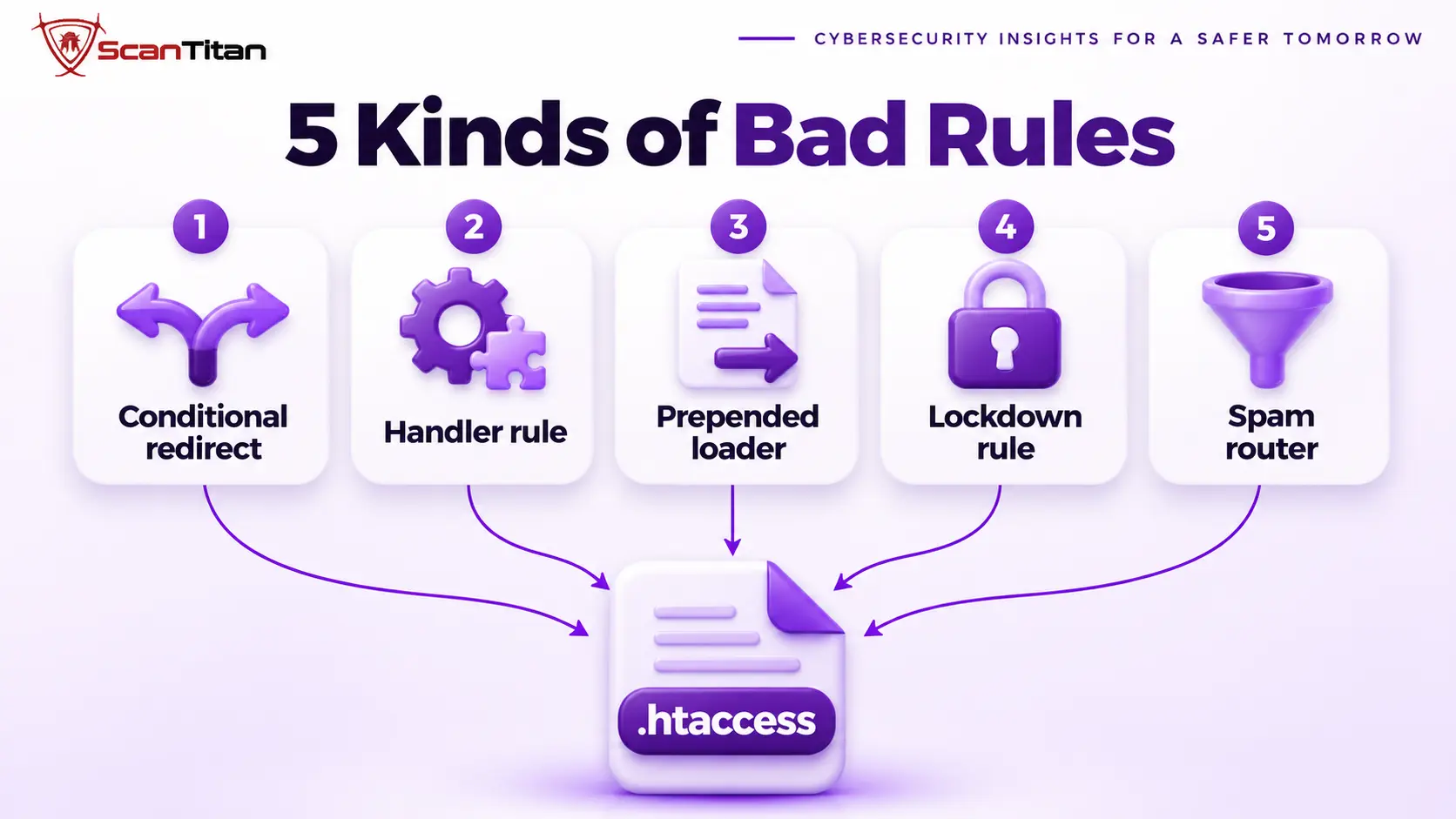
A malicious rule is a directive that changes who sees what, which code runs or which files stay reachable. Five kinds cover almost every case you will meet.
- Conditional redirect: A conditional redirect is a rewrite rule that sends only some visitors, such as those arriving from a search engine or using a phone, to another domain, so the owner never sees it. Our guide to malicious redirects covers the symptoms.
- Handler rule: A handler rule is a directive that tells Apache to run a non-PHP file, such as an image or an icon, as PHP, which turns a harmless-looking upload into a backdoor.
- Prepended loader: A prepended loader is a
php_value auto_prepend_fileline that runs a named file before every PHP script, so the loader executes on every request, much like the technique in our guide to WordPress mu-plugin malware. - Lockdown rule: A lockdown rule is a deny directive, often copied into every folder, that blocks all PHP files except a short list of the attacker’s names, which keeps their backdoors reachable and can lock you out of the dashboard.
- Spam router: A spam router is a rewrite rule that sends thousands of made-up URLs to one script that generates spam pages, the mechanism behind the Japanese keyword hack.
Use the table to decode any directive you find, and read the last column before you delete anything.
| Directive | What it does | Legitimate use | Suspicious sign |
|---|---|---|---|
| RewriteCond on HTTP_REFERER or HTTP_USER_AGENT | Tests who is asking | Hotlink protection or blocking bad bots | Names search engines, crawlers or phones, then redirects |
| RewriteRule with R=301 or R=302 | Redirects the request | HTTPS, www and moved-page redirects | Targets a domain you do not own, or acts for some visitors only |
| AddHandler, SetHandler, AddType, ForceType | Maps file types to handlers | A host line that sets the PHP version for .php files | Gives .ico, .jpg, .png or .txt files to PHP |
| php_value auto_prepend_file or auto_append_file | Runs a file before or after every script | A firewall plugin loading its own file | Names a file in uploads or a hidden file you did not install |
| FilesMatch with a deny rule | Blocks file types | A security plugin denying PHP in uploads | An allow-list of specific file names, copied into many folders |
| ErrorDocument | Sets a custom error page | A branded 404 page on your own site | Sends errors to an outside URL or an unknown script |
Read a Conditional Redirect Line by Line
The sample below is defanged, with a placeholder domain. The first condition matches visitors whose referrer names a search engine, and the second skips anyone who carries a WordPress login cookie, which excludes you as the administrator. The rule then sends everyone who passes both tests to another domain with a temporary redirect. Nothing in your theme or plugins changes, and a visit from your own bookmark shows a normal site. This is the server-level version of the behavior in our guide to a cloaking hack in WordPress, and the same tests expose it.
RewriteEngine On
RewriteCond %{HTTP_REFERER} (google|bing|yahoo) [NC]
RewriteCond %{HTTP_COOKIE} !wordpress_logged_in [NC]
RewriteRule ^(.*)$ https://redirect.example/go?s=$1 [R=302,L]
Spot a Handler Rule That Runs Images as PHP
A handler rule needs no redirect and no visible spam. The sample below tells Apache that files ending in .ico or .jpg are PHP programs, so an attacker can hide a backdoor in a file named like a favicon that no one opens and no scanner treats as code. The exact handler name differs between hosts and PHP versions, so the finding is the pattern, not the string: any rule that gives a non-PHP extension to PHP is hostile. When you find one, search the same folder for the files it protects, using our guide to find a backdoor in a website.
<FilesMatch "\.(ico|jpg)$">
    SetHandler application/x-httpd-php
</FilesMatch>
Legitimate Rules That Look Suspicious
Some rules look alarming and are normal. An HTTPS redirect or a www redirect to your own domain uses the same directives as a malicious redirect, and hotlink protection reads the referrer on purpose. A security plugin denies PHP in the uploads folder with a FilesMatch rule, and a firewall plugin may prepend its own loader file. Ask three questions before you delete a rule: does the target belong to you, does a plugin you installed explain it, and would your host confirm it. Remove only what fails all three, and keep a copy first.
How to Find Every .htaccess File on the Server
The malicious copies are rarely in the WordPress root, so search the whole hosting account. Every command below only reads files and changes nothing. Run them over SSH from the account’s home directory, so folders above the site and neighbouring sites are included.
- List every .htaccess file with its size and date, and look for dates that match the infection.
- Group the files by checksum, because identical copies in many folders are a strong sign.
- Search the files for handler, prepend, referrer, user agent and error page directives.
- Compare each hit with your list of expected files and with the decoder table above.
- Check the folders above the WordPress folder and the other sites in the account, because the same attacker usually writes to all of them.
find . -name ".htaccess" -type f -printf "%s %TY-%Tm-%Td %p\n" | sort -k2
find . -name ".htaccess" -type f -exec md5sum {} + | sort
grep -rnE "SetHandler|AddHandler|AddType|auto_prepend_file|auto_append_file|HTTP_REFERER|HTTP_USER_AGENT|ErrorDocument" --include=.htaccess .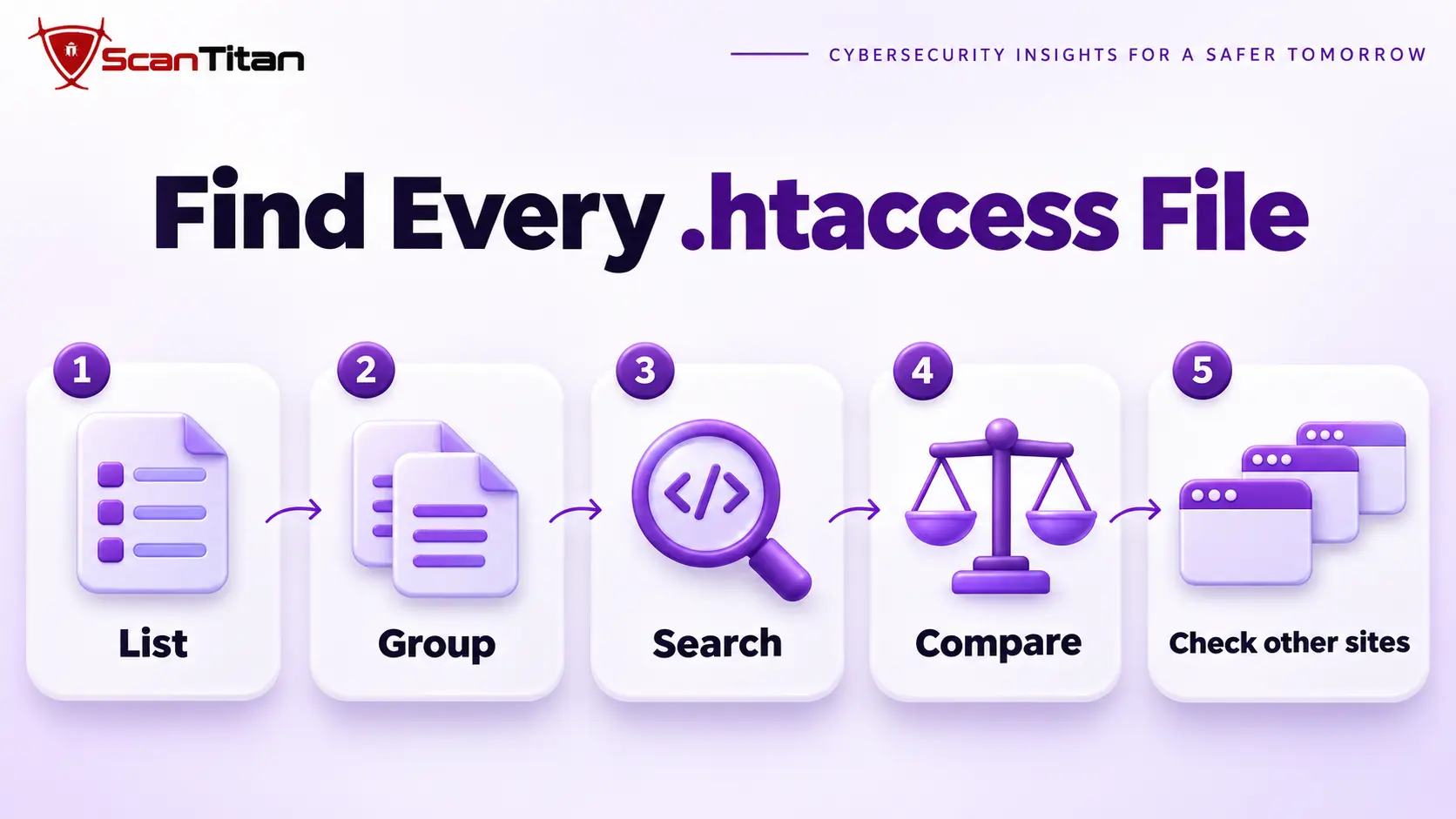
How to Clean .htaccess Malware Safely
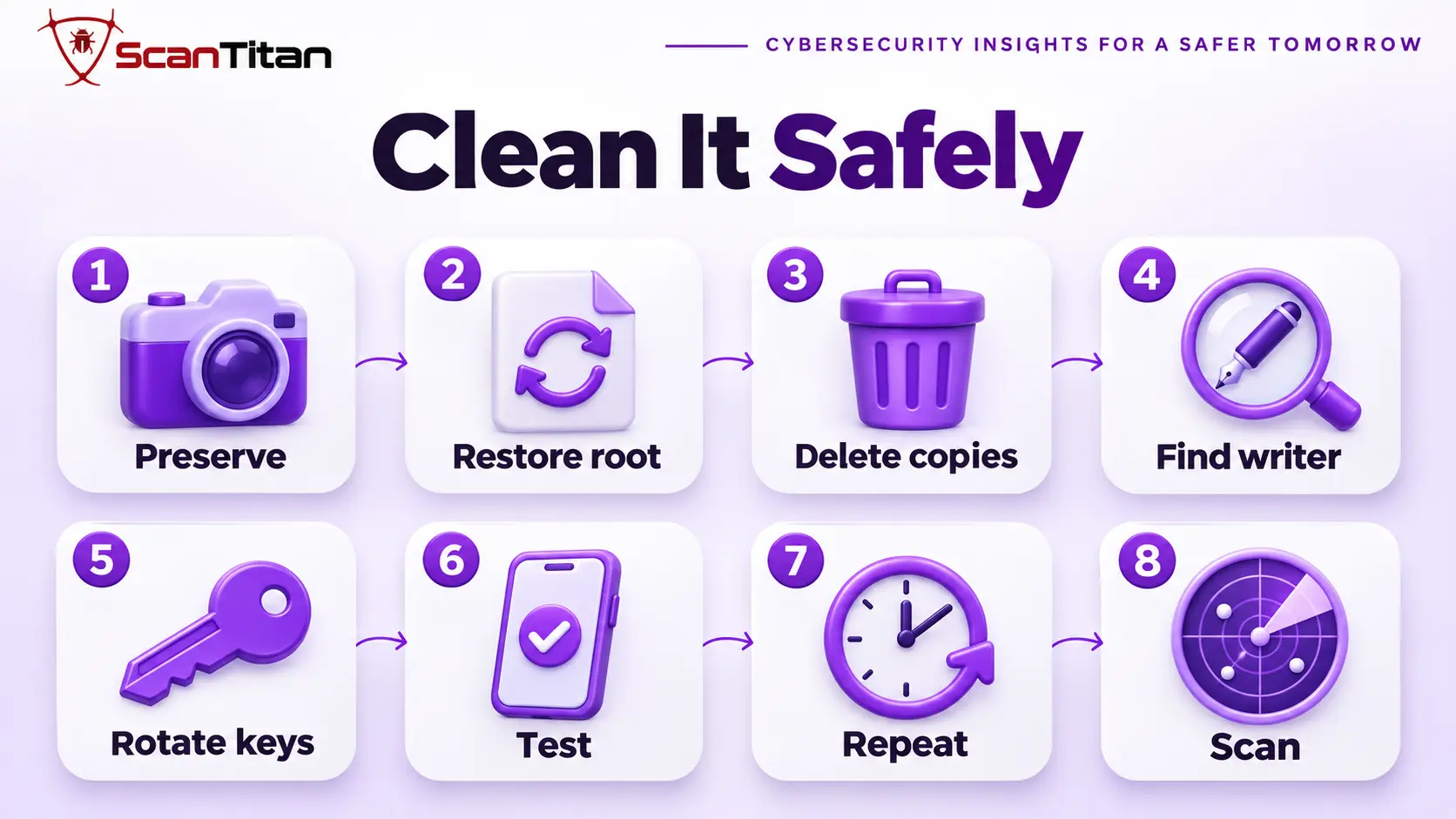
Do not delete the root file without restoring it, because pretty permalinks stop working and every post returns a 404. Follow the steps in this order.
- Preserve a copy of every suspicious file and the access logs before you change anything, because they show how the attacker got in.
- Restore the root file by saving Settings and then Permalinks in the dashboard, or by pasting the default block, after you remove every line you cannot explain.
- Delete the malicious copies in other folders, together with the files they were protecting.
- Find the writer that creates the files, such as a backdoor, a scheduled task or another site in the account, using the checks in our guide on how to remove malware from a website.
- Rotate every credential, including hosting, SFTP, the database and the WordPress administrators.
- Test as a search visitor, as a phone visitor and with no login cookie, and watch for 500 errors, which a leftover
php_valueline causes on hosts that run PHP through PHP-FPM. - Repeat the find commands after 24 hours, because a hidden writer recreates the files on a schedule.
- Scan the site from outside and save the result.
Why .htaccess Malware Keeps Coming Back
A file that returns after you delete it has a source. The four causes below cover most repeat cases, and each one tells you where to look next.
- Hidden writer: A hidden writer is a backdoor, a scheduled task or a must-use plugin that recreates the files after you delete them. Confirm it by watching whether the files return with the same dates.
- Sibling site: A sibling site is another site in the same hosting account that carries the writer, so a cleaned site is rewritten from its neighbour. Search the whole account, not one folder.
- Missed copy: A missed copy is an .htaccess file in a folder you did not search, often above the site folder or in an old install. The checksum search finds it.
- Writable permissions: Writable permissions mean the web server can change .htaccess in many folders, so any foothold can plant rules again. Ask your host to tighten them, and read why WordPress malware keeps coming back.
When .htaccess Malware Needs a Professional Cleanup
Get help when the files return after you delete them, when you find the same rules in several sites, when a handler rule points at files you cannot explain, or when customers were redirected or lost access. These cases usually involve a hidden writer and more than one foothold, and guessing costs time while the attacker stays in. A professional cleanup searches the whole account, proves the fix from several visitor types and finds what wrote the files, which is the step most owners cannot do alone. The list of signs of website malware shows what else to check, and ScanTitan’s website malware removal service covers the cleanup.
.htaccess Malware FAQ
Can .htaccess be hacked?
Yes. An attacker who can write files to your hosting account can edit or create .htaccess files, and Apache reads them on the next request. They can redirect visitors, run images as PHP, load a hidden file or lock folders, so check every copy on the account.
What is .htaccess used for?
It is a per-directory configuration file for Apache and LiteSpeed. WordPress uses it to make pretty permalinks work, and plugins and hosts use it for redirects, caching, access rules and PHP settings. Because it controls requests, attackers target it.
Can you get malware from a redirect?
A redirect itself does not install anything, but it can send you to a page that tries to trick you into allowing notifications or downloading a file. Close the page, do not enter data and tell the site owner, who should look for a malicious rewrite rule.
How do I fix a hacked .htaccess file?
Copy the file, remove every line you cannot explain and restore the default WordPress block, for example by saving Permalinks. Then search the whole account for other copies, find what wrote them and test as a search visitor and a phone visitor.
Does nginx use .htaccess?
No. The WordPress documentation notes that nginx has no directory-level configuration file like .htaccess, so these files have no effect there. A site on nginx can still be redirected through its server configuration, which only the server administrator can change.